
EOTECH 512.A65
EOTECH 512 Holographic Weapon Sight 512.A65 User Manual
מאָדעל: 512.A65
הקדמה
This manual provides detailed instructions for the proper setup, operation, and maintenance of your EOTECH 512 Holographic Weapon Sight. The Model 512 is designed for fast target acquisition, reliability, and durability, making it a popular choice for various applications.
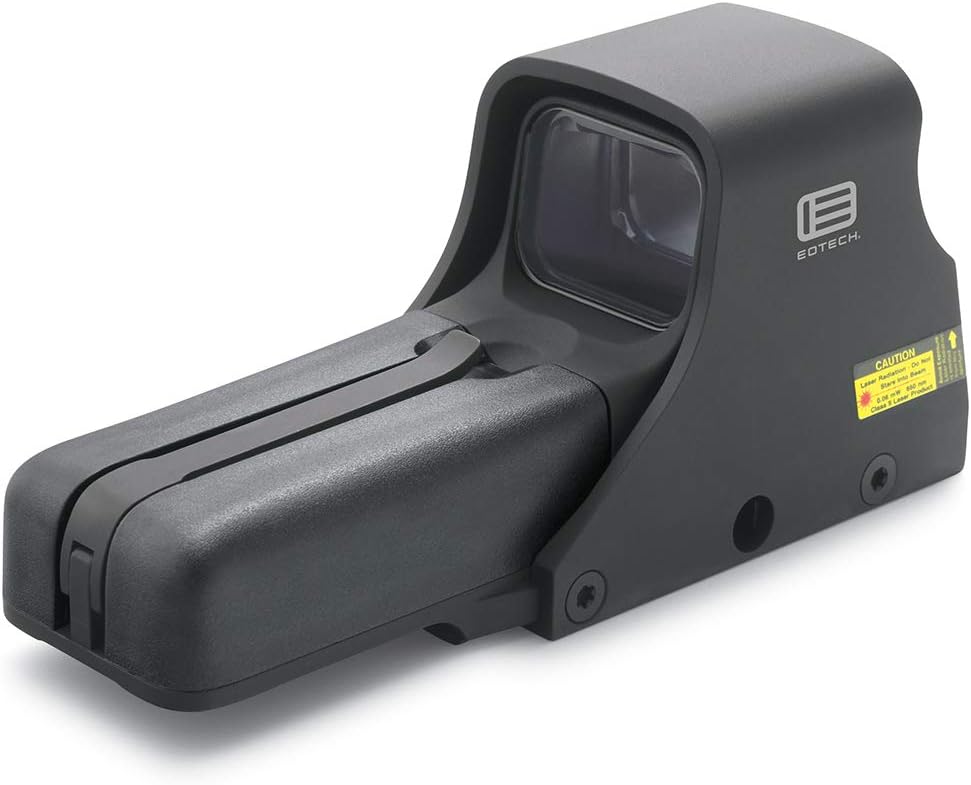
Figure 1: EOTECH 512 Holographic Weapon Sight (Model 512.A65)
The EOTECH 512.A65 Holographic Weapon Sight is a robust optical device featuring a black finish and a distinctive 68 MOA ring with a 1 MOA dot reticle. It is engineered for quick target acquisition and reliable performance in various lighting conditions.
זיכערקייַט אינפֿאָרמאַציע
Always handle firearms and optical devices responsibly. Read and understand all safety warnings before using this product. Failure to follow these instructions may result in injury or damage to the device.
- Ensure the firearm is unloaded and safe before mounting or adjusting the sight.
- Do not look directly into the laser aperture. This device contains a Class 1 laser product.
- האַלטן באַטעריז אויס פון דערגרייכן פון קינדער.
- אַוועקוואַרפן באַטעריז רעכט לויט די היגע רעגיאַליישאַנז.
פּעקל אינהאַלט
באַשטעטיקן אַז אַלע זאכן זענען פאַראַן אין פּעקל:
- EOTECH 512.A65 Holographic Weapon Sight
- באַניצער מאַנואַל (דעם דאָקומענט)
- 2 x AA Batteries (may be included or sold separately)
סעטאַפּ
ייַנמאָנטירונג פון באַטאַרייע
The EOTECH 512.A65 operates on two (2) AA batteries. For optimal performance and battery life, lithium batteries are recommended.
- Locate the removable battery compartment on the front of the sight.
- Lift the battery cap latch to open the compartment.
- אַרײַנשטעלן צוויי AA באַטעריעס לויט די פּאָלאַריטעט אינדיקאַטאָרן אינעווייניק פֿון דעם אָפּטייל.
- Close the battery compartment securely, ensuring the latch clicks into place.

Figure 2: Key components of the EOTECH 512.A65, including the removable battery compartment and the 1" Weaver or MIL-STD-1913 rail mount.
This image highlights the battery cap latch, aluminum hood, removable battery compartment, and the compatible 1" Weaver or MIL-STD-1913 rail for mounting. Proper battery installation is crucial for the sight's functionality.
מאַונטינג די סייט
The EOTECH 512.A65 is designed to fit both 1" Weaver and MIL-STD-1913 (Picatinny) rails.
- זיכער מאַכן אַז די פייַער־וואָפן איז אַראָפּגעלאָדן און געצילט אין אַ זיכערער ריכטונג.
- Loosen the mounting bolt(s) on the sight's base.
- Align the sight's base with the rail on your firearm.
- Slide the sight onto the rail until it is in the desired position.
- Tighten the mounting bolt(s) securely. Do not overtighten.
אַפּערייטינג ינסטראַקשאַנז
מאַכט אויף / אַוועק
- To turn on: Press either the UP or אַראָפּ arrow button located on the rear of the sight.
- To turn off: Press both the UP און אַראָפּ arrow buttons simultaneously. The sight will also automatically shut off after 8 hours if no buttons are pressed.
ברייטנאַס אַדזשאַסטמאַנט
The EOTECH 512.A65 features 20 brightness settings to accommodate various lighting conditions.
- צו פֿאַרגרעסערן די ליכטיקייט: דריק די UP פייַל קנעפּל.
- צו פֿאַרקלענערן די ליכטיקייט: דריק די אַראָפּ פייַל קנעפּל.

פיגור 3: פון אויבן אַראָפּ view of the EOTECH 512.A65, illustrating the location of the UP and DOWN arrow buttons for power and brightness control.
דאָס בילד גיט אַ קלאָרע view of the sight's top, highlighting the control buttons used for powering the unit on/off and adjusting the reticle's brightness. The windage and elevation adjustment knobs are also visible.
רעטיקלע אינפֿאָרמאַציע
The 512.A65 features a 68 MOA ring with a 1 MOA dot reticle. This design allows for rapid target acquisition while providing a precise aiming point.

Figure 4: EOTECH 68 MOA Ring and 1 MOA Dot Reticle Diagram.
This diagram illustrates the precise dimensions of the 68 MOA outer ring and the central 1 MOA dot, which together form the sight's aiming pattern.

פיגורע 5: רעטיקלע view through the EOTECH 512.A65 sight.
This image demonstrates how the 68 MOA ring and 1 MOA dot reticle appear when viewed through the holographic sight, providing a clear aiming point against a background.
Zeroing the Sight (Windage and Elevation)
To achieve accuracy, the sight must be zeroed to your firearm. This involves adjusting the reticle's point of impact to match the bullet's point of impact.
- Locate the windage (horizontal) and elevation (vertical) adjustment knobs on the side of the sight (refer to Figure 3).
- Using a small flat-head screwdriver or a coin, turn the adjustment knobs. Each click typically represents a specific change in point of impact at a given distance (e.g., 1/2 MOA per click).
- הייך אַדזשאַסטמאַנט: Turning the knob clockwise moves the point of impact אַראָפּ. Turning counter-clockwise moves it UP.
- ווינדאַגע אַדזשאַסטמאַנט: Turning the knob clockwise moves the point of impact רעכט. Turning counter-clockwise moves it לינקס.
- Perform adjustments incrementally and test fire to confirm changes until the sight is zeroed.
וישאַלט
רייניקונג
Regular cleaning will ensure optimal performance and longevity of your sight.
- Use a soft, lint-free cloth to wipe the exterior surfaces.
- For lenses, use a lens cleaning pen or a soft brush to remove dust, then gently wipe with a microfiber lens cloth and a small amount of lens cleaning solution if necessary.
- Avoid using abrasive materials or harsh chemicals, as they may damage the coatings.
באַטערי פאַרבייַט
Replace batteries when the reticle begins to dim or flicker, or if the sight fails to power on. Refer to the "Battery Installation" section under Setup for detailed steps.
- Always use fresh, high-quality AA batteries.
- Remove old batteries promptly to prevent corrosion.
טראָובלעשאָאָטינג
| פּראָבלעם | מעגלעך סיבה | לייזונג |
|---|---|---|
| Sight does not power on. | טויט אָדער ימפּראַפּערלי אינסטאַלירן באַטעריז. | פאַרבייטן באַטעריעס מיט פרישע, זיכער מאַכן אַז די פּאָלאַריטעט איז ריכטיק. |
| Reticle is dim or flickers. | נידעריק באַטאַרייע מאַכט. | פאַרבייַטן באַטעריז. |
| Reticle appears blurry or distorted. | Astigmatism (user's vision), dirty lens, or incorrect brightness setting. | Adjust brightness. Clean lenses. If issue persists, consult an optometrist as holographic sights can appear blurry to individuals with astigmatism. |
| פונקט פון אימפּאַקט פארשיבט זיך. | Sight not securely mounted, or zeroing is off. | Check mounting bolts and re-tighten if necessary. Re-zero the sight. |
ספּעסאַפאַקיישאַנז
Detailed technical specifications for the EOTECH 512.A65 Holographic Weapon Sight:
- דימענסיעס: 5.6" (ל) x 2.0" (ברייט) x 2.5" (ה)
- וואָג: 11.5 oz (309 Grams)
- וואַסער קעגנשטעל: 10 פט (3 עם)
- קאָליר: שוואַרץ
- בארג: Fits both 1" Weaver and MIL-STD-1913 Rail
- ברייטנאַס סעטטינגס: 20
- מאַכט מקור: 2 רענטגענ אַאַ באַטעריז
- באַטאַרייע לעבן: Up to 2500 continuous hours (lithium) or 2200 continuous hours (alkaline) at nominal setting 12
- רעטיקל: 68 MOA ring with 1 MOA dot
- Night Vision Compatible: ניין
- מאַטעריאַל: אַלומינום
- פאַרגרעסערונג: 1x (Fixed)
- פעלד פון View: 28 מעטער

Figure 6: EOTECH Holographic Weapon Sight Model Comparison.
This table provides a comparative overview of key features across different EOTECH HWS models, including the 512, 518, 552, and 558, highlighting differences in night vision capability, button operation, weight, water resistance, and mounting options.
וואָראַנטי און שטיצן
EOTECH stands behind its products with a comprehensive warranty.
- וואָראַנטי: The EOTECH 512.A65 comes with a 10-year limited warranty. For full details and terms, please refer to the official EOTECH website or the warranty information provided with your product.
- באַניצער מאַנואַל (PDF): א דיגיטאַלע ווערסיע פון די באַניצער מאַנואַל קען געפֿונען ווערן דאָ.
- קונה שטיצן: For technical assistance, service, or warranty claims, please contact EOTECH customer support directly. Visit the official EOTECH webפּלאַץ פֿאַר קאָנטאַקט אינפֿאָרמאַציע.
Ask a question about this manual
Ask about setup, troubleshooting, compatibility, parts, safety, or missing instructions. Manuals+ will review the question and use this page’s manual context to help answer it.