
פּאָלאַראָיד 6026
Polaroid Now I-Type Instant Camera User Manual
מאָדעל: 6026
הקדמה
The Polaroid Now I-Type Instant Camera is designed to capture life's moments in original Polaroid photographs. This manual provides essential information for setting up, operating, and maintaining your camera to ensure optimal performance and longevity. It covers key features such as autofocus, double exposure, and self-timer functions.
Please read this manual thoroughly before using your camera to familiarize yourself with its functions and ensure proper handling.
אָנהייבן: סעטאַפּ
1. טשאַרדזשינג די באַטערי
Your Polaroid Now camera comes with a built-in rechargeable Lithium-Ion battery. Before first use, ensure the battery is fully charged. Connect the camera to a USB power source using the provided USB cable. The battery indicator light will show charging status and turn solid when fully charged. A full charge typically supports up to 15 film packs or 120 pictures.
2. לאָדן פֿילם
The Polaroid Now camera is compatible with both I-Type and 600 film. To load film:
- Open the film door on the front of the camera by pressing the button on the side.
- Insert the film pack with the darkslide facing up and the metal contacts facing down, sliding it all the way in until it clicks into place.
- מאַכט צו די פילם טיר. די דאַרקסלייד וועט זיך אויטאָמאַטיש אַרויסוואַרפן. ציעט נישט די דאַרקסלייד אַרויס מיט די האַנט.
- The film counter display will show '8' (or the number of exposures in the pack).

Image: The Polaroid Now camera shown alongside its packaging and a film box, illustrating the product and its components.

Image: A close-up of the Polaroid Color I-Type Film box, indicating it contains 16 instant photos and is not for vintagאי קאַמעראַס.
אַפּערייטינג די אַפּאַראַט
1. נעמען א פאָטאָ
To take a photo, point the camera at your subject. The camera features autofocus, which will automatically adjust the focus. Press the shutter button fully to capture the image. The photo will eject from the front slot.
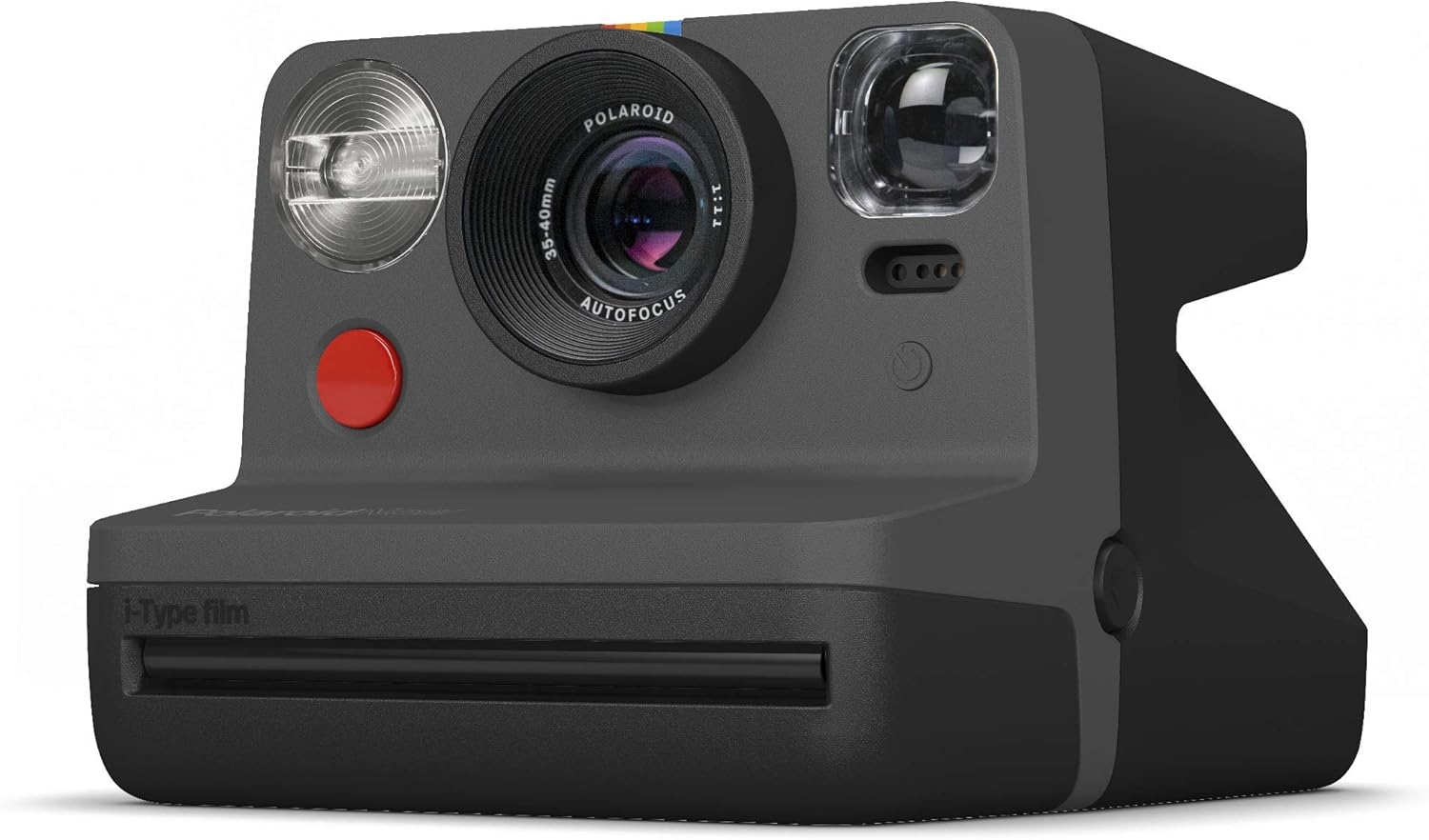
בילד: א דעטאַלירטע view of the Polaroid Now camera, highlighting its lens, flash, and autofocus mechanism.
2. בליץ קאָנטראָל
The camera has an accurate flash for various lighting conditions. The flash will fire automatically in low light. You can manually turn the flash on or off by pressing the flash button located on the side of the camera.
3. Self-Timer Function
To activate the self-timer, press the self-timer button. The LED next to the button will blink, indicating the timer is active. The camera will take a photo after approximately 9 seconds. Press the button again to cancel.
4. Double Exposure
The double exposure feature allows you to combine two images into one. Press the double exposure button once to activate. The film counter will blink '1'. Take your first photo. The counter will then blink '2'. Take your second photo. The combined image will then eject.

בילד: אַן עקסample of an instant photo produced by the camera, featuring neon text overlayed on a person, demonstrating the camera's output quality.
5. Film Development
After a photo is taken, it will eject from the camera. For best results, immediately place the photo face down on a flat surface to protect it from light during development. Development time is typically 10-15 minutes. Do not shake the photo during development, as this can negatively affect the chemical process and image quality.
וישאַלט
1. Cleaning the Lens and Rollers
Regularly clean the camera lens with a soft, lint-free cloth. If you notice streaks or imperfections on your developed photos, the film rollers may need cleaning. Open the film door and gently wipe the rollers with a damp cloth. Allow them to dry completely before closing the film door.
2. באַטערי קער
To prolong battery life, avoid fully discharging the battery frequently. Charge the camera regularly, especially if it will be stored for an extended period. Store the camera in a cool, dry place.
3. פילם סטאָרידזש
Unused film packs should be stored in a cool, dry place, ideally in a refrigerator, to maintain optimal chemical stability and image quality. Allow refrigerated film to come to room temperature before use.
טראָובלעשאָאָטינג
- Photo is too dark/light: Ensure the flash is enabled in low light conditions. For outdoor shots, avoid direct sunlight on the subject. The camera's exposure control is automatic, but extreme lighting can affect results.
- Photos are blurry: Ensure you are holding the camera steady when pressing the shutter. The autofocus system requires a moment to lock focus; a half-press of the shutter button can help confirm focus before fully pressing.
- Film not ejecting: Check if the film pack is correctly inserted and if there is still film remaining (check the film counter). Ensure the battery is sufficiently charged.
- Streaks or spots on photos: This often indicates dirty film rollers. Refer to the "Cleaning the Lens and Rollers" section under Maintenance.
- די אַפּאַראַט טוט נישט קער אויף: Ensure the battery is fully charged. If the issue persists, try connecting the camera to a different USB power source.
For more detailed troubleshooting, refer to the official user guide or contact Polaroid customer support.
ספּעסאַפאַקיישאַנז
| פּראָדוקט דימענשאַנז | 4.4 X 3.7 X 5.9 אינטשעס |
| פּונקט וואָג | 1 פונט (16 אונסעס) |
| מאָדעל נומער | 6026 |
| באַטעריז | 1 ליטהיום יאָן באַטאַרייע (אַרייַנגערעכנט) |
| פילם פֿאָרמאַט טיפּ | Instant (I-Type and 600 film compatible) |
| ספּעציעלע פֿעיִקייטן | Autofocus, Flash, Self-Timer, Double Exposure |
| פאַבריקאַנט | פּאָלאַראָיד אָריגינאַלס |
וואָראַנטי אינפֿאָרמאַציע
The Polaroid Now I-Type Instant Camera typically comes with a manufacturer's limited warranty. For specific details regarding warranty coverage, duration, and terms, please refer to the warranty card included with your product or visit the official Polaroid website. Additional protection plans may be available for purchase from authorized retailers.
שטיצן
For further assistance, frequently asked questions, or to download the latest version of this manual, please visit the official Polaroid support website. You can also find additional resources and contact information for customer service there.
- אפיציעלע באַניצער גייד (PDF): אראפקאפיע דאָ
- אפיציעלע באַניצער מאַנואַל (PDF): אראפקאפיע דאָ
- Polaroid Official Webפּלאַץ: באַזוכן קראָם בלאַט