
Shot Navi SN-NEO2-HP
Shot Navi NEO2 HP Golf GPS Device
Model: SN-NEO2-HP
בראַנד: שאָט נאַווי
הקדמה
This manual provides detailed instructions for the proper use and maintenance of your Shot Navi NEO2 HP Golf GPS Device. Please read this manual thoroughly before using the device to ensure optimal performance and longevity.
פּראָדוקט איבערview
שליסל פֿעיִקייטן
- High-precision positioning with Michibiki L1S support.
- Provides low difference and reference distance displays.
- Features voice guidance and a large character display option.
- Includes a competition mode for compliant play.
- Pre-loaded with golf course data for Japan (100%+), Asia, Hawaii, Guam, and Saipan.
פּעקל אינהאַלט
באַשטעטיקט אַז אַלע זאכן וואָס זענען אויסגערעכנט אונטן זענען אַרייַנגערעכנט אין אייער פּעקל:
- Shot Navi NEO2 HP Main Unit
- microUSB Cable
- אַק אַדאַפּטער
- אינסטרוקציע מאַנואַל מיט וואָראַנטי קאַרטל
- שנעל גייד

Figure 1: Shot Navi NEO2 HP device and its key features.
סעטאַפּ
1. טשאַרדזשינג די מיטל
- Connect the microUSB cable to the device's charging port.
- Connect the other end of the microUSB cable to the AC adapter.
- צאַפּן די AC אַדאַפּטער אין אַ מאַכט ווענטיל.
- Allow approximately 3 hours for a full charge. The battery indicator on the screen will show charging status.
א פולע אָפּצאָל גיט בערך 17 שעה פון קעסיידערדיק נוצן.
2. ערשטע איינשאַלטונג
Press and hold the power button (usually located on the side or top) until the Shot Navi logo appears on the screen.
3. סאַטעליט אַקוויזיציע
For accurate distance measurement, the device needs to acquire satellite signals. Perform initial setup outdoors with a clear view פון הימל.
- קער אויף די מיטל.
- Wait for the GPS signal icon to stabilize, indicating successful satellite acquisition. This may take a few minutes on first use or after a long period of inactivity.

Figure 2: Michibiki L1S satellite signal reception for enhanced accuracy.
אַפּערייטינג ינסטראַקשאַנז
1. יקערדיק נאַוויגאַציע
Once satellites are acquired, the device will automatically detect the golf course and display relevant information.

Figure 3: Main display showing distance to the green.
2. ווייַז מאָדעס
The NEO2 HP offers various display modes to suit your needs:
- פּשוט View: Basic distance to the green.
- גרין View: דעטאַילעד view of the green, often showing front, center, and back distances.
- ריזיקירן View: Displays distances to various hazards on the course.
- Large Character View: Tilting the device horizontally will enlarge the distance display for easier readability.
- Low Difference Display: Shows elevation differences and adjusted distances.
ניצן די באַשטימען קנעפּל צו דורכגיין פֿאַרשידענע אַרויסווייַז מאָדעס.
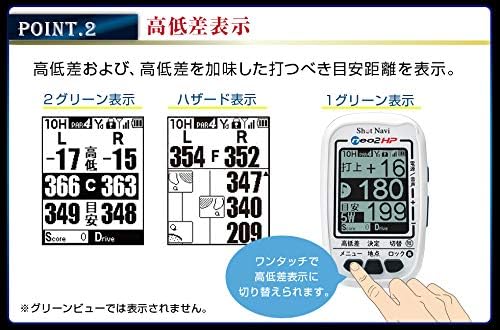
פיגורע 4: עקסamples of Low Difference Display, Hazard View, און גרין View.

Figure 5: Large Character View activated by tilting the device.
3. Voice Guidance
The device can provide audible distance information to the green center. This is useful when you prefer not to look at the screen or are using the Hazard View.
- דרוק די Power/Voice button to activate voice guidance.
- The device will announce the distance to the green center.

Figure 6: Voice guidance feature in action.
4. Competition Mode
For official competitions, the device features a competition mode that disables certain functions to comply with rules.
- In competition mode, features like low difference, reference distance, and flight distance are not displayed.
- Refer to the quick guide or full manual for instructions on how to activate/deactivate competition mode.
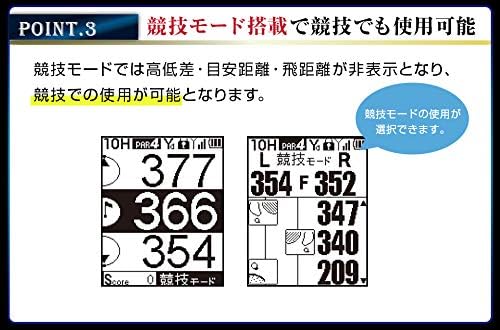
Figure 7: Display in Competition Mode.
5. Data Management Functions
- Point Recording: Mark specific locations on the course.
- דיסטאַנסע מעזשערמאַנט: Measure shot distances.
- SCO Log Support: Log your scores and course data.
- Scorecard Function: Keep track of your score directly on the device.
- Score Counter Function: A simple counter for strokes.
Access these functions through the device's menu. Consult the quick guide for specific button operations.
וישאַלט
1. רייניקונג
- ווישן די מיטל מיט אַ ווייך, טרוקן שטאָף.
- פֿאַר שווערן שמוץ, אַ ביסל דampווייקט דעם שטאָף מיט וואַסער. ניצט נישט קיין שאַרפע כעמיקאַלן אדער אַברייסיוו רייניקונגסמיטלען.
- Ensure the charging port cover is securely closed to maintain IPX4 water resistance.
2. Data Updates
Golf course data can be updated via USB storage mode using a Windows or Mac computer. Regularly update your device to ensure the most current course information.
- Connect the device to your computer using the microUSB cable.
- The device should appear as a removable storage drive.
- Visit the Shot Navi official website for the latest update software and instructions.
3. סטאָרידזש
האַלט דאָס אַפּאַראַט אין אַ קיל, טרוקן אָרט אַוועק פון דירעקט זונשייַן און עקסטרעמע טעמפּעראַטורן ווען עס איז נישט אין באַנוץ.
טראָובלעשאָאָטינג
| פּראָבלעם | מעגלעך סיבה | לייזונג |
|---|---|---|
| די מיטל טוט נישט מאַכט אויף. | נידעריגע אדער אויסגעשעפטע באַטעריע. | Charge the device for at least 3 hours using the provided AC adapter and microUSB cable. |
| Cannot acquire satellite signals. | פארמאכט view of the sky; first-time use; device not updated. | זייט זיכער אז איר זענט אינדרויסן מיט א קלארן view of the sky. Wait a few minutes. Update the device's course data. |
| נישט פּינקטלעכע דיסטאַנץ מעסטונגען. | Poor satellite signal; outdated course data. | Move to an area with a clearer view of the sky. Update the device's course data. |
| דער עקראַן רעאַגירט נישט אָדער איז פֿאַרפֿרוירן. | ווייכווארג פראבלעם. | Perform a soft reset by pressing and holding the power button for 10-15 seconds until the device restarts. |
If you encounter issues not listed here or if the suggested solutions do not resolve the problem, please contact Shot Navi customer support.
ספּעסאַפאַקיישאַנז

Figure 8: Product Specifications Table.
| אַלגעמיינע ספּעסאַפאַקיישאַנז | |
|---|---|
| סאָרט | שאָס נאַווי |
| מאָדעל נומער | SN-NEO2-HP |
| דימענסיעס (L X W X H) | 49 מם X 18 מם X 80 מם |
| וואָג | 62 גראַמז |
| ווייַז | 2-inch Black and White LCD (128x160 dots) |
| באַטערי טיפּ | ליטהיום-יאָן |
| גאַנץ טשאַרדזשינג צייט | בעערעך. 3 שעה |
| קעסיידערדיק באַניץ צייט | בעערעך. 17 שעה |
| וואָטערפּרוף רייטינג | IPX4 |
| קאַנעקטיוויטי | וסב |
| Supported Satellite Systems | QZSS (Michibiki L1S) |
| מאַפּע טיפּ | Asia (including Japan, Hawaii, Guam, Saipan) |
| Data Update Method | USB Storage Mode (Windows/Mac) |
| שליסל פאַנגקשאַנז | |
|---|---|
| Navi Functions | פּשוט View, גרין View, Hazard View, Large Character View, Low Difference Display |
| דאַטאַ מאַנאַגעמענט | Point Recording, Distance Measurement, SCO Log Support, Scorecard Function, Score Counter Function |
| אנדערע פאַנגקשאַנז | Auto Start, Navi Interruption Function, Black/White Reversal Display, Voice Guidance, Competition Mode |
וואָראַנטי און שטיצן
וואָראַנטי אינפֿאָרמאַציע
The Shot Navi NEO2 HP comes with a איין יאָר וואָראַנטי from the date of purchase. This warranty is limited to defects arising from normal use. Please retain your proof of purchase and the warranty card included in the package.
קונה שטיצן
For technical assistance, troubleshooting, or warranty claims, please contact Shot Navi customer support. Refer to the contact information provided in your warranty card or visit the official Shot Navi webפּלאַץ פֿאַר שטיצן דעטאַילס.
Official Shot Navi Webפּלאַץ: www.shotnavi.jp
Ask a question about this manual
Ask about setup, troubleshooting, compatibility, parts, safety, or missing instructions. Manuals+ will review the question and use this page’s manual context to help answer it.