
הקדמה און איבערview
The LeapFrog Level Up and Learn Controller is an interactive educational toy designed to engage young children aged 6 months and up. This controller allows children to develop fine motor skills while learning about animals, ABCs, counting, numbers, opposites, rhyming, and Spanish. It features a four-direction joystick, six animal buttons, a peek-a-boo tiger, and various interactive elements.

Image: The blue LeapFrog Level Up and Learn Controller, featuring animal buttons and a pop-up tiger.
שליסל פֿעיִקייטן:
- Six animal buttons for learning animal names, sounds, ABCs, counting, numbers, opposites, rhyming, and Spanish.
- Four-direction joystick for interactive play and fine motor skill development.
- Peek-a-boo tiger that pops up with a press of a button.
- Clickable dial, pressable buttons, and a volume switch for tactile exploration.
- Lights up during play to enhance engagement.
סעטאַפּ
ייַנמאָנטירונג פון באַטאַרייע:
- געפינט די באַטאַרייע אָפּטייל אויף דער צוריק פון דעם קאָנטראָללער.
- ניצן אַ שרויפנ - ציער, עפענען די באַטאַרייע אָפּטייל דעקן.
- אַרײַנשטעלן 2 AAA באַטעריעס, און זיכער מאַכן אַז די פּאָלאַריטעט איז ריכטיק (+/-).
- פאַרבייַטן די דעקן פון די באַטאַרייע אָפּטייל און באַוואָרענען עס מיט די שרויף.
Note: Batteries included are for demo purposes only. New batteries are recommended for regular use.
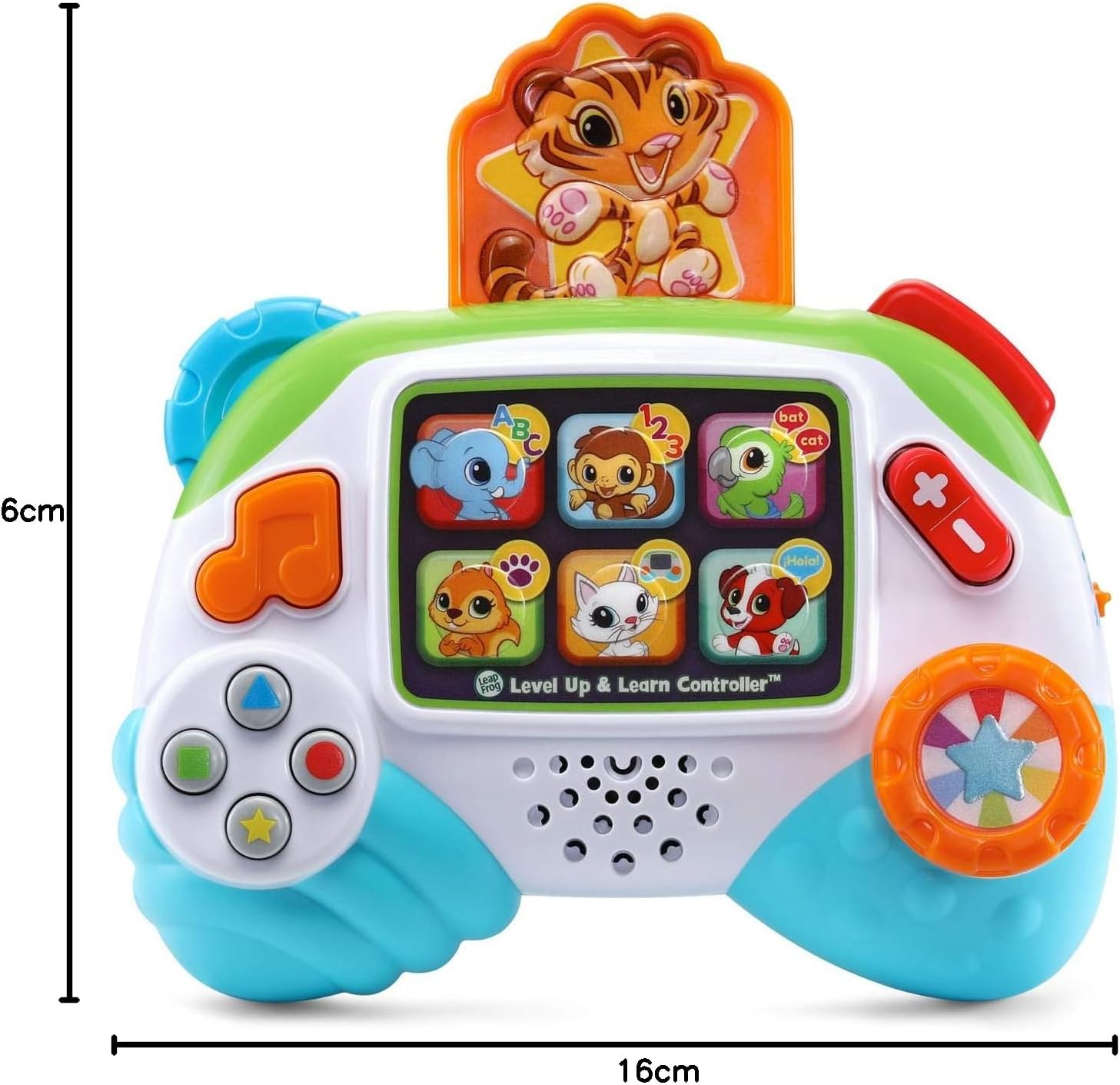
Image: The underside of the controller, highlighting the battery compartment.
אַפּערייטינג ינסטראַקשאַנז
מאַכט אויף / אַוועק און באַנד קאָנטראָל:
- Locate the power/volume switch on the side of the controller.
- Slide the switch to turn the controller on or off.
- Adjust the switch to select between two different volume levels (low and high).
ינטעראַקטיווע שפּיל:
- כייַע קנעפּלעך: Press any of the six animal buttons on the screen to hear animal names, sounds, and engage in various learning activities. The buttons light up when pressed.
- Four-Direction Joystick: Use the joystick on the left side to move an LED light on the screen, selecting different animal buttons and exploring learning games. This helps develop fine motor skills.
- Peek-a-boo Tiger: Press the red shoulder button on the top right to make the tiger pop up for an interactive peek-a-boo game. Press the tiger back down to reset.
- Dial and Other Buttons: Click the colorful dial on the right side and press the various other buttons to activate different sounds, phrases, and songs, further enhancing fine motor skills.

Image: A child interacting with the controller, using the joystick to navigate.

Image: A child engaging with the peek-a-boo tiger feature on the controller.
לערנען מאָדעס
The controller offers multiple learning opportunities through its interactive buttons and modes:
- כייַע דערקענונג: Press the animal buttons to hear the animal's name and its corresponding sound.
- ABCs and Counting: Engage with activities that introduce letters and numbers, helping children learn basic literacy and numeracy skills.
- Opposites and Rhyming: Discover games and phrases that teach concepts of opposites and rhyming words.
- Spanish Words: Some activities introduce basic Spanish vocabulary, providing early exposure to a second language.
- לידער: Enjoy three fun learning songs that reinforce educational content.
Video: Official product video demonstrating the various learning features and interactions of the LeapFrog Level Up & Learn Controller.
וישאַלט
רייניקונג:
- Wipe the surface of the controller with a slightly damp שטאָף.
- Do not immerse the controller in water or use harsh cleaning agents.
- Ensure the controller is completely dry before storing or allowing children to play with it.
באַטערי זאָרגן:
- אַראָפּנעמען באַטעריז אויב די צאַצקע וועט נישט זיין געוויינט פֿאַר אַ לאַנג צייַט צו פאַרמייַדן ליקאַדזש.
- אָפּזאָגן געוויינט באַטעריז ריספּאַנסאַבלי לויט די היגע רעגיאַליישאַנז.
טראָובלעשאָאָטינג
קיין געזונט אָדער לייץ:
- Check if the power/volume switch is in the 'On' position.
- ענשור אַז באַטעריז זענען ריכטיק אינסטאַלירן מיט געהעריק פּאָולעראַטי.
- פאַרבייַטן אַלטע באַטעריעס מיט נייַע AAA באַטעריעס.
אומגעריכטע אויפפירונג:
- If the controller behaves unexpectedly, try resetting it by removing the batteries for a few seconds and then reinserting them.
ספּעסאַפאַקיישאַנז
- סאָרט: לעאַפּפראָג
- מאָדעל נומער: 80-609100
- עלטער קייט: 6+ Months (Manufacturer Minimum Age: 6 months, Maximum Age: 36 months)
- מאַטעריאַל טיפּ: פּלאַסטיק
- נומער דימענשאַנז (L x W x H): 2.36 X 6.3 X 6.1 אינטשעס
- נומער וואָג: 0.58 פונט
- מאַכט מקור: Battery Powered (2 AAA batteries required, included for demo)
- אָפּעראַציע מאָדע: מאַנואַל
- אַרייַנגערעכנט קאַמפּאָונאַנץ: Level Up and Learn Controller, Parent's Guide
וואָראַנטי און שטיצן
This LeapFrog Level Up and Learn Controller comes with a 90-day warranty against manufacturer defects.
For further support, product information, or to explore other LeapFrog products, please visit the official LeapFrog Store.