
1. הקדמה
Thank you for choosing the Arcam SA10 Class A/B Integrated Ampלייפיער. די מאַנואַל גיט וויכטיקע אינפֿאָרמאַציע פֿאַר אויפֿשטעלן, אָפּערירן און וישאַלטן אייער amplifier to ensure years of high-quality audio enjoyment. The SA10 is designed to deliver class-leading sound quality, bringing your music to life with its powerful 50W per channel output, high-performance ESS9016K2M Sabre DAC, and low noise floor. It offers a listening experience as close to the artist's original performance as possible.
2. זיכערקייַט אינפֿאָרמאַציע
ביטע ליינט אלע זיכערהייט אינסטרוקציעס קערפול איידער איר ניצט דעם אַפּאַראַט. האַלט דעם מאַנואַל פֿאַר צוקונפֿטיקע רעפֿערענץ.
- דו זאלסט נישט ויסשטעלן דעם אַפּאַראַט צו רעגן אָדער נעץ.
- בלאָקירט נישט קיין ווענטילאַציע עפענונגען. אינסטאַלירט לויט די אינסטרוקציעס פונעם פאַבריקאַנט.
- דו זאלסט נישט ינסטאַלירן לעבן קיין היץ קוואלן אַזאַ ווי ראַדיאַטאָרס, היץ רעדזשיסטערז, סטאָוווז אָדער אנדערע אַפּאַראַט (אַרייַנגערעכנט ampליפיערס) וואָס פּראָדוצירן היץ.
- באַשיצן די מאַכט שנור פון גיין אויף אָדער פּינטשט, ספּעציעל אין די פּלאַגז, קאַנוויניאַנס רעסאַפּיז און די פונט ווו זיי אַרויסגיין פון די אַפּאַראַט.
- נאָר נוצן אַטאַטשמאַנץ / אַקסעסעריז ספּעסיפיעד דורך דער פאַבריקאַנט.
- אָפּשטויסן דעם אַפּאַראַט בעשאַס בליץ סטאָרמז אָדער ווען אַניוזד פֿאַר לאַנג פּיריאַדז.
- קאָנטאַקט אַלע קוואַלאַפייד סערוויס פּערסאַנעל. סערוויסינג איז פארלאנגט אויב די אַפּאַראַט איז דאַמידזשד אין קיין וועג.
- דער פּראָדוקט כּולל קעמיקאַלז באקאנט צו די שטאַט פון קאַליפאָרניאַ צו פאַרשאַפן ראַק און געבורט חסרונות אָדער אנדערע רעפּראָדוקטיווע שאָדן.
3. פּעקל אינהאַלט
Upon opening the box, please ensure all the following items are present:
- Arcam SA10 Integrated Ampליפער
- אַק מאַכט שנור
- ווײַטקאָנטראָל (מיט 2 AAA באַטעריעס אַרײַנגערעכנט)
- באַניצער מאַנואַל (דעם דאָקומענט)
4. פּראָדוקט איבערview
Familiarize yourself with the front and rear panels of your Arcam SA10 ampליפער.
4.1 פראָנט פּאַנעל
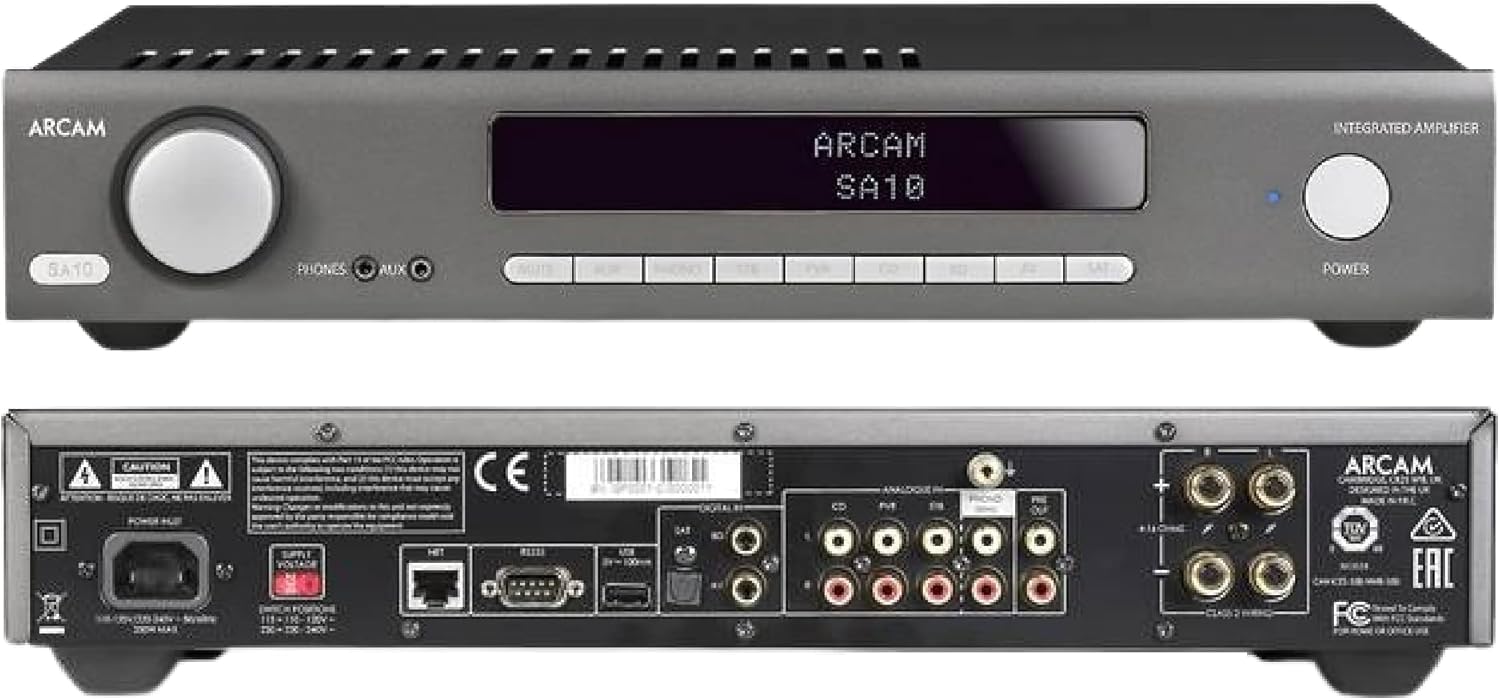
Figure 4.1: Front and Rear Panels of the Arcam SA10. The front panel features a large volume knob on the left, a display screen in the center, input selection buttons below the display, and a power button on the right. Headphone and auxiliary inputs are also present.
- באַנד קנעפּל: אַדזשאַסטירט די אַלגעמיינע אַרויסגאַנג באַנד.
- ווייַז פאַרשטעלן: ווײַזט איצטיקע אינפֿוט, וואָלומען לעוועל, און אַנדערע סטאַטוס אינפֿאָרמאַציע.
- אַרייַנשרייַב סעלעקציע קנעפּלעך: Allows selection between various audio sources (CD, Tuner, AV, SAT, etc.).
- מאַכט קנעפּל: טאַגאַלז די amplifier between standby and operational modes.
- כעדפאָונז רעזולטאַט: 3.5 מם דזשאַק פֿאַר קאַנעקטינג כעדפאָונז.
- אַגזיליערי אַרייַנשרייַב: 3.5mm jack for connecting portable audio devices.
4.2 דערציען פּאַנעל
The rear panel provides all the necessary connections for your audio system.
Figure 4.2: Detailed Rear Panel Connections. This view highlights the speaker terminals, analog RCA inputs (including Phono), digital optical and coaxial inputs, and the power inlet.
- ספּיקער טערמינאַלס: Connect your passive speakers (left and right channels).
- אנאַלאָג איינגאַבעס (RCA): Multiple stereo RCA inputs for connecting analog audio sources like CD players, tuners, or other line-level devices.
- פאָנאָ אַרייַנגאַנג (RCA): Dedicated input for turntables with moving magnet (MM) cartridges.
- דיגיטאַל ינפּוץ:
- אָפּטיש (טאָסלינק): For digital audio sources like TVs or game consoles.
- קאָואַקסיאַל: For digital audio sources like CD players or network streamers.
- פאַר-אויס: פֿאַר קאַנעקטינג צו אַ פונדרויסנדיק מאַכט ampליפיער אָדער פּאַוערד סובוואָאָפער.
- וסב פּאָרט: For firmware updates or service.
- עטהערנעט פּאָרט: For network control and future updates.
- AC Power Inlet: קאַנעקץ די ampליפיער צו די מעינס מאַכט צושטעלן.
5. סעטאַפּ
5.1 פּלייסמאַנט
Place the Arcam SA10 on a stable, level surface away from direct sunlight, heat sources, and excessive moisture. Ensure adequate ventilation around the unit to prevent overheating. Do not place other components directly on top of the ampליפער.
5.2 קאַנעקטינג ספּיקערז
Connect your passive speakers to the speaker terminals on the rear panel. Ensure correct polarity (+ to + and - to -) for both left and right channels. Use high-quality speaker cables for optimal sound performance.
5.3 פֿאַרבינדן אַודיאָ קוועלער

Figure 5.3: The Arcam SA10 offers convenient connections including Toslink optical, two digital coaxial inputs, and three stereo analog RCA inputs, plus a dedicated phono input.
- אנאלאג קוועלער: Connect CD players, tuners, or other line-level devices to the RCA analog inputs (CD, Tuner, AV, SAT).
- טערנטייבאַל: Connect a turntable with a moving magnet (MM) cartridge to the dedicated PHONO input.
- דיגיטאַלע קוועלער: Connect digital audio sources using either the optical (Toslink) or coaxial digital inputs.
- Portable Devices: Use the 3.5mm AUX input on the front panel for quick connection of portable media players.
5.4 מאַכט קאַנעקשאַן
Once all audio connections are made, connect the supplied AC power cord to the AC power inlet on the rear panel of the ampלײַפֿער און דערנאָך צו אַ פּאַסיק וואַנט אַוטלעט.
6. אַפּערייטינג ינסטרוקטיאָנס
6.1 פּאַוערינג אויף / אַוועק
דרוק די מאַכט button on the front panel or the remote control to switch the amplifier on or into standby mode. The blue LED next to the power button indicates operational status.
6.2 אַרייַנשרייַב סעלעקציע
Use the input selection buttons on the front panel or the remote control to choose your desired audio source. The selected input will be displayed on the front panel screen.
6.3 באַנד קאָנטראָל
דרייען די גרויסע באַנד knob on the front panel clockwise to increase volume and counter-clockwise to decrease it. Alternatively, use the volume up/down buttons on the remote control.
6.4 נוצן פון כעדפאָונז
Plug your headphones into the 3.5mm פאָנעס jack on the front panel. Connecting headphones will automatically mute the main speaker outputs.
6.5 ווײַטקאָנטראָל און אַפּ קאָנטראָל

Figure 6.5: Control your SA10 with the included remote or via UPnP audio and basic functions using the FREE MusicLife App on your iPad, iPhone, or Android device.
The included remote control provides full functionality for the SA10. Ensure the supplied AAA batteries are correctly inserted. For advanced control and UPnP audio streaming, download the free Arcam MusicLife App from your device's app store (available for iOS and Android).
7. וישאַלט
To maintain the appearance and performance of your Arcam SA10:
- ווישט די אויסערליכע ייבערפלאַכן מיט אַ ווייכן, טרוקענעם, לינט-פֿרייע שטאָף.
- ניצט נישט קיין אברייסיוו רייניגער, וואקס, אדער סאָלווענטן.
- Ensure the ventilation grilles are free from dust and obstructions.
- Disconnect the power cord from the wall outlet before cleaning.
8. טראָובלעשאָאָטינג
If you experience issues with your Arcam SA10, refer to the following common problems and solutions:
| פּראָבלעם | מעגלעך סיבה | לייזונג |
|---|---|---|
| קיין מאַכט | עלעקטרישע שנור נישט פארבונדן; עלעקטרישע ווענטיל איז דעפעקטיוו. | זיכער מאַכן אַז די עלעקטרישע שנור איז זיכער פֿאַרבונדן. פּרוּווט אַן אַנדער עלעקטרישער אַוטלעט. |
| קיין געזונט | Incorrect input selected; speaker cables loose; volume too low; mute activated. | Select correct input. Check speaker cable connections. Increase volume. Deactivate mute. |
| פאַרקרימט געזונט | Source signal too high; speaker impedance mismatch; faulty cables. | Reduce source output level. Ensure speakers are compatible (8 ohms recommended). Check/replace cables. |
| ווייַט קאָנטראָל נישט ארבעטן | Batteries depleted or incorrectly inserted; obstruction between remote and ampליפער. | Replace batteries. Ensure correct polarity. Remove obstructions. |
If the problem persists, please contact Arcam customer support or your authorized dealer.
9. ספּעסאַפאַקיישאַנז
Key technical specifications for the Arcam SA10 Integrated Ampלייבער:

Figure 9.1: The Arcam SA10 delivers 50 watts per channel, features 5 analog inputs (including phono), 3 digital inputs, a 32-bit DAC, and boasts a low total harmonic distortion + noise of 0.003%.
- מאַכט רעזולטאַט: 50W per channel (8 ohms, 20-20,000 Hz, at 0.5% THD)
- Ampלאַפאַקיישאַן טיפּ: קלאַס א/ב
- דיגיטאַל-צו-אַנאַלאָג קאָנווערטער (DAC): 32-bit ESS9016K2M Sabre DAC
- אַנאַלאָג ינפּוץ: 5 (including 1 dedicated Phono input for Moving Magnet cartridges)
- דיגיטאַל ינפּוץ: 3 (1 Optical Toslink, 2 Coaxial)
- גאַנץ האַרמאָניק דיסטאָרשאַן + ראַש: 0.003%
- דימענשאַנז (ב x ד x ה): 17.05 X 12.72 X 3.43 אינטשעס (433 X 323 X 87 מם)
- וואָג: 2.03 פונט (0.92 קג)
- קאָנטראָל: Full I/P control, Remote Control, MusicLife App compatibility
- Batteries for Remote: 2 אַאַאַ (אַרייַנגערעכנט)
10. וואָראַנטי און שטיצן
Arcam products are designed and manufactured to the highest standards. For information regarding warranty coverage, technical support, or service, please refer to the warranty card included with your product or visit the official Arcam webזייטל. האַלט דיין קויפן באַווייַז פֿאַר וואָראַנטי קליימז.