
Listo 3380585002611
ליסטאָ RC4875 טעלעוויזיע ווײַטקאָנטראָל באַניצער מאַנואַל
Model: RC4875 (3380585002611)
הקדמה
This manual provides comprehensive instructions for the setup, operation, and maintenance of your LISTO RC4875 TV Remote Control. Please read this manual carefully before using the device to ensure proper functionality and longevity.
פּראָדוקט איבערview
The LISTO RC4875 is an infrared remote control designed for use with televisions. It features 25 buttons for comprehensive control of your TV functions.

פיגורע 1: פראָנט view of the LISTO RC4875 TV remote control. This image displays the full layout of the 25 buttons, including numerical keys, channel and volume controls, navigation buttons, and colored function keys.
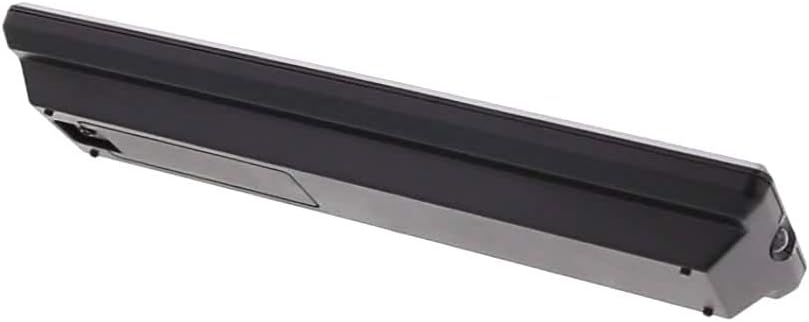
פיגורע 2: זייַט view of the LISTO RC4875 TV remote control. This image highlights the sleek profile of the remote and indicates the location of the battery compartment on the rear side.
סעטאַפּ
1. באַטאַרייע ייַנמאָנטירונג
- געפֿינען די באַטאַרייע אָפּטייל אויף די צוריק פון די ווייַט קאָנטראָל.
- רוקט דעם באַטעריע דעקל אַראָפּ אָדער אין דער ריכטונג וואָס ווערט אָנגעוויזן דורך אַ פײַל צו עס עפֿענען.
- אריינשטעלן צוויי נייע אַלקאַליין batteries (not included), ensuring the positive (+) and negative (-) terminals align correctly with the markings inside the compartment.
- פֿאַרמאַכט דעם באַטעריע דעקל דורך עס צוריקצורוקן אין פּלאַץ ביז עס קליקט זיכער.
2. ערשטע פּאָרינג (אויב אָנווענדלעך)
The LISTO RC4875 remote control is designed to work with compatible televisions using infrared technology. In most cases, no special pairing is required. Simply point the remote at your TV and press a button. If the remote does not respond, ensure the batteries are correctly installed and the TV's infrared receiver is not obstructed.
Note: This remote is designed for a single device (television) and uses infrared connectivity. It does not support Bluetooth or Wi-Fi pairing.
אַפּערייטינג ינסטראַקשאַנז
To operate your television with the LISTO RC4875 remote control, ensure you have a clear line of sight between the remote's infrared emitter and your TV's infrared receiver.
יקערדיק פאַנגקשאַנז:
- מאַכט קנעפּל: פּרעסע צו דרייען די טעלעוויזיע אויף אָדער אַוועק.
- נומער קנעפּלעך (0-9): ניצן צו גלייך אריינלייגן קאַנאַל נומערן.
- Volume Up/Down (+V / -V): סטרויערן די געזונט באַנד.
- Channel Up/Down (+P / -P): Change TV channels sequentially.
- שטיל קנעפּל: שטום אָדער ונמוט די טעלעוויזיע געזונט.
- נאַוויגאַציע קנעפּלעך (אַרויף, אַראָפּ, לינקס, רעכטס, גוט): נאַוויגירן דורך מעניוז און באַשטעטיקן סעלעקשאַנז.
- מעניו קנעפּל: צוטריט דעם טעלעוויזיע'ס הויפּט מעניו.
- אַרויסגאַנג קנעפּל: Exit from menus or current screens.
- מקור / אַרייַנשרייַב קנעפּל: באַשטימען צווישן פאַרשידענע אַרייַנשרייַב קוואלן (HDMI, AV, עטק).
- קאָלירטע קנעפּלעך (רויט, גרין, געל, בלוי): These buttons typically correspond to specific functions within TV menus or smart TV applications, as indicated on your TV screen.
אָפּטימאַל באַניץ:
- ריכט די ווײַטקאָנטראָל גלייך אויפן טעלעוויזאָר.
- Maintain a maximum distance of 10 meters (approximately 33 feet) from the TV for optimal performance.
- Avoid placing objects between the remote and the TV's infrared receiver.
וישאַלט
געהעריגע אויפהאלטונג גאראנטירט די לאנגעוויטי און פארלעסלעכע אפעראציע פון אייער ווייט קאנטראל.
- רייניקונג: Use a soft, dry cloth to wipe the surface of the remote control. Do not use liquid cleaners, abrasive pads, or chemical solvents, as these can damage the surface or internal components.
- באַטערי פאַרבייַט: Replace batteries when the remote's response becomes sluggish or stops working. Always replace both batteries at the same time with new אַלקאַליין באַטעריז.
- סטאָרידזש: אויב די ווײַטקאָנטראָל וועט נישט ווערן גענוצט פֿאַר אַ לענגערע צײַט, נעמט אַרויס די באַטעריעס כּדי צו פֿאַרמײַדן ליקאַדזש און מעגלעכע שאָדן צום ווײַטקאָנטראָל. האַלט אין אַ קיל, טרוקן אָרט.
- ויסמיידן טראפנס: Protect the remote from physical shocks and drops, which can damage internal circuitry.
טראָובלעשאָאָטינג
If you encounter issues with your LISTO RC4875 remote control, refer to the following common problems and solutions:
| פּראָבלעם | מעגלעך סיבה | לייזונג |
|---|---|---|
| די ווײַטקאָנטראָל רעאַגירט נישט. | Dead or incorrectly inserted batteries. Obstruction between remote and TV. Remote is out of range. | פאַרבייַטן באַטעריז מיט נייַ אַלקאַליין ones, ensuring correct polarity. Remove any obstructions. Move closer to the TV (within 10 meters). |
| Buttons are not working consistently. | Low battery power. Dirt or debris under buttons. | Replace batteries. Gently clean around the buttons with a dry cloth. |
| Remote only works sometimes. | Interference from other electronic devices or strong light sources. Weak infrared signal. | Ensure no strong light sources (like direct sunlight) are hitting the TV's IR receiver. Try moving the TV or remote to reduce interference. Replace batteries. |
| Remote does not control TV functions. | Remote is not compatible with the TV. | Verify that the remote control model RC4875 is compatible with your specific television model. This remote is designed for general TV use but specific TV models might require specific codes or programming (though this model is typically plug-and-play for compatible TVs). |
ספּעסאַפאַקיישאַנז
| שטריך | דעטאַל |
|---|---|
| סאָרט | רשימה |
| מאָדעל נומער | RC4875 (3380585002611) |
| קאָליר | שוואַרץ |
| קאַנעקטיוויטי טעכנאָלאָגיע | ינפרערעד (IR) |
| קאַמפּאַטאַבאַל דעוויסעס | טעלעוויזיע |
| מאַקס סופּפּאָרטעד דעוויסעס | 1 |
| נומער פון קנעפּלעך | 25 |
| קאָנטראָללער טיפּ | קנעפּל קאָנטראָל |
| מאַקסימום קייט | 10 מעטער |
| באַטערי טיפּ | אַלקאַליין (ניט אַרייַנגערעכנט) |
וואָראַנטי און שטיצן
Information regarding specific warranty terms, availability of spare parts, or software updates for the LISTO RC4875 remote control is not provided in the available product data.
For further assistance or inquiries, please refer to the contact information provided by your retailer or the product manufacturer, Listo.
Ask a question about this manual
Ask about setup, troubleshooting, compatibility, parts, safety, or missing instructions. Manuals+ will review the question and use this page’s manual context to help answer it.