
הקדמה
This manual provides comprehensive instructions for the Doro 6040 Senior Mobile Phone, model 7826. Designed for ease of use, this phone features a clear display, large buttons, and essential functions to keep you connected. Please read this manual carefully to ensure proper operation and maintenance of your device.
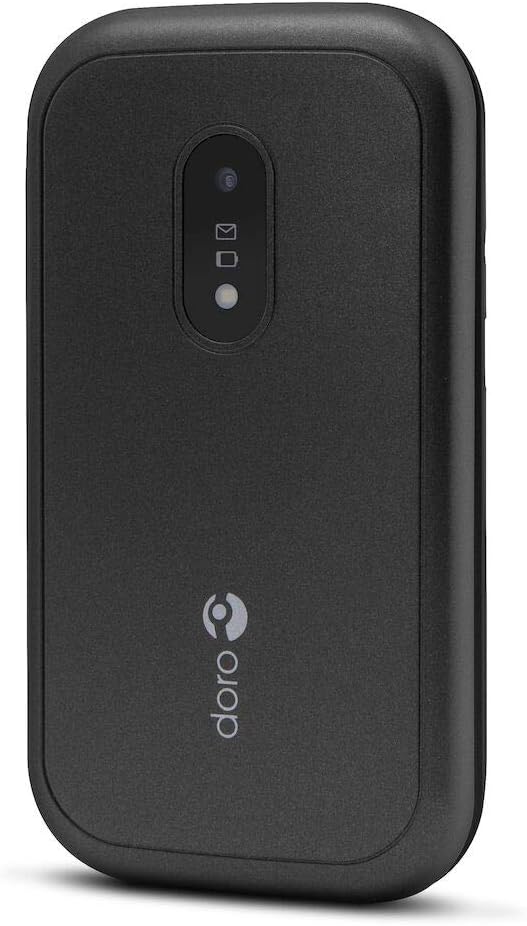
Figure 1: Doro 6040 Senior Mobile Phone (Rear View)
This image displays the rear of the Doro 6040 mobile phone, featuring its black casing. Visible elements include the rear camera lens, indicators for messages and notifications, and the Doro brand logo positioned vertically on the lower part of the phone's back.
וואָס איז אין די קעסטל
ביים עפענען דעם פעקל, ביטע זיכער מאכן אז אלע קאמפאנענטן זענען דא:
- Doro 6040 Mobile Phone
- באַטעריע (ליטיום יאָן)
- אַדאַפּטער (טשאַרדזשער)
- שנעל סעטאַפּ גייד
סעטאַפּ
1. באַטאַרייע ייַנמאָנטירונג
- פֿאָרזיכטיק אַראָפּנעמען די הינטערשטע דעקל פֿון טעלעפֿאָן.
- Insert the Lithium Ion battery into the battery compartment, ensuring the gold contacts align with those in the phone.
- לייג צוריק דעם הינטערשטן דעקל ביז עס קליקט זיכער אריין אין פלאץ.
2. סים קאָרט ינסטאַלירונג
The Doro 6040 uses a MicroSIM card.
- מיט די באַטאַרייע אַרויסגענומען, געפינט די סים קאַרטל שפּאַלט.
- Insert your MicroSIM card into the designated slot, ensuring the cut corner aligns correctly.
- צוריקשטעלן די באַטאַרייע און הינטערשטע דעקל.
3. טשאַרדזשינג די טעלעפאָן
פארן ערשטן באַנוץ, לאָדן די טעלעפאָן'ס באַטאַרייע גאָר אויף.
- פאַרבינדן די אַדאַפּטער צו אַ מאַכט ווענטיל.
- Plug the charging cable into the phone's charging port.
- The battery indicator on the screen will show charging progress. Disconnect the charger once the battery is full.
4. פּאָווערינג אויף / אויסגעלאשן
- To power on: Press and hold the Power button until the screen lights up.
- אויסצולאָשן: דריק און האַלט דעם פּאַוער קנעפּל, און דערנאָך סעלעקטיר "אויסלאָשן" פון די אָפּציעס.
אַפּערייטינג ינסטראַקשאַנז
מאַכן און באַקומען קאַללס
- צו רופן: אַרייַן די טעלעפאָן נומער מיטן קלאַוויאַטור און דריקן דעם גרינעם רוף קנעפּל.
- צו ענטפֿערן: דריק דעם גרינעם רוף קנעפּל ווען דער טעלעפאָן קלינגט.
- צו ענדיגן דעם רוף: דריק דעם רויטן ענד רוף קנעפל.
- Answering by opening: The phone supports answering calls by simply opening the flip.
Contacts (Phonebook)
- Navigate to the "Contacts" menu.
- Use the navigation keys to scroll through your contacts.
- To call a contact, select their name and press the green call button.
Messaging (SMS/MMS)
- Go to the "Messages" menu to read or compose new messages.
- The phone supports both Short Message Services (SMS) and Multimedia Messaging System (MMS).
אַפּאַראַט
- צוטריט די קאַמעראַ פֿון די הויפּט מעניו.
- Point the camera at your subject and press the capture button to take a photo.
- The phone features a 2 MP rear camera with a built-in flash.
עמערגענסי קנעפּל
The Doro 6040 is equipped with an emergency button on the back, which can be activated if configured. Refer to the Quick Setup Guide for instructions on setting up emergency contacts and functions.
נאָך פֿעיִקייטן
- פלאַשליגהט: An integrated flashlight is available for convenience.
- שרעק פֿונקציע: שטעלן אַלאַרמס פֿאַר רימיינדערז אָדער וועקן-אַרויף קאַללס.
- קאַלקולאַטאָר: A basic calculator is included for simple arithmetic.
- קאַלענדאַר: Keep track of dates and appointments.
- בלועטאָאָטה: Connect to compatible Bluetooth devices (version 3.0).
וישאַלט
- רייניקונג: ניצט אַ ווייכע, טרוקענע שטאָף צו רייניקן די אויסערלעכע טיילן פון טעלעפאָן. פֿאַרמייַדט ניצן פליסיקע רייניקונגס-מיטלען אָדער אַעראָזאָלן.
- באַטערי זאָרגן: כדי צו פארלענגערן די לעבן פון די באַטעריע, זאָלט איר נישט אויסשטעלן דעם טעלעפאָן צו עקסטרעמע טעמפּעראַטורן. זאָלט איר אָפט לאָדענען די באַטעריע, אָבער זאָלט איר נישט איבערלאָדן.
- סטאָרידזש: אויב איר לייגט אפ דעם טעלעפאן פאר א לענגערע צייט, זייט זיכער אז די באטעריע איז טיילווייז אויפגעלאדן (ארום 50%) און לייגט עס אפ אין א קילן, טרוקענעם ארט.
- ווייכווארג דערהייַנטיקונגען: Keep your phone's software updated if prompted, to ensure optimal performance and security.
טראָובלעשאָאָטינג
If you encounter issues with your Doro 6040, refer to the following common problems and solutions:
| פּראָבלעם | מעגלעך סיבה / לייזונג |
|---|---|
| דער טעלעפאָן גייט נישט אָן. | Battery may be depleted. Charge the phone for at least 30 minutes. Ensure battery is correctly installed. |
| קען נישט מאַכן אָדער באַקומען רופן. | Check if the SIM card is properly inserted. Ensure you have network coverage. Contact your service provider. |
| Audio quality is poor during calls. | Adjust the call volume. Move to an area with better network signal. Ensure the speaker/microphone is not obstructed. |
| Difficulty finding contacts in phonebook. | Scrolling through contacts using only up/down keys can be slow. Ensure contacts are saved correctly. |
| Ringtone volume is low (custom tones). | Custom ringtones via microSD or Bluetooth may have lower volume than pre-installed tones. Adjust phone volume settings. |
| טעלעפאָן פרירט זיך אָדער ווערט נישט-רעאַגירנדיק. | אַרויסנעמען און צוריקשטעלן די באַטאַרייע צו דורכפירן אַ ווייכן ריסעט. |
ספּעסאַפאַקיישאַנז
| שטריך | דעטאַל |
|---|---|
| מאָדעל נאָמען | Doro 6040 (Model 7826) |
| פּראָדוקט דימענשאַנז | 2.24 X 0.79 X 4.17 אינטשעס (57 X 20 X 106.7 מם) |
| פּונקט וואָג | 4.2 אונסעס (118 ג) |
| ווייַז | 2.8 Inches, 320 x 240 pixels resolution |
| באַטאַרייע קאַפּאַציטעט | 1000 מאַה ליטהיום יאָן |
| Talk Time (2G) | 6.8 שעה |
| Standby Time (2G) | 420 שעה |
| דערציען אַפּאַראַט | 2 MP with built-in flash |
| סים קאָרט טיפּ | MicroSIM (Single SIM capacity) |
| קאַנעקטיוויטי | Bluetooth 3.0, 2G Cellular Technology |
| כעדפאָון דזשאַק | 3.5 מם |
| אָפּערייטינג סיסטעם | Android (Note: This is from the product data, but for a feature phone, it's likely a highly customized or simplified version, not full Android OS as on smartphones.) |
| זכּרון סטאָרידזש קאַפּאַסיטי | 1.58 מב |
| קאָליר | שוואַרץ |
| פֿעיִקייטן | Calculator, Calendar, Alarm function, Integrated flashlight, SMS, MMS, Emergency button. |
וואָראַנטי און שטיצן
וואָראַנטי אינפֿאָרמאַציע
The Doro 6040 Senior Mobile Phone comes with a צוויי-יאָר וואָראַנטי against factory defects. Please retain your proof of purchase for warranty claims.
קונה שטיצן
For further assistance, technical support, or warranty inquiries, please contact Doro customer service. Refer to the contact information provided in your Quick Setup Guide or visit the official Doro webפּלאַץ.
For online resources and frequently asked questions, you may visit the Doro Support Page.