
1. הקדמה
The Fender Passport Event Series 2 is a portable audio system designed for amplifying voices, instruments, and background music. It features full-range speakers, a powered mixer with front-panel controls, and 375 watts of power. This system is suitable for various applications including educational settings, sporting events, worship services, meetings, presentations, and small live performances. Connectivity options include combination XLR/¼” jacks.
2. פּראָדוקט איבערview
2.1 שליסל פֿעיִקייטן
- All-in-one PA system with seven-channel powered mixer and full-range speakers
- 375 וואטס רעזולטאַט מאַכט
- Bluetooth audio streaming capability
- Nine inputs: four XLR/¼” combination jacks, two ¼” instrument/line inputs, two ¼” stereo inputs, one 1/8” stereo input, and stereo Bluetooth input
- Sub output with automatic high-pass filter for powered subwoofer use
2.2 אַרייַנגערעכנטע קאָמפּאָנענטן
- Portable PA System (mixer and two speakers)
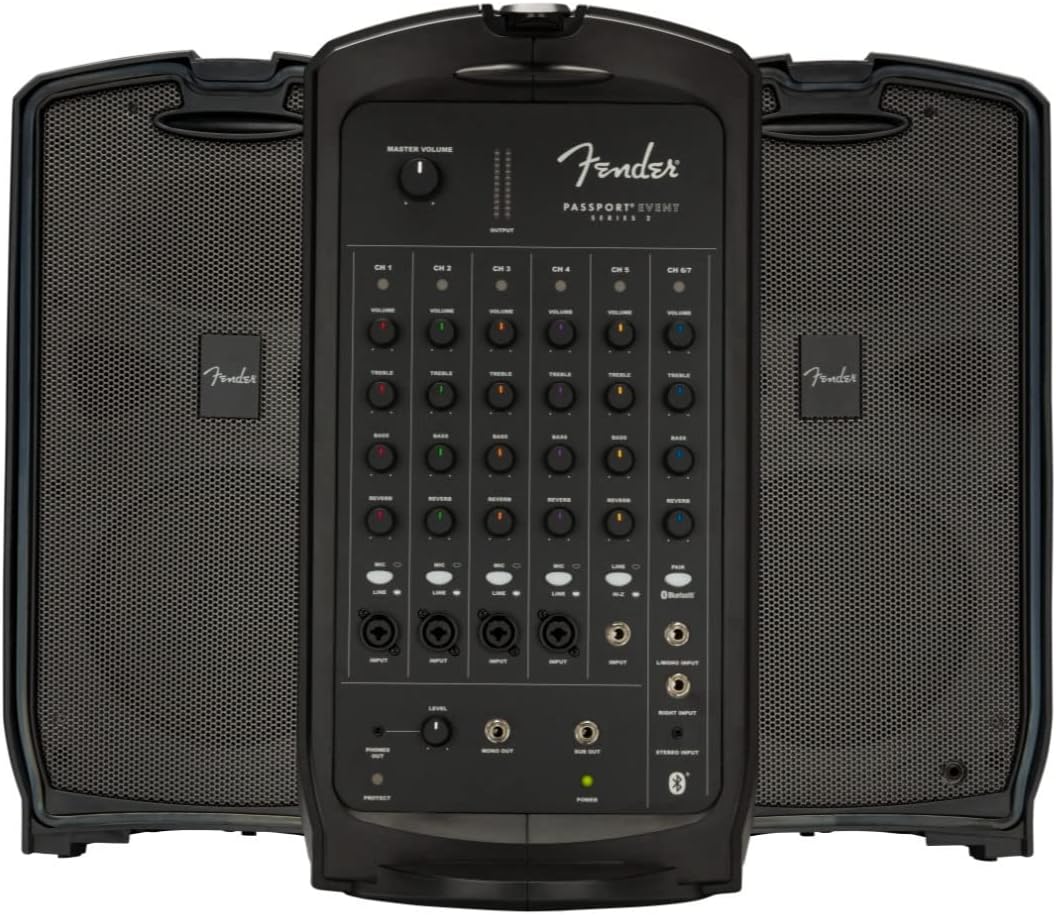
Figure 1: The Fender Passport Event Series 2 PA System in its assembled configuration, showcasing the central mixer unit flanked by two speakers.
3. סעטאַפּ
3.1 אַנפּאַקינג און אַסעמבלי
The Passport Event Series 2 is designed for easy transport and quick setup. The two speakers detach from the central mixer unit for deployment. To separate the components, release the latches securing the speakers to the mixer. Place the mixer on a stable surface and position the speakers as desired, ensuring they are connected to the mixer using appropriate speaker cables (not included).

Figure 2: The Passport Event Series 2 with its speakers detached from the central mixer, ready for setup.
3.2 פֿאַרבינדן קאָמפּאָנענטן
- מאַכט קשר: Connect the power cable to the AC inlet on the rear of the mixer and then to a suitable power outlet.
- רעדנער קשר: Connect the left and right speakers to the corresponding speaker outputs on the mixer using standard speaker cables.
- אַרייַנשרייַב דעוויסעס: Connect microphones, instruments, or other audio sources to the available input channels on the front panel. The system supports XLR, ¼” instrument/line, and stereo inputs.
- Subwoofer (Optional): If using an external powered subwoofer, connect it to the dedicated sub output on the mixer.

Figure 3: The Passport Event Series 2 in its compact, closed configuration, ideal for transport and storage.
4. אָפּעראַציע
4.1 פּאַוערינג אויף / אַוועק
After all connections are made, locate the power switch on the rear panel of the mixer. Flip the switch to the 'ON' position to power on the system. Ensure the master volume is set to a low level before powering on to prevent sudden loud noises. To power off, set the master volume to minimum and then flip the power switch to 'OFF'.
4.2 אַרייַנשרייַב טשאַנאַלז
The mixer features seven input channels, each with independent volume, treble, bass, and reverb controls. Adjust these controls to achieve the desired sound for each connected device.
- טשאַננעלס קסנומקס-קסנומקס: XLR/¼” combination inputs for microphones or line-level instruments.
- טשאַננעלס קסנומקס-קסנומקס: ¼” instrument/line inputs.
- טשאַננעל 7: Stereo inputs (¼” or 1/8”) and Bluetooth input for connecting external audio players.
4.3 Volume and Tone Controls
Each channel has dedicated controls for volume, treble, bass, and reverb. The master volume control adjusts the overall output level of the system. Experiment with these controls to find the optimal sound balance for your environment and audio sources.
4.4 בלועטוט קאָנעקטיוויטי
To stream audio via Bluetooth, activate Bluetooth on your device and select the Passport Event Series 2 from the list of available devices. The system will indicate a successful connection. Adjust the Bluetooth volume on your device and the mixer's Channel 7 volume for optimal playback.
5. וישאַלט
To ensure the longevity and optimal performance of your Fender Passport Event Series 2 PA System, follow these maintenance guidelines:
- רייניקונג: Regularly wipe down the exterior surfaces with a soft, dry cloth. Avoid using abrasive cleaners or solvents, which can damage the finish.
- סטאָרידזש: When not in use, store the system in its compact, closed configuration in a cool, dry place away from direct sunlight and extreme temperatures.
- קאַבלע פאַרוואַלטונג: Ensure all cables are properly coiled and stored to prevent damage. Avoid sharp bends or kinks in cables.
- ווענטילאַטיאָן: Ensure that the mixer unit's ventilation openings are not obstructed during operation to prevent overheating.
6. טראָובלעשאָאָטינג
If you encounter issues with your Passport Event Series 2, refer to the following common troubleshooting steps:
- קיין קול: Check all power and audio connections. Ensure the master volume and individual channel volumes are turned up. Verify that input devices are functioning correctly.
- פאַרקרימט סאָונד: Reduce the input gain for the affected channel and/or the master volume. Check for damaged cables or faulty input devices.
- בלועטאָאָטה קאַנעקשאַן ישוז: Ensure Bluetooth is enabled on your device and the system is in pairing mode. Try unpairing and re-pairing the device. Ensure no other devices are actively connected to the PA system via Bluetooth.
- זשומען/זומען גערויש: Check for proper grounding of all equipment. Try plugging the PA system into a different power outlet. Ensure audio cables are not running parallel to power cables.
If problems persist after attempting these steps, contact Fender customer support for further assistance.
7. ספּעסאַפאַקיישאַנז
| שטריך | באַשרייַבונג |
|---|---|
| מאַונטינג טיפּ | שטאָק שטייענדיק |
| מאָדעל נאָמען | געשעעניש |
| רעדנער טיפּ | Full-range (Subwoofer output available) |
| ספּעציעלע שטריך | באַס באָאָסט |
| רעקאָממענדעד ניצט | Music, Public Address |
| קאַמפּאַטאַבאַל דעוויסעס | Smartphone, Microphones, Instruments |
| יוניט גראף | 1.0 Count (System includes 2 speakers and 1 mixer) |
| קאָליר | שוואַרץ |
| אַרייַנגערעכנט קאַמפּאָונאַנץ | פּאָרטאַטיוו פּאַ סיסטעם |
| פּראָדוקט דימענשאַנז | 24.7"ד רענטגענ 31.6"וו רענטגענ 14.5"ה |
| איז וואָטערפּרוף | פאַלש |
| נומער פון זאכן | 5 (System components) |
| קאָנטראָל מעטאָד | Manual (Front Panel) |
| מאַכט מקור | קאָרדעד עלעקטריק |
| UPC | 885978347315 |
| פאַבריקאַנט | פענדער אַודיאָ |
| פּונקט וואָג | 51 פונט |
| ASIN | B084Q98R29 |
| נומער מאָדעל נומער | 6943000000 |
| ערשטער דאַטע בנימצא | 14 פעברואר 2020 |
| קאַנעקטער טיפּ | XLR, 1/4 inch, 1/8 inch |
| רעדנער Ampלאַפאַקיישאַן טיפּ | אַקטיוו |
| רעזולטאַט וואָסtage | 375 וואטס |
| אָפטקייַט ענטפער | 20 KHz |
| קאַנעקטיוויטי טעכנאָלאָגיע | XLR, Bluetooth |
| אַודיאָ רעזולטאַט מאָדע | סטערעאָ |
8. וואָראַנטי און שטיצן
8.1 וואָראַנטי אינפֿאָרמאַציע
The Fender Passport Event Series 2 PA System typically includes a 2-Year Warranty. Additional protection plans, such as a 3-Year Protection Plan or a monthly Complete Protect plan, may be available for purchase to extend coverage. Please refer to your purchase documentation for specific warranty terms and conditions.
8.2 קונה שטיצן
For technical assistance, service, or any questions regarding your Fender Passport Event Series 2, please contact Fender customer support. You can find contact information on the official Fender website or through your product's registration materials.
For information regarding returns or shipping, please refer to the policies of your retailer, such as Austin Bazaar, which handles shipping and returns for this product.