
1. הקדמה
Thank you for choosing the SUNSHINE P-1503T Analog Power Supply. This manual provides essential information for the safe and efficient operation, setup, maintenance, and troubleshooting of your device. Please read this manual thoroughly before using the product and keep it for future reference.
The SUNSHINE P-1503T is a versatile 15-volt, 3-amp analog power supply designed primarily for mobile phone maintenance. It features touch-sensitive controls and includes two USB ports for convenient mobile testing and charging.
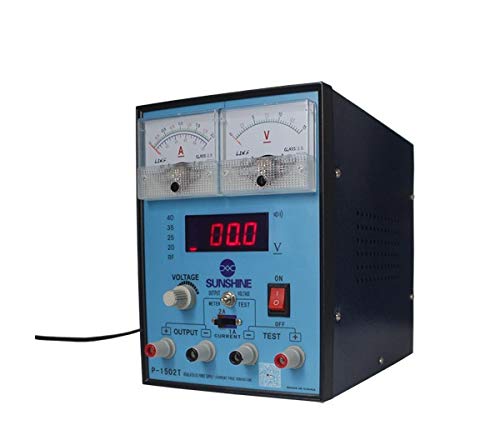
פיגורע 1: פראָנט view of the SUNSHINE P-1503T Analog Power Supply. This image shows the device's display, control knobs, and output terminals, including the two USB ports.
2. זיכערקייַט אינפֿאָרמאַציע
ווארענונג: נישט נאכפאלגן די זיכערהייט אינסטרוקציעס קען רעזולטירן אין עלעקטרישן שאק, פייער, אדער ערנסטע שאדן.
- שטענדיק פֿאַרבינדן די מאַכט צושטעל צו אַ געערדטער עלעקטרישער ווענטיל.
- דו זאלסט נישט אַרבעטן די מיטל אין נאַס אָדער דamp באדינגונגען.
- פאַרזיכערן געהעריק ווענאַליישאַן צו פאַרמייַדן אָוווערכיטינג. דו זאלסט נישט פאַרשפּאַרן ווענטאַליישאַן אָופּאַנינגז.
- נישט עפענען דעם סיasinג פון דער מאַכט צושטעל. עס זענען נישטאָ קיין טיילן וואָס דער באַניצער קען סערוויסן אינעווייניק. לאָזט איבער אַלע סערוויסינג צו קוואַליפֿיצירטע פּערסאָנעל.
- Avoid touching output terminals when the device is powered on.
- Disconnect the power cord from the outlet before cleaning or if the device will not be used for an extended period.
- Use only the specified input voltage (15 Volts) as indicated on the device.
3. סעטאַפּ
3.1 אַנפּאַקינג
- Carefully remove the power supply from its packaging.
- Inspect the device for any signs of damage during transit. If damaged, do not use and contact your supplier.
- Ensure all accessories are present (e.g., power cord, test leads if included).
3.2 קאַנעקטינג צו מאַכט
- Place the power supply on a stable, level surface with adequate ventilation.
- Connect the provided power cord to the power input socket on the rear of the device.
- Plug the other end of the power cord into a suitable grounded electrical outlet.
4. אַפּערייטינג ינסטרוקטיאָנס
4.1 פּאַוערינג אויף / אַוועק
- To power on the device, press the power switch located on the front panel. The display will illuminate.
- צו אויסלעשן, דריק נאכאמאל דעם מאכט קנעפל.
4.2 Adjusting Output
The P-1503T is an analog power supply, typically meaning voltage and current are set via rotary knobs.
- ניצן די Voltage אַדזשאַסטמאַנט קנופּ צו שטעלן די געוואונטשענע אויסגאַנג באַנדtage. Monitor the voltage אַרויסווייַזן.
- ניצן די קראַנט אַדזשאַסטמאַנט קנופּ to set the desired current limit. Monitor the current display.
- The device emits a sound upon touch, indicating interaction with its controls.
4.3 ניצן USB פּאָרטן
The power supply features two USB ports on the front panel:
- USB Port 1 (Mobile Testing): Connect a mobile device here for diagnostic purposes. This port is designed to provide stable power for testing mobile phone circuits.
- USB Port 2 (Mobile Charging): Connect a mobile device here for charging. This port delivers power suitable for recharging mobile phone batteries.
Note: Always ensure the output voltage and current settings are appropriate for the device being connected to prevent damage.
5. וישאַלט
5.1 רייניקונג
- Ensure the power supply is turned off and disconnected from the main power outlet before cleaning.
- ניצן אַ ווייך, טרוקן שטאָף צו ווישן די יקסטיריער פון די מיטל.
- Do not use liquid cleaners, aerosols, or solvents, as these may damage the casinג אדער אינערלעכע קאמפאנענטן.
- האַלט די ווענטילאַציע עפענונגען ריין פון שטויב און שמוץ.
5.2 סטאָרידזש
ווען נישט אין באַנוץ, האַלט די מאַכט צושטעל אין אַ קיל, טרוקן אָרט, אַוועק פון דירעקט זונשייַן און עקסטרעמע טעמפּעראַטורן.
6. טראָובלעשאָאָטינג
| פּראָבלעם | מעגלעך סיבה | לייזונג |
|---|---|---|
| די מיטל טוט נישט מאַכט אויף. |
|
|
| קיין רעזולטאַט וואָלtagE/קראַנט. |
|
|
| USB ports not working. |
|
|
7. ספּעסאַפאַקיישאַנז
| שטריך | דעטאַל |
|---|---|
| סאָרט | זונשייַן |
| מאָדעל | פּ-1503ט |
| קאַמפּאַטאַבאַל דעוויסעס | מאָביל טעלעפאָן |
| קאַנעקטער טיפּ | אַטקס |
| פאָרם פאַקטאָר | אַטקס |
| קאָאָלינג אופֿן | לופט |
| מאַקסימום אַרייַנשרייַב וואָלtage | 15 וואלטס |
| מינימום אַרייַנשרייַב וואָלtage | 15 וואלטס |
| פאַבריקאַנט | זונשייַן |
| System Bus Connector Type | קאַנעקטער 2 |
| מאַכט מקור | פונדרויסנדיק |
| ASIN | B0847QS2FX |
8. וואָראַנטי און שטיצן
This product is covered by a standard manufacturer's warranty. Please refer to the warranty card included with your purchase for specific terms and conditions. For technical support, service, or warranty claims, please contact your retailer or the manufacturer directly.
For the latest information and support, please visit the official SUNSHINE webפּלאַץ (אויב בנימצא).