
1. הקדמה
The Aerocool LUXPRO550 is a 550W power supply unit designed for desktop computers, offering reliable and efficient power delivery. This unit is 80 Plus 230V EU Bronze certified, ensuring over 88% efficiency. It features high-quality 105°C Japanese capacitors and a 14cm FDB fan for enhanced durability and optimized thermal performance. This manual provides essential information for the safe and correct installation, operation, and maintenance of your LUXPRO550 power supply.

Image 1.1: The Aerocool LUXPRO550 Power Supply Unit, highlighting its high efficiency and 80 Plus Bronze certification.
2. זיכערקייַט פּריקאָשאַנז
- Always disconnect the power cord from the wall outlet before installing or removing the power supply.
- עפֿנט נישט די מאַכט־צושטעל casinז. הויך באַנדtagעס זענען פאראן אינעווייניק, וואָס קענען פאַראורזאַכן עלעקטרישע שאָק.
- פאַרזיכערן געהעריק גראַונדינג צו פאַרמייַדן עלעקטריקאַל כאַזערדז.
- אינסטאלירט די מאַכט צושטעל אין אַ גוט-ווענטילאַטעד אָרט, אַוועק פון היץ קוועלער און נעץ.
- ניצט נאָר די קייבלס וואָס קומען מיטן מאַכט צושטעל.
- This product is designed for use in computer systems only. Do not use it for any other purpose.
3. ינסטאַללאַטיאָן גייד
The LUXPRO550 power supply supports all Intel ATX12V formats and features flat, black cables for optimized internal airflow and ease of installation.
3.1. פּריפּערינג פֿאַר ייַנמאָנטירונג
- Turn off your computer and disconnect the power cord from the wall outlet.
- Open your computer case. Refer to your computer case manual for specific instructions.
- אויב איר פאַרבייט אַן עקסיסטירנדיקע מאַכט צושטעל, דיסקאַנעקט אַלע קייבאַלז פון די אַלטע PSU און אַרויסנעמען עס פון די קעסטל.
3.2. ינסטאָלינג די מאַכט צושטעלן
- Carefully place the LUXPRO550 into the power supply bay of your computer case.
- Secure the power supply to the case using the provided screws.
- Connect the 20+4 pin ATX motherboard power connector to your motherboard.
- Connect the 4+4 pin CPU power connector to your motherboard.
- Connect SATA power connectors to your storage drives (HDDs, SSDs) and optical drives.
- Connect PCIe 6+2 pin connectors to your graphics card(s) if required.
- Connect any other peripheral connectors (e.g., Molex) as needed for case fans or other components.
- Ensure all connections are secure. Use cable ties to manage cables for better airflow.
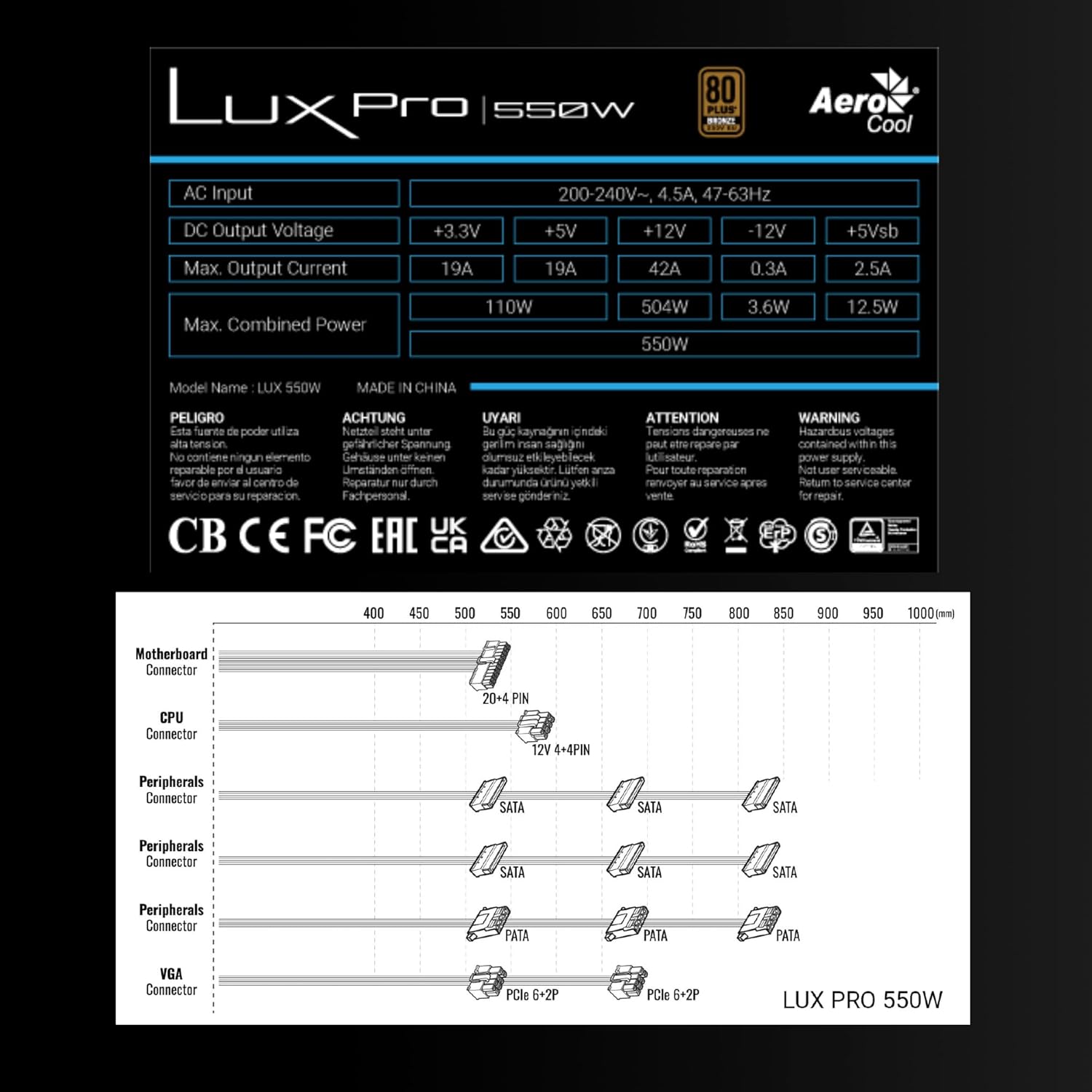
Image 3.1: Connector types and lengths for the LUXPRO550 power supply. This diagram illustrates the available connectors including Motherboard (20+4 PIN), CPU (12V 4+4 PIN), Peripherals (SATA, PATA), and VGA (PCIe 6+2 PIN).
3.3. לעצט סטעפּס
- נאָענט דיין קאָמפּיוטער פאַל.
- פאַרבינדן די אַק מאַכט שנור צו די מאַכט צושטעלן און דעמאָלט צו אַ וואַנט ווענטיל.
- Flip the power switch on the back of the PSU to the 'ON' position.
- מאַכט אויף דיין קאָמפּיוטער.
4. אַפּערייטינג ינסטרוקטיאָנס
The Aerocool LUXPRO550 is designed for continuous and stable operation once correctly installed. Its 80 Plus Bronze certification ensures high energy efficiency, reducing power consumption and heat generation.
4.1. Active PFC Technology
The integrated Active Power Factor Correction (APFC) technology ensures efficient and reliable power distribution, contributing to overall system stability and energy savings.
4.2. פען אפעראציע
The 14cm FDB (Fluid Dynamic Bearing) fan features optimized thermal speed control. It operates silently, starting at less than 700 RPM, and only increases speed as the load approaches 40% at ambient temperatures of 25°C, ensuring quiet operation under typical loads.

Image 4.1: The 14cm FDB fan of the LUXPRO550, illustrating its optimized thermal speed control for efficient cooling.
5. וישאַלט
The LUXPRO550 is built with high-quality components, including 105°C Japanese capacitors, designed for maximum reliability and a long operational lifespan with minimal maintenance.

Image 5.1: High-quality 105°C Japanese capacitors, contributing to the power supply's reliability and extended lifespan.
5.1. אַלגעמיינע קער
- Keep the power supply and computer case free from dust. Dust accumulation can hinder cooling and reduce efficiency.
- Use compressed air to gently clean the fan and ventilation grilles periodically. Ensure the computer is powered off and unplugged before cleaning.
- Do not obstruct the airflow around the power supply.
קיין באַניצער-סערוויסאַבאַל טיילן זענען אינעווייניק. פּרוּווט נישט צו עפענען אָדער פאַרריכטן דעם אַפּאַראַט אַליין.
6. טראָובלעשאָאָטינג
If you encounter issues with your LUXPRO550 power supply, please follow these basic troubleshooting steps:
- קיין מאַכט:
- זיכער מאַכן אַז די AC מאַכט שנור איז זיכער פארבונדן צו ביידע די מאַכט צושטעל און די וואַנט ווענטיל.
- Check that the power switch on the back of the PSU is in the 'ON' position.
- באַשטעטיקן אַז די וואַנט אַוטלעט אַרבעט דורך אַרײַנשטעקן אַן אַנדער דעוויס.
- סיסטעם בוטט נישט:
- Double-check all power connections to the motherboard, CPU, graphics card, and storage devices.
- Ensure all components are properly seated in their slots.
- If possible, test the power supply with another known working system or test another power supply with your system to isolate the issue.
- ומגעוויינטלעך נויזיז:
- A slight hum is normal. If you hear grinding or loud fan noises, ensure the fan is not obstructed by cables or dust.
- אויב דער ראַש בלייבט, קאָנטאַקטירט קונה שטיצע.
If these steps do not resolve the issue, please contact Aerocool customer support or your retailer for further assistance. Do not attempt to repair the unit yourself.
7. ספּעסאַפאַקיישאַנז
| שטריך | באַשרייַבונג |
|---|---|
| מאָדעל נאָמען | LUXPRO550 |
| סאָרט | אַעראָקאָל |
| וואָסtage | 550 וואטס |
| עפעקטיווקייט סערטיפיקאציע | 80 Plus Bronze 230V EU (over 88% efficiency) |
| פאָרם פאַקטאָר | אַטקס |
| קאַפּאַסיטאָרס | Japanese 105°C |
| פאָכער טיפּ | 14cm FDB (Fluid Dynamic Bearing) with thermal speed control |
| PFC | אַקטיוו פּפק |
| דימענשאַנז (LxWxH) | 16 X 15 X 8.5 סענטימעטער |
| וואָג | 1.4 קג |
| קאַמפּאַטאַבאַל דעוויסעס | PC |
7.1. דק רעזולטאַט חלקtagE טיש
The following table details the DC output voltages and maximum currents for the LUXPRO550:
| דק רעזולטאַט וואָלtage | +3.3V | +5V | +12V | -12וו | +5Vsb |
|---|---|---|---|---|---|
| מאַקס. רעזולטאַט קראַנט | 19 א | 19 א | 42 א | 0.3 א | 2.5 א |
| מאַקס. קאַמביינד מאַכט | 110 וו | 504 וו | 3.6 וו | 12.5 וו | |
| Total Combined Power | 550 וו | ||||
8. וואָראַנטי און שטיצן
8.1. וואָראַנטי אינפֿאָרמאַציע
The Aerocool LUXPRO550 power supply comes with an extended 5 יאָר וואָראַנטי, reflecting its high reliability and the quality of its components, such as the 105°C Japanese capacitors.
ביטע האַלטן דיין דערווייַז פון קויפן פֿאַר וואָראַנטי קליימז.
8.2. קונה שטיצן
For technical assistance, warranty claims, or any questions regarding your Aerocool LUXPRO550 power supply, please contact Aerocool customer support through their official webוועבזייטל אדער אייער לאקאלער הענדלער.
Do not attempt to open or repair the power supply unit, as this will void the warranty.