
1. הקדמה
This manual provides essential information for the safe and effective use of your YUSTDA TNS30W-xy-z 24V AC/DC Adapter. This power supply is designed to be compatible with various PetSafe wireless fence transmitter radio systems, including models PIF00-12917, 300-1070, Stay+Play Extra Wireless Fence Transmitter, 650-627, PIF00-13210, 12917, RFA-464, PIF0012917, and PIF0013210. Please read this manual thoroughly before installation and operation.
2. זיכערקייַט אינפֿאָרמאַציע
כדי צו זיכער מאַכן זיכערע אָפּעראַציע און פאַרמייַדן שאָדן, זאָל מען אָבסערווירן די פאלגענדע זיכערהייט מיטלען:
- בלויז דרינענדיק נוצן: די אַדאַפּטער איז דיזיינד פֿאַר נוצן אינעווייניק אין טרוקענע ערטער. שטעלט עס נישט אויס צו רעגן, נעץ, אדער עקסטרעמע טעמפּעראַטורן.
- גראָונדעד אָוטלעט: Connect the adapter only to a properly grounded electrical outlet.
- Information Technology Use: This adapter is intended for use with information technology equipment.
- ווענטילאַטיאָן: Ensure adequate ventilation around the adapter. Do not cover it or place it in an enclosed space that could restrict airflow.
- קאַבלע אָרנטלעכקייַט: Regularly inspect the power cord for any signs of damage. Do not use if the cord is frayed or damaged.
- אָפּשטעקן ווען ניט אין נוצן: Disconnect the adapter from the power outlet when not in use for extended periods or during electrical storms.
- קיין דיסאַסעמבאַל: Do not attempt to open or repair the adapter. Refer all servicing to qualified personnel.

Image 1: YUSTDA 24V AC/DC Adapter showing input/output specifications and safety warnings. Note the 'Indoor Use Only' and 'Connect to Grounded Outlet' labels.
3. פּראָדוקט פֿעיִקייטן
The YUSTDA TNS30W-xy-z AC/DC Adapter offers reliable performance with the following features:
- וניווערסאַל אַרייַנשרייַב וואָלtage: Supports worldwide input voltage from 100-240VAC, 50/60Hz.
- קאַמפּאַטאַבילאַטי: 100% compatible with the specified PetSafe wireless fence transmitter models.
- עקסטענדעד קאַבלע לענג: Features a total power cord length of 10 feet (approximately 3 meters) for flexible placement.
- אַוואַנסירטע זיכערהייט שוץ: Includes over current protection, total power protection, over voltagE שוץ, און קורץ קרייַז שוץ.
- קוואַליטעט קאַנסטראַקשאַן: Manufactured with high-quality materials and certified by FCC, CE, and RoHS standards.
- Anti-Interference Ring: Equipped with an anti-interference magnetic ring for enhanced reliability and stability of system operation.
- LED ינדיקאַטאָר: A blue LED light indicates when the adapter is powered on and functioning.
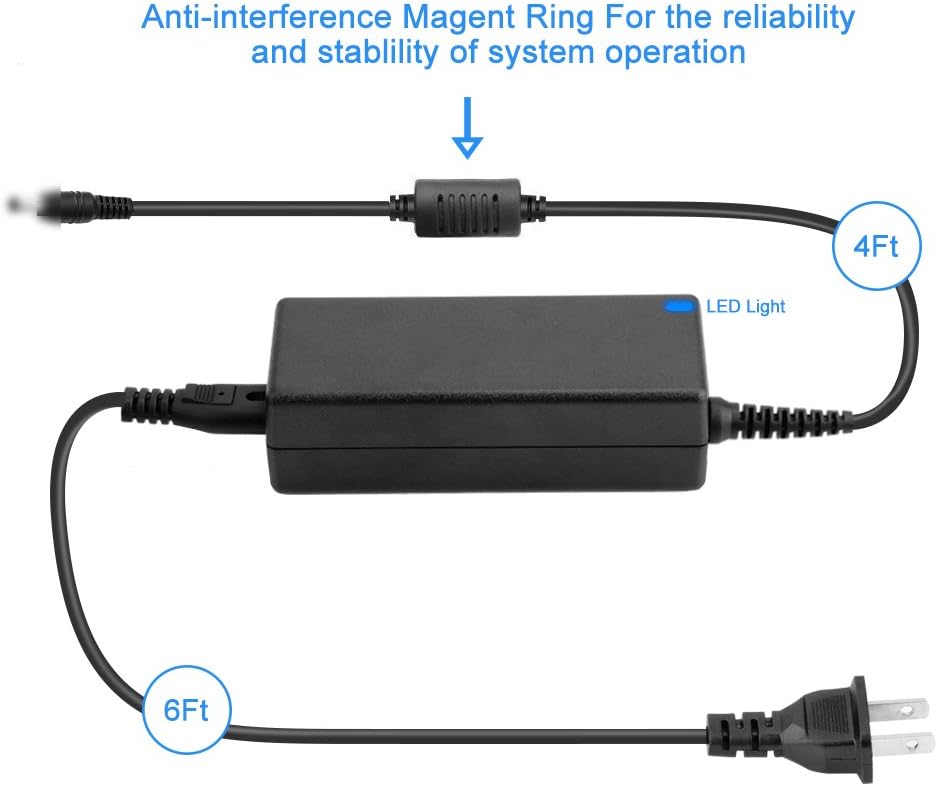
Image 2: Diagram illustrating the adapter's components, including the anti-interference ring, LED indicator, and cable lengths (4ft output, 6ft input).
4. סעטאַפּ אינסטרוקציעס
פֿאָלגט די סטעפּס צו ריכטיק אויפֿשטעלן אייער AC/DC אַדאַפּטער:
- אַנפּאַק: Carefully remove the adapter from its packaging. Inspect for any visible damage.
- פאַרבינדן צו מיטל: Plug the barrel connector of the adapter's output cable (the thinner cable, approximately 4 feet long) into the power input port of your compatible PetSafe wireless fence transmitter. Ensure a secure connection.
- פאַרבינדן צו מאַכט אָוטלעט: Plug the AC input cable (the thicker cable with a standard 2-prong plug, approximately 6 feet long) into a grounded 100-240VAC wall outlet.
- באַשטעטיקן מאַכט: Once connected, the blue LED indicator on the adapter unit should illuminate, indicating that power is being supplied.

Image 3: The YUSTDA AC/DC Adapter shown with its packaging, illustrating the product as it appears when new.
5. אַפּערייטינג ינסטרוקטיאָנס
Once properly connected, the adapter will continuously supply power to your device. The blue LED light on the adapter indicates active power delivery. No further user interaction is typically required during operation.
6. וישאַלט
כדי צו זיכער מאַכן די לאַנגלעבעניש און אָפּטימאַלע פאָרשטעלונג פון דיין אַדאַפּטער:
- רייניקונג: Disconnect the adapter from the power outlet and the device before cleaning. Use a soft, dry cloth to wipe the exterior. Do not use liquid cleaners or solvents.
- סטאָרידזש: When not in use, store the adapter in a cool, dry place, away from direct sunlight and extreme temperatures. Avoid tightly coiling the cables to prevent damage.
- דורכקוק: Periodically check the cables and connectors for any signs of wear, cuts, or bends.
7. טראָובלעשאָאָטינג
אויב איר טרעפט פּראָבלעמען מיט אייער אַדאַפּטער, זעט די פאלגענדע טאַבעלע:
| פּראָבלעם | מעגלעך סיבה | לייזונג |
|---|---|---|
| Adapter LED is off, device not powering on. | No power from outlet; loose connection; faulty adapter. | Check wall outlet with another device; ensure all connections are secure; try a different outlet. If problem persists, adapter may be faulty. |
| Device powers on intermittently. | לויזע פֿאַרבינדונג; געשעדיגטע קאַבל. | Ensure all connections are firm. Inspect cables for damage. Replace if cables are damaged. |
| דער אַדאַפּטער פילט זיך צו הייס. | Poor ventilation; overloaded circuit; internal fault. | Ensure adapter has adequate airflow. Disconnect and allow to cool. If overheating persists, discontinue use and replace. |
אויב די פראבלעם-לייזונג לייזט נישט אויס דעם פראבלעם, קאנטאקטירט קאסטומער שטיצע.
8. ספּעסאַפאַקיישאַנז
Technical specifications for the YUSTDA TNS30W-xy-z AC/DC Adapter:
| שטריך | באַשרייַבונג |
|---|---|
| מאָדעל נומער | TNS30W-xy-z |
| אַרייַנשרייַב וואָלtage | 100-240VAC, 50/60הז |
| רעזולטאַט חלקtage | 24V |
| רעזולטאַט קראַנט | 1.5 א |
| מאַכט שנור לענג | 10 פֿיס (אומגעפער 3 מעטער) |
| קאַנעקטער טיפּ | פאַס קאַנעקטער |
| קאַמפּאַטאַבאַל דעוויסעס | PetSafe PIF00-12917, PIF00-13210, 300-1070, 650-627, RFA-464 Stay+Play Extra Wireless Fence Transmitter Radio System |
| סערטיפיקאַטיאָנס | FCC, CE, RoHS |
| פּונקט וואָג | 9.9 אונס (בעערעך 280 גראַמז) |
| ספּעציעלע פֿעיִקייטן | איבער קראַנט, איבער וואָלtage, short circuit protection; Anti-interference ring |
9. וואָראַנטי און שטיצן
For warranty information or technical support, please refer to the documentation provided with your purchase or contact the manufacturer directly. Keep your purchase receipt as proof of purchase.