
Andoer HDV-201LM
Andoer HDV-201LM 1080p Digital Video Camera User Manual
Model: HDV-201LM
1. הקדמה
This manual provides detailed instructions for the safe and effective use of your Andoer HDV-201LM Digital Video Camera. Please read this manual thoroughly before operating the device and retain it for future reference.
The Andoer HDV-201LM is a 1080p Full HD digital video camera featuring a 5-megapixel CMOS sensor, capable of capturing video at 1920x1080p at 30 frames per second and still images up to 24 megapixels (interpolated). It includes a 16X digital zoom, a 3.0-inch TFT-LCD screen with 270-degree rotation, and supports external accessories via a hot shoe mount.
2. פּעקל אינהאַלט
באַשטעטיקט אַז אַלע זאכן וואָס זענען אויסגערעכנט אונטן זענען אַרייַנגערעכנט אין אייער פּעקל. אויב עפּעס פעלנדיק אָדער צעבראָכן, ביטע קאָנטאַקט אייער הענדלער.
- 1 x Andoer HDV-201LM Digital Video Camera
- 1 x קאַמעראַ זעקל
- 2 x Rechargeable 3.7V 800mAh Batteries (one pre-installed)
- קסנומקס רענטגענ וסב קאַבלע
- קסנומקס רענטגענ אַוו קאַבלע
- 1 x רימאָוט קאָנטראָל
- 1 x Camera User Manual (English)
- 1 x 0.39X Wide-Angle Lens
- 1 רענטגענ פונדרויסנדיק מיקראָפאָן
- 1 x Microphone Connection Cable
- 1 x Microphone User Manual (Chinese)
Note: A memory card is not included. A Class 10 or higher SD card (up to 32GB) is strongly recommended for optimal performance.
3. פּאַרץ לעגיטימאַציע
Familiarize yourself with the various components of your digital video camera.

פיגורע 3.1: פראָנט view of the Andoer HDV-201LM camera with attached wide-angle lens and external microphone.

פיגורע 3.2: דעטאַילעד views highlighting the hot shoe mount, control buttons, battery compartment, and 1/4-inch tripod thread.
- לענס: Main optical component for capturing images and videos.
- LCD פאַרשטעלן: 3.0-inch TFT-LCD display for viewing and menu navigation. Rotates 270 degrees.
- מאַכט קנעפּל: טוט אָן אָדער אויסלעשן די קאַמעראַ.
- Record/Stop Button: Initiates or stops video recording.
- פאָטאָ קנעפּל: כאַפּט נאָך בילדער.
- זום לעווער (W/T): אַדזשאַסטירט דיגיטאַלן זום (ברייט/טעלעפאָטאָ).
- מעניו קנעפּל: צוטריט קאַמעראַ סעטטינגס.
- נאַוויגאַציע קנעפּלעך: געניצט פֿאַר מעניו נאַוויגאַציע און סעלעקציע.
- הייסע שוך בארג: For attaching external accessories like microphones or LED lights.
- דרייַפוס פֿאָדעם: 1/4-inch thread for mounting the camera on a tripod.
- באַטערי אָפּטייל: אינהאלטן די ריטשאַרדזשאַבאַל באַטאַרייע.
- SD Card Slot: For inserting a memory card.
- וסב פּאָרט: צום פֿאַרבינדן צו אַ קאָמפּיוטער אָדער צו לאָדן.
- AV רעזולטאַט: פֿאַר פֿאַרבינדן צו אַ טעלעוויזיע.
- לעד פיל ליכט: Provides additional illumination in low-light conditions.
4. סעטאַפּ
4.1. טשאַרדזשינג די באַטערי
- עפענען די באַטאַרייע אָפּטייל דעקן.
- Insert the provided 3.7V 800mAh battery, ensuring correct polarity. If an insulator tab is present, remove it before insertion.
- נאָענט די דעקן פון די באַטאַרייע אָפּטייל.
- Connect the camera to a power source using the USB cable. The charging indicator will illuminate.
- אַמאָל גאָר אָנגעלאָדן, וועט די אינדיקאַטאָר ליכט זיך ענדערן אָדער אויסלעשן.
4.2. אַרייַנלייגן אַ זכּרון קאָרט
- מאַכן זיכער אַז די אַפּאַראַט איז פּאַוערד אַוועק.
- געפֿינען די סד קאָרט שפּעלטל.
- Insert a Class 10 or higher SD card (up to 32GB) into the slot until it clicks into place.
- To remove, gently press the card until it springs out.
4.3. Attaching the Wide-Angle Lens
- Remove the protective cap from the camera lens.
- Carefully screw the 0.39X wide-angle lens onto the camera's main lens thread until secure.

Figure 4.1: The camera with the 0.39X super wide-angle lens attached, demonstrating its expanded field of view.
4.4. Attaching the External Microphone
- Slide the external microphone into the hot shoe mount on top of the camera.
- Connect the microphone cable to the camera's external microphone input port.
5. אַפּערייטינג די קאַמעראַ
5.1. פּאָווערינג אויף / אויסגעלאשן
- To power on, open the LCD screen or press the מאַכט קנעפּל.
- To power off, close the LCD screen or press and hold the מאַכט קנעפּל.
5.2. רעקאָרדינג ווידיאס
- Ensure the camera is in video mode (indicated on the LCD screen). If not, press the מאָדע קנעפּל צו באַשטימען.
- דרוק די רעקאָרד / האַלטן button to start recording. A red indicator will typically flash.
- דרוק די רעקאָרד / האַלטן קנעפּל ווידער צו האַלטן רעקאָרדינג.
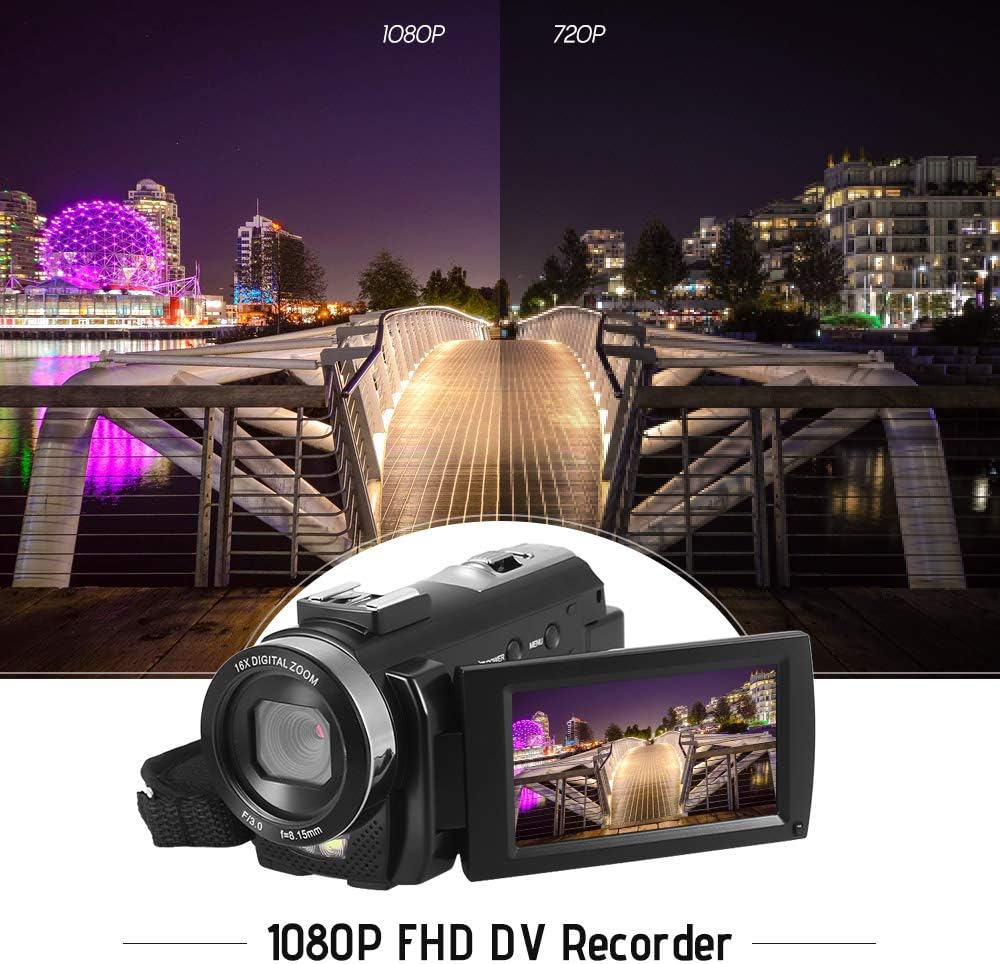
Figure 5.1: The camera is capable of recording in 1080p Full HD and 720p HD resolutions.
5.3. גענומען פאָטאָס
- Ensure the camera is in photo mode. If not, press the מאָדע קנעפּל צו באַשטימען.
- ראַמען דיין שאָס מיטן LCD עקראַן.
- דרוק די פאָטאָ button to capture an image.
5.4. Using Digital Zoom
- ניצן די W (Wide) און T (Telephoto) lever to adjust the 16X digital zoom.

Figure 5.2: The camera's 16X digital zoom allows for closer views of subjects.
5.5. מעניו סעטטינגס
- דרוק די מעניו קנעפּל צו צוקומען צו די סעטטינגס.
- Use the navigation buttons to scroll through options such as:
- ווייַס באַלאַנס: Auto, Daylight, Cloudy, Fluorescent, Tungsten.
- סצענע מאָדע: Auto, Night, Portrait, Landscape, Backlight, Sport, Party, Beach, High Sensitivity.
- שאָס מאָדע: Single, Continuous.
- אויסגעשטעלטקייט: Adjust ±3.0EV.
- Self-Timer: Off, 2s, 5s, 10s.
- אַוטאָ מאַכט אַוועק: Off, 1min, 3min, 5min.
- שפּראַך: English, German, French, Spanish, Italian, Turkish, Russian, Portuguese, Dutch, Simplified Chinese, Traditional Chinese, Japanese, Polish.
- אנדערע פאַנגקשאַנז: Face Detection, Smile Capture, Beauty Face, Anti-Shake.
- דרוק די OK or רעקאָרד / האַלטן קנעפּל צו באַשטעטיקן סאַלעקשאַנז.
- דרוק די מעניו קנעפּל ווידער צו אַרויסגאַנג.
5.6. זיך פֿאַרבינדן צו אַ טעלעוויזיע
- Use the provided AV cable to connect the camera's AV output to your television's AV input.
- Select the correct AV input channel on your TV to view camera content.
6. וישאַלט
6.1. רייניקונג די קאַמעראַ
- ניצט אַ ווייכן, טרוקענעם שטאָף צו רייניקן דעם קאַמעראַ קערפּער.
- פֿאַר די לינז און LCD עקראַן, ניצט אַ ספּעציעלע לינז רייניקונג שטאָף און לייזונג. פֿאַרמייַדט שטרענגע כעמיקאַלן.
6.2. סטאָרידזש
- האַלט די קאַמעראַ אין אַ קיל, טרוקן אָרט אַוועק פון דירעקט זונשייַן און עקסטרעמע טעמפּעראַטורן.
- אַראָפּנעמען די באַטאַרייע אויב די אַפּאַראַט וועט נישט זיין געוויינט פֿאַר אַ לאַנג צייַט.
7. טראָובלעשאָאָטינג
| פּראָבלעם | מעגלעך סיבה | לייזונג |
|---|---|---|
| די קאַמעראַ גייט נישט אָן. | די באַטעריע איז אויסגעשעפּט אָדער נישט ריכטיק אַרײַנגעשטעלט. | Charge the battery fully. Ensure the battery is inserted with correct polarity and the insulator tab is removed. |
| קען נישט רעקאָרדירן ווידעא אדער נעמען פאָטאָס. | די זכּרון קאַרטל איז פול, נישט אַרײַנגעשטעלט, אָדער קאָרומפּירט. | אַרײַנשטעלן אַ זכּרון קאַרטל. אויסמעקן נישט-נייטיקע files or format the card (this will erase all data). Replace the card if corrupted. |
| Poor video/image quality. | Insufficient lighting, dirty lens, or incorrect settings. | Ensure adequate lighting. Use the LED fill light if necessary. Clean the lens. Adjust white balance and scene mode settings. |
| די קאַמעראַ פרירט זיך אָדער ווערט נישט-רעאַגירנדיק. | ווייכווארג גליטש אָדער נידעריק באַטאַרייע. | Remove and reinsert the battery to reset the camera. Ensure the battery is charged. |
8. ספּעסאַפאַקיישאַנז
| שטריך | באַשרייַבונג |
|---|---|
| סאָרט | Andoer |
| מאָדעל | HDV-201LM |
| בילד סענסאָר | 5 מעגאַפּיקסעל קמאָס סענסאָר |
| ווידעא האַכלאָטע | 1920x1080P (FHD 30fps), 1280x720 (HD 30fps), 640x480 (VGA 30fps), 320x240 (VGA 30fps) |
| ווידעא פֿאָרמאַט | AVI |
| בילד האַכלאָטע | 24MP (Interpolated), 20MP (Interpolated), 16MP (Interpolated), 12MP (Interpolated), 10MP (Interpolated), 7M Wide (Interpolated), 5MP, 3MP, 2M Wide, VGA |
| בילד פֿאָרמאַט | JPG |
| דיגיטאַל פארגרעסער | 16X |
| לענס | ff (F/3.0 f=8.15mm) |
| מאַקס עפענונג | 8.15 פ |
| לקד סקרין | 3.0-inch TFT-LCD (16:9), 270-degree rotation |
| סטאָרידזש | SD Card (up to 32GB, Class 10 recommended) |
| קאַנעקטיוויטי | USB 2.0, AV Output (NTSC/PAL) |
| מאַכט צושטעלן | 1 x 3.7V 800mAh ריטשאַרדזשאַבאַל באַטאַרייע |
| רימאָוט קאָנטראָל באַטערי | 1 x 3V CR2025 באַטעריע |
| אַפּערייטינג סיסטעם שטיצן | Windows XP/Vista/7/8/10 |
| ספּעציעלע פֿעיִקייטן | Anti-shake, Face Detection, Smile Capture, Beauty Face, Self-Timer, LED Fill Light, Hot Shoe Mount |
| דימענשאַנז | 13.5 רענטגענ 5.5 רענטגענ 6.5 סענטימעטער (5.3 רענטגענ 2.2 רענטגענ 2.6 אין) |
| וואָג | 273g (9.6oz) with battery |
| קאָליר | שוואַרץ |
9. וואָראַנטי און שטיצן
פֿאַר וואָראַנטי אינפֿאָרמאַציע און טעכנישע שטיצע, ביטע זען די דאָקומענטאַציע וואָס איז צוגעשטעלט געוואָרן מיט אייער קויף אָדער קאָנטאַקט אייער הענדלער. האַלט אייער קויף באַווייַז פֿאַר קיין וואָראַנטי קליימז.
Ask a question about this manual
Ask about setup, troubleshooting, compatibility, parts, safety, or missing instructions. Manuals+ will review the question and use this page’s manual context to help answer it.