
הקדמה
The Aula S6 Multi-Mode Wireless Gaming Headset is designed to provide a versatile audio experience for gaming and multimedia. This headset features three connection options: 2.4GHz wireless, Bluetooth 5.3, and a traditional 3.5mm wired connection. Its ultra-lightweight design, weighing only 180 grams, ensures comfort during extended use. The integrated microphone with smart noise reduction technology delivers clear communication, and the headset offers up to 22 hours of battery life.
פּעקל אינהאַלט
ביטע אָפּהאַקן דאָס קעסטל פֿאַר די פֿאָלגנדיקע זאַכן:
- 1 x Aula S6 Multi-Mode Wireless Gaming Headset
- 1 x 2.4GHz Wireless Connection Dongle
- 1 x Type-C to 3.5mm Audio Connection Cable (1.5 meters)
- 1 רענטגענ וסב טיפּ- C טשאַרדזשינג קאַבלע
- 1 x באַניצער מאַנואַל
פּראָדוקט איבערview
מאַכט זיך באַקאַנט מיט די כעדסעט'ס קאָמפּאָנענטן און קאָנטראָלס.
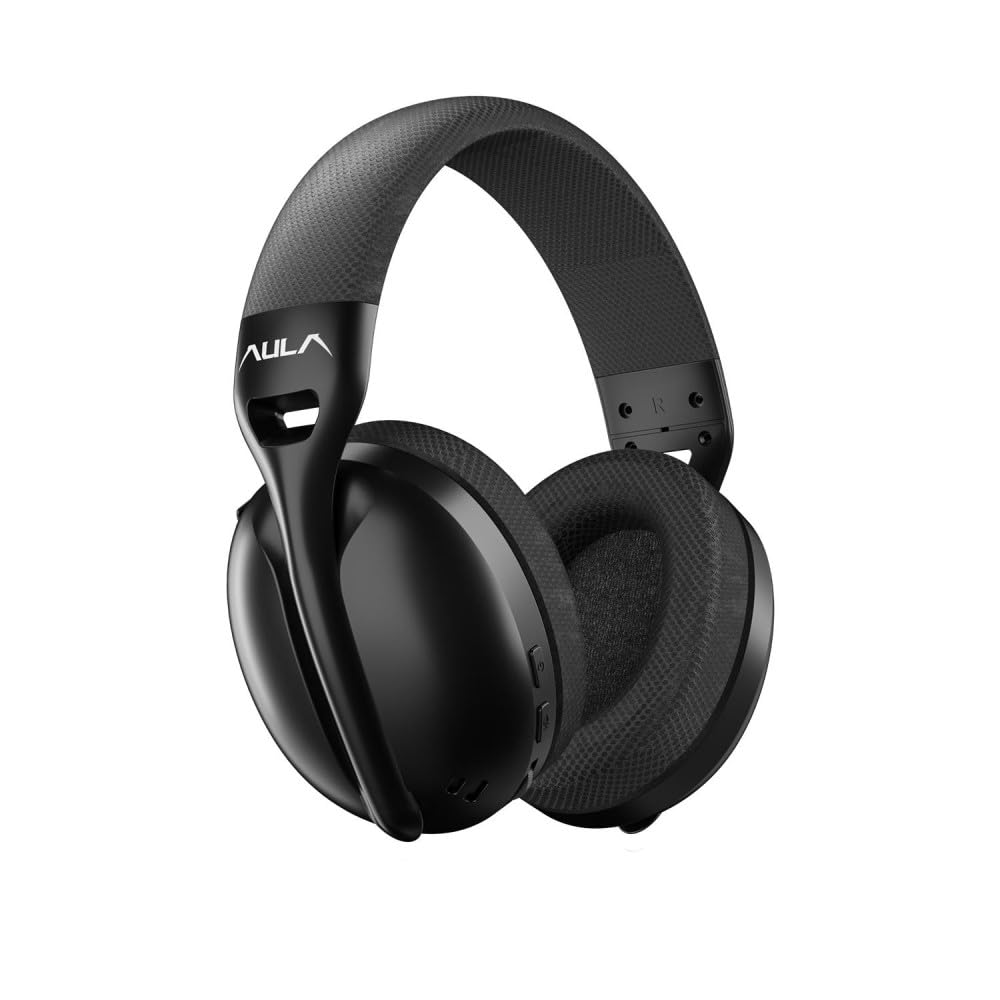
בילד: פראָנט view of the Aula S6 Multi-Mode Wireless Gaming Headset. This image displays the overall design of the headset, highlighting its earcups and headband.
קאָנטראָלס און פּאָרץ

בילד: דנאָ view of the Aula S6 headset. This image illustrates the location of the Type-C charging port, 3.5mm audio jack, volume wheel, and other control buttons on the earcups.
- מאַכט קנעפּל: Used to power the headset on/off and for pairing.
- מאָדע באַשטימען קנעפּל: Toggles between Game Mode and Music Mode for optimized audio profiles.
- באַנד ראָד: אַדזשאַסץ די אַודיאָ באַנד.
- מולטי-פונקציע קנעפּלעך: For call management (accept/reject) and switching between Bluetooth and 2.4GHz connections.
- ריטראַקטאַבאַל מיקראָפאָן: Mute by retracting into the earcup, unmute by extending.
- טיפּ-C פּאָרט: פֿאַר טשאַרדזשינג די כעדסעט.
- 3.5 מם אַודיאָ דזשאַק: For wired connection using the provided Type-C to 3.5mm cable.
סעטאַפּ
טשאַרדזשינג די העאַדסעט
Before first use, fully charge the headset. Connect the provided USB Type-C charging cable to the headset's Type-C port and the other end to a USB power source (e.g., computer, wall adapter). The LED indicator will show charging status and turn off when fully charged.
קאַנעקטינג די העאַדסעט
The Aula S6 offers three connection methods:
1. 2.4GHz Wireless Connection (via Dongle)
- Insert the 2.4GHz wireless dongle into a USB port on your computer or compatible device.
- Power on the headset by pressing and holding the Power button.
- The headset should automatically connect to the dongle. The LED indicator will confirm a successful connection.
2. בלועטוט 5.3 פֿאַרבינדונג
- מאַכט די כעדסעט.
- דריק און האלט דעם פּאַוער קנעפּל ביז דער LED אינדיקאַטאָר בלינקט שנעל, וואָס ווײַזט אויף פּערינג מאָדע.
- אויף אייער דעווייס (סמאַרטפאָן, טאַבלעט, לאַפּטאָפּ), אַקטיווירט בלועטוט און זוכט פֿאַר פֿאַראַן דעווייסעס.
- Select "Aula S6" from the list of devices to pair. The LED indicator will show a solid light upon successful connection.
3. Wired 3.5mm Connection
- Connect the Type-C end of the provided audio cable to the headset's Type-C port.
- Connect the 3.5mm end of the cable to the audio jack of your device.
- די כעדסעט וועט ארבעטן אין דראט מאָדע, בייפּאַסינג וויירלעס פאַנגקשאַנז.
אַפּערייטינג ינסטראַקשאַנז
מאַכט אויף / אַוועק
- צו מאַכט אויף: דריק און האלט דעם פּאַוער קנעפּל פֿאַר אַרום 3 סעקונדעס ביז דער LED אינדיקאַטאָר צינדט זיך אָן.
- צו מאַכט אַוועק: דריק און האלט דעם פּאַוער קנעפּל פֿאַר אַרום 5 סעקונדעס ביז דער LED אינדיקאַטאָר גייט אויס.
Mode Switching (Game/Music)
Press the Mode Switch button to toggle between Game Mode and Music Mode. Each mode optimizes audio settings for its intended use.
מיקראָפאָן באַניץ

בילד: אַנגגאַלד view of the Aula S6 headset with its retractable microphone extended. This shows the microphone in its active position for communication.
- צו אָנמאַכן: Extend the microphone from the earcup.
- צו שטום: Retract the microphone fully into the earcup.
The smart noise reduction technology helps minimize ambient noise for clearer voice transmission.
רופן פאַרוואַלטונג
When connected via Bluetooth or 2.4GHz wireless, use the multi-function buttons on the headset to manage calls:
- אָננעמען רופן: דריקן די מולטי-פונקציע קנעפּל אַמאָל.
- אָפּוואַרפן רופן: דריקן און האַלטן די מולטי-פונקציע קנעפּל פֿאַר 2 סעקונדעס.
- סוף רופן: דריק איין מאל דעם מולטי-פונקציע קנעפל בעת א רוף.
באַנד קאָנטראָל
Rotate the Volume Wheel up or down to precisely adjust the audio output level.
Multi- דיווייס קאַנעקשאַן
The headset supports simultaneous wireless connection to two different devices. Use the multi-function buttons to switch between the connected devices as needed.
וישאַלט
To ensure the longevity and optimal performance of your Aula S6 headset, follow these maintenance guidelines:
- רייניקונג: ניצט אַ ווייכע, טרוקענע שטאָף צו רייניקן די כעדסעט. פֿאַרמייַדט ניצן שטרענגע כעמיקאַלן אָדער שרײַבנדיקע מאַטעריאַלן.
- סטאָרידזש: האַלט די כעדסעט אין אַ קיל, טרוקן אָרט אַוועק פון דירעקט זונשייַן און עקסטרעמע טעמפּעראַטורן.
- ויסמיידן נעץ: The headset is not waterproof. Keep it away from water and high humidity.
- קאַבלע זאָרגן: באַהאַנדלט די קאַבלען מיט זאָרג. פֿאַרמייַדט שאַרפֿע בייגן אָדער איבערגעטריבענעם ציען כּדי צו פֿאַרמייַדן שאָדן.
טראָובלעשאָאָטינג
If you encounter issues with your Aula S6 headset, refer to the following common solutions:
- קיין קלאַנג/נידעריק באַנד:
- קאָנטראָלירט דעם וואָלומען לעוועל אויף ביידע די כעדסעט און אייער פֿאַרבונדענע מיטל.
- Ensure the headset is properly connected (wired, Bluetooth, or 2.4GHz dongle).
- באַשטעטיקט אַז די ריכטיקע אַודיאָ אַרויסגאַנג מיטל איז אויסגעקליבן אין אייער מיטל'ס געזונט סעטטינגס.
- מיקראָפאָן איז נישט ארבעטן:
- Ensure the microphone is extended and not muted.
- Check microphone input settings on your connected device.
- פּרובירט דעם מיקראָפאָן מיט אַן אַנדער אַפּליקאַציע אָדער מיטל.
- קשר ישוז:
- פֿאַר בלועטאָאָטה: Ensure the headset is in pairing mode and within range. Forget the device on your phone and re-pair.
- פֿאַר 2.4GHz: Ensure the dongle is securely plugged in and the headset is powered on. Try a different USB port.
- פֿאַר ווייערד: זיכער מאַכן אַז דער 3.5 מ״מ קאַבל איז גאָר אַרײַנגעשטעקט אין ביידע דעם כעדסעט און דעם אַפּאַראַט.
- Headset Not Powering On:
- Charge the headset for at least 30 minutes.
- Try a different charging cable and power source.
ספּעסאַפאַקיישאַנז
| סאָרט | AULA |
| מאָדעל | S6 |
| קאַנעקטיוויטי | Bluetooth 5.3, 2.4GHz Wireless, 3.5mm Wired |
| דרייווער גרייס | 40 מם |
| ימפּידאַנס | 120 Ohm |
| כעדפאָון סענסיטיוויטי | 120 דב |
| מיקראָפאָן סענסיטיוויטי | -38 ± 2דב |
| אָפטקייַט ענטפער | 20 הז - 20 כז |
| וואָג | 180 גראַמז |
| באַטערי לעבן | אַרויף צו 22 שעה |
| מאַטעריאַל | Breathable Fabric and ABS Plastic |
| קאַמפּאַטאַבאַל דעוויסעס | Mobile Phone, Laptop, Desktop Computer, Game Console, Tablet, Television |
וואָראַנטי און שטיצן
The Aula S6 Multi-Mode Wireless Gaming Headset comes with a 2-Year Aula Turkey Warranty.
For warranty claims, technical support, or further assistance, please contact your local Aula authorized dealer or visit the official Aula webפּלאַץ פֿאַר שטיצן קאָנטאַקט אינפֿאָרמאַציע.