
הקדמה
This manual provides essential information and instructions for the Easytry123 replacement remote control. This remote is designed to be compatible with various Hisense LCD LED HDTV models, specifically those that originally used the EN3A31 series remote. Please review this manual thoroughly before use.
סעטאַפּ
ייַנמאָנטירונג פון באַטאַרייע
די ווײַטקאָנטראָל דאַרף צוויי (2) AAA באַטעריעס פֿאַר אָפּעראַציע. באַטעריעס זענען נישט אַרייַנגערעכנט מיטן ווײַטקאָנטראָל און מוזן ווערן געקויפֿט באַזונדער.
- געפֿינען די באַטאַרייע אָפּטייל אויף די צוריק פון די ווייַט קאָנטראָל.
- רוקט דעם דעקל פונעם באַטעריע־אָפּטייל אַראָפּ און נעמט עס אַראָפּ.
- אַרײַנשטעלן צוויי AAA באַטעריעס, און זיכער מאַכן אַז די פּאָזיטיוו (+) און נעגאַטיוו (-) טערמינאַלן זענען ריכטיק אויסגעשטעלט מיט די מאַרקירונגען אינעווייניק אין דעם אָפּטייל.
- Replace the battery compartment cover by sliding it back into position until it clicks securely.

This image illustrates the battery compartment located on the back of the remote control. The cover slides off to allow insertion of two AAA batteries.
אַפּערייטינג ינסטראַקשאַנז
This replacement remote control is designed for immediate use with compatible Hisense televisions. No programming is typically required.
קאַמפּאַטאַבילאַטי
- Ensure your television model is listed as compatible with the Hisense EN3A31 series remote. Compatible models include LTDN42K320UWSEU, LTDN42K390XWSEU3D, and LTDN42K680XWSEU3D.
- While designed to replace the original, some advanced or specific functions of your original remote may not be fully supported by this replacement unit.
יקערדיק פאַנגקשאַנז
Point the remote control directly at the infrared receiver on your television. Press the desired buttons to control functions such as power, volume, channel selection, and menu navigation.
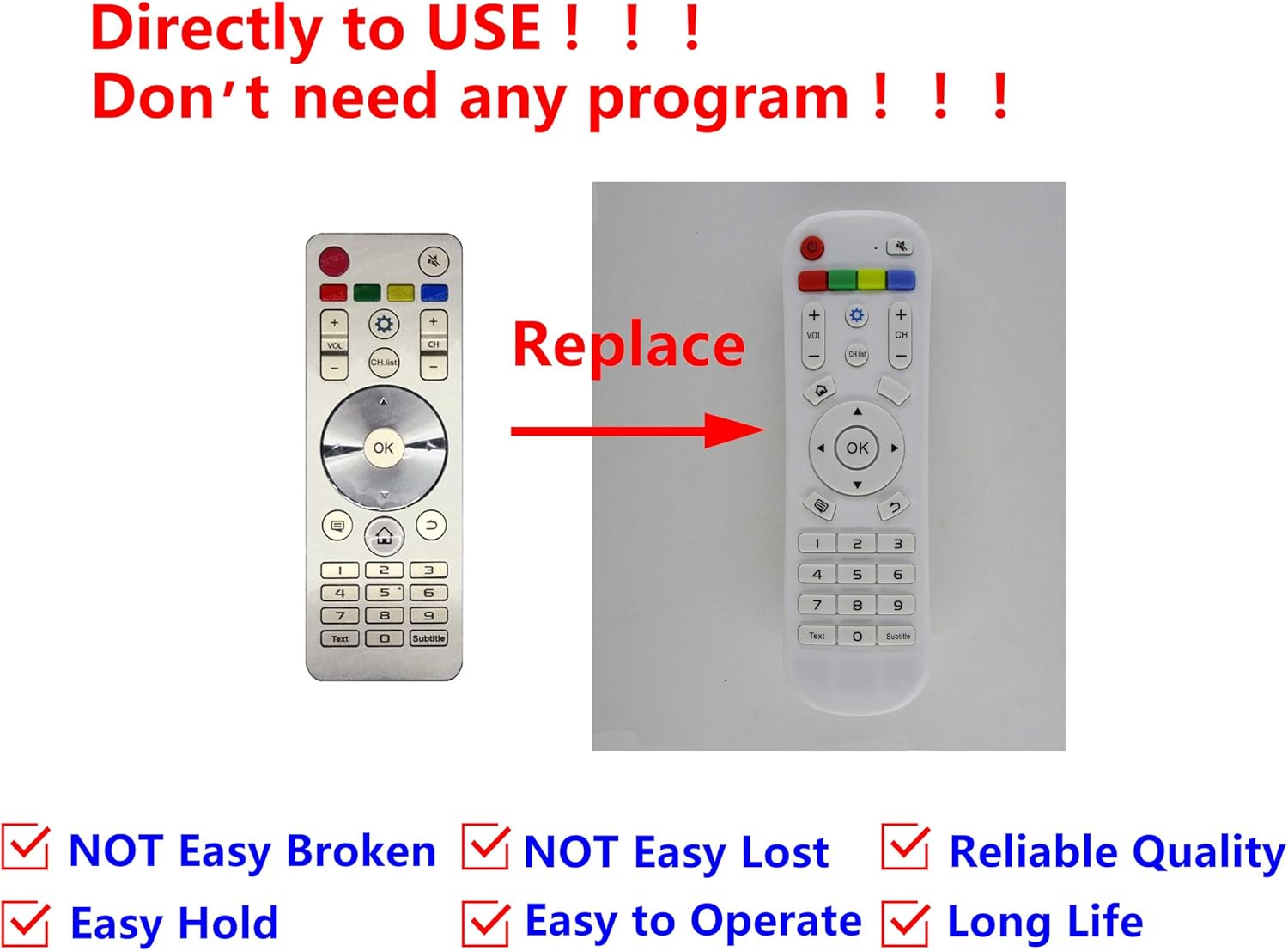
This image displays the Easytry123 replacement remote control, showing its button layout. It also includes a comparison to an original Hisense remote, indicating that the replacement is designed to function similarly.
וישאַלט
רייניקונג
To clean the remote control, gently wipe it with a soft, dry cloth. Do not use liquid cleaners, abrasive pads, or chemical solvents, as these can damage the remote's surface or internal components.
באַטערי קער
- טוישט די באַטעריעס ווען די ווייַטקאָנטראָל אַרבעט ווייניקער אָדער הערט אויף צו אַרבעטן.
- Remove batteries if the remote control will not be used for an extended period to prevent leakage and potential damage.
- אָפּזאָגן געוויינט באַטעריז ריספּאַנסאַבלי לויט די היגע רעגיאַליישאַנז.
טראָובלעשאָאָטינג
ווייַט ניט ריספּאַנדינג
- טשעק באַטעריז: זיכער מאַכן אַז די באַטעריעס זענען ריכטיק אַרײַנגעשטעלט מיט דער ריכטיקער פּאָלאַריטעט (+/-) און זענען נישט אויסגעשעפּט. אויב נייטיק, פֿאַרבײַטן זיי מיט נײַע AAA באַטעריעס.
- שורה פון דערזען: Make sure there are no obstructions between the remote control and the television's infrared receiver. The remote uses infrared technology, requiring a clear line of sight.
- דיסטאַנסע: זייט זיכער אז איר זענט אין דער עפעקטיווער ארבעטס-ראַנג פון דער ווײַטקאָנטראָל.
- טעלעוויזיע קאַמפּאַטאַבילאַטי: Double-check that your television model is indeed compatible with the EN3A31 series remote.
ספּעסאַפאַקיישאַנז
| סאָרט | גרינג צו טריי123 |
| מאָדעל סעריעס | EN3A31 |
| קאַמפּאַטאַבאַל דעוויסעס | Hisense Televisions (e.g., LTDN42K320UWSEU, LTDN42K390XWSEU3D, LTDN42K680XWSEU3D) |
| קאַנעקטיוויטי טעכנאָלאָגיע | ינפרערעד (IR) |
| קאָנטראָללער טיפּ | קנעפּל קאָנטראָל |
| ספּעציעלע שטריך | ערגאַנאַמיק פּלאַן |
| באַטעריז פארלאנגט | 2 X AAA (ניט אַרייַנגערעכנט) |
וואָראַנטי און שטיצן
For any issues or questions regarding your Easytry123 replacement remote control, please contact the seller directly through your purchase platform. Specific warranty details may vary by retailer and purchase date.