
1. הקדמה
This manual provides instructions for the FocalTop N2QAYB000953 replacement remote control. This remote is designed to function as a direct replacement for the original Panasonic Blu-ray Player remote control models N2QAYB000953, compatible with DMP-BDT360, DMP-BDT361, DMP-BDT460, and DMP-BDT460PS Blu-ray players.
No programming is required for this remote control. Simply insert batteries, and it is ready for use.
2. סעטאַפּ
2.1 באַטאַרייע ייַנמאָנטירונג
- געפֿינען די באַטאַרייע אָפּטייל אויף די צוריק פון די ווייַט קאָנטראָל.
- רוקט דעם דעקל פונעם באַטעריע־אָפּטייל אַראָפּ צו עס עפֿענען.
- Insert two (2) AAA alkaline batteries (not included), ensuring the positive (+) and negative (-) terminals align correctly with the markings inside the compartment.
- שטופּט צוריק דעם דעקל פון דעם באַטעריע־אָפּטייל ביז עס קליקט זיכער.

פיגור 2.1: באַטעריע אָפּטייל מיטן דעקל אַראָפּגענומען, ווײַזנדיק די באַטעריע פּלאַצירונג.
באַמערקונג: Ensure batteries are inserted with correct polarity. Incorrect installation may prevent the remote from functioning.
3. אַפּערייטינג די רימאָוט קאָנטראָל
The FocalTop N2QAYB000953 remote control is designed for intuitive operation of your compatible Panasonic Blu-ray Player. Point the remote directly at the Blu-ray player's infrared sensor for optimal performance.
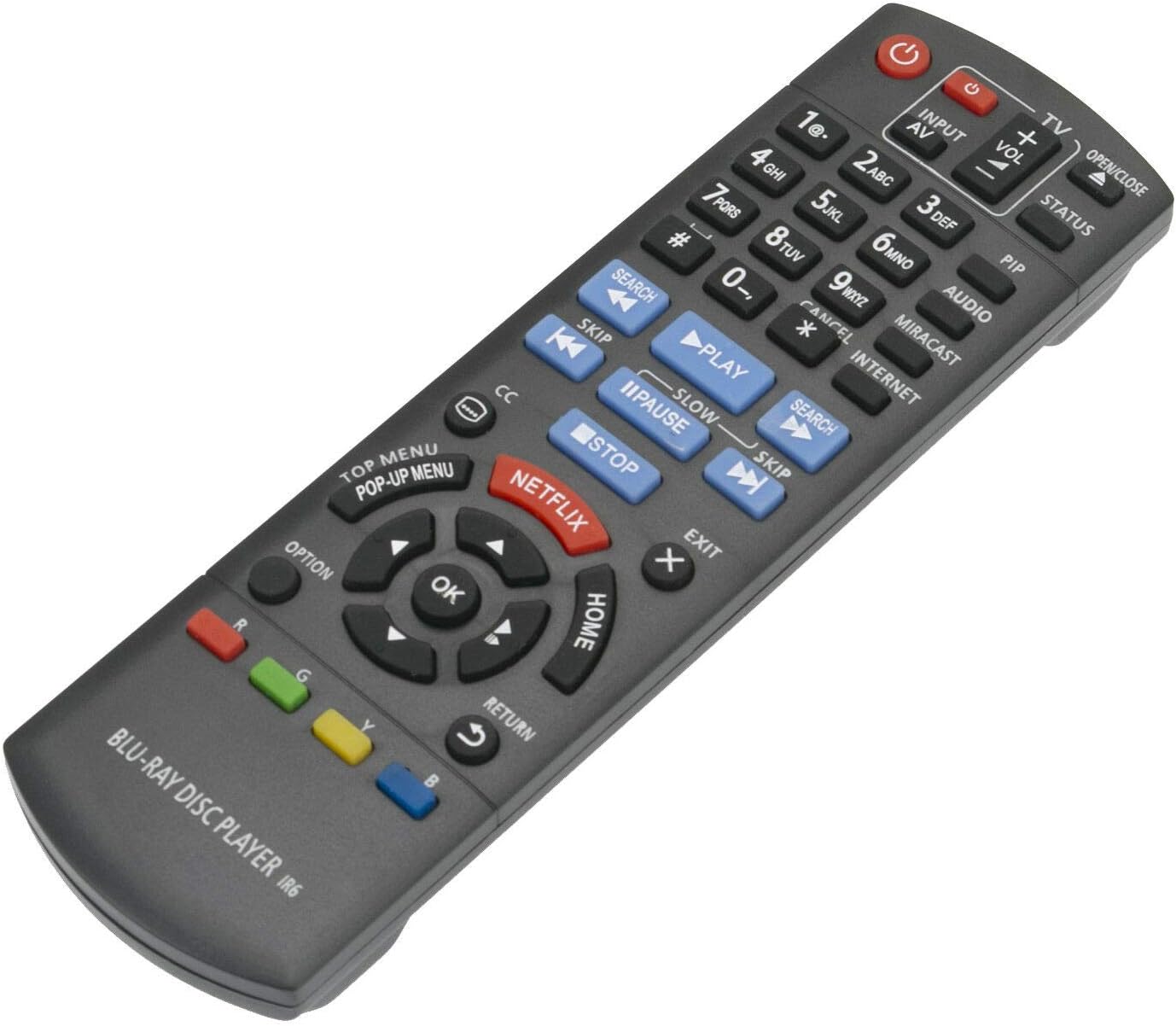
פיגורע 3.1: פראָנט view פון די ווײַטקאָנטראָל מיט קנעפּל אויסלייג.
3.1 שליסל פאַנגקשאַנז
- מאַכט (⏻): Turns the Blu-ray player on or off.
- Input/AV: Selects the input source on your television.
- באַנד (+/-): Adjusts the volume of the connected audio system (if supported by the Blu-ray player's HDMI-CEC or similar function).
- נומער קנעפּלעך (0-9): Used for direct track selection or entering numerical data.
- שפּיל (▶), פּויזע (⏸), אָפּשטעל (■): נאָרמאַל מעדיע פּלייבאַק קאָנטראָלס.
- האָפּקען (⏭), Search (⏮): Navigate between tracks or fast-forward/rewind.
- Directional Pad (Up, Down, Left, Right) & OK: נאַוויגירט מעניוז און באַשטעטיקט סעלעקשאַנז.
- היים: Returns to the main menu of the Blu-ray player.
- TOP MENU/POP-UP MENU: Accesses the disc's top menu or pop-up menu.
- נעטפליקס: Direct access button for the Netflix application.
- צוריקקומען: גייט צוריק צום פריערדיקן עקראַן אָדער מעניו.
- OPTION: Displays options relevant to the current screen or playback.
- קאָליר קנעפּלעך (רויט, גרין, געל, בלוי): Used for specific functions within menus or applications, as indicated on-screen.
4. וישאַלט
- רייניקונג: ווישט אָפּ די ווײַטקאָנטראָל מיט אַ ווייכן, טרוקענעם שטאָף. ניצט נישט קיין פֿליסיקע רייניגער אָדער שרײַבנדיקע מאַטעריאַלן.
- באַטערי פאַרבייַט: Replace batteries when the remote's response becomes sluggish or stops working. Always replace both batteries at the same time with new ones of the same type (AAA alkaline).
- סטאָרידזש: אויב די ווײַטקאָנטראָל וועט נישט ווערן גענוצט פֿאַר אַ לענגערע צײַט, נעמט אַרויס די באַטעריעס כּדי צו פֿאַרמײַדן ליקאַדזש און מעגלעכן שאָדן.
- סוויווע: פֿאַרמײַדט אויסשטעלן דעם ווײַטקאָנטראָל צו עקסטרעמע טעמפּעראַטורן, דירעקטע זונשײַן, אָדער הויכע פֿײַכטקײַט.
5. טראָובלעשאָאָטינג
| פּראָבלעם | מעגלעך סיבה | לייזונג |
|---|---|---|
| ווייַט קאָנטראָל טוט נישט אַרבעטן. |
|
|
| עטלעכע קנעפּלעך רעאַגירן נישט. |
|
|
| די ווײַטקאָנטראָל אַרבעט צווישנצײַטיק. |
|
|
6. ספּעסאַפאַקיישאַנז
- מאָדעל: N2QAYB000953
- סאָרט: FocalTop
- קאַמפּאַטאַבילאַטי: Panasonic Blu-ray Player models DMP-BDT360, DMP-BDT361, DMP-BDT460, DMP-BDT460PS
- קאַנעקטיוויטי טעכנאָלאָגיע: ינפרערעד (IR)
- קאָנטראָללער טיפּ: קנעפּל קאָנטראָל
- מאַכט מקור: 2 x AAA אַלקאַליין באַטעריעס (נישט אַרייַנגערעכנט)
- ספּעציעלע שטריך: ערגאַנאַמיק פּלאַן
7. וואָראַנטי און שטיצן
This product is a replacement remote control. For specific warranty information or technical support, please refer to the documentation provided by the original seller or contact FocalTop directly. No explicit warranty information is provided within this manual.