
1. הקדמה
Thank you for choosing the Amcrest 1080P WiFi Pan/Tilt Indoor Security Camera (Model: ASH21-W). This manual provides essential information for setting up, operating, and maintaining your device. This camera offers advanced features such as 1080P Full-HD video, pan/tilt functionality, human and pet detection, motion tracking, two-way audio, and various storage options to ensure comprehensive monitoring of your indoor spaces.
2. וואָס איז אין דער קעסטל
- Amcrest ASH21-W 1080P WiFi Pan/Tilt Camera
- מאַכט אַדאַפּטער
- וסב מאַכט קאַבלע
- מאַונטינג פּלאַטע
- מאַונטינג סקרוז און אַנגקערז
- שנעל אָנהייב גייד
באַמערקונג: A MicroSD card (up to 256GB) for local storage is not included and must be purchased separately.
3. סעטאַפּ
3.1 מאַכט אויף
- Connect the USB power cable to the camera's power port.
- צאַפּן די מאַכט אַדאַפּטער אין אַ נאָרמאַל עלעקטריקאַל ווענטיל.
- The camera will power on, and the indicator light will begin to flash.
3.2 App Download & Account Registration
- אָפּלאָדירן די Amcrest SmartHome אַפּ פֿון די אַפּ סטאָר (iOS) אָדער גוגל פּליי סטאָר (אַנדרויד).
- עפֿנט די אַפּ און רעגיסטרירט זיך פֿאַר אַ נײַעם אַקאַונט אָדער לאָגט זיך אײַן אויב איר האָט שוין אײנס.
3.3 מיטל פּערינג
- In the Amcrest SmartHome app, tap the "Add Device" icon (usually a '+' symbol).
- Select your camera model or choose to scan the QR code.
- יבערקוקן די QR קאָד אויף די דנאָ פון דיין אַפּאַראַט.
- Follow the on-screen prompts to connect the camera to your 2.4GHz Wi-Fi network and set a device password.
- Name your device (e.g., "Living Room Camera", "Baby's Room").
3.4 מאַונטינג אָפּציעס
The camera can be placed on a tabletop or mounted on a wall or ceiling. Use the provided mounting plate, screws, and anchors for secure installation if mounting is desired.

בילד 1: Amcrest ASH21-W camera on a table, showcasinג זײַן קאָמפּאַקטן דיזײַן.
4. אַפּערייטינג ינסטרוקטיאָנס
4.1 לעבן View און פּאַן/טילט קאָנטראָל
Once connected, access the live video feed through the Amcrest SmartHome app. Use the on-screen controls to remotely pan (355°) and tilt (80°) the camera lens to view פֿאַרשידענע געביטן פֿון דיין צימער.

בילד 2: Amcrest ASH21-W camera demonstrating pan and tilt motion with blue arrows, indicating its auto-tracking capability.
4.2 צוויי-וועג אַודיאָ
The camera features a built-in microphone and speaker, enabling two-way communication. Tap the "Talk" button in the app to speak through the camera, and tap "Listen" to hear audio from the camera's location.

בילד 3: A person using a smartphone to engage in two-way talk through the Amcrest camera, showing the live feed on the phone screen.
4.3 Baby Monitor Mode
Activate Baby Monitor Mode in the app to receive notifications based on adjustable sound thresholds (VOX alarm). This feature is ideal for monitoring infants or pets, alerting you to sounds like crying or barking without requiring constant visual monitoring.
בילד 4: Amcrest ASH21-W camera with a smartphone displaying the baby monitor interface, showing a baby in a crib and audio level graphs.
4.4 Motion Detection & Smart Tracking
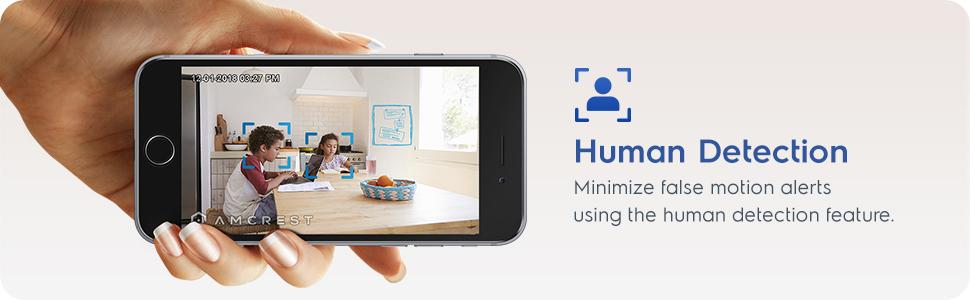
Enable motion detection to receive alerts and record footage when movement is detected. Utilize the human detection filter to reduce false alarms. With Smart Tracking enabled, the camera will automatically pan and tilt to follow detected human movement across the room.

בילד 5: Amcrest ASH21-W camera on a table, with a smartphone showing a human detection alert and a 93-degree viewing angle graphic.
4.5 נאַכט זעאונג
The camera provides clear night vision up to 33 feet in absolute darkness, ensuring continuous monitoring even in low-light conditions.
4.6 רעקאָרדינג און סטאָרידזש
Recordings can be stored in several ways:
- מיקראָסד קאָרט: שטעקט אריין א MicroSD קארטל (ביז 256GB, נישט אריינגערעכנט) אין דער קאמערא'ס סלאט פאר לאקאלע סטאָרידזש.
- Amcrest Cloud: Utilize optional cloud storage services for remote access to recordings.
- דריט-פּאַרטיי ווייכווארג: Compatible with Amcrest NVRs and third-party surveillance software like Blue Iris, Synology, QNAP NAS, Zoneminder, and RTSP.

בילד 6: Amcrest ASH21-W camera highlighting the MicroSD card slot and showing icons for Amcrest Smart Home Cloud and MicroSD Card storage options.
4.7 Alerts & Notifications
Receive instant notifications on your smartphone when motion or human detection events occur. Review event playback directly from the app.
ווידעא 1: Official Amcrest video demonstrating the Smart Home WiFi Pan/Tilt Baby Monitor Camera's features, including setup, app interface, baby monitor mode, human detection, smart tracking, night vision, and storage options.
5. וישאַלט
- רייניקונג: Use a soft, dry cloth to clean the camera lens and body. Avoid harsh chemicals or abrasive materials.
- Firmware דערהייַנטיקונגען: Regularly check the Amcrest SmartHome app for firmware updates to ensure optimal performance and security.
- אָרט: Ensure the camera is placed in a location with good Wi-Fi signal strength and away from direct heat sources or extreme temperatures.
6. טראָובלעשאָאָטינג
- קאַנעקטיוויטי ישוז: Ensure your Wi-Fi network is 2.4GHz. Check your router's signal strength and try restarting both the camera and your router.
- קיין לעבן View: Verify the camera is powered on and connected to Wi-Fi. Check the app for any error messages.
- פאַלש אַלאַרמס: Adjust motion detection sensitivity settings in the app. Utilize human detection filters to minimize alerts from non-human movement.
- נעבעך בילד קוואַליטעט: Ensure the camera lens is clean. Check your internet connection speed.
- צוויי-וועג אַודיאָ פּראָבלעמען: Check volume settings on your phone and in the app. Ensure there is no obstruction to the camera's microphone or speaker.
7. ספּעסאַפאַקיישאַנז
| שטריך | דעטאַל |
|---|---|
| ווידעא קאַפּטורע רעסאָלוטיאָן | 1080 פּ |
| פּאַן / טילט קייט | פּאַן 355°, טילט 80° |
| Viewינג אַנגלע | 93 דיגריז |
| נאַכט וויזשאַן ראַנגע | אַרויף צו 33 פֿיס |
| סטאָרידזש אָפּציעס | MicroSD (up to 256GB), Amcrest Cloud, NVR/3rd Party Software |
| קאַנעקטיוויטי | ווי-פי (2.4 גהז) |
| צוויי-וועג אַודיאָ | Yes (Built-in Mic & Speaker) |
| באַוועגונג דעטעקשאַן | Yes (Human & Pet Detection, Motion-Tracking) |
| קאַמפּאַטאַבאַל דעוויסעס | אַמאַזאָן אַלעקסאַ |
| מאַכט מקור | עלעקטריש מיט שנור (5V DC, 5W) |
| דימענסיעס (L X W X H) | 4.17 X 3.04 X 3.04 אינטשעס |
| פּונקט וואָג | 0.53 פונט (8.4 אונסעס) |
| מאַטעריאַל | פּלאַסטיק |
| דרינענדיק / דרויסנדיק באַניץ | דרינענדיק |
8. וואָראַנטי און שטיצן
The Amcrest ASH21-W camera comes with a full 1-year US Warranty. For any technical assistance or support, please contact Amcrest directly. Lifetime technical support is provided by Amcrest, a United States-based company headquartered in Houston, TX.
For further assistance, please refer to the Amcrest SmartHome app's support section or visit the official Amcrest webפּלאַץ.