
הקדמה
די ווampler Terraform is a multi-modulation guitar effects pedal designed to provide a wide range of modulation effects in a compact unit. It features 11 distinct effect blocks, stereo and mono routing options, MIDI control, and expression pedal integration. This manual provides detailed instructions for setting up, operating, and maintaining your Terraform pedal.
סעטאַפּ
מאַכט רעקווירעמענץ
The Terraform pedal requires a 9-18V DC power supply, center negative, with a minimum current draw of 100mA. Ensure your power supply meets these specifications to prevent damage and ensure optimal performance.
קאַנעקשאַנז
The pedal offers versatile connectivity options for integration into various guitar rigs.
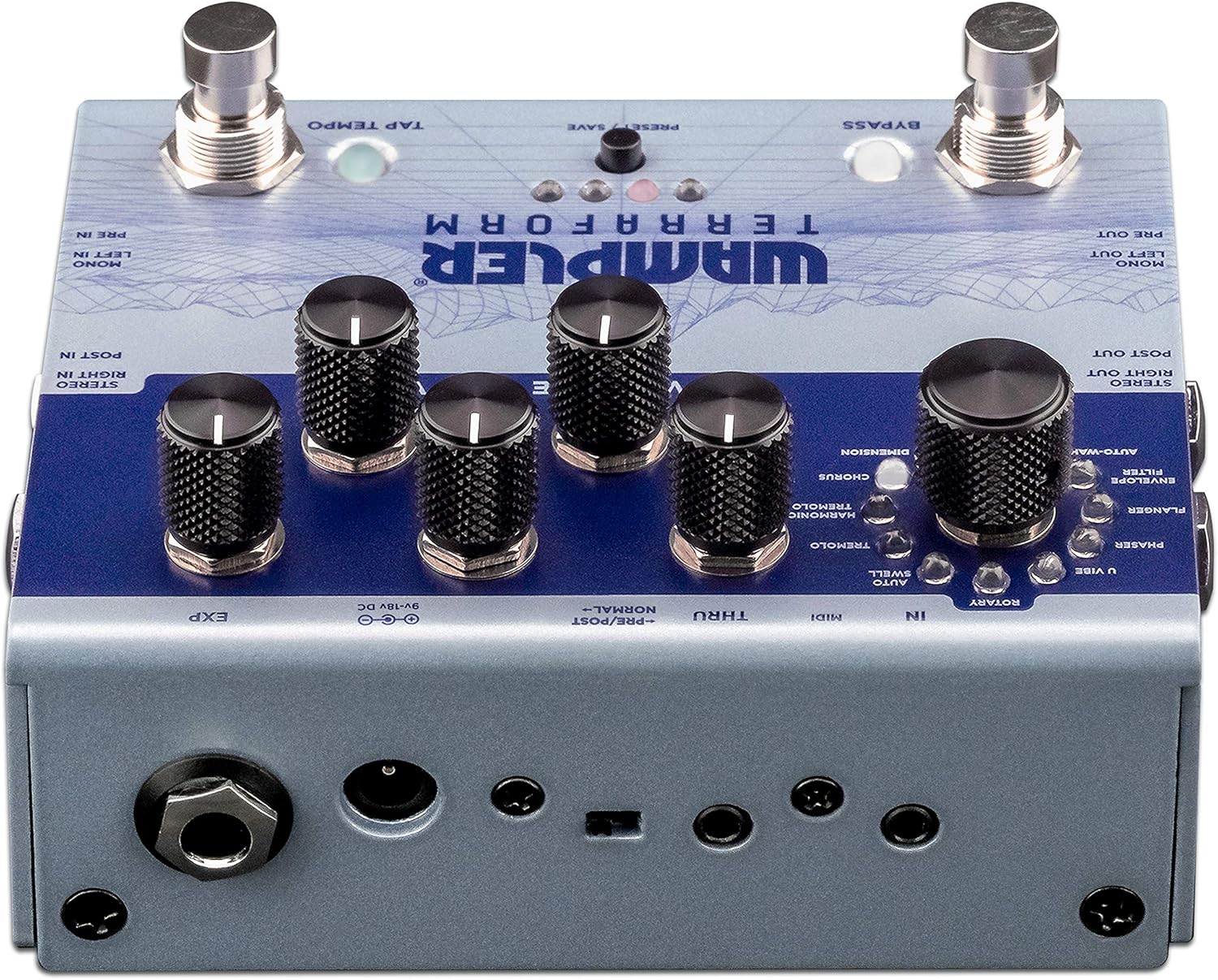
Figure 1: Rear panel connections of the Wampler Terraform pedal.
- Power Input (9-18V DC): Connect your compatible power supply here.
- Mono Left In / Pre In: Standard mono input for your guitar signal.
- Mono Left Out / Pre Out: Standard mono output.
- Stereo Right In / Post In: Input for stereo operation or for effects placed after drive pedals.
- Stereo Right Out / Post Out: Output for stereo operation.
- MIDI אריין/דורך: Connect MIDI devices for control and synchronization. The pedal includes 3.5mm to 5-pin DIN adapters.
- EXP (Expression Pedal): Connect an expression pedal for real-time control over various parameters.
ערשט מאַכט-אַרויף
After connecting power and your instrument, the pedal will power on. The LEDs will illuminate, indicating its current state and selected preset.
אַפּערייטינג ינסטראַקשאַנז
The Terraform pedal features a user-friendly interface with dedicated knobs and footswitches for intuitive control.

פיגורע 2: איבערview פון די ווampler Terraform pedal controls.
קאָנטראָלס
- Effect Selector Knob: This large knob allows you to choose between the 11 available modulation effects. The effects include: Dimension, Chorus, Harmonic Tremolo, Tremolo, AutoSwell, Rotary, U-Vibe, Phaser, Flanger, Envelope Filter, and AutoWah.
- Rate Knob: אַדזשאַסטירט די גיכקייט אדער קורס פון דעם אויסגעקליבענעם מאָדולאַציע-עפעקט.
- טיפקייַט קנופּ: קאָנטראָלירט די אינטענסיטעט אָדער טיפקייט פון דער מאָדולאַציע.
- Blend Knob: Mixes the wet (effected) signal with the dry (unaffected) signal.
- Variable Knob: This control's function changes depending on the selected effect, offering additional parameter adjustment specific to each modulation type.
- באַנד קנעפּל: אַדזשאַסטירט די אַלגעמיינע אַרויסגאַנג באַנד פון די פּעדאַל.

Figure 3: Detail of the effect selection knob.

Figure 4: Detail of the Rate, Depth, and Blend control knobs.
פאָאָטוויטטשעס
- בייפּאַס פאָאָטסוויטש: אַקטיוויזירט אָדער דיאַקטיוויזירט דעם עפֿעקט.
- Tap Tempo Footswitch: Allows you to tap in the desired tempo for time-based effects.
פּרעסעץ
The Terraform pedal can store up to 8 presets. These presets can be recalled via the front panel button, the footswitches, or through MIDI commands. Refer to the full manual for detailed instructions on saving and recalling presets.
Expression Pedal Functionality
An external expression pedal can be connected to control any of the five main control parameters (Rate, Depth, Blend, Variable, Volume). You can also set the heel and toe points for precise control over the parameter range.
Stereo and Mono Routing
The pedal supports both mono and full stereo operation. Additionally, it allows for splitting the mono signal to route certain effects before your drive pedals or amplifier gain, while other effects follow in your ampליפיער'ס עפעקטן שלייף.
MIDI קאָנטראָל
The Terraform pedal is fully MIDI mappable, allowing for external control of parameters, preset changes, and synchronization with other MIDI-enabled gear.
וישאַלט
רייניקונג
צו רייניקן דעם פּעדאַל, ניצט אַ ווייכן, טרוקן שטאָף. פֿאַרמייַדט ניצן אַברייסיוו רייניגער אָדער סאָלווענטן, ווייל די קענען שעדיקן די ענדיקונג און אינעווייניקסטע קאָמפּאָנענטן.
Power Supply Care
Always use a regulated power supply that matches the pedal's voltage and current requirements. Consider using a power surge protector to safeguard your equipment from electrical fluctuations and ground noise.
סטאָרידזש
האַלט דעם פּעדאַל אין אַ טרוקענער סביבה, אַוועק פון עקסטרעמע טעמפּעראַטורן און דירעקטער זון, ווען נישט אין באַנוץ.
טראָובלעשאָאָטינג
קיין סאָונד אָדער ינטערמיטאַנט געזונט
- Check all cable connections (input, output, power) to ensure they are secure.
- באַשטעטיקן אַז די מאַכט צושטעל איז ריכטיק פארבונדן און גיט די ספּעציפֿישע וואָלומעןtagE און קראַנט.
- זיכער מאַכן אַז אייערע מכשירים און ampדי לייפיערס פונקציאָנירן ריכטיק.
- Check the pedal's bypass status.
Unwanted Noise or Hum
- זייט זיכער אז איר ניצט א הויך-קוואַליטעט, אפגעזונדערטע מאַכט צושטעל.
- קוק פֿאַר גראַונד לופּס אין דיין סיגנאַל קייט.
- טעסט מיט פארשידענע קייבלס.
Pedal Not Responding to Controls
- Verify the pedal is powered on.
- If using MIDI, ensure MIDI connections are correct and the pedal is receiving the expected commands.
- If using an expression pedal, ensure it is properly connected and calibrated.
If issues persist, consult the Wampler support resources or contact customer service.
ספּעסאַפאַקיישאַנז
| שטריך | דעטאַל |
|---|---|
| סאָרט | Wampler |
| מאָדעל נאָמען | טערראַפאָרם |
| מאָדעל נומער | WAMTERRAFORM |
| פּראָדוקט דימענשאַנז (L x W x H) | 7" x 6" x 4" |
| פּונקט וואָג | 1.41 פונט |
| Voltage | 9-18 Volts DC (Center Negative) |
| Ampעראַגע | 100 מיליampס (מינימום) |
| אַודיאָ אַרויסגאַנג עפֿעקטן | Dimension, Chorus, Harmonic Tremolo, Tremolo, AutoSwell, Rotary, U-Vibe, Phaser, Flanger, Envelope Filter, AutoWah |
| קאָנטראָלס טיפּ | קנעפּל, פֿוסשוויטש |
| מאַכט מקור | דק מאַכט צושטעלן |
| ייַזנוואַרג צובינד | 1/4-inch Audio, 3.5mm MIDI, Expression Pedal |
| סיגנאַל פֿאָרמאַט | אַנאַלאָג |
וואָראַנטי & שטיצן
וואָראַנטי אינפֿאָרמאַציע
די ווampler Terraform Multi-Modulation Guitar Effects Pedal comes with a 5 יאָר וואָראַנטי covering parts and labor from the date of purchase. This warranty covers defects in materials and workmanship under normal use. Please retain your proof of purchase for warranty claims.
קונה שטיצן
For technical assistance, troubleshooting, or warranty service, please visit the official Wampler website or contact their customer support team. Detailed contact information can typically be found on the Wampler webזייטל אדער אין די פּאַקקאַגינג מאַטעריאַלן.