
הקדמה
This manual provides detailed instructions for the assembly, operation, and maintenance of your Hemudu HT03B-003P Universal TV Stand. This stand is designed to accommodate televisions from 40 to 86 inches, with a maximum load capacity of 66 kg (132 lbs) and VESA patterns up to 600x400mm. It features 5 adjustable height levels and a sturdy tempered glass base, offering a stable and versatile solution for your television display.
וויכטיק סאַפעטי אינפֿאָרמאַציע
Please read and understand all instructions before assembly and use. Failure to follow these instructions may result in serious personal injury or property damage. Keep this manual for future reference.
- וואָג קאַפּאַציטעט: Do not exceed the maximum load capacity of 66 kg (132 lbs). Overloading can cause instability and potential injury.
- טעלעוויזיע גרייס: This stand is suitable for TVs between 40 and 86 inches. Ensure your TV's size and weight are within these limits.
- VESA קאַמפּאַטאַבילאַטי: Verify your TV's VESA mounting pattern (distance between mounting holes on the back of the TV) is compatible with the stand (100x100mm to 600x400mm).
- סטאַביל ייבערפלאַך: שטעלט שטענדיק דעם טעלעוויזיע שטאנד אויף א פלאכער, גלייכער און סטאַבילער ייבערפלאַך כדי צו פאַרמייַדן עס צו איבערקערן.
- זיכער אַסעמבלי: Ensure all screws and bolts are securely tightened before placing the TV on the stand. Do not overtighten.
- קינדער און פּעץ: Keep small parts away from children and pets, as they may pose a choking hazard.
- קאַבלע פאַרוואַלטונג: Use the provided cable management system to prevent tripping hazards and maintain a tidy setup.
- באַוועגן דעם שטאַנד: Always remove the TV from the stand before attempting to move the unit. Move with caution and assistance.
פּעקל אינהאַלט
Before assembly, please check that all parts are present and undamaged. If any parts are missing or damaged, do not proceed with assembly and contact customer support.

Image: All components of the TV stand, including the base, column, TV mounting arms, and hardware kit.
- טעמפּערד גלאז באַזע
- הויפּט שטיצע קאָלום
- טעלעוויזיע מאָנטירונג קלאַמערן (לינקס און רעכטס)
- VESA Arms
- Hardware Kit (various screws: M4, M6, M8; washers, spacers)
- אַנטי-צעטל גומע פֿיס
- קאַבלע מאַנאַגעמענט קליפּס
- פֿאַרזאַמלונג מכשירים (למשל, אַלען שליסל)
סעטאַפּ און אַסעמבלי
Follow these steps carefully to assemble your TV stand. It is recommended to have two people for certain steps, especially when mounting the TV.
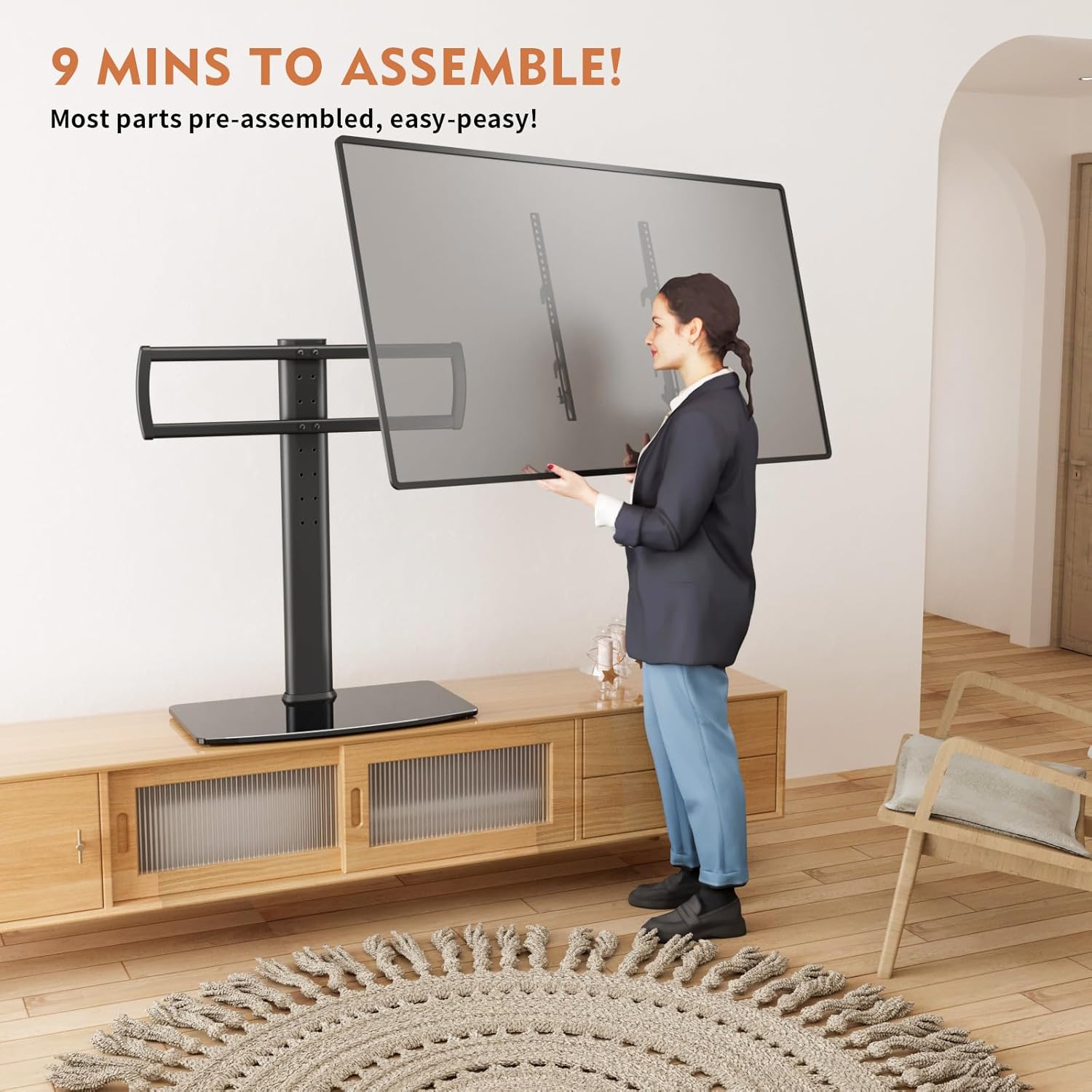
Image: Illustration of the assembly process, highlighting ease of setup.
- צוגרייטן די באַזע: Carefully place the tempered glass base on a soft, clean surface to prevent scratches. Attach the anti-slip rubber feet to the bottom corners of the glass base.
- Assemble the Main Column: Secure the main support column to the tempered glass base using the provided screws and tools. Ensure it is firmly attached and upright.
- Attach TV Brackets to Column: Mount the TV mounting brackets to the main support column. These brackets allow for height adjustment. Select your desired height level and secure the brackets with the appropriate screws.
- Attach VESA Arms to TV: Lay your TV face down on a soft, clean surface. Identify the VESA mounting holes on the back of your TV. Attach the VESA arms to these holes using the correct size screws, washers, and spacers from the hardware kit. Ensure the arms are securely fastened and evenly aligned.
- מאָנטירן טעלעוויזיע צו שטאַנד: With assistance, carefully lift your TV and hook the VESA arms onto the TV mounting brackets on the stand. Ensure the TV is centered and level.
- זיכערע טעלעוויזיע: Use the safety lock screws or mechanisms provided to secure the TV to the stand, preventing accidental dislodgement.
- קאַבלע פאַרוואַלטונג: Utilize the cable management clips on the back of the main column to organize and conceal your TV cables, ensuring a neat and safe setup.

Image: Guide for checking TV compatibility and VESA patterns.

Image: Detail of the safety lock feature.

Image: Detail of the cable management system.
אַפּערייטינג ינסטראַקשאַנז
The Hemudu HT03B-003P TV stand offers adjustable features for optimal viewאין טרייסט.

Image: Visual representation of the 5 adjustable height levels.
הייך אַדזשאַסטמאַנט
The TV stand features 5 levels of height adjustment, with each level allowing for a 3 cm change in height. To adjust the height:
- Remove TV: For safety, it is recommended to remove the TV from the stand before adjusting the height.
- Adjust Brackets: Loosen the screws securing the TV mounting brackets to the main column.
- אויסקלייבן נייע הייך: Slide the brackets to the desired height level. Ensure both brackets are at the same level.
- זיכער בראַקאַץ: Retighten the screws firmly to secure the brackets in the new position.
- Re-mount TV: Carefully re-mount your TV onto the adjusted brackets and secure it with the safety locks.

Image: The TV stand in use, showing height adjustability for comfortable viewing.
Additional Space
The sturdy tempered glass base provides additional space for placing AV components such as soundbars, DVD players, or gaming consoles.

Image: The stand's base providing space for media devices.
וישאַלט
Proper maintenance will ensure the longevity and safe operation of your TV stand.
- רייניקונג: Use a soft, dry cloth to clean the stand. For the tempered glass base, a glass cleaner can be used, but avoid abrasive cleaners or harsh chemicals that may damage the finish.
- רעגולער טשעקס: Periodically check all screws and connections to ensure they remain tight. Re-tighten if necessary, but do not overtighten.
- ויסמיידן פּראַל: Protect the tempered glass base from sharp impacts or heavy objects, which could cause it to crack or shatter.
טראָובלעשאָאָטינג
If you encounter any issues with your TV stand, refer to the following common problems and solutions.
| פּראָבלעם | מעגלעך סיבה | לייזונג |
|---|---|---|
| דער שטאַנד איז נישט סטאַביל אָדער וואָקלדיק. | Screws are loose; stand is on an uneven surface; weight capacity exceeded. | Ensure all assembly screws are tightened. Move the stand to a flat, level surface. Verify TV weight is within limits. |
| דער טעלעוויזאר פּאַסט נישט צום שטאַנד. | Incorrect VESA pattern; TV size outside specified range. | Check your TV's VESA pattern against the stand's compatibility (100x100mm to 600x400mm). Confirm your TV size is between 40-86 inches. |
| פעלנדיקע טיילן אדער געשעדיגטע קאמפאנענטן. | פּאַקאַדזשינג טעות אָדער שיפּינג שעדיקן. | Do not proceed with assembly. Contact Hemudu customer support or the retailer for assistance. |
ספּעסאַפאַקיישאַנז
| שטריך | דעטאַל |
|---|---|
| מאָדעל נומער | HT03B-003P |
| קאָמפּאַטיבלע טעלעוויזיע סיזעס | 40 - 86 אינטשעס |
| מאַקסימום מאַסע קאַפּאַציטעט | 66 קג (132 לבס) |
| וועסאַ קאָמפּאַטיביליטי (ברייט x הויך) | 100x100mm, 200x100mm, 200x200mm, 300x200mm, 300x300mm, 400x200mm, 400x400mm, 500x300mm, 600x200mm, 600x400mm |
| הייך אַדזשאַסטמאַנט | 5 levels, 3 cm per level |
| באַזע דימענשאַנז | 580 x 330 מם (22.8 רענטגענ 13 אינטשעס) |
| מאַטעריאַל | טעמפּערד גלאָז, צומיש שטאָל |
| קאָליר | שוואַרץ |
| טיפּ פון באַוועגונג | אַרטיקיאַלייטינג |
| מאַקסימום טילט ווינקל | 15 דיגריז |
וואָראַנטי אינפֿאָרמאַציע
This Hemudu product comes with a standard manufacturer's warranty. For specific details regarding warranty coverage, duration, and terms, please refer to the warranty card included with your product packaging or visit the official Hemudu webזייטל. ביטע באַהאַלטן אייער קויפן באַווייַז פֿאַר וואָראַנטי קליימז.
קונה שטיצן
If you have any questions, require technical assistance, or need to report a missing or damaged part, please contact Hemudu customer support. You can typically find contact information on the official Hemudu webוועבזייטל אדער דורך דעם פארקויפער וואו איר האט געקויפט דעם פראדוקט.
For the quickest resolution, please have your model number (HT03B-003P) and proof of purchase ready when contacting support.