
פּראָדוקט איבערview
The XINJIA Digital Watch is a robust and versatile timepiece designed for daily wear and various activities such as running, cycling, or hiking. It features a high-quality digital movement housed in a durable plastic case with a comfortable silicone strap.
Key features include a clear digital display, backlight function for low-light conditions, stopwatch, and alarm functions. The watch is designed with four intuitive buttons for easy operation and setting adjustments.
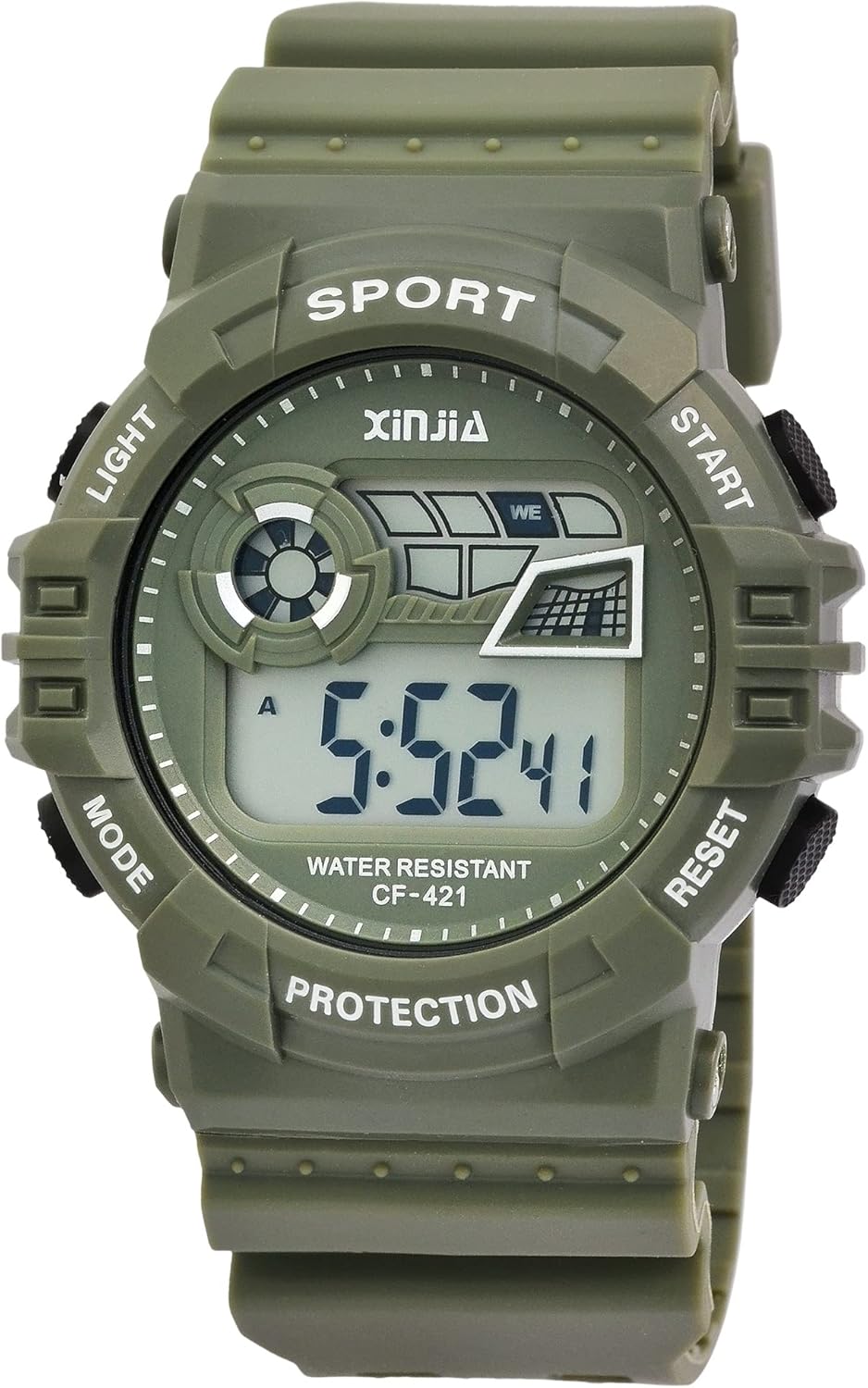
פיגורע 1: פראָנט view of the XINJIA Digital Watch. The display shows the time, and the watch face indicates button functions such as LIGHT, MODE, START, and RESET.
פּעקל אינהאַלט
- XINJIA Digital Watch (Model: 2400018)
- Pre-installed LR44 battery
- באַניצער מאַנואַל (דעם דאָקומענט)
סעטאַפּ
ערשט צייט באַשטעטיקן
Your XINJIA digital watch comes with a pre-installed battery. Upon first use, you may need to set the current time and date.
- אידענטיפיצירן קנעפּלעך: The watch has four buttons located around the case. Refer to Figure 2 for button identification.

פיגורע 2: זייַט view showing the four control buttons. These buttons are used for navigating modes and adjusting settings.
- אַרייַן באַשטעטיקן מאָדע: דרוק די מאָדע button repeatedly until the time digits begin to flash. This indicates you are in setting mode.
- סטרויערן צייט: ניצן די אָנהייב or באַשטעטיק buttons to adjust the flashing digits (hours, minutes, seconds). Press מאָדע again to cycle through the different time components (e.g., hours, then minutes).
- Set Date and Day: פאָרזעצן דרינגלעך מאָדע to move to date and day settings. Adjust these using the אָנהייב or באַשטעטיק קנעפּלעך ווי דארף.
- אַרויסגאַנג פון סעטטינג מאָדע: אַמאָל אַלע סעטטינגס זענען אַדזשאַסטיד, דריקן די מאָדע button one last time to exit the setting mode and return to the normal time display.
אַפּערייטינג ינסטראַקשאַנז
ווייַז מאָדעס
דרוק די מאָדע button to cycle through the different display modes:
- צייט ווייַז: Shows current time (hours, minutes, seconds), day of the week, and date.
- שרעק מאָדע: Allows setting and activating the alarm.
- סטאַפּוואַטש מאָדע: פֿאַר צייט-פֿאַרבינדונגען צווישן געשעענישן.
ניצן די באַקלייט
כדי צו באַלויכטן דעם עקראַן אין שוואַכע ליכטיקע באדינגונגען, דריק די ליכט button. The backlight will remain active for a few seconds.
ניצן די סטאַפּוואַטש
- דרוק די מאָדע button until you reach the Stopwatch mode (usually indicated by "00:00:00" or similar).
- דרוק די אָנהייב קנעפּל צו אָנהייבן טיימינג.
- דרוק אָנהייב נאכאמאל צו פּויזירן די סטאָפּוואַטש.
- דרוק די באַשטעטיק קנעפּל צו ויסמעקן די סטאָפּוואַטש צו נול.
באַשטעטיקן די שרעק
- דרוק די מאָדע button until you reach the Alarm mode.
- דרוק די אָנהייב or באַשטעטיק buttons to adjust the alarm time (hours and minutes).
- דרוק מאָדע to confirm the alarm time and exit the setting.
- To activate or deactivate the alarm, typically a combination of buttons (e.g., אָנהייב און באַשטעטיק simultaneously in alarm mode, or a dedicated alarm ON/OFF indicator) is used. Refer to the display for an alarm icon.
וישאַלט
רייניקונג
צו רייניקן אייער זייגער, ווישט עס אָפּ מיט אַ ווייכן, טרוקענעם שטאָף.amp cloth. Avoid using harsh chemicals, solvents, or abrasive cleaners, as these can damage the case or strap.
וואַסער קעגנשטעל
This watch has a water resistance rating of 3 באַר (30 מעטער). This means it is suitable for daily use, splashes, rain, and accidental immersion. It is ניט פּאַסיק for showering, bathing, swimming, snorkeling, or any water sports involving high-velocity water or prolonged submersion.
Do not operate the buttons while the watch is wet or submerged, as this can compromise the water resistance.
באַטערי פאַרבייַט
The watch uses one LR44 battery. When the display becomes dim or the watch stops functioning, it's time to replace the battery. Battery replacement should ideally be performed by a qualified watch technician to ensure proper sealing and maintain water resistance.

פיגורע 3: דערציען view of the watch, showing the stainless steel case back. This is where the battery compartment is located.
טראָובלעשאָאָטינג
| פּראָבלעם | מעגלעך סיבה | לייזונג |
|---|---|---|
| דער עקראַן איז ליידיק אָדער טונקל. | נידעריגע אדער אויסגעשעפטע באַטעריע. | טוישט אויס די LR44 באַטעריע. |
| די צייט איז נישט ריכטיק. | די צייט נישט ריכטיק איינגעשטעלט אדער א אַקסאַדענטאַלע קנעפּל דריק. | Refer to the "Initial Time Setting" section to reset the time. |
| די קנעפּלעך זענען נישט ריספּאַנדינג. | די זייגער איז אפשר אין א פארשלאסענעם מאָד אָדער האט א אינערליכע פראבלעם. | Try removing and reinserting the battery (if comfortable). If issue persists, contact support. |
| Condensation inside the display. | אויסשטעלן צו עקסטרעמע טעמפּעראַטור ענדערונגען אָדער קאָמפּראָמיטירט וואַסער קעגנשטעל. | Avoid extreme temperature changes. If condensation persists, water resistance may be compromised; seek professional repair. |
ספּעסאַפאַקיישאַנז
- סאָרט: XINJIA
- מאָדעל נומער: 2400018
- באַוועגונג: דיגיטאַל קוואַרץ
- קאַסטן מאַטעריאַל: פּלאַסטיק
- קאַסע דיאַמעטער: 46 מם
- קעיס הייך: 16 מם
- רימען מאַטעריאַל: סיליקאָנע
- רימען ברייט: 29 מם
- גאַנץ לענג: 26 סענטימעטער
- צוריק דעקן: Stainless Steel, secured with four screws
- וואַסער קעגנשטעל: 3 באַר (30 מעטער)
- באַטערי טיפּ: 1 x LR44 (אריינגערעכנט)
- פּראָדוקט דימענשאַנז: 26 X 4.6 X 1.6 סענטימעטער
- פּראָדוקט וואָג: 54.43 גראַמז
וואָראַנטי און שטיצן
Specific warranty information for your XINJIA Digital Watch may be provided at the point of purchase or on the manufacturer's official webזייטל. ביטע באַהאַלטן אייער קויפן באַווייַז פֿאַר קיין וואָראַנטי קליימז.
For technical support or further assistance, please refer to the contact information provided by your retailer or the XINJIA brand's official support channels.