
1. הקדמה
Thank you for choosing the AUNA Pro Amp-Pro1 BT PA Ampליפיער. דאס amplifier is designed to deliver professional-level sound for various events, including karaoke nights, parties, and general audio amplification. It features a robust 2 x 50W RMS output, Bluetooth connectivity, multiple microphone inputs, USB/SD media playback, and a 7-band equalizer for precise sound control. This manual provides essential information for safe operation, setup, and maintenance of your device.
2. זיכערקייַט אינסטרוקציעס
Please read these safety instructions carefully before operating the device and keep them for future reference. Failure to follow these instructions may result in electric shock, fire, or other hazards.
- מאַכט צושטעלן: Connect the device only to a 230 V, 50 Hz AC power outlet. Ensure the power cord is not damaged or pinched.
- ווענטילאַטיאָן: Do not block any ventilation openings. Ensure adequate airflow around the unit to prevent overheating. Do not place the amplifier on soft surfaces that may block vents.
- וואַסער און נעץ: Do not expose the device to rain or moisture. Do not place objects filled with liquids, such as vases, on or near the ampליפער.
- היץ קוואלן: האַלטן די amplifier away from heat sources such as radiators, heat registers, stoves, or other heat-producing appliances.
- רייניקונג: Unplug the device from the power outlet before cleaning. Use a dry, soft cloth. Do not use liquid cleaners or aerosol cleaners.
- סערוויס: פרובירט נישט צו סערוויסן דעם פראדוקט אליין. לאָזט איבער אלע סערוויסינג צו קוואַליפֿיצירטע סערוויס פּערסאָנעל. עפענען דעם אַפּאַראַט קען אייך אויסשטעלן צו געפערלעכע וואָלומען.tagעס אָדער אנדערע כאַזערדז.
- כייפעץ און פליסיק פּאָזיציע: קיינמאָל שטופּן אַבדזשעקץ פון קיין מין אין דעם פּראָדוקט דורך אָופּאַנינגז ווייַל זיי קען אָנרירן געפערלעך וואָלtagE ווייזט אָדער קורץ-אויס פּאַרץ וואָס קען רעזולטאַט אין אַ פייַער אָדער עלעקטריש קלאַפּ.
- אָרט: Place the unit on a stable, level surface. Avoid placing it in direct sunlight or in areas with high humidity or dust.
3. פּראָדוקט איבערview
The AUNA Pro Amp-Pro1 BT is a versatile PA amplifier designed for powerful audio output and flexible connectivity. It can be used as a standalone unit or installed in a 19-inch Hi-Fi rack.
שליסל פֿעיִקייטן:
- שטאַרק רעזולטאַט: 2 x 50 W RMS power at 4 ohms.
- בלועטאָאָטה פֿונקציע: For wireless audio streaming from smartphones, tablets, or laptops.
- קייפל מיקראָפאָן ינפּוץ: Three fully adjustable 6.3 mm jack microphone inputs for karaoke and vocal performances.
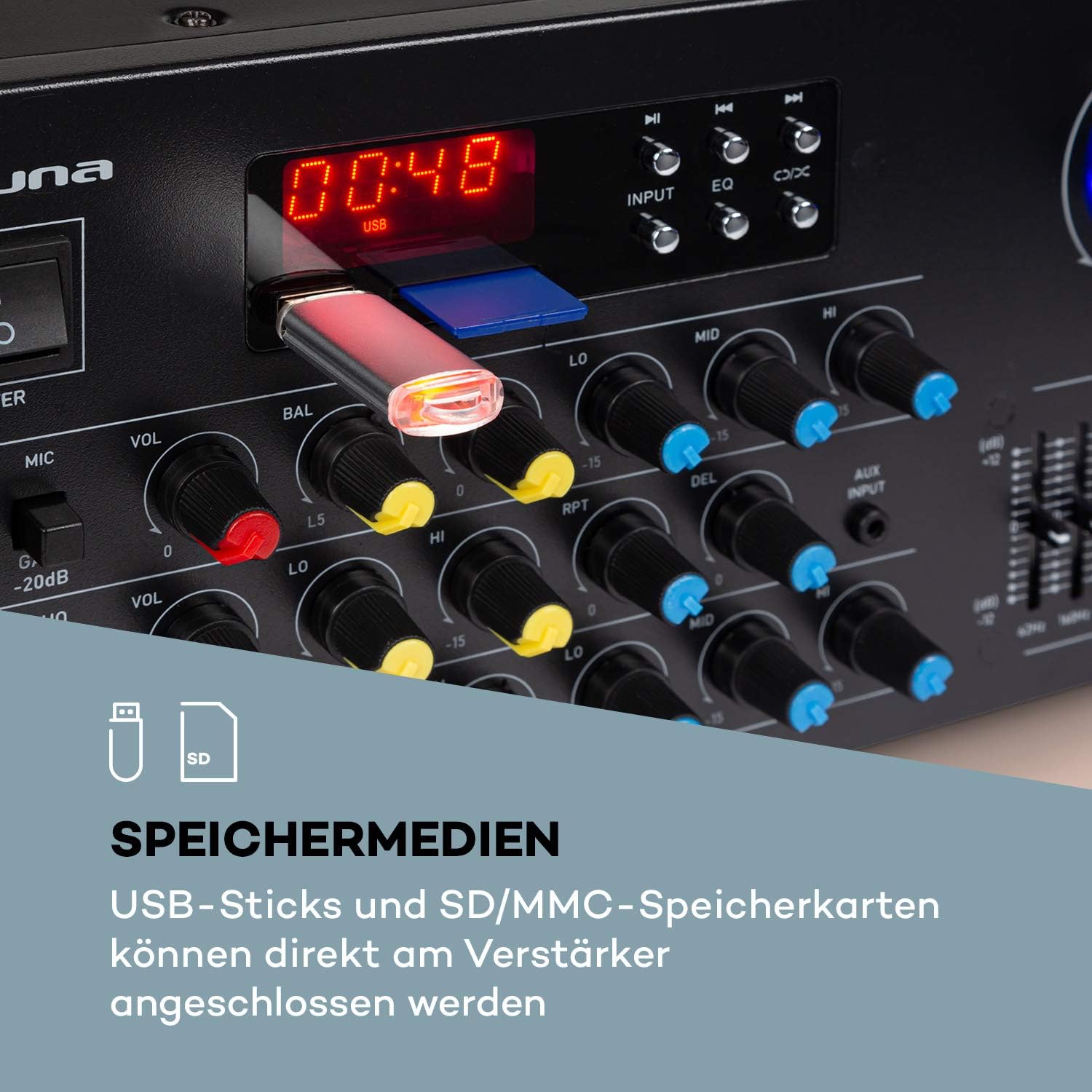
- מעדיע פּלייבאַק: USB port and SD/MMC card slot for direct playback of digital audio files.
- 7-באַנד עקוואַליזער: Two-channel, 7-band equalizer for precise adjustment of treble, bass, and mid-range frequencies.
- ברייט קאַנעקטיוויטי: 2 x stereo RCA inputs, 1 x antenna input, 1 x 3.5 mm AUX input, and 2 x stereo speaker outputs.
- געשטעל מאָונטאַבלע: Suitable for installation in a 19-inch Hi-Fi rack.
Front Panel Controls and Connections:
The front panel provides access to power, microphone inputs, media playback controls, and sound adjustments.

דערציען פּאַנעל קאַנעקשאַנז:
The rear panel houses the main audio inputs and speaker outputs.

4. סעטאַפּ און קאַנעקשאַנז
Follow these steps to set up your AUNA Pro Amp-Pro1 BT ampליפער.
4.1 קאַנעקטינג ספּיקערז
- פאַרזיכערן די ampדער עלעקטרישער מאַכט איז אויסגעלאָשן און אַרויסגענומען פֿון דער עלעקטרישער אַוטלעט.
- Connect your passive speakers to the stereo speaker outputs on the rear panel. Use appropriate speaker cables.
- For a single set of speakers, ensure their impedance is between 4 and 16 ohms.
- If connecting two sets of speakers simultaneously, ensure their combined impedance is between 8 and 16 ohms.
4.2 פֿאַרבינדן אַודיאָ קוועלער
די ampליפיער אָפפערט פֿאַרשידענע אינפוט אָפּציעס:
- RCA אַרייַנשרייַב: Connect external audio devices like CD players, DVD players, or mixers to the 2 x stereo RCA inputs on the rear panel.
- AUX אַרייַנשרייַב: For portable devices, use the 3.5 mm AUX input on the front panel.
- USB/SD: Insert a USB stick or SD/MMC card into the respective slots on the front panel for direct media playback.
- בלועטאָאָטה: פֿאַר וויירלעס אַודיאָ סטרימינג פֿון קאָמפּאַטיבלע דעוויסעס.
4.3 קאַנעקטינג מייקראָופאָונז
Connect up to three 6.3 mm jack microphones to the dedicated inputs on the front panel.

4.4 מאַכט קאַנעקשאַן
Once all audio and speaker connections are made, plug the amplifier's power cord into a suitable 230 V, 50 Hz AC power outlet.
5. אַפּערייטינג ינסטרוקטיאָנס
5.1 פּאַוערינג אויף / אַוועק
דרוק די מאַכט קנעפּל אויף דער פראָנט פּאַנעל צו דרייען די amplifier on or off. The display will illuminate when the unit is powered on.
5.2 מקור סעלעקציע
ניצן די אַרייַנשרייַב selector button on the front panel to cycle through available audio sources: Bluetooth, USB, SD, AUX, and RCA inputs.
5.3 בלועטאָאָטה אָפּעראַציע
- Select the Bluetooth input source using the אַרייַנשרייַב button. The display will show 'BLUE' or a similar indicator.
- Enable Bluetooth on your smartphone, tablet, or laptop.
- זוכן פֿאַר available devices and select 'AUNA Amp-Pro1 BT' (or similar) from the list.
- אַמאָל געפּאָרט, קענט איר סטרימען אַודיאָ וויירלעס צו די ampליפער.

5.4 USB/SD שפּיל
- Insert a USB stick or SD/MMC card into the corresponding slot on the front panel.
- Select the USB or SD input source using the אַרייַנשרייַב קנעפּל. די amplifier will automatically detect and begin playing compatible audio files.
- Use the playback controls (Play/Pause, Next, Previous) on the front panel to manage your music.
5.5 מיקראָפאָן קאָנטראָלס
Each microphone input has individual volume, 3-band equalizer (treble, mid, bass), balance, and echo effect controls. The echo effect also has 2-band equalizer, repeat, delay, and volume controls.
- סטרויערן די MIC VOL knob for the overall microphone volume.
- Use the individual VOL knobs for each microphone input.
- סטרויערן די LO, MID, HI knobs for microphone equalization.
- Control the echo effect using the ECHO, RPT (Repeat), and DEL (Delay) knobs.
5.6 עקוואַליזער אַדזשאַסטמאַנט
די amplifier features a 2-channel, 7-band equalizer to fine-tune your audio output. Adjust the sliders for each frequency band (62Hz, 160Hz, 400Hz, 1KHz, 3KHz, 8KHz, 16KHz) to shape your sound.

5.7 האר באנד קאָנטראָל
Adjust the large בעל באַנד קנעפּל צו קאָנטראָלירן די אַלגעמיינע רעזולטאַט מדרגה פון די ampליפער.
6. וישאַלט
6.1 רייניקונג
שטענדיק אָפּשטעקן די amplifier before cleaning. Use a soft, dry cloth to wipe the exterior surfaces. Do not use abrasive cleaners, waxes, or solvents, as they may damage the finish.
6.2 סטאָרידזש
אויב די amplifier will not be used for an extended period, unplug it from the power outlet and store it in a cool, dry place, away from direct sunlight and extreme temperatures.
6.3 קאָריק פאַרבייַט
די amplifier is equipped with a 2A fuse. If the unit fails to power on, the fuse may need replacement. This should only be performed by qualified service personnel to ensure safety and proper operation.
7. טראָובלעשאָאָטינג
אויב איר דערפאַרונג ישוז מיט דיין ampליפיער, זעט די פאלגענדע אלגעמיינע פראבלעמען און לייזונגען:
| פּראָבלעם | מעגלעך סיבה | לייזונג |
|---|---|---|
| קיין מאַכט | Power cord unplugged; Power outlet faulty; Fuse blown | Check power cord connection; Try a different outlet; Contact service for fuse replacement. |
| קיין געזונט רעזולטאַט | Incorrect input selected; Volume too low; Speakers not connected or faulty; Mute function active | Select correct input source; Increase Master Volume; Check speaker connections; Ensure no mute is active. |
| בלועטאָאָטה איז נישט קאַנעקטינג | Amplifier not in Bluetooth mode; Device not discoverable; Interference | Select Bluetooth input; Ensure Bluetooth is enabled on your device and in pairing mode; Move devices closer; Restart both devices. |
| מיקראָפאָן טוט נישט אַרבעטן | Microphone not connected; Microphone volume too low; Microphone faulty | Check microphone connection; Increase individual MIC VOL; Test with another microphone. |
| פאַרקרימט געזונט | Volume too high; Input signal too strong; Speaker impedance mismatch | Reduce Master Volume or input source volume; Check speaker impedance. |
אויב די פראבלעם בלייבט נאך פרובירן די לייזונגען, ביטע קאנטאקטירט קאסטומער סופארט.
8. טעכניש ספּעסאַפאַקיישאַנז
Below are the technical specifications for the AUNA Pro Amp-Pro1 BT PA Ampלייבער:
| שטריך | באַשרייַבונג |
|---|---|
| רעזולטאַט מאַכט | 2 x 50 W RMS at 4 ohms |
| אָפטקייַט ענטפער | 20 הערץ - 20 קילאָהערץ |
| סיגנאַל-צו-נויז ראַטיאָ | > 76 דב |
| Speaker Impedance (1 set) | 4 - 16 אָום |
| Speaker Impedance (2 sets synchronized) | 8 - 16 אָום |
| מיקראָפאָן ינפּוץ | 3 x 6.3 mm jack (front) |
| אַודיאָ ינפּוץ | 2 x stereo RCA, 1 x 3.5 mm AUX, USB, SD/MMC |
| אַנטענע ינפּוט | 1 x antenna input |
| רעדנער אַוטפּוץ | 2 x stereo (screw terminals/banana connector) |
| מאַכט צושטעלן | 230 V, 50 הז |
| פוסע | 2 א |
| דימענשאַנז (ב x ה x ד) | בעערעך 43 רענטגענ 16.3 רענטגענ 32.5 סענטימעטער |
| וואָג | בעערעך. 3.0 קג |
| קאַנעקטיוויטי טעכנאָלאָגיע | AUX, בלועטוט, USB |
| קאַמפּאַטאַבאַל דעוויסעס | לאַפּטאַפּ, סמאַרטפאָנע |

9. באַזייַטיקונג אינפֿאָרמאַציע
Do not dispose of this product with normal household waste. This product should be handed over to an applicable collection point for the recycling of electrical and electronic equipment. By ensuring this product is disposed of correctly, you will help prevent potential negative consequences for the environment and human health, which could otherwise be caused by inappropriate waste handling of this product. For more detailed information about recycling of this product, please contact your local city office, your household waste disposal service or the shop where you purchased the product.
10. וואָראַנטי און שטיצן
For warranty information, technical support, or service inquiries, please refer to the documentation provided with your purchase or contact your retailer. You can also visit the official AUNA webפּלאַץ פֿאַר ווייַטער הילף.