
1. הקדמה
Thank you for choosing the SEBSON IR_OUT_D Outdoor Motion Detector. This device is designed to provide reliable motion detection for outdoor lighting applications, offering enhanced security and convenience. This manual provides essential information for the safe installation, operation, and maintenance of your motion detector. Please read these instructions carefully before installation and retain them for future reference.
2. זיכערקייַט אינסטרוקציעס
- די אינסטאַלאַציע מוז דורכגעפירט ווערן דורך אַ קוואַליפֿיצירטן עלעקטריקער לויט די נאַציאָנאַלע וויירינג רעגולאַציעס.
- Ensure the power supply is disconnected before installation, maintenance, or repair.
- Do not open or modify the device. Unauthorized modifications may compromise safety and void the warranty.
- This product is designed for outdoor use with an IP65 rating, protecting against dust and water jets. Ensure proper sealing during installation.
- Avoid installing the detector near heat sources, air conditioning units, or objects that may cause rapid temperature changes, as this can lead to false triggers.
- Do not point the sensor directly at sunlight or reflective surfaces.
3. פּראָדוקט איבערview
3.1 שליסל פֿעיִקייטן
- Integrated infrared sensor for targeted detection of people, large animals, and vehicles.
- IP65 protection rating for outdoor use.
- Ceiling surface mount design.
- Adjustable ambient brightness (LUX) and lighting duration (TIME).
- Wide detection area of 20x4m with a 360° angle.
- קאַמפּאַטאַבאַל מיט געפירט לamps and other energy-saving bulbs up to 1000W, and incandescent lampאַרויף צו 2000 וו.
3.2 פּראָדוקט קאַמפּאָונאַנץ
The SEBSON IR_OUT_D motion detector consists of a main housing, an infrared sensor dome, and internal wiring terminals. Adjustment dials for TIME and LUX settings are located on the unit.

בילד 1: פראָנט view of the SEBSON IR_OUT_D motion detector, highlighting its 360° detection, IP65 rating, LED compatibility up to 1000W, 10 sec - 30 min time setting, 3-2000 LUX brightness range, and 230V operation.

בילד 2: The motion detector showing its maximum detection range of 20m and maximum detection height of 4m. The image also indicates the location of the TIME and LUX adjustment dials.
4. ספּעסאַפאַקיישאַנז
| מאָדעל נומער | IR_OUT_D |
| דימענסיעס (L X W X H) | 10.1 X 10.1 X 5.5 סענטימעטער |
| וואָג | 170 גראַמז |
| קאָליר | ווייַס |
| מאַטעריאַל | פּלאַסטיק |
| מאַכט טיפּ | AC |
| Voltage | 230 וואלטס |
| מאַקס לאָוד (גלייכנדיק) | 2000 וואטס |
| Max Load (LED/Energy-saving) | 1000 וואטס |
| ייַנמאָנטירונג אופֿן | סטעליע בארג |
| דעטעקשאַן קאַווערידזש | max. 20x4m / 360° |
| ינסטאַלירונג הייך | 4m (min) to 10m (max) |
| צייט באַשטעטיקן | 10 סעקונדעס צו 30 מינוט |
| Brightness Setting (LUX) | 3-2000 לוקס |
| שוץ רייטינג | IP65 |
| אַפּערייטינג טעמפּעראַטור | אַרויף צו 40 °C |

בילד 3: Technical drawing showing the dimensions of the motion detector: 101mm x 101mm x 55mm.
5. ינסטאַלירונג
5.1 מאָונטינג אָרט
The motion detector is designed for ceiling surface mounting. Choose a location that provides the desired detection coverage and is free from obstructions. The optimal installation height is between 4 meters and 10 meters to achieve the specified 20x4m detection area.
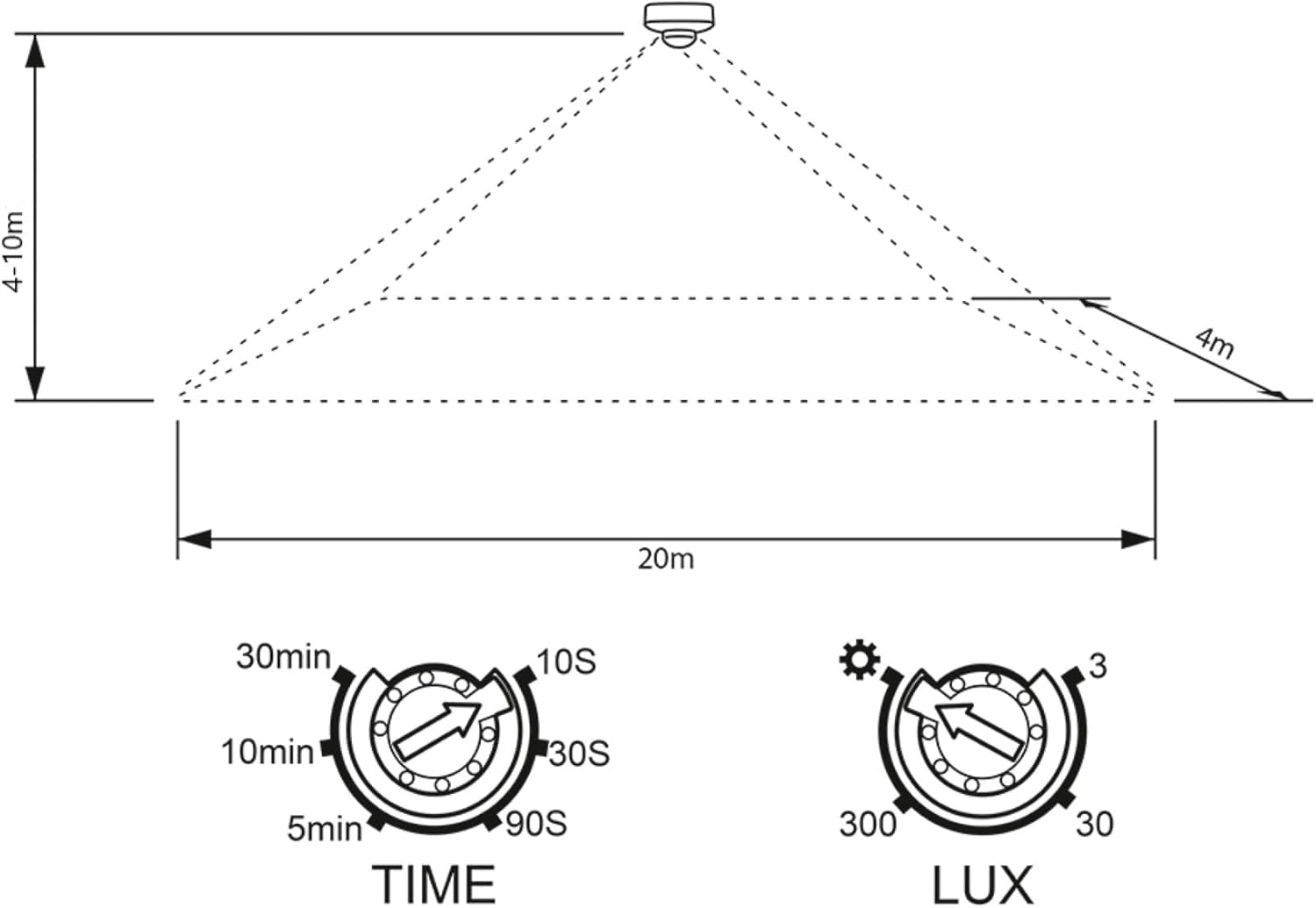
בילד 4: Diagram showing the recommended installation height of 4-10m and the detection area of 20m width and 4m depth from the sensor.
5.2 וויירינג
ווארענונג: Ensure the main power supply is switched off before commencing any wiring work.
- Open the housing of the motion detector carefully.
- Connect the power supply wires to the appropriate terminals as shown in the wiring diagram below.
- Connect the load (e.g., light fixture) wires to the designated output terminals.
- ענשור אַז אַלע קאַנעקשאַנז זענען זיכער און רעכט ינסאַלייטיד.
- Close the housing, ensuring a tight seal to maintain the IP65 rating.

בילד 5: דערציען view of the motion detector, illustrating the wiring terminals for power input and load output. Typically, blue is neutral, brown is live, and red is the switched live to the load.
6. אָפּעראַציע און סעטטינגס
After successful installation and power-up, the motion detector will enter a warm-up phase for approximately 30-60 seconds. During this time, it may trigger randomly. Once the warm-up is complete, you can adjust the settings using the two dials:
6.1 TIME Setting (Lighting Duration)
די צייט dial controls how long the connected light remains on after motion is detected and no further motion is sensed. You can adjust it from approximately 10 seconds to 30 minutes.
- Turn the dial clockwise for a longer duration.
- Turn the dial counter-clockwise for a shorter duration.
6.2 LUX Setting (Ambient Brightness)
די לוקס dial determines the ambient light level at which the detector will activate the connected light. This setting allows the light to only turn on when it's dark enough. The range is from 3 LUX (darkness) to 2000 LUX (daylight).
- Turn the dial towards the moon symbol (lower LUX value) for activation only in darker conditions.
- Turn the dial towards the זון סימבאָל (higher LUX value) for activation even in brighter conditions (e.g., during the day for testing).
7. וישאַלט
The SEBSON motion detector requires minimal maintenance. To ensure optimal performance:
- Regularly clean the sensor lens with a soft, damp cloth to remove dust, dirt, or spiderwebs that may obstruct detection. Do not use abrasive cleaners.
- Periodically check the mounting and wiring connections for any signs of wear or damage.
- Ensure the area around the sensor remains clear of moving objects (e.g., tree branches) that could cause false triggers.
8. טראָובלעשאָאָטינג
| פּראָבלעם | מעגלעך סיבה | לייזונג |
|---|---|---|
| די ליכט צינדט זיך נישט אן ווען מען דעטעקטירט באוועגונג. |
|
|
| ליכט סטייז אויף קעסיידער. |
|
|
| False triggers (light turns on without apparent motion). |
|
|
9. וואָראַנטי און שטיצן
Information regarding specific warranty terms and customer support contact details was not available in the provided product data. For warranty claims or technical assistance, please refer to the product packaging or contact your retailer or the manufacturer directly via their official webפּלאַץ.