
1. הקדמה
This manual provides essential instructions for the safe operation, assembly, maintenance, and troubleshooting of your Evolution Power Tools Rage 5-S Multi-Material Table Saw. Please read this manual thoroughly before initial use to ensure proper function and to prevent injury or damage to the tool.
The Rage 5-S table saw is designed for cutting various materials including steel, aluminum, wood (even with embedded nails), and plastic, utilizing a single 10-inch TCT blade. Its portable design with a folding stand and wheels enhances convenience for transport and storage.

Figure 1.1: Evolution Rage 5-S Multi-Material Table Saw
2. זיכערקייַט אינסטרוקציעס
שטענדיק געבן זיכערקייט די פריאריטעט ווען איר ניצט עלעקטרישע געצייג. נישט נאכפאלגן די אינסטרוקציעס קען רעזולטירן אין ערנסטע שאדן אדער שאדן פאר אייגנטום.
- פערזענלעכע פּראַטעקטיוו עקוויפּמענט: Always wear safety glasses, hearing protection, and a dust mask. Use appropriate clothing; avoid loose clothing or jewelry that could get caught in moving parts.
- אַרבעט שטח: זיכער מאַכן אַז אייער אַרבעטס־געגנט איז ריין, גוט באַלויכטן, און פֿרײַ פֿון שטערונגען. ניצט נישט די זעג איןamp אדער נאַסע באדינגונגען. האַלט קינדער און פֿאַרבייגייער אַוועק.
- עלעקטריקאַל זיכערקייַט: Ensure the power supply matches the saw's requirements (120V). Do not use the saw with a damaged cord or plug. Avoid using extension cords unless absolutely necessary, and ensure they are rated for outdoor use and heavy-duty applications.
- בלייד זיכערקייַט: Always ensure the blade is sharp and correctly installed. Never attempt to cut material without the blade guard in place. Disconnect power before changing blades or performing maintenance.
- מאַטעריאַל האַנדלינג: Securely support all workpieces. Use the push stick for narrow cuts. Never reach over or behind the spinning blade.
- פאָרלייג 65 ווארענונג: This product may expose you to chemicals known to the State of California to cause cancer and birth defects or other reproductive harm. Wash hands after handling.
3. קאַמפּאָונאַנץ איבערview
The Evolution Rage 5-S table saw includes the following main components:
- Table Saw Unit
- Folding Stand with Wheels
- 10-inch 28T Multi-Material TCT Blade
- בלייד גאַרד אַסעמבלי
- Rip Fence with Measuring Rail Guide
- מיטער גאַוגע
- שטופּן שטעקן
- שטויב עקסטראַקטיאָן קישקע
- Table Extensions (Left and Right)

Figure 3.1: The Rage 5-S table saw is capable of cutting wood, wood with nails, composite decking, ferrous metals, non-ferrous metals, laminates, and plastics.
4. סעטאַפּ און אַסעמבלי
Assembly is required before first use. Refer to the visual diagrams provided in the original manual for detailed steps. General assembly involves:
- סטאנד אַסעמבלי: Unfold the stand and secure its locking mechanisms. The integrated wheels facilitate movement.
- Attaching the Saw Unit: Mount the table saw unit securely onto the assembled stand.
- בלייד ינסטאַלירונג: Ensure the saw is unplugged. Install the 10-inch TCT blade, ensuring it is oriented correctly for cutting.
- Blade Guard and Riving Knife: Install the blade guard and riving knife assembly. The blade guard is crucial for safety and dust collection.
- Rip Fence and Miter Gauge: Attach the rip fence to the table and ensure it slides smoothly. The miter gauge can be inserted into the table slots.
- Dust Extraction Hose: Connect the supplied dust extraction hose to the saw's dust port.
- טיש עקסטענשאַנז: Extend the left and right table extensions as needed for larger workpieces.

Figure 4.1: The collapsible frame and wheels allow for easy transport and upright storage of the table saw.
5. אַפּערייטינג ינסטרוקטיאָנס
5.1 פּאַוערינג אויף / אַוועק
To power on the saw, press the green 'ON' button. To power off, press the red 'OFF' button. Always ensure the saw is off and unplugged before making adjustments or performing maintenance.
5.2 בלייד הייך אַדזשאַסטמאַנט
The blade height can be adjusted to suit the thickness of your material or for trench cuts. Use the blade height adjustment wheel located on the front of the saw to raise or lower the blade. Ensure the blade is set to cut approximately 1/8 inch above the workpiece for through cuts.

Figure 5.1: Blade height adjustment mechanism. The saw achieves a 3-1/4 inch depth of cut at 90 degrees.

Figure 5.2: Maximum depth of cut through wood is 3-1/4 inches.
5.3 Bevel and Miter Angle Adjustment
The saw allows for precise angle adjustments for both bevel and miter cuts.
- בעוועל אַדזשאַסטמענט: The blade can be tilted up to 45 degrees for bevel cuts. Use the bevel adjustment lever and scale to set the desired angle. The maximum depth of cut at 45 degrees bevel is 2-1/4 inches.
- Miter Adjustment: The miter gauge allows for angle cuts up to 60 degrees. Adjust the miter gauge to the required angle and secure it before making the cut.

Figure 5.3: Clear and precise angle settings for miter and bevel cutting.
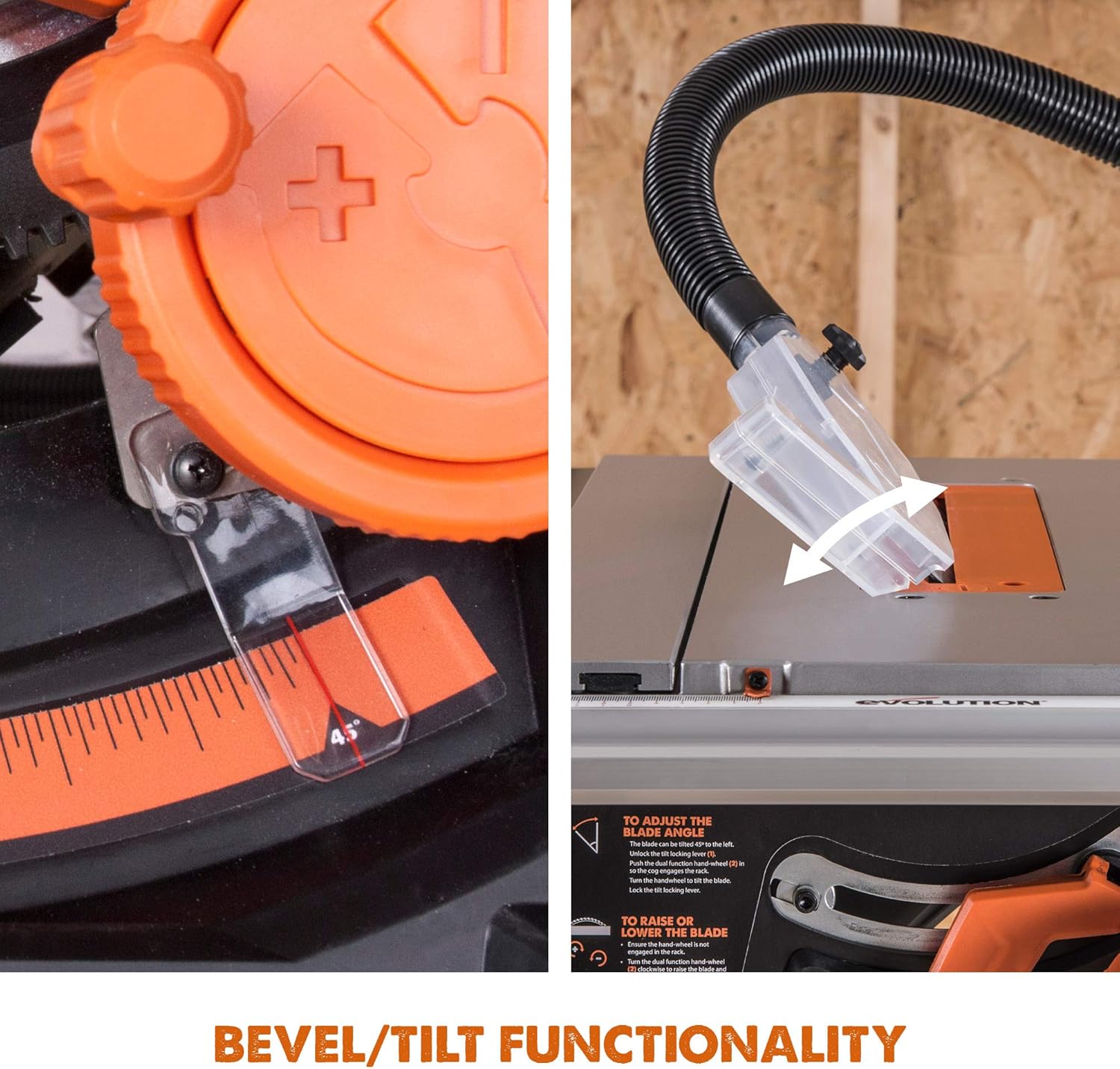
Figure 5.4: Bevel/tilt functionality allows for angled cuts.

Figure 5.5: Accurate cutting from 90 degrees to 45 degrees left bevel.
5.4 Rip Cutting
For rip cuts (cutting along the grain), use the adjustable, full-length parallel fence. Position the fence according to the desired width using the measuring rail guide. Ensure the workpiece is firmly against the fence and use the push stick for the final portion of the cut, especially for narrow pieces. The saw offers a 25-1/2 inch rip capacity to the right of the blade.
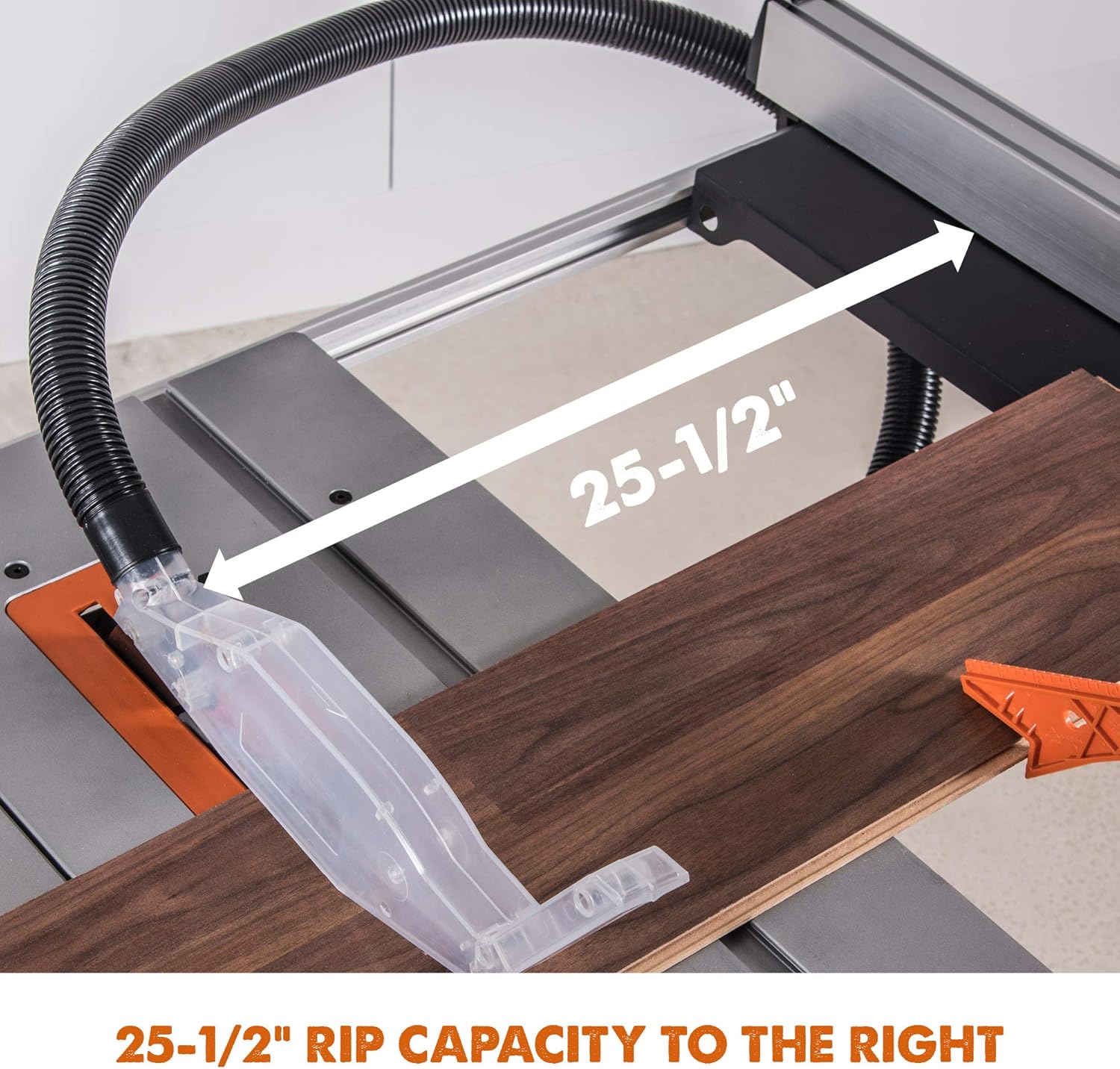
Figure 5.6: The saw provides a 25-1/2 inch rip capacity to the right of the blade.

Figure 5.7: The sliding table and anti-vibration device assist in smooth and stable cuts.
5.5 Cross Cutting
For cross cuts (cutting across the grain), use the miter gauge. Set the miter gauge to the desired angle and slide it in the table slot. Hold the workpiece firmly against the miter gauge and feed it slowly through the blade.
5.6 שטויב עקסטראַקטיאָן
The saw features an effective dust extraction system to maintain a cleaner work environment. Connect the supplied 70-14/16 inch hose to the dust port on the saw and to a suitable dust collector or shop vacuum. This helps reduce airborne dust and keeps the cutting line visible.

Figure 5.8: Effective dust extraction with the supplied hose.
5.7 Table Extensions
The built-in left and right table extensions can be deployed to support larger workpieces, providing a total surface area of 47-1/4 x 25-3/16 inches. Ensure extensions are locked in place before use.
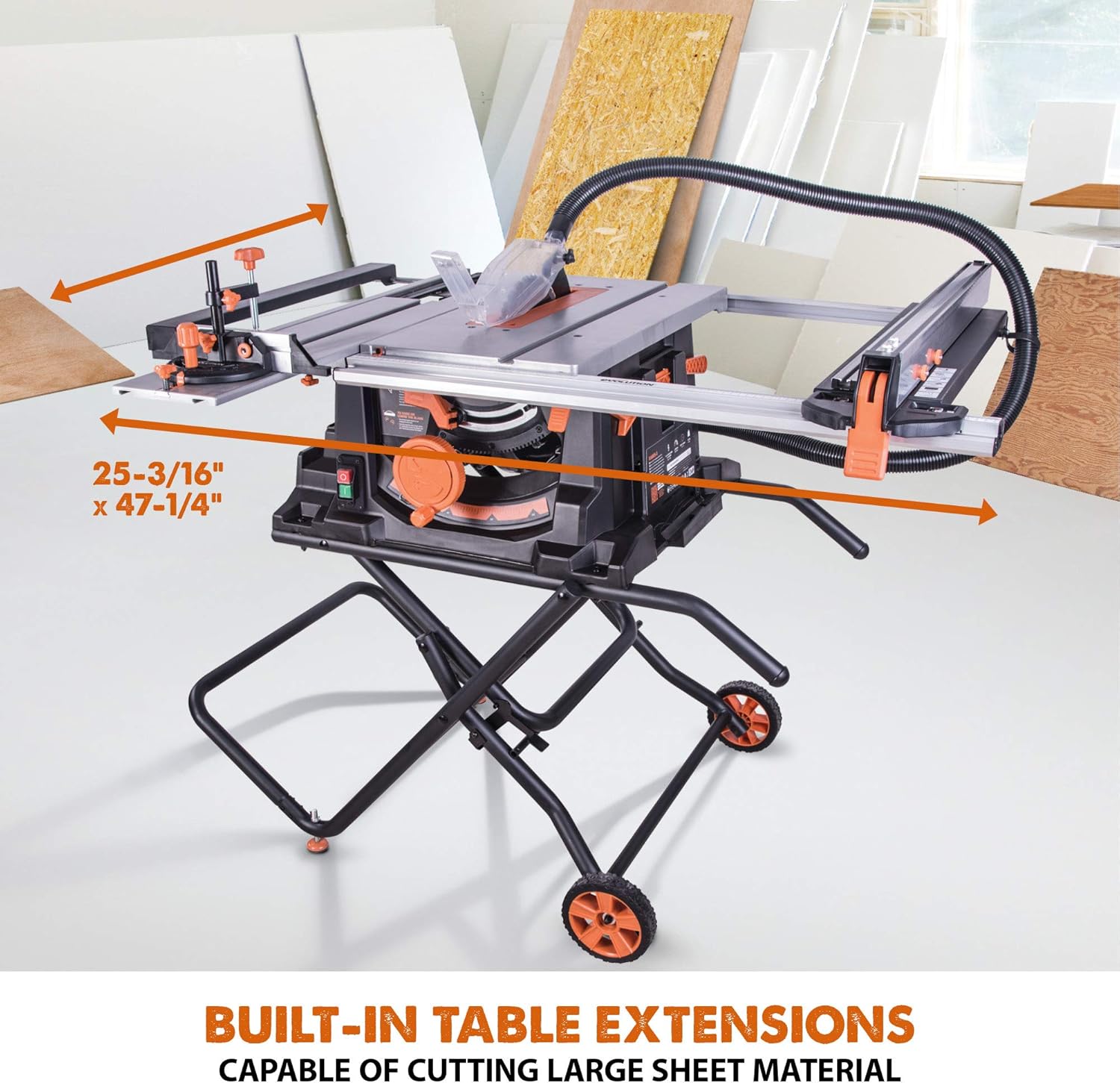
Figure 5.9: Built-in table extensions capable of cutting large sheet material.
6. וישאַלט
רעגולערע אויפהאלטונג גאראנטירט די לאנגעוויטי און זיכערע אפעראציע פון אייער טיש זעג.
- רייניקונג: After each use, disconnect the power and clean the saw table, blade guard, and dust ports. Remove sawdust and debris from the motor ventilation openings.
- בלייד דורכקוק: Regularly inspect the blade for sharpness, damage, or missing teeth. Replace dull or damaged blades immediately.
- מאָווינג טיילן: Check all moving parts for proper function and lubrication. Ensure all fasteners are tight.
- שנור דורכקוק: קאָנטראָלירט דעם עלעקטרישן שנור פֿאַר יעדע סימן פֿון שאָדן. ניצט נישט די זעג אויב דער שנור איז געשעדיגט.
7. טראָובלעשאָאָטינג
If you encounter issues with your Rage 5-S table saw, refer to the following common problems and solutions:
- Saw Does Not Start: Check if the power cord is securely plugged in. Verify the power outlet is functional. Ensure the 'ON' button is fully depressed.
- Poor Cut Quality (Tear-out, Burning): The blade may be dull or dirty. Replace or clean the blade. Ensure the blade is correctly installed and aligned. Reduce feed rate.
- יבעריק ווייבריישאַן: Check if the blade is properly installed and tightened. Ensure the saw is securely mounted to the stand and the stand is stable on a level surface.
- Dust Collection Ineffective: Check for clogs in the dust extraction hose or dust port. Ensure the hose is properly connected to a functioning dust collector.
For issues not resolved by these steps, contact Evolution Power Tools customer support.
8. ספּעסאַפאַקיישאַנז
| שטריך | באַשרייַבונג |
|---|---|
| סאָרט | עוואָלוציע |
| מאָדעל נומער | RAGE5-S |
| מאַכט מקור | קאָרדעד עלעקטריק |
| Voltage | 120 וואלטס |
| וואָסtage | 1800 וואטס |
| ספּיד | 2500 רפּם |
| בלייד דיאַמעטער | 10 אינטשעס (255 מם) |
| נומער פון ציין | 28T (TCT) |
| מאַקסימום טיפקייט פון שניט (90°) | 3-1/4 אינטשעס |
| Max Depth of Cut (45° Bevel) | 2-1/4 אינטשעס |
| Max Rip Capacity (Right) | 25-1/2 אינטשעס |
| Table Surface Area (Extended) | 47-1/4 X 25-3/16 אינטשעס |
| פּונקט וואָג | 65 פונט |
| שנור לענג | 64 אינטשעס |
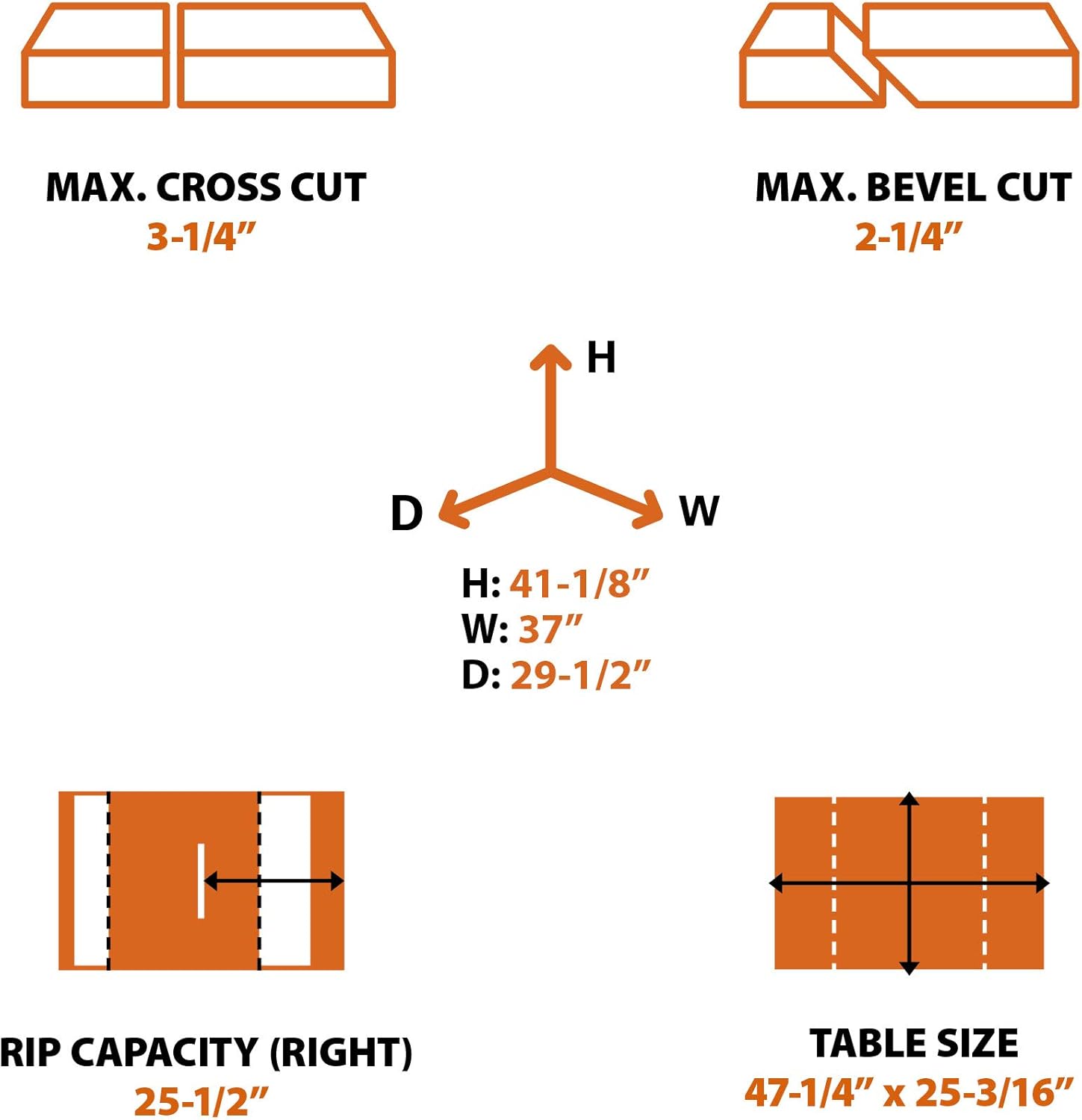
Figure 8.1: Key cutting capacities and dimensions of the Rage 5-S table saw.
9. וואָראַנטי און שטיצן
The Evolution Power Tools Rage 5-S Table Saw comes with a 3-יאָר לימיטעד וואָראַנטידי וואָראַנטי דעקט חסרונות אין מאַטעריאַלן און אַרבעט אונטער נאָרמאַל נוצן. ביטע האַלטן דיין קויפן באַווייַז פֿאַר וואָראַנטי קליימז.
For technical assistance, warranty service, or to order replacement parts, please contact Evolution Power Tools customer support. Refer to the official Evolution Power Tools webזייטל פֿאַר איצטיקע קאָנטאַקט אינפֿאָרמאַציע.