
הקדמה
This manual provides detailed instructions for the safe and efficient use of your FONESTAR DOTS-N Bluetooth TWS Speaker. Please read this manual thoroughly before operating the device and retain it for future reference.
The FONESTAR DOTS-N is a portable Bluetooth TWS speaker featuring Bluetooth 4.2 and NFC connectivity. It offers powerful sound with enhanced bass, playback controls, and hands-free calling. Equipped with a rechargeable Li-Ion battery providing up to 10 hours of autonomy, it also includes a 3.5mm auxiliary input. Its compact design makes it suitable for home use.
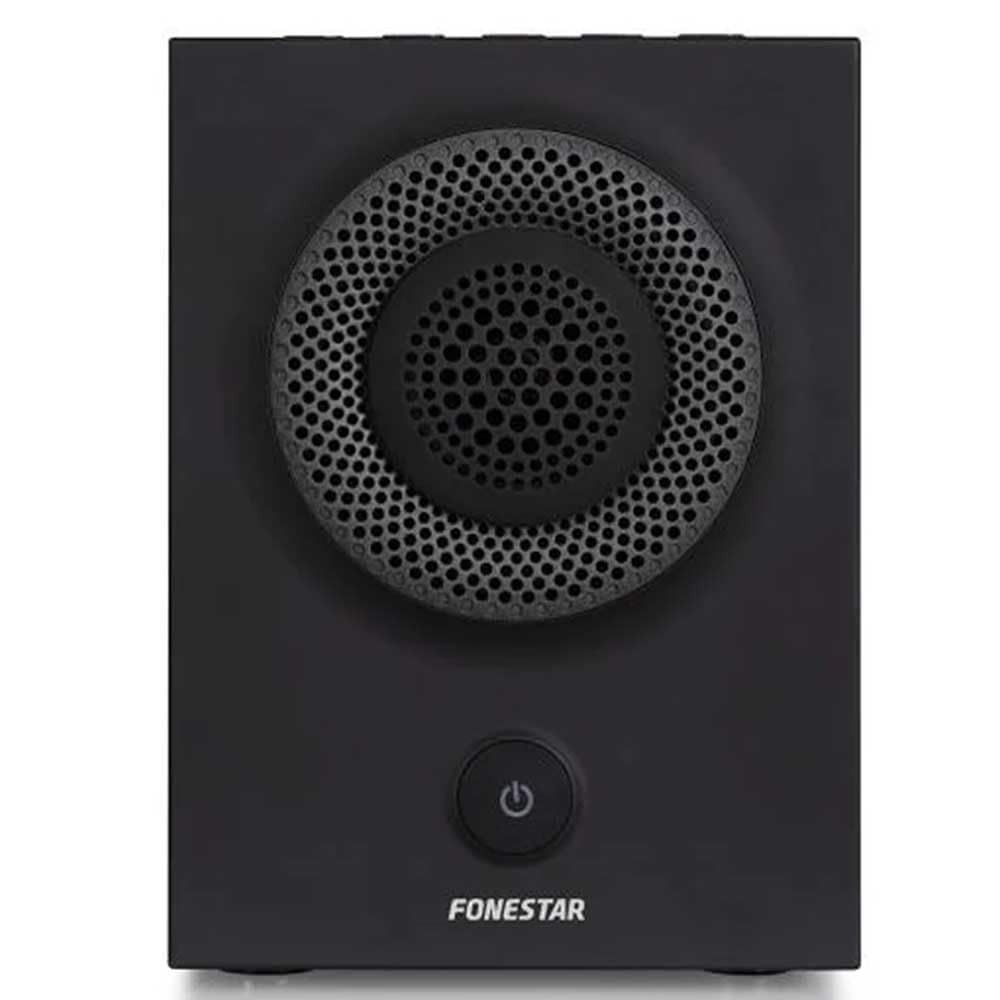
פיגורע 1: פראָנט view of the FONESTAR DOTS-N Bluetooth TWS Speaker.
סעטאַפּ
1. ונפּאַקקינג
פֿאָרזיכטיק אַרויסנעמען אַלע קאָמפּאָנענטן פֿון דער פּאַקאַדזשינג. זיכער מאַכן אַז אַלע זאַכן וואָס זענען אויסגערעכנט אונטן זענען פֿאַראַן:
- FONESTAR DOTS-N Bluetooth TWS Speaker
- וסב צו מיקראָ וסב טשאַרדזשינג קאַבלע
- 3.5 מ״מ סטערעאָ אַודיאָ קאַבל
- באַניצער מאַנואַל (דעם דאָקומענט)
2. טשאַרדזשינג די ספּיקער
Before first use, fully charge the speaker. Connect the Micro USB end of the charging cable to the speaker's charging port and the USB-A end to a compatible USB power adapter (not included) or a computer's USB port.
- די טשאַרדזשינג אינדיקאַטאָר ליכט וועט זיך אָנצינדן בעת טשאַרדזשינג.
- טשאַרדזשינג צייט איז בעערעך 3 שעה פֿאַר אַ פול אָפּצאָל.
- די אינדיקאַטאָר ליכט וועט זיך ענדערן אָדער אויסלעשן אַמאָל די טשאַרדזשינג איז פֿאַרטיק.
3. פּאָווערינג אויף / אויסגעלאשן
To power on the speaker, press and hold the power button (usually indicated by a ⏻ symbol) for a few seconds until you hear an audible prompt or see an indicator light. To power off, repeat the process.
אַפּערייטינג ינסטראַקשאַנז
1. בלועטאָאָטה פּערינג
The speaker supports Bluetooth 4.2 for wireless audio streaming.
- Ensure the speaker is powered on and in pairing mode (usually indicated by a flashing LED). If not, press the Bluetooth pairing button or power button briefly to enter pairing mode.
- אויף אייער סמאַרטפאָון, טאַבלעט, אָדער אַנדער בלוטוט-ענייבאַלד מיטל, גייט צו די בלוטוט סעטטינגס.
- זוכן פֿאַר available devices and select "FONESTAR DOTS-N" from the list.
- Once paired, the speaker will emit an audible confirmation, and the LED indicator will typically become solid.
2. NFC פּערינג (נעענטער פעלד קאָמוניקאַציע)
For devices with NFC, pairing can be done quickly:
- Ensure NFC is enabled on your device and the speaker is powered on.
- Tap your NFC-enabled device gently against the NFC area on the speaker (refer to product diagram for exact location, if available).
- באַשטעטיקן די פּאָרינג בעטן אויף דיין מיטל.
3. אמתע ווירעלעס סטערעאָ (TWS) פונקציע
The TWS function allows you to pair two FONESTAR DOTS-N speakers together for a stereo sound experience.
- Ensure both DOTS-N speakers are powered on and not connected to any other Bluetooth device.
- On one speaker (this will be the primary speaker), press and hold the TWS button (if available) or a designated button for TWS pairing.
- דער הויפּט רעדנער וועט זוכן דעם צווייטן רעדנער. אַמאָל פֿאַרבונדן, וועלן ביידע רעדנערס אַרויסלאָזן אַ באַשטעטיקונגס־קלאַנג.
- Now, connect your Bluetooth device to the primary speaker as described in the "Bluetooth Pairing" section. Audio will play in stereo through both speakers.
4. הילפס-איינגאנג (AUX)
For non-Bluetooth devices, use the included 3.5mm stereo audio cable.
- פֿאַרבינדט איין עק פֿון דעם 3.5 מ״מ אַודיאָ קאַבל צום AUX-אין פּאָרט אויף דעם רעדנער.
- פֿאַרבינדט דעם אַנדערן עק צום כעדפאָון דזשעק אָדער אַודיאָ אַרויסגאַנג פֿון אייער דעווייס.
- The speaker will automatically switch to AUX mode or may require manual selection via a mode button.
5. Playback Control and Hands-Free Calls
The speaker features integrated controls for music playback and managing calls:
- שפּיל / פּויזע: Press the Play/Pause button (often combined with the power button or a dedicated button).
- באַנד אַרויף / אַראָפּ: Use the volume buttons (+ / -) אויף דעם רעדנער.
- ווייַטער / פרייַערדיק שפּור: Long press or double-press the volume buttons, or use dedicated track skip buttons if present.
- ענטפֿערן / סוף רופן: Press the Play/Pause button during an incoming call to answer, and again to end the call.
- אָפּוואַרפן רופן: דריק און האלט דעם שפּיל/פּויזע קנעפּל בעת אַן אינקאַמינג רוף.
וישאַלט
1. רייניקונג
- שטענדיק אויסלעשן דעם רעדנער איידער איר רייניגט.
- ניצט אַ ווייכן, טרוקענעם, לינט-פֿרייעם שטאָף צו ווישן די אויסערלעכע פֿלאַכן.
- ניצט נישט קיין שרײַבנדיקע רייניגער, וואַקסן אדער סאָלווענטן, ווײַל זיי קענען שאַטן די ענדיקונג.
- פֿאַרמײַדט אַרײַנצוקומען פֿײַכטקײַט אין קיין עפענונגען.
2. סטאָרידזש
- האַלט דעם רעדנער אין אַ קיל, טרוקן אָרט אַוועק פון דירעקט זונשייַן און עקסטרעמע טעמפּעראַטורן.
- אויב איר לייגט עס אויף פאר א לענגערע צייט, לאדט אויף די באטעריע ביז בערך 50% יעדע פאר חדשים כדי צו אויפהאלטן די געזונטהייט פון די באטעריע.
3. באַטערי קער
- שטעלט נישט אויס די באַטעריע צו איבערגעטריבענער היץ, פייער, אדער דירעקטער זונשייַן.
- פֿאַרמײַדט אָפֿט פֿולשטענדיק אויסצולאָדן די באַטעריע, ווײַל דאָס קען פֿאַרקירצן איר לעבנסדויער.
- Only use the provided charging cable or a certified equivalent.
טראָובלעשאָאָטינג
| פּראָבלעם | מעגלעך סיבה | לייזונג |
|---|---|---|
| דער רעדנער גייט נישט אן. | באַטערי איז דיפּליטיד. | באַשולדיקן די רעדנער מיט די צוגעשטעלט וסב קאַבלע. |
| קען נישט פארבינדן דורך בלוטוט. | רעדנער איז נישט אין פּערינג מאָדע; די דעווייס איז צו ווייט; שטערונג. | Ensure speaker is in pairing mode. Move device closer (within 10m). Turn off other Bluetooth devices. |
| קיין קלאַנג אָדער נידעריקע וואָלומען. | Volume too low on speaker or source device; incorrect input mode. | Increase volume on both speaker and source device. Check if the correct input (Bluetooth/AUX) is selected. |
| TWS פּאָרינג פיילז. | Speakers are already paired to another device; incorrect TWS pairing procedure. | זיכער מאַכן אַז ביידע רעדנערס זענען אָפּגעטיילט פֿון אַנדערע דעווייסעס. פֿאָלגט די TWS פּערינג טריט קערפֿול. |
| געזונט דיסטאָרשאַן. | Volume too high; low battery; poor signal. | Reduce volume. Charge the speaker. Move source device closer to the speaker. |
טעכניש ספּעסאַפאַקיישאַנז

Figure 2: Dimensions of the FONESTAR DOTS-N Bluetooth TWS Speaker.
| מאָדעל נאָמען | DOTS-N |
| סאָרט | FONESTAR |
| קאַנעקטיוויטי טעכנאָלאָגיע | Bluetooth 4.2, NFC, 3.5mm AUX |
| ווירעלעסס ראַנגע | אַרויף צו 10 מעטער (33 פֿיס) |
| אַודיאָ רעזולטאַט מאָדע | סטערעאָ (מיט TWS) |
| רעדנער טיפּ | 3" Coaxial Woofer with Tweeter, 3" Subwoofer, 4" Passive Radiator |
| מאַקסימום רעדנער אַרויסגאַנג מאַכט | 12 וואטס רמס |
| אָפטקייַט ענטפער | 80 - 20,000 הערץ |
| סיגנאַל-צו-נויז ראַטיאָ | ≥ 75 דב |
| מאַכט מקור | באַטעריע געטריבן (ריטשאַרדזשאַבאַל לי-יאָן) |
| באַטאַרייע קאַפּאַציטעט | 2200 מאַה, 7.4 וו |
| באַטערי אויטאָנאָמיע | אַרויף צו 10 שעה (ביי 50% באַנד) |
| טשאַרדזשינג צייט | בעערעך 3 שעה |
| קאָנטראָל מעטאָד | טאַקטיל (ריר) |
| ספּעציעלע פֿעיִקייטן | High-res audio, Bluetooth, Integrated microphone, USB port (for charging) |
| קאַמפּאַטאַבאַל דעוויסעס | סמאַרטפאָנעס, טאַבלאַץ |
| רעקאַמענדיד נוצן | For home |
| קאָליר | שוואַרץ |
| דימענשאַנז (ב x ה x ד) | 125 X 175 X 158 מם (בעערעך 4.9 X 6.9 X 6.2 אינטשעס) |
| פּונקט וואָג | 1.82 קג (בעערעך 4.01 לבס) |
| וואָטערפּרוף | ניין |
Note: Specifications are subject to change without prior notice. Battery autonomy may vary depending on usage, volume level, and music type.
וואָראַנטי אינפֿאָרמאַציע
FONESTAR products are designed and manufactured to the highest quality standards. This product is covered by a limited warranty against manufacturing defects from the date of purchase. The specific terms and duration of the warranty may vary by region and retailer.
Please retain your proof of purchase (receipt or invoice) as it will be required for any warranty claims. The warranty does not cover damage caused by misuse, accident, unauthorized modification, or normal wear and tear.
For detailed warranty terms and conditions, please refer to the warranty card included with your product or contact your local FONESTAR distributor or retailer.
קונה שטיצן
If you encounter any issues that are not resolved by the troubleshooting guide, or if you require further assistance, please contact FONESTAR customer support or your authorized retailer.
ווען איר קאָנטאַקטירט שטיצע, ביטע זייט גרייט צו צושטעלן די פאלגענדע אינפֿאָרמאַציע:
- Product Model: FONESTAR DOTS-N
- דאַטע פון קויפן
- באַשרייַבונג פון די אַרויסגעבן
- דיין קאָנטאַקט אינפֿאָרמאַציע
For the most up-to-date support information, including contact details and FAQs, please visit the official FONESTAR webפּלאַץ.