
Amazon Basics MDUDP-35AEN1-BA8
אַמאַזאָן באַסיקס גרויס דעהומידיפיער באַניצער מאַנואַל
Model: MDUDP-35AEN1-BA8 (35 Pint Standard)
1. הקדמה
Thank you for choosing the Amazon Basics Large Dehumidifier. This manual provides important information for the proper setup, operation, and maintenance of your dehumidifier. Please read this manual thoroughly before using the appliance to ensure safe and efficient operation. Keep this manual for future reference.
וויכטיק סאַפעטי אינפֿאָרמאַציע
- Always place the dehumidifier on a level, stable surface.
- Ensure proper clearance around the unit for adequate airflow.
- דו זאלסט נישט אַרבעטן די אַפּאַראַט מיט אַ דאַמידזשד מאַכט שנור אָדער צאַפּן.
- נעמט ארויס דעם אַפּאַראַט איידער איר רייניגט אדער פירט אויס קיין שום אויפהאלטונג.
- האַלטן אויס פון דערגרייכן פון קינדער און פּעץ.
2. פּראָדוקט איבערview
The Amazon Basics Large Dehumidifier is designed to effectively reduce humidity in spaces up to 2,500 square feet, maintaining optimal indoor humidity between 45-55% for enhanced comfort and air quality.

פיגורע 2.1: פראָנט view of the Amazon Basics Large Dehumidifier.
שליסל קאַמפּאָונאַנץ
- קאָנטראָל פּאַנעל: Located on the top of the unit for easy access to settings.
- לופט ינלעט: Where humid air enters the unit.
- לופט אָוטלעט: Where dehumidified air exits the unit.
- וואַסער טאַנק: Collects condensed water. Features a visible water level indicator.
- ריוזאַבאַל פילטער: Located behind the air inlet, designed for easy cleaning.
- קאַסטער ווהעעלס: פֿאַר גרינגע באַוועגלעכקייט פֿון דער אַפּאַראַט.

פיגורע 2.2: איבערview of the dehumidifier's key features including the control panel, auto-defrost, overflow protection, and auto-restart functionality.
קאָנטראָל פּאַנעל
The intuitive control panel allows for effortless dehumidification. It includes buttons for power, fan speed, timer, and humidity settings, along with indicator lights for various functions.

Figure 2.3: Detail of the control panel and water tank full indicator (A).
3. סעטאַפּ
אַנפּאַקינג און פּלייסמאַנט
- נעמט פֿאָרזיכטיק אַרויס דעם לופט-טרוקענער פֿון זײַן פּאַקעט.
- Place the unit upright on a firm, level surface in the desired location. Ensure there is at least 8 inches (20 cm) of space around the unit for proper air circulation.
- לאָזט דעם אַפּאַראַט שטיין אויפֿרעכט פֿאַר מינדעסטנס 24 שעה איידער איר עס אַרײַנשטעקט אין דער עלעקטרישער מאַכט. דאָס לאָזט דעם קילמאַטעריאַל זיך באַזעצן.
מאַכט קאַנעקשאַן
Plug the grounded power cord into a suitable electrical outlet. The unit is designed for standard household electrical supply.
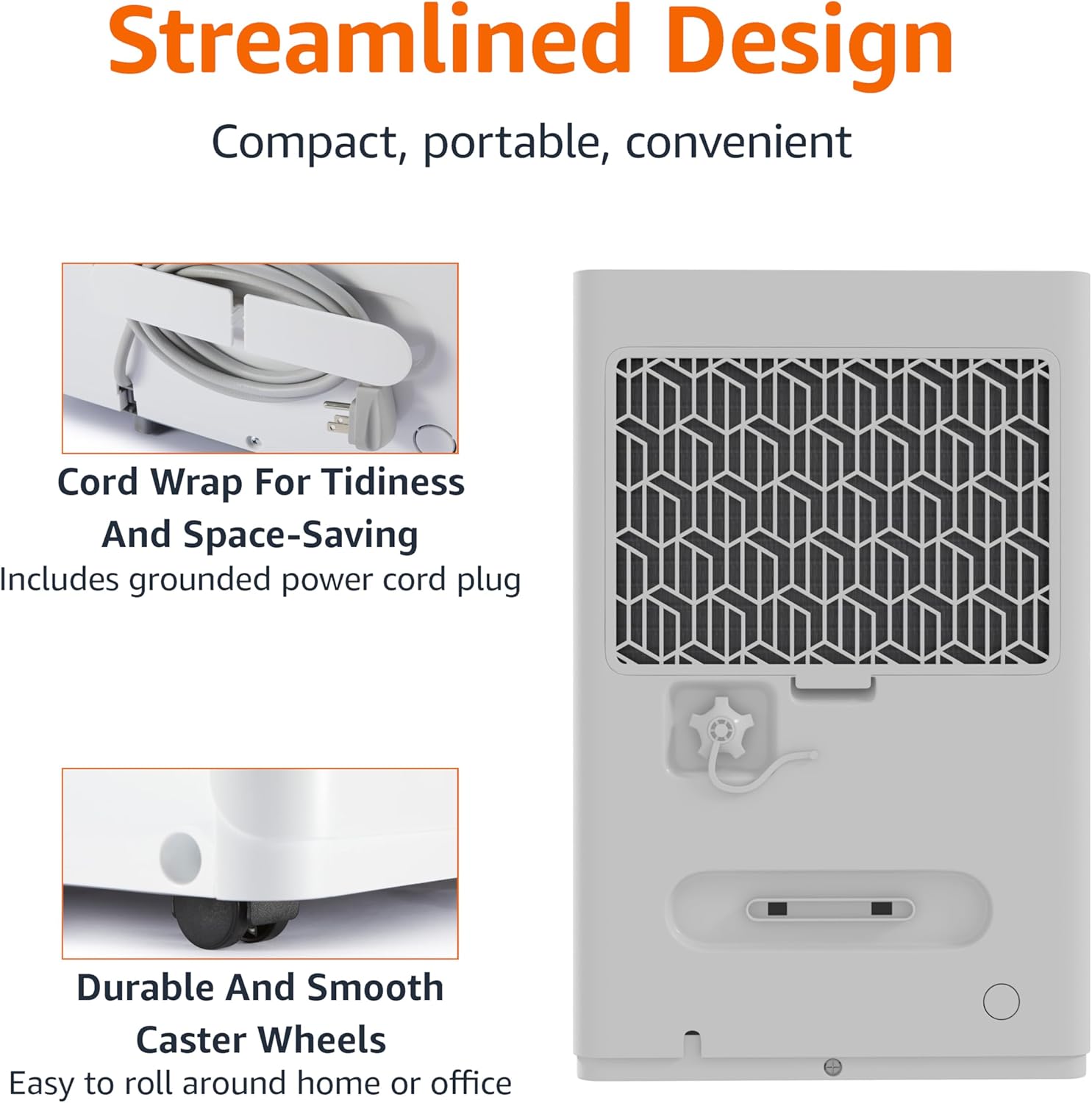
Figure 3.1: The dehumidifier features a cord wrap for tidiness and durable caster wheels for easy movement.
4. אַפּערייטינג ינסטרוקטיאָנס
קערן אויף / אַוועק
- דרוק די מאַכט button on the control panel to turn the unit on or off.
Setting Humidity Level
The dehumidifier maintains optimal indoor humidity between 45-55%. You can adjust the target humidity using the control panel.
- ניצן די Up און אַראָפּ arrow buttons to set your desired humidity level. The display will show the current humidity.
טייַמער פֿונקציע
The unit features a timer for scheduled operation.
- דרוק די טיימער button to set the desired operating time (from 0.5 to 24 hours). The unit will turn off or on after the set time.

Figure 4.1: The dehumidifier is ideal for standard 8 ft / 2.4 m ceilings and features a schedule on/off timer from 0.5 to 24 hours.
Auto-Defrost
The auto-defrost feature prevents frost build-up on the coils, ensuring continuous and efficient operation, especially in cooler environments.
Auto Re-start Function
אין די געשעעניש פון אַ מאַכט אָtage, the dehumidifier will automatically resume operation with your previous settings once power is restored, providing consistent humidity control without manual intervention.
5. וישאַלט
עמפּטיינג די וואַסער טאַנק
When the water tank is full, the unit will stop operating and an indicator light will illuminate. The water tank has a capacity of 1.59 gallons (6 liters).
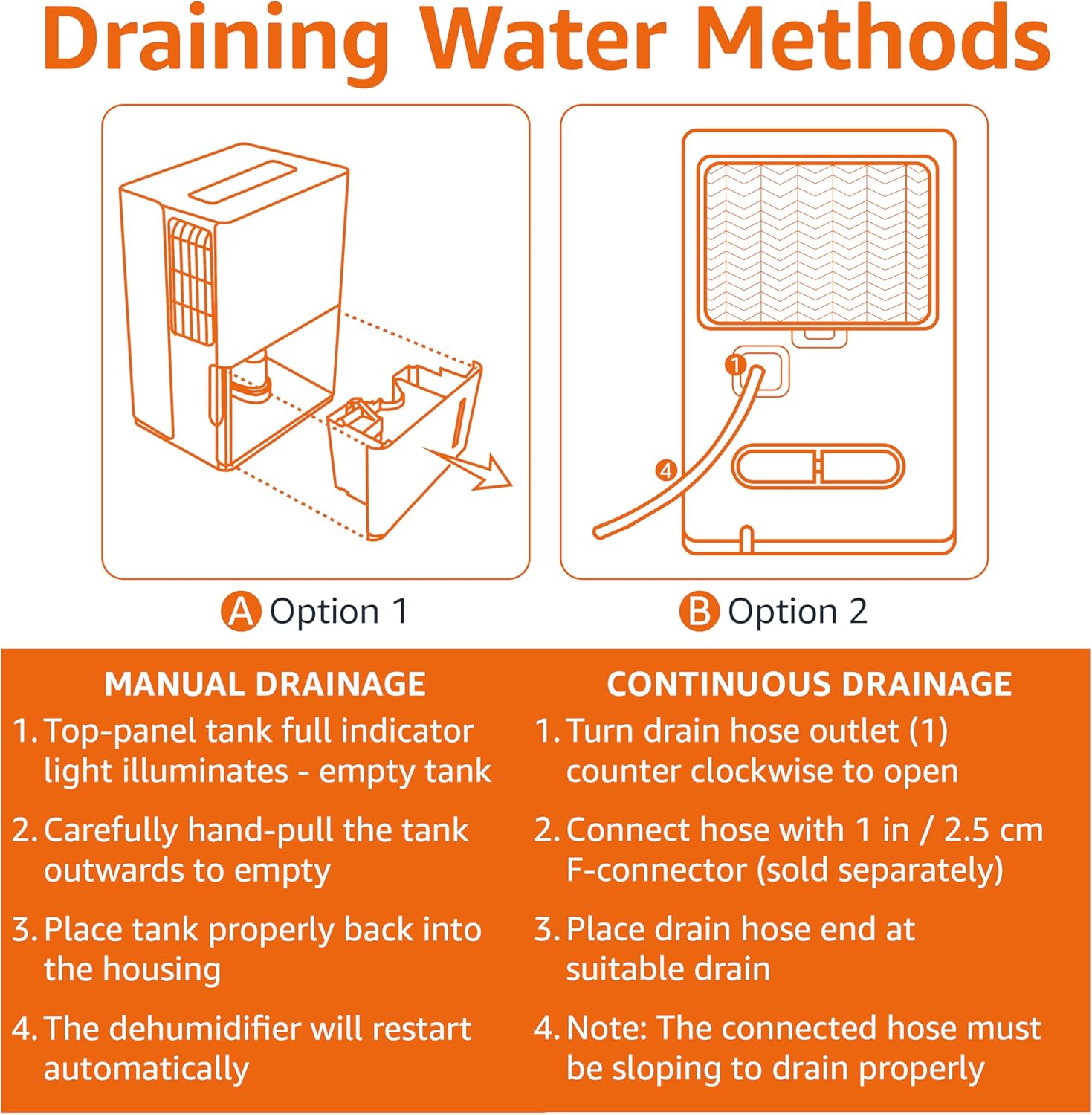
Figure 5.1: Manual and Continuous Drainage Methods.
Manual Drainage (Option 1)
- When the top-panel tank full indicator light illuminates, carefully pull the tank outwards to empty.
- ליידיקן דאָס געזאַמלטע וואַסער.
- Place the tank properly back into the housing. The dehumidifier will restart automatically.
Continuous Drainage (Option 2)
- Turn the drain hose outlet counter-clockwise to open.
- Connect a standard garden hose (sold separately) with a 1 inch / 2.5 cm F-connector to the outlet.
- Place the drain hose end at a suitable drain (e.g., floor drain, sink).
- באַמערקונג: The connected hose must be sloping downwards to drain properly.
רייניקונג פון דעם ווידער-ניצלעכן פילטער
The reusable filter is simple to clean, ensuring the unit performs at its best without frequent replacements.
- נעמט ארויס דעם לופט-טרוקענער פון דער עלעקטרישער ווענטיל.
- אַראָפּנעמען די פילטער פון די צוריק פון די אַפּאַראַט.
- רייניקט דעם פילטער מיט ווארעם, זייפיגן וואסער. שווענקט גוט אויס.
- לאָזט דעם פילטער גאָר טרוקן ווערן אין דער לופט איידער איר לייגט עס צוריק אַרײַן אין דעם אַפּאַראַט.
- Plug the dehumidifier back in.
6. טראָובלעשאָאָטינג
If you experience issues with your dehumidifier, please refer to the following common troubleshooting steps. For more detailed assistance, consult the full User Manual PDF or contact customer support.
| פּראָבלעם | מעגלעך סיבה | לייזונג |
|---|---|---|
| דער לופט-טרוקענער צינדט זיך נישט אן. | No power supply; Power cord not securely plugged in. | Check power outlet and ensure cord is fully inserted. |
| Unit is not collecting water. | Water tank is full or not properly seated; Air filter is clogged; Room temperature is too low. | Empty and re-seat water tank; Clean air filter; Ensure room temperature is above 41°F (5°C). |
| Unit is running but humidity is not decreasing. | Room size exceeds unit capacity; Doors/windows are open; Air filter is clogged. | Ensure unit is appropriate for room size; Close all doors and windows; Clean air filter. |
| אַפּאַראַט איז טומלדיק. | Unit is not on a level surface; Air filter is dirty. | שטעלט דעם אַפּאַראַט אויף אַ גלייכער ייבערפלאַך; רייניקט דעם לופט פילטער. |
7. ספּעסאַפאַקיישאַנז
| שטריך | דעטאַל |
|---|---|
| סאָרט | אַמאַזאָן באַסיקס |
| מאָדעל נאָמען | MDUDP-35AEN1-BA8 |
| קאַפּאַציטעט | 35 פּינטס פּער טאָג |
| שטאָק שטח קאַווערידזש | אַרויף צו 2500 קוואַדראַט פֿיס |
| טאַנק באַנד | 35 Pints (1.59 Gallons / 6 Liters) |
| פּראָדוקט דימענשאַנז (ד רענטגענ וו רענטגענ ה) | 11.1"ד רענטגענ 15.43"וו רענטגענ 24.25"ה |
| פּונקט וואָג | 39.2 פונט |
| קאָליר | ווייַס |
| ענערגיע סערטיפיקאציע | סערטיפיקאַטעד ענערגיע שטערן |
| אָפּעראַציע מאָדע | נאָרמאַל |
| פאַבריקאַנט | אַמאַזאָן |
| UPC | 810004816732 |
8. וואָראַנטי און שטיצן
לימיטעד וואָראַנטי
This Amazon Basics Dehumidifier comes with a 1-year limited warranty from the date of purchase. This warranty covers defects in materials and workmanship under normal use. For full warranty terms and conditions, please refer to the official User Manual PDF available online or contact Amazon Basics customer support.
שוץ פּלאַנז
Extended protection plans are available for purchase to provide additional coverage beyond the standard manufacturer's warranty. These plans offer peace of mind for longer periods.
- 3-יאָר שוץ פּלאַן: Extends coverage for an additional 3 years.
- 4-יאָר שוץ פּלאַן: Extends coverage for an additional 4 years.
- גאַנץ באַשיצן: א מאנאטליכער פלאן וואס באדעקט אלע בארעכטיגטע פארגאנגענע און צוקונפטיגע קויפן.
פֿאַר פרטים וועגן קויפןasing these plans, please visit the product page on Amazon.com or contact Amazon customer service.
קונה שטיצן
For any questions, technical assistance, or warranty claims, please contact Amazon customer support through your Amazon account or visit the Amazon Basics Store online.
You can also access the official User Manual (PDF) for detailed instructions and diagrams: דאַונלאָוד באַניצער מאַנואַל (PDF)
Ask a question about this manual
Ask about setup, troubleshooting, compatibility, parts, safety, or missing instructions. Manuals+ will review the question and use this page’s manual context to help answer it.