
1. פּראָדוקט איבערview
The Leadleds LED Sign Hat is a versatile baseball cap featuring an integrated LED display panel. This panel can be customized via a Bluetooth-connected smartphone application to show text, patterns, graffiti, and audio visualizations. It is designed for various occasions, offering a unique way to express messages or enhance visual appeal.
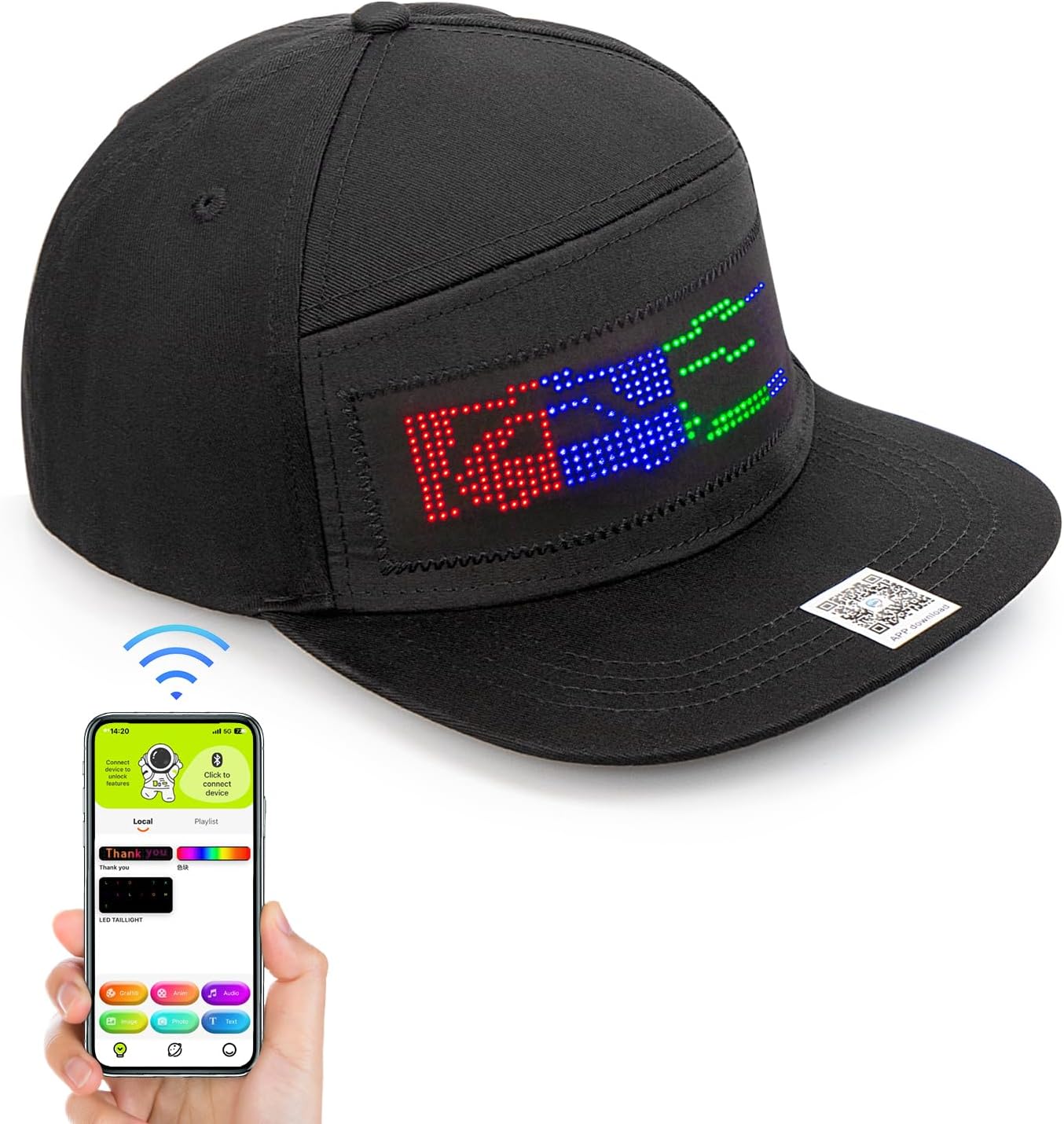
Image 1.1: The Leadleds LED Sign Hat shown alongside a smartphone demonstrating the control application interface.
2. סעטאַפּ גייד
2.1 טשאַרדזשינג די מיטל
Before initial use, ensure the LED Sign Hat is fully charged. Connect the hat's charging port to a standard USB power source using the provided charging cable. The LED indicator will show charging status.
2.2 Downloading the Application
Locate the QR code on the hat or in the packaging. Scan the QR code with your smartphone to download the dedicated control application. Alternatively, search for "LED Space" or a similar app name (as indicated in the product packaging) in your device's app store (Google Play Store for Android, Apple App Store for iOS).
2.3 בלועטאָאָטה קאַנעקשאַן
- זיכער מאַכן אַז אייער סמאַרטפאָון'ס בלועטוט איז ענייבאַלד.
- Open the downloaded control application.
- Power on the LED Sign Hat.
- Within the app, navigate to the device connection section (often indicated by a Bluetooth icon or 'Connect Device').
- Select the LED Sign Hat from the list of available Bluetooth devices. A successful connection will typically be indicated by a change in the app's interface or a notification.
3. אַפּערייטינג ינסטרוקטיאָנס
Once connected, the application provides various modes for customizing the LED display:
- טעקסט מאָדע: Type custom messages to be displayed on the hat. You can often adjust font, color, scroll direction, and speed.
- Pattern Mode: Select from a library of pre-designed patterns or animations.
- Graffiti Mode: Draw custom designs directly within the app, which will then be displayed on the hat.
- אַודיאָ מאָדע: The LED display can react to ambient sound or music, creating dynamic visualizations.

בילד 3.1: עקס.amples of different display modes available for the LED Sign Hat, including animation, graffiti, audio visualization, and custom text.
3.1 אַדזשאַסטירן די דיספּליי סעטטינגס
Within each mode, the app typically allows for adjustments such as:
- ברייטקייט: Control the intensity of the LED lights.
- גיכקייַט: Adjust the speed of scrolling text or animations.
- קאָליר: Change the color of text or patterns (if supported by the hat's LED panel).
Video 3.2: An official product video from Leadleds demonstrating the various display capabilities and dynamic effects of the LED Sign Hat in different settings.
4. וישאַלט
4.1 רייניקונג אינסטרוקציעס
The cap itself is made of 100% cotton and can be hand washed. וויכטיק: Before washing, you must carefully remove the LED panel and battery pack from the hat. Failure to do so will damage the electronic components.

Image 4.1: Illustration showing the removable LED panel and battery unit, which must be detached from the cap before cleaning.
4.2 באַטערי קער
The hat uses a rechargeable Lithium Ion battery. To prolong battery life:
- פֿאַרמײַדט אָפֿט פֿולשטענדיק אויסצולאָדן די באַטעריע.
- סטאָר די הוט אין אַ קיל, טרוקן אָרט ווען ניט אין נוצן.
- Charge the battery periodically if stored for extended periods.
5. טראָובלעשאָאָטינג
| פּראָבלעם | מעגלעך סיבה | לייזונג |
|---|---|---|
| Hat does not power on. | באַטערי איז דיסטשאַרדזשד. | Charge the hat fully using the provided USB cable. |
| קען נישט פאַרבינדן דורך בלוטוט. | Bluetooth is off on phone or hat. App not open. | Ensure Bluetooth is enabled on both devices. Restart the app and hat. Try pairing again. |
| דער עקראַן איז טונקל אָדער פליקערט. | נידעריגע באַטעריע. לויזע פֿאַרבינדונג. | Recharge the hat. Check that the LED panel is securely connected to the battery pack. |
| App crashes or does not load. | Outdated app version or operating system. | Ensure your app is updated to the latest version. Check your phone's operating system for updates. If issues persist, try reinstalling the app. |
6. ספּעסאַפאַקיישאַנז
- מאָדעל נומער: LLD-HAT1248BM-1
- מאַטעריאַל טיפּ: 100% וואַטע
- קלאָוזשער טיפּ: Drawstring (Adjustable Snapback)
- קאָפּ אַרומקרייז: Adjustable for 22-27 inches
- באַטערי: 1 ליטהיום יאָן באַטאַרייע (אַרייַנגערעכנט)
- באַהאַנדלונג אינסטרוקציעס: Hand Wash Only (remove LED panel and battery)
- נומער וואָג: בעערעך 4.97 אונסעס
- וואַסער קעגנשטעל מדרגה: Waterproof (referring to LED panel, but cap itself is not fully waterproof when electronics are installed)
- Sun Protection Factor (SPF): 20+

Image 6.1: The adjustable snapback closure of the hat, allowing for a comfortable fit for head circumferences between 22 and 27 inches.
7. וואָראַנטי & שטיצן
7.1 וואָראַנטי אינפֿאָרמאַציע
Specific warranty details for the Leadleds LED Sign Hat are not provided in this manual. Please refer to the retailer's return policy or contact Leadleds customer support for comprehensive warranty information regarding your purchase.
7.2 קונה שטיצן
For further assistance, technical support, or inquiries, please contact Leadleds customer support through their official website or the retailer where the product was purchased. Keep your purchase receipt and model number (LLD-HAT1248BM-1) ready for faster service.