
הקדמה
This manual provides comprehensive instructions for the setup, operation, and maintenance of your Zerone Universal Remote Control. This remote is designed to function with various Pioneer DVD player models, offering a convenient replacement or secondary control unit.
קאַמפּאַטאַבילאַטי
The Zerone Universal Remote Control is compatible with the following Pioneer DVD player models:
- Pioneer VXX2811
- Pioneer VXX2914
- Pioneer VXX3218
- Pioneer VXX2801
- Pioneer VXX2800
- Pioneer VXX2913
For optimal performance, ensure your DVD player model is listed above.
סעטאַפּ
1. באַטאַרייע ייַנמאָנטירונג
- געפֿינען די באַטאַרייע אָפּטייל אויף די צוריק פון די ווייַט קאָנטראָל.
- רוקט דעם באַטעריע דעקל אַראָפּ אָדער דריק דעם לאַטש און הייבט אויף צו עפֿענען.
- Insert two (2) AA 1.5V batteries, ensuring the positive (+) and negative (-) terminals align correctly with the markings inside the compartment.
- לייגט צוריק דעם באַטעריע דעקל דורך עס צוריקצורוקן אין זיין פּאָזיציע ביז עס קליקט זיכער.
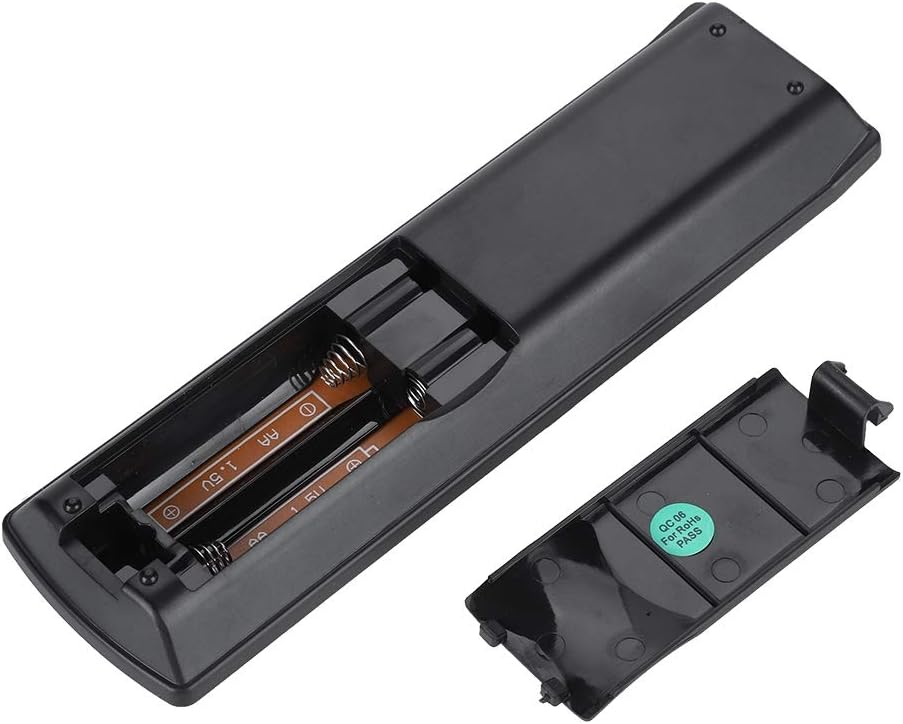
בילד: הינטערשטע view of the Zerone remote control, showing the battery compartment cover.

Image: The battery compartment of the remote control with two AA batteries correctly inserted.
No programming or setup is required. Once batteries are installed, the remote is ready for use with compatible Pioneer DVD players.
אַפּערייטינג ינסטראַקשאַנז
Point the remote control directly at your Pioneer DVD player. The effective control distance is typically over 8 meters (approximately 26 feet), though this may vary based on environmental factors and the specific DVD player model.

בילד: פראָנט view of the Zerone Universal Remote Control, displaying all buttons and their labels.
שליסל פאַנגקשאַנז:
- סטאַנדביי / אויף: Powers the DVD player on or off.
- עפֿענען / נאָענט: אָפּענס אָדער קלאָוזיז די דיסק טאַץ.
- אַודיאָ: Selects audio tracks or languages.
- סאַבטייטאַל: טאַגלט אָדער סעלעקטירט אונטערטיטל אָפּציעס.
- ווינקל: ענדערונגען די viewing angle if supported by the DVD.
- נומער קנעפּלעך (0-9): Direct track selection or input.
- קלאָר: Clears numerical input.
- אַרייַן: קאַנפערמז סאַלעקשאַנז.
- שפּיץ מעניו: Accesses the main menu of the DVD.
- מעניו: Accesses the disc menu.
- HOME MENU: Navigates to the home menu of the DVD player.
- צוריקקומען: גייט צוריק צום פריערדיקן עקראַן אָדער מעניו.
- Directional Pad (Up, Down, Left, Right) & ENTER: נאַוויגירט מעניוז און באַשטעטיקט סעלעקשאַנז.
- Playback Controls (Play, Pause, Stop, Fast Forward, Rewind, Skip Forward, Skip Backward): Standard media playback functions.
- שפּיל מאָדע: אויסקלײַבט ווידערשפּיל מאָדעס (למשל, איבערחזרן, שאַפן).
- SURROUND: Adjusts surround sound settings.
- זאָאָם: Zooms in or out on the video.
- אַרויסווייַז: Shows on-screen display information.

Image: A hand holding the Zerone remote control, demonstrating its ergonomic design and ease of use.

Image: The remote control positioned in front of a television displaying content, illustrating its intended use.

Image: A visual representation of the remote control's effective operating distance, indicating a range of over 8 meters.
וישאַלט
- רייניקונג: ווישט אָפּ די ווײַטקאָנטראָל מיט אַ ווייכן, טרוקענעם שטאָף. ניצט נישט קיין פֿליסיקע רייניגער אָדער שרײַבנדיקע מאַטעריאַלן.
- באַטערי פאַרבייַט: טוישט די באַטעריעס ווען די ווײַטקאָנטראָל רעאַקציע ווערט טראָג אָדער הערט אויף צו אַרבעטן. טוישט שטענדיק ביידע באַטעריעס אין דער זעלבער צייט מיט נײַע.
- סטאָרידזש: האַלט די ווײַטקאָנטראָלירטע אַפּאַראַטור אין אַ קיל, טרוקן אָרט, ווײַט פֿון דירעקטער זון און עקסטרעמע טעמפּעראַטורן.
- ויסמיידן שעדיקן: Do not drop the remote or expose it to water.
טראָובלעשאָאָטינג
- ווייַט ניט ריספּאַנדינג:
- זיכער מאַכן אַז די באַטעריעס זענען ריכטיק אינסטאַלירט מיט דער ריכטיקער פּאָלאַריטעט.
- פאַרבייַטן אַלטע באַטעריעס מיט נייַע AA באַטעריעס.
- Check for any obstructions between the remote control and the DVD player's infrared sensor.
- Ensure you are within the effective operating range (typically within 8 meters).
- Certain functions not working:
- Verify that your Pioneer DVD player model is listed in the compatibility section.
- Some advanced functions may be specific to the original remote or not supported by all DVD player models.
ספּעסאַפאַקיישאַנז
| שאָל מאַטעריאַל | High-grade ABS |
| קאָנטראָל דיסטאַנסע | > 8 meters (316 inches) |
| באַטערי טיפּ | 2 x AA 1.5V Batteries (Not included) |
| דימענשאַנז | אומגעפער 174 x 49 x 20 מ״מ (6.85 x 1.93 x 0.79 אינטשעס) |
| וואָג | אומגעפער 75 גראַם (2.46 אונסעס) |
| מאָדעל נומער | 743562180017 |
וואָראַנטי און שטיצן
For warranty information or technical support, please refer to the documentation provided with your purchase or contact the manufacturer, Zerone, directly through their official channels. Keep your purchase receipt as proof of purchase.