
1. הקדמה
The Alpine X308U Mech-Less Navigation Receiver is designed to provide advanced smartphone integration and a reliable built-in navigation system for your vehicle. This manual provides essential information for the proper installation, operation, and maintenance of your device.
שליסל פֿעיִקייטן:
- 8-inch WVGA High-Resolution Capacitive Touch Display
- Compatibility with Apple CarPlay and Android Auto
- Embedded Navigation with 3D & 2D mapping and Pinch-to-Zoom interface
- בלועטוט הענט-פריי רופן און אודיא סטרימינג
- Built-In HD Radio Tuner and SiriusXM Satellite Radio readiness
- Multiple connectivity options including HDMI input/output and USB
- Advanced audio tuning features: 9-band parametric EQ and 6-channel time correction
- Support for FLAC, AAC, MP3, WMA, HE-AC Playback
- Accessory Control Ready (KAC-001 Required) and iDatalink Maestro Module compatibility
2. פּראָדוקט איבערview

פיגורע 2.1: פראָנט View with Navigation Display. This image shows the Alpine X308U unit with its 8-inch high-resolution capacitive touch display active, presenting a detailed 3D navigation map. The screen displays street names, distances, and navigation icons, demonstrating the unit's integrated GPS capabilities. Control buttons are visible along the bottom edge of the screen.

פיגורע 2.2: פראָנט View with Media Interface. This image illustrates the Alpine X308U's user interface for media playback and radio tuning. The display shows current FM radio frequency (105.8 MHz), preset stations, and options for HDMI, Music, Pandora, and Bluetooth Audio. Album art and song information are also visible, highlighting the unit's multimedia capabilities.

Figure 2.3: Audio Settings Interface. This image displays the "BASS ENGINE SQ" audio adjustment screen on the Alpine X308U. Users can select from various sound presets like Standard, Punch, Rich, Mid Bass, and Low Bass, and adjust levels for Bass Engine, Navi Audio, and Back Audio. This interface demonstrates the unit's comprehensive audio customization options.

פיגור 2.4: הינטערשטע פּאַנעל קאַנעקשאַנז. דאָס בילד גיט אַ דעטאַלירטע view of the rear panel of the Alpine X308U, highlighting its various input and output ports. Visible connections include GPS antenna input, USB ports, HDMI In, HDMI Out, and the main wiring harness connector. A cooling fan is also visible on the left side, indicating thermal management features.
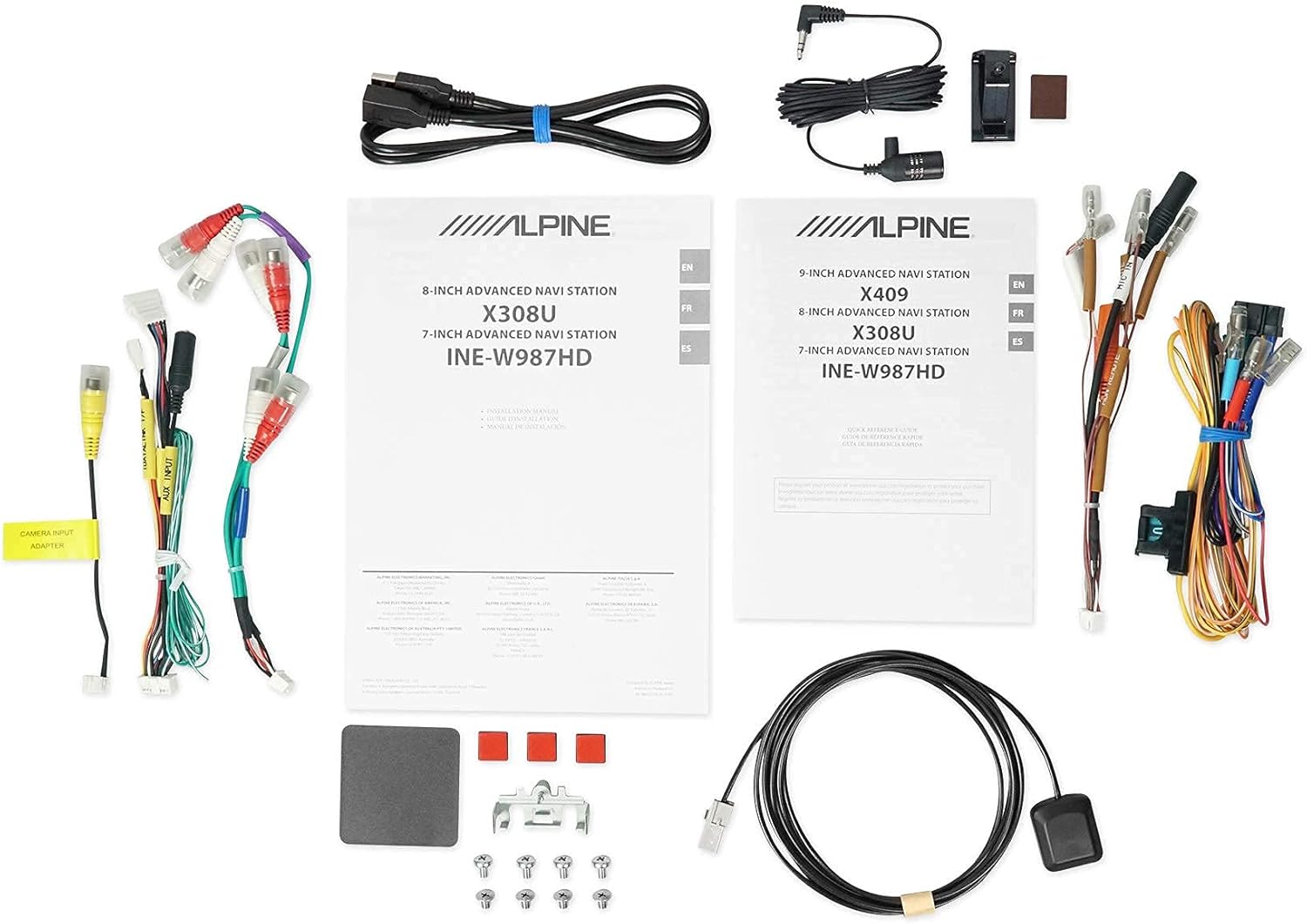
פיגור 2.5: אריינגערעכנטע קאמפאנענטן. This image displays a selection of cables and accessories that come with the Alpine X308U unit. These include various wiring harnesses, RCA cables for audio/video connections, a USB extension cable, and a GPS antenna. These components are essential for the proper installation and functionality of the receiver.
3. סעטאַפּ און ייַנמאָנטירונג
Proper installation is crucial for the optimal performance of your Alpine X308U. It is highly recommended that installation be performed by a qualified professional car audio installer.
3.1. פאַר-אינסטאַלאַציע טשעקליסט:
- Ensure all components listed in the "What's in the Box" section are present.
- טרענט אפ דעם נעגאטיווען באטעריע-טערמינאל פונעם אויטא איידער איר הייבט אן קיין עלעקטרישע ארבעט.
- Review your vehicle's specific wiring diagrams and dash disassembly instructions.
3.2. וויירינג קאַנעקשאַנז:
Connect the main wiring harness to the vehicle's power, ground, and speaker wires. Utilize the provided connectors for a secure fit. Refer to the wiring diagram included with your unit for specific color codes and pin assignments.
- מאַכט קאַנעקשאַנז: Connect the yellow wire (constant 12V), red wire (switched 12V), and black wire (ground).
- רעדנער אַוטפּוץ: Connect the speaker wires to the corresponding vehicle speakers. Ensure correct polarity.
- HDMI אַרייַנשרייַב / רעזולטאַט: Use the HDMI ports for connecting external video sources or outputting video to a rear entertainment system. Note that HDMI output functionality may be limited to specific Alpine accessories.
- וסב ינפּוט: Connect USB devices for media playback or smartphone integration (CarPlay/Android Auto).
- אַפּאַראַט אַרייַנשרייַב: פֿאַרבינדט אַ הינטערשטן-view camera to the dedicated input for enhanced safety. The unit supports up to 3 cameras with the optional KCX-C250MC Multi-camera selector.
- פאר-amp אויסגאבעס: Utilize the 6-channel pre-amp אַוטפּוץ פֿאַר קאַנעקטינג פונדרויסנדיק ampליפערז.
- גפּס אַנטענע: מאָנטירט די דזשי-פּי-עס אַנטענע אין אַ אָרט מיט אַ קלאָרן view of the sky for optimal navigation performance.
3.3. מאָונטינג די אַפּאַראַט:
Securely mount the X308U in your vehicle's dashboard using the provided mounting hardware. Ensure adequate ventilation around the unit to prevent overheating.
4. אַפּערייטינג ינסטרוקטיאָנס
4.1. באַסיק אָפּעראַציע:
- מאַכט אויף / אַוועק: Press and hold the power button (usually located on the front panel) to turn the unit on or off.
- באַנד קאָנטראָל: Adjust volume using the dedicated volume buttons or on-screen controls.
- טאָוטשסקרעען צובינד: Navigate through menus and select functions by tapping icons on the capacitive touch display. The unit supports 4-Way Swipe Action Control.
- מעניו קנעפּל: Access the main menu to switch between different sources and settings.
4.2. נאַוויגאַציע סיסטעם:
- Accessing Navigation: Tap the "Navigation" icon on the main menu.
- אריינגעבן דעסטאַניישאַנז: Use the on-screen keyboard to input addresses, points of interest, or select from recent destinations.
- מאַפּע View: וועקסל צווישן 2D און 3D מאַפּע views. Use pinch-to-zoom gestures to adjust the map scale.
- קול גיידאַנס: Follow spoken turn-by-turn directions for guidance.
4.3. Smartphone Integration (CarPlay & Android Auto):
- Connecting Your Smartphone: Connect your compatible iPhone or Android phone to the unit's USB port using a certified USB cable.
- Activating CarPlay/Android Auto: Once connected, the respective interface will automatically launch or prompt you to activate it on the screen.
- ניצן אַפּפּס: Access supported navigation, music, messaging, and communication apps directly from the unit's display.
4.4. Bluetooth Functions:
- צוזאמענשטעלן א דעווייס: Go to the Bluetooth settings menu, enable pairing mode on the X308U, and search for the unit on your smartphone. Select "Alpine X308U" and confirm the pairing code.
- הענט-פריי רופן: Make and receive calls directly through the unit's microphone and vehicle speakers.
- אַודיאָ סטרימינג: סטרים מוזיק אָן דראָטן פֿון אייַער פֿאַרבונדענעם סמאַרטפֿאָן.
4.5. אַודיאָ סעטטינגס:
- עקוואַליזער: Access the 9-band parametric EQ to fine-tune audio frequencies.
- צייט קערעקשאַן: Adjust the sound stage for optimal listening position using the 6-channel time correction feature.
- TuneIt App: For advanced audio tuning and sharing settings, download and use the Alpine TuneIt App on your smartphone.
5. וישאַלט
Regular maintenance ensures the longevity and optimal performance of your Alpine X308U.
- סקרין רייניקונג: Use a soft, lint-free cloth specifically designed for electronic screens to gently wipe the display. Do not use abrasive cleaners or solvents.
- אַלגעמיינע רייניקונג: Keep the unit free from dust and debris. Use a soft, dry cloth to wipe the exterior.
- ווייכווארג דערהייַנטיקונגען: Periodically check the Alpine website for firmware updates to ensure your unit has the latest features and bug fixes. Follow the instructions provided with the update carefully.
- ינווייראַנמענאַל טנאָים: פֿאַרמײַדט אויסשטעלן דעם אַפּאַראַט צו עקסטרעמע טעמפּעראַטורן, דירעקטע זונשײַן פֿאַר פֿאַרלענגערטע פּעריאָדן, אָדער איבערגעטריבענע פֿײַכטקייט.
6. טראָובלעשאָאָטינג
If you encounter issues with your Alpine X308U, refer to the following common troubleshooting steps before contacting support.
| פּראָבלעם | מעגלעך סיבה | לייזונג |
|---|---|---|
| קיין מאַכט/איינהייט צינדט זיך נישט אָן. | לויזער מאַכט פֿאַרבינדונג, צעבראָכענע פיוז, פּראָבלעם מיט פֿאָרמיטל באַטעריע. | Check all power wiring connections. Inspect and replace any blown fuses. Ensure vehicle battery is charged. |
| קיין געזונט פון ספּיקערז. | Speaker wires disconnected, incorrect audio settings, unit in mute mode. | Verify speaker wire connections. Check audio settings (e.g., fader/balance, EQ). Ensure unit is not muted. |
| נאַוויגאַציע אַרבעט נישט אָדער איז נישט פּינקטלעך. | GPS antenna not properly connected or obstructed, outdated map data. | זיכער מאַכן אַז די GPS אַנטענע איז זיכער פֿאַרבונדן און האָט אַ קלאָרע view of the sky. Check for available map updates. |
| די בלוטוט דעווייס וועט זיך נישט פארבינדן. | Device not in pairing mode, incorrect pairing procedure, interference. | זיכער מאַכן אַז ביידע דעוויסעס זענען אין פּערינג מאָדע. ויסמעקן פריערדיקע פּערינגז און פּרוּווט ווידער. גיי נענטער צום אַפּאַראַט. |
| טאָוטשסקרעען ניט ריספּאַנדאַבאַל. | Temporary software glitch, screen calibration needed. | Perform a soft reset (refer to manual for specific method). If issue persists, contact support. |
7. ספּעסאַפאַקיישאַנז
| שטריך | דעטאַל |
|---|---|
| מאָדעל נומער | X308U |
| פאַרשטעלן גרייס | 8 אינטשעס (21 ס״מ דיאַגאָנאַל) |
| ווייַז טיפּ | WVGA High-Resolution Capacitive Touch Display |
| מאַקסימום מאַכט רעזולטאַט | 50 Watts x 4 channels |
| CTA-2006 Power Rating | 18 Watts x 4 channels |
| פאר-amp אַוטפּוץ | 3 (4-Volt) |
| קאַנעקטיוויטי טעכנאָלאָגיע | בלועטאָאָטה, וסב, הדמי |
| מאַפּע טיפּ | Satellite, North America (Built-in 3D & 2D Navigation) |
| פּראָדוקט דימענשאַנז | 12 X 12 X 12 אינטשעס |
| פּונקט וואָג | 6.4 פונט |
| אַרייַנגערעכנט קאַמפּאָונאַנץ | HDMI input, USB input, composite A/V input, rear-view camera input, HDMI output, 6-channel preamp outputs, USB source |
8. וואָראַנטי און שטיצן
This product is covered by a manufacturer's warranty. Please refer to the warranty card included with your purchase for specific terms and conditions, including warranty period and coverage details.
קונה שטיצן:
For technical assistance, troubleshooting beyond this manual, or warranty claims, please contact Alpine customer support. Visit the official Alpine webזייטל פֿאַר די מערסט אַרויף-צו-דאַטע קאָנטאַקט אינפֿאָרמאַציע און שטיצע רעסורסן.
Note: Keep your proof of purchase for warranty validation.