
1. הקדמה
This manual provides instructions for the safe operation and maintenance of your Summer Infant Lookout 5-Inch Color Video Baby Monitor. Please read all instructions carefully before use and retain this manual for future reference. This monitor is designed to assist you in monitoring your baby, but it is not a substitute for direct adult supervision.
2. זיכערקייַט אינפֿאָרמאַציע
- שטראַנגולאַטיאָן ריזיקירן: Children can become entangled in cords. Keep the camera unit and adapter cords out of reach of children (at least 3 feet / 1 meter away). Never place the camera or cords within the crib or playpen.
- טשאָקינג ריזיקירן: דער פּראָדוקט כּולל קליין טיילן. האַלטן אויס פון דערגרייכן פון קינדער.
- HEAT HAZARD: Do not place the monitor or camera near heat sources such as radiators, heat registers, stoves, or other appliances that produce heat.
- וואַסער און נעץ: Do not use the product near water, such as a bathtub, sink, or swimming pool.
- POWER ADAPTERS: Use only the AC power adapters provided. Using other adapters may damage the unit.
- באַטערי זיכערהייט: The monitor unit contains a rechargeable battery. Do not attempt to replace the battery yourself. Contact customer support for battery replacement.
3. פּעקל אינהאַלט
באַשטעטיקן אַז אַלע קאָמפּאָנענטן זענען פאַראַן אין דיין פּעקל:
- Parent Unit (Monitor) with 5-inch color screen
- בעיבי אַפּאַראַט (אַפּאַראַט)
- Two AC Power Adapters
- PrestoMount (for camera wall mounting)
4. פּראָדוקט איבערview
4.1 פאָטער אַפּאַראַט (מאָניטאָר)
The parent unit features a 5-inch color LCD screen for clear viewing of your baby. It includes controls for digital zoom, two-way talk, and menu navigation. A temperature display is also integrated.

Image: The Summer Infant Lookout 5-inch color video baby monitor parent unit, displaying a baby in a crib and showing the temperature and signal strength.
4.2 בעיבי אַפּאַראַט (קאַמעראַ)
The baby unit includes a camera lens, infrared LEDs for night vision, a microphone for audio detection, and a speaker for two-way talk. It also has a sync button for pairing and a power input port.

Image: The Summer Infant Lookout baby monitor camera unit, shown placed on a flat surface.

Image: The Summer Infant Lookout baby monitor camera unit, highlighting its two-way talk capability with an icon.
5. סעטאַפּ
5.1 קאַמעראַ פּלאַצירונג
Position the camera unit in a location that provides a clear view of your baby. Ensure the camera and its cord are at least 3 feet (1 meter) away from the crib or playpen to prevent strangulation hazards.
The camera can be placed on a flat surface or mounted to a wall using the included PrestoMount.
Using the PrestoMount for Wall Installation:
- Clean the wall surface with rubbing alcohol. Do not use household cleaners or water.
- Remove the protective backing from the PrestoMount adhesive.
- Press the PrestoMount firmly onto the desired wall location for 30 seconds.
- Wait 24 hours before attaching the camera to the wall mount to ensure proper adhesion.
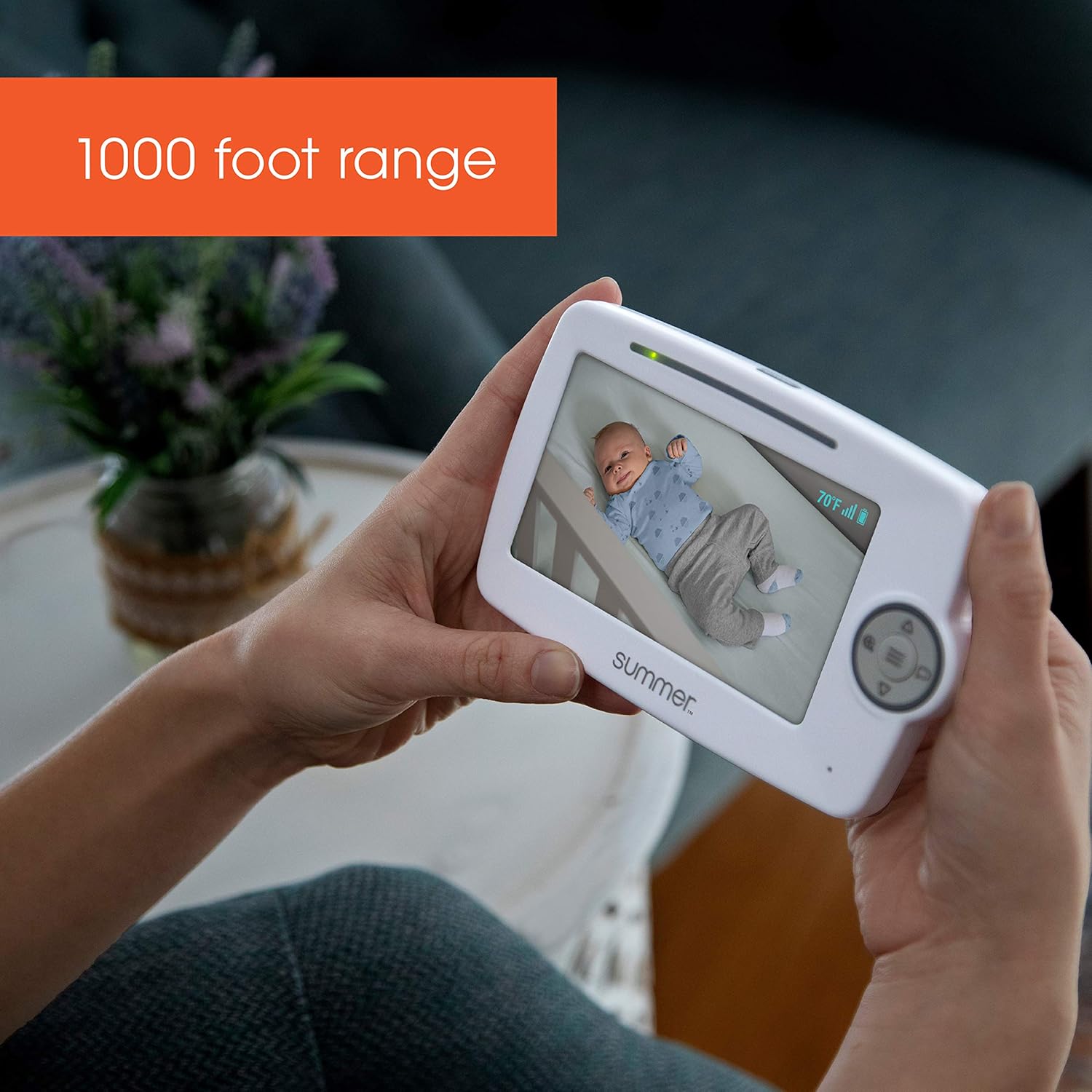
Image: A graphic illustrating the four steps for wall mount installation using the PrestoMount adhesive.

Image: A comparison showing a traditional screw and wall anchor mount (crossed out) versus the no-hole PrestoMount, emphasizing no drilling is required.

Image: A hand attaching the baby monitor camera unit to the installed wall mount, indicated by a dashed arrow.
5.2 מאַכט אויף
- Connect one AC power adapter to the camera unit and plug it into a standard electrical outlet.
- Connect the second AC power adapter to the parent unit and plug it into a standard electrical outlet. The parent unit has a rechargeable battery for portable use, but it should be charged before first use.
- Press and hold the Power button on the parent unit until the screen turns on.
5.3 Pairing (If Necessary)
The camera and parent unit are pre-paired at the factory. If you need to re-pair or add additional cameras (up to 4 total, sold separately), follow these steps:
- Ensure both the parent unit and camera are powered on.
- On the parent unit, navigate to the 'Add Camera' option in the menu.
- Press the 'Sync' button located on the back of the camera unit. The parent unit should display the camera's video feed once successfully paired.
6. אַפּערייטינג ינסטרוקטיאָנס
6.1 Viewדיין בעיבי
Once powered on and paired, the parent unit will automatically display the video feed from the camera. If multiple cameras are connected, you can switch between them using the camera selection button on the parent unit.

Image: A parent holding the Summer Infant Lookout baby monitor, which displays a clear image of a baby sleeping in a crib.

Image: A person holding the Summer Infant Lookout baby monitor, showing a baby in a crib on its screen, demonstrating typical use in a home environment.
6.2 צוויי-וועגיקע שמועס
To speak to your baby, press and hold the Talk button on the parent unit. Release the button to hear your baby's sounds.
6.3 דיגיטאַל פארגרעסער
Use the zoom button on the parent unit to digitally zoom in on your baby for a closer view. Press the button again to zoom out.

Image: A split image demonstrating the digital zoom feature, showing a wide view of a baby in a crib on the left and a zoomed-in view of the baby on the right.
6.4 Automatic Night Vision
The camera is equipped with infrared LEDs that automatically activate in low-light conditions, providing a clear black and white image of your baby in the dark.
6.5 צימער טעמפּעראַטור אַרויסווייַזונג
The parent unit displays the current room temperature detected by the camera unit, helping you ensure a comfortable environment for your baby.
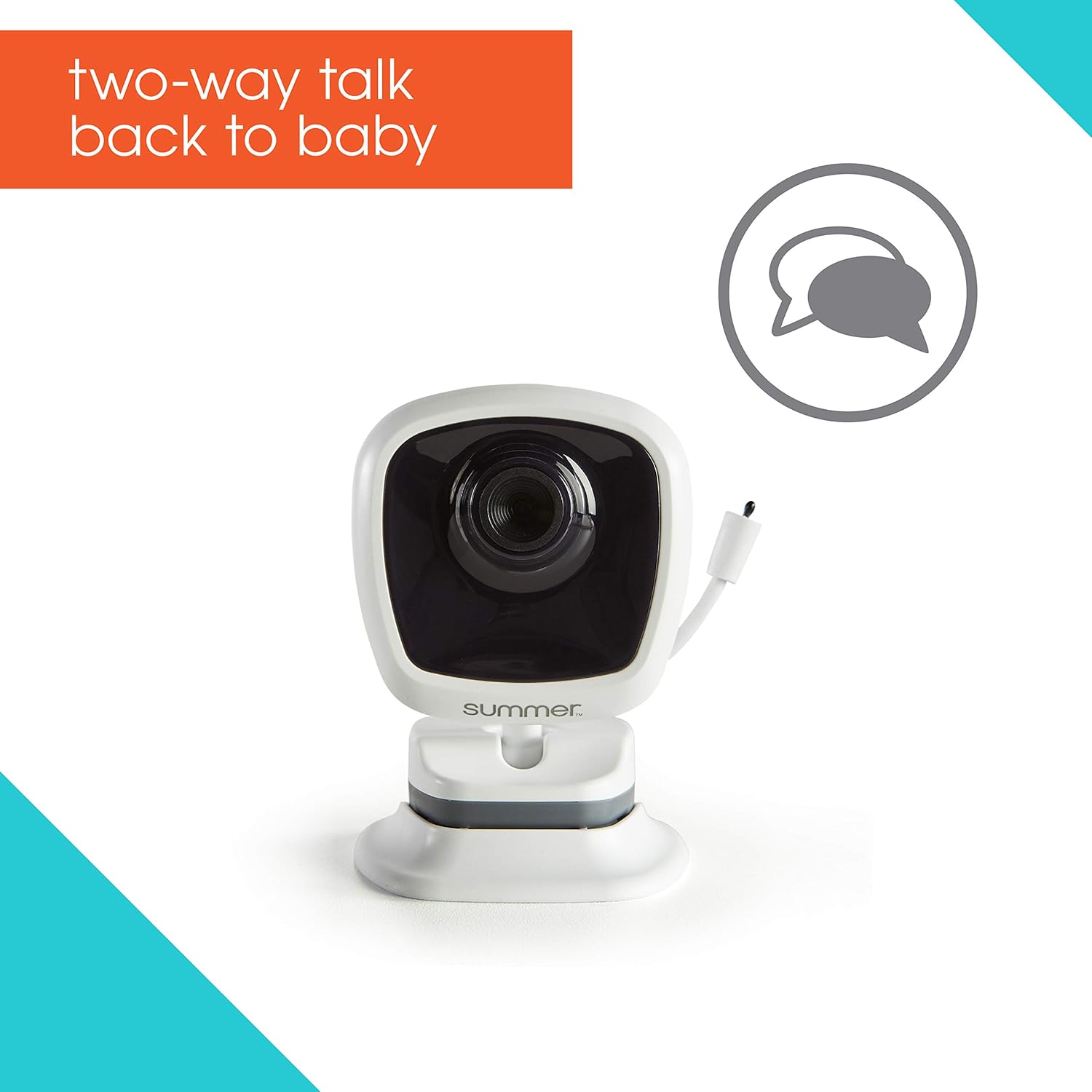
Image: A close-up of the Summer Infant Lookout baby monitor screen, clearly showing the room temperature display at 70°F.
6.6 וויירלעסס ראַנגע
The monitor offers a wireless range of up to 1,000 feet (300 meters) in open areas. Environmental factors such as walls, floors, and other electronic devices may reduce the effective range.

Image: A person holding the Summer Infant Lookout baby monitor, with text indicating its 1000-foot range capability.
6.7 אויסברייטערבארע סיסטעם
The system supports up to 4 cameras. Additional cameras are sold separately. The parent unit can auto-scan video and audio between multiple cameras.
7. וישאַלט
7.1 רייניקונג
Wipe the monitor and camera units with a dry, soft cloth. Do not use cleaning sprays or liquid cleaners. Ensure the units are unplugged before cleaning.
7.2 באַטערי קער
The parent unit contains a rechargeable battery. For optimal battery life, fully charge the unit before first use. Avoid completely draining the battery frequently. If the unit will not be used for an extended period, charge it periodically to maintain battery health.
8. טראָובלעשאָאָטינג
- קיין בילד/קלאַנג: Ensure both units are powered on and connected to their respective power adapters. Check that the camera and parent unit are within range. Re-pair the units if necessary (refer to Section 5.3).
- שלעכטע בילד קוואַליטעט: Adjust the camera's position for a clearer view. Ensure there are no obstructions between the camera and parent unit. Reduce interference from other electronic devices.
- קורץ באַטאַרייע לעבן: Ensure the parent unit is fully charged. Battery performance may decrease over time. Keep the parent unit plugged in when not in portable use.
- Feedback/Static Noise: Move the parent unit further away from the camera unit. Ensure no other electronic devices are causing interference.
- Camera Disconnects Randomly: Check the wireless range. Ensure the camera's power adapter is securely connected. Try re-pairing the units.
9. ספּעסאַפאַקיישאַנז
| שטריך | באַשרייַבונג |
|---|---|
| מאָדעל נומער | 36134 |
| פאַרשטעלן גרייס | 5-אינטש קאָליר על-סי-די |
| קאַנעקטיוויטי טעכנאָלאָגיע | Wireless (Wi-Fi Protocol) |
| מאַכט מקור | Battery Powered (Parent Unit), AC Adapter (Camera) |
| באַטעריז פארלאנגט | 4 AAA batteries (included for parent unit, rechargeable) |
| נאַכט זעאונג | Automatic Infrared Night Color |
| נאַכט וויזשאַן ראַנגע | אַרויף צו 1000 פֿיס |
| דיגיטאַל פארגרעסער | יא |
| צוויי-וועג רעדן | יא |
| רום טעמפּעראַטורע ווייַז | יא |
| יקספּאַנדאַבאַל | אַרויף צו 4 קאַמעראַס |
| פּראָדוקט דימענשאַנז | 29.85 X 20.32 X 13.34 סענטימעטער |
| פּונקט וואָג | 734.82 ג (1.62 פונט) |
10. וואָראַנטי אינפֿאָרמאַציע
This Summer Infant product is covered by a 1-יאָר לימיטעד פאַבריקאַנט ס וואָראַנטי from the date of purchase. This warranty covers defects in materials and workmanship under normal use. For specific terms and conditions, please refer to the warranty card included with your product or contact customer support.
11. קונה שטיצן
If you have any questions, require assistance, or need to claim warranty service, please contact Summer Infant customer support. Refer to the contact information provided in your product packaging or visit the official Summer Infant webפּלאַץ פֿאַר שטיצן דעטאַילס.