
1. פּראָדוקט איבערview
The OOYCYOO 100 Amp MPPT Solar Charge Controller, Model KP60 100, is designed for efficient management of solar power systems. It automatically identifies 12V or 24V battery systems and is compatible with various battery types, including AGM, Sealed, Gel, Flooded, and Lithium. This controller features advanced Maximum Power Point Tracking (MPPT) technology to maximize energy harvest from solar panels, ensuring optimal charging for your battery bank.
Key features include a backlit LCD display for real-time monitoring, enhanced safety protections, and a high DC/DC transfer efficiency of up to 98.7%.

פיגורע 1: פראָנט view of the OOYCYOO 100 Amp MPPT Solar Charge Controller, showing the LCD display and connection terminals.
2. זיכערקייַט אינסטרוקציעס
ביטע ליינט אלע אינסטרוקציעס און ווארענונגען קערפול איידער די אינסטאלאציע און באניץ. נישט נאכפאלגן די אינסטרוקציעס קען רעזולטירן אין עלעקטרישע שאק, פייער, אדער ערנסטע שאדן.
- זיכער מאַכן אַז אַלע וויירינג איז ריכטיק פּאָלאַריזירט און זיכער פארבונדן צו פאַרמייַדן שעדיקן צו די קאָנטראָללער און פארבונדענע דעוויסעס.
- Always disconnect the solar panel array and battery before installing or adjusting the controller.
- אינסטאַלירט דעם קאָנטראָללער אין אַ גוט-ווענטילירטן אָרט, אַוועק פון ברענענדיקע מאַטעריאַלן און דירעקטער זונשייַן.
- נעמט נישט אוועק אדער פרובירט נישט צו פאררעכטן דעם קאנטראלער. ווענדט זיך צו קוואַליפֿיצירטע פּערסאָנעל פֿאַר סערוויס.
- ניצט פּאַסיקע קרייַז ברעאַקערס אָדער פיוזיז פֿאַר אַלע קאַנעקשאַנז צו באַשיצן קעגן אָוווערשטראָם.
- טראָגט פּאַסיקע פּערזענלעכע שוץ-עקוויפּמענט, אַרייַנגערעכנט אויג-שוץ און איזאָלירטע הענטשקעס, בעת דער אינסטאַלאַציע.
3. פּראָדוקט קאָמפּאָנענטן און פֿאַרבינדונגען
The controller features clearly labeled terminals for solar panel input, battery connection, and load output. It also includes a remote temperature sensor port and USB charging ports.

פיגורע 2: דעטאַילעד view of the controller's LCD display, 5S Reset button, Solar Panel Terminal, Battery Terminal, Load Terminal, USB 5V2A ports, Remote Temp Sensor port, and RS485 Communication Port.
פּעקל אינהאַלט:
- 1 x OOYCYOO 100A MPPT Solar Charge Controller (Model K2500W)
- קסנומקס רענטגענ טעמפּעראַטור סענסאָר
- 1 x באַניצער מאַנואַל (ענגליש)
4. טעכניש ספּעסאַפאַקיישאַנז
The following table outlines the technical specifications for the OOYCYOO 100 Amp MPPT Solar Charge Controller (Model KP60 100).
| פּאַראַמעטער | באַשרייַבונג |
|---|---|
| רייטאַד אָפּצאָל קראַנט | 100 א |
| סיסטעם נאָמינאַל וואָלtage | 12V/24VDC Auto Identifying |
| 12V System Max. PV Input Power | 1300 וו |
| 24V System Max. PV Input Power | 2600 וו |
| מאַקס. PV Open Circuit Voltage (וואָק) | 100VDC |
| באַטערי וואָלtagE ראַנגע | קסנומקסוו ~ קסנומקסוו |
| Power Terminal Wire Gauge | 10 AWG |
| דימענסיעס (L X W X H) | 12 X 7.8 X 3.2 אינטשעס (30.5 X 19.8 X 8.1 סענטימעטער) |
| וואָג | 8.84 פונט (4 קג) |
| ווייַז טיפּ | לקד |
| אַפּערייטינג טעמפּעראַטור | אַרויף צו 45°C (113°F) |
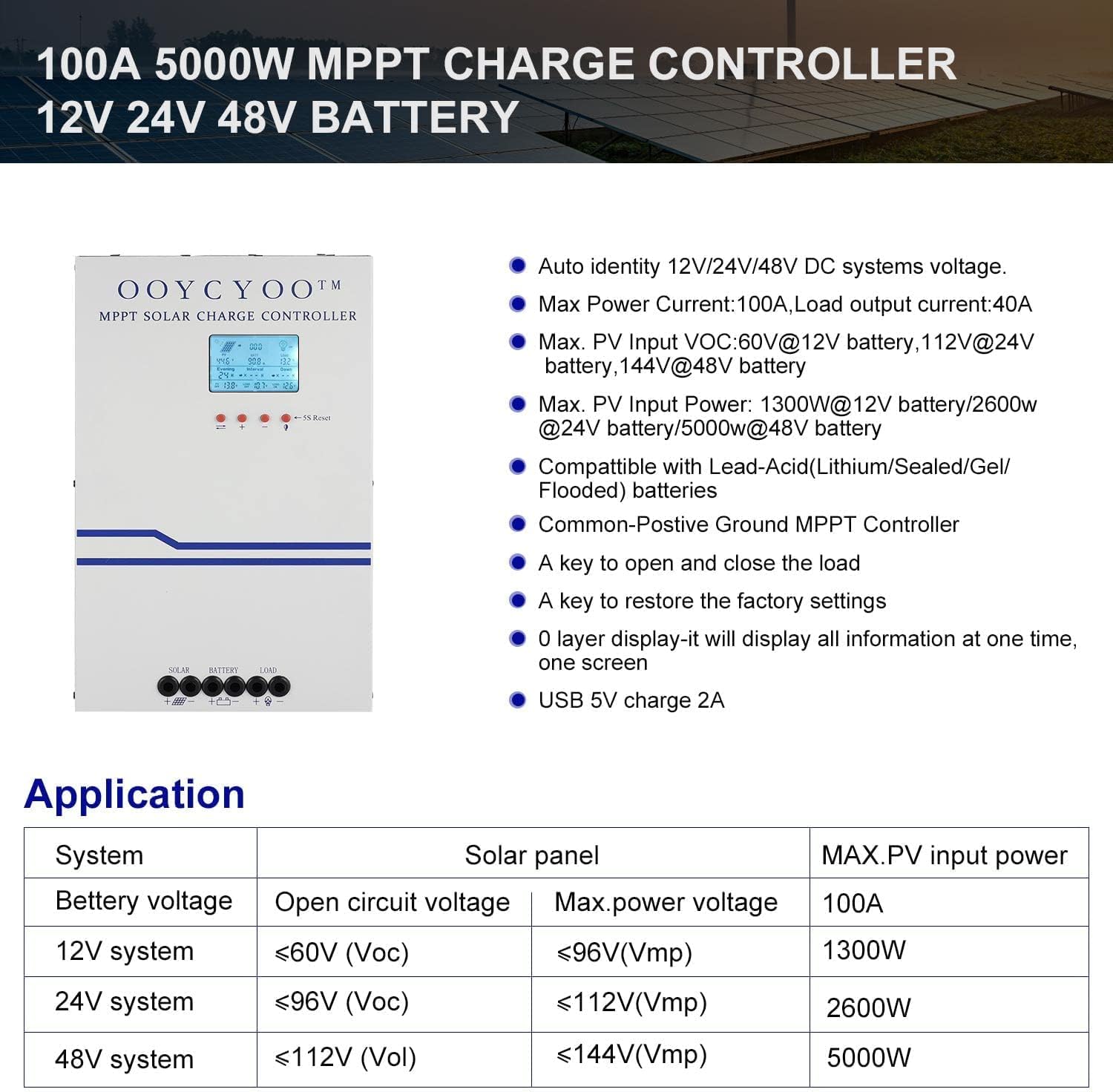
Figure 3: Application table detailing maximum PV input power and voltage for 12V, 24V, and 48V systems.
5. ינסטאַללאַטיאָן גייד
Proper installation is crucial for the safe and efficient operation of your solar charge controller. Follow these steps carefully:
5.1 מאַונטינג די קאָנטראָללער
- קלייבט אויס א טרוקענע, גוט-ווענטילירטע לאקאציע, באשיצט פון דירעקטע זונשייַן, הויכע טעמפּעראַטורן און פייכטקייט.
- Ensure sufficient clearance around the controller for proper airflow, especially around the cooling vents.
- מאָנטירט דעם קאָנטראָללער ווערטיקאַל אויף אַ ניט-ברענענדיקער ייבערפלאַך מיט פּאַסיקע פאַסטנערס.
5.2 וויירינג קאַנעקשאַנז
Connect the components in the following order: Battery > Solar Panel > Load. Always ensure correct polarity.
- פאַרבינדן די באַטאַרייע: Connect the battery cables to the battery terminals on the controller. Ensure the positive (+) and negative (-) terminals are correctly matched. The controller will automatically detect the battery voltagE (12 וו אָדער 24 וו).
- פאַרבינדן די זונ פּאַנעל: Connect the solar panel cables to the PV input terminals on the controller. Verify correct polarity. Ensure the open circuit voltage (Voc) of your solar array does not exceed 100VDC.
- פֿאַרבינדן די לאַסט: Connect your DC load to the load output terminals. Ensure the load current does not exceed the controller's rated load current.
- Connect Temperature Sensor: Plug the remote temperature sensor into its designated port. This sensor helps the controller optimize charging based on battery temperature.
The controller is compatible with various battery types:

Figure 4: The controller supports AGM, Sealed, Gel, Flooded, and Lithium-Iron phosphate batteries for 12V/24V/48V systems.
6. אָפּעראַציע גייד
Once installed, the controller will begin operation. The LCD display provides real-time system status and allows for configuration.
6.1 לקד ווייַז
The backlit LCD display shows various parameters such as battery voltage, טשאַרדזשינג קראַנט, זונ פּאַנעל באַנדtage, load status, and accumulated energy (KWH). Use the buttons below the display to navigate through the different screens and access settings.
6.2 יקערדיק סעטטינגס
The controller allows users to set parameters for different battery types (Lithium, LiFePO4, Li(NiCoMn)O2, Flooded, Sealed, Gel). Refer to the on-screen menu for specific adjustments to absorption voltagE, פלאָוט וואָלtagE, און נידעריק וואָלtage disconnect settings. A load timer function is also available for controlling DC loads.
6.3 קילער פען אפעראציע
The built-in cooling fan activates automatically when the internal temperature exceeds 45°C (113°F) and turns off when the temperature drops below 40°C (104°F). This mechanism ensures optimal performance and extends the lifespan of the controller.
7. וישאַלט
Regular maintenance helps ensure the longevity and optimal performance of your solar charge controller.
- רייניקונג: Periodically clean the controller's exterior with a dry cloth. Ensure cooling vents are free from dust and debris.
- פֿאַרבינדונגען: יערליך קאנטראלירט אלע דראט פארבינדונגען אויף פעסטקייט און קאראזיע. לויזע פארבינדונגען קענען פאראורזאכן איבערהיצונג און שאדן.
- סוויווע: Verify that the installation environment remains dry and well-ventilated.
8. טראָובלעשאָאָטינג
The controller incorporates multiple protection functions to safeguard your system. If an issue arises, check the LCD display for error codes or indicators.
8.1 שוץ פאַנגקשאַנז
- PV Over Current/Power Protection
- PV Short Circuit Protection
- פּוו פאַרקערט פּאָולעראַטי פּראַטעקשאַן
- Night Reverse Charging Protection
- באַטערי פאַרקערט פּאָולעראַטי פּראַטעקשאַן
- באַטערי איבער וואָלtagE פּראַטעקשאַן
- באַטערי איבער אָפּזאָגן פּראַטעקשאַן
- Battery Overheating, Controller Overheating Protection
- Lithium Battery Low Temperature Protection
- מאַסע שאָרט קרייַז פּראַטעקשאַן
- מאַסע אָווערלאָאַד פּראַטעקשאַן
- TVS High Voltage טראַנסיענץ פּראַטעקשאַן
8.2 פּראָסט ישוז
- קיין טשאַרדזשינג: Check solar panel connections, ensure sufficient sunlight, and verify battery voltage איז אין דעם אפעראציע ראנגע.
- לאָדן אַרבעט נישט: Check load connections, ensure battery voltage איז העכער די נידעריק וואָלtage disconnect setting, and verify load timer settings.
- איבערהייצונג: Ensure adequate ventilation around the controller and that cooling vents are clear.
- פאַלש חלקtagE רידינגז: Verify all connections are secure and the temperature sensor is properly installed.
If issues persist after checking these points, please contact customer support.
9. וואָראַנטי און שטיצן
The OOYCYOO 100 Amp MPPT Solar Charge Controller is a professional product. For any questions or technical assistance, please contact us directly via email. We are committed to providing prompt support and ensuring your satisfaction.
ביטע זעט אייער קויף דאקומענטאציע פאר ספעציפישע גאַראַנטיע טערמינען און באדינגונגען.