
1. הקדמה
This manual provides detailed instructions for the safe and proper installation, operation, and maintenance of your Cabletech UCH0198-2 Full Motion TV Wall Mount. Please read this manual thoroughly before installation and retain it for future reference. This wall mount is designed to securely hold flat-panel or curved LED televisions ranging from 32 to 55 inches, with a maximum weight capacity of 35 kg (77 lbs).
2. וויכטיק סאַפעטי אינפֿאָרמאַציע
- וואָג קאַפּאַציטעט: נישט איבערשטייגן די מאקסימום וואָג קאַפּאַציטעט פון 35 ק"ג (77 פונט). איבערשטייגן דעם לימיט קען רעזולטירן אין ערנסטע שאָדן אָדער שאָדן צו פאַרמעגן.
- פאַרשטעלן גרייס: This mount is designed for TVs between 32 and 55 inches. While some larger TVs may fit VESA patterns, ensure they do not exceed the weight limit.
- VESA קאַמפּאַטאַבילאַטי: Verify your TV's VESA mounting pattern is compatible with the mount's supported patterns (75x75, 100x100, 100x150, 150x100, 150x150, 200x100, 100x200, 300x200, 300x300, 400x200, 400x300, 400x400).
- וואַנט סטרוקטור: Ensure the mounting surface (wall) can safely support the combined weight of the mount and your television. For wood stud installation, ensure studs are solid. For concrete or brick walls, use appropriate anchors (not always included). Consult a professional installer if unsure about your wall's integrity.
- מכשירים: Use appropriate tools for installation. Always wear safety glasses.
- פֿאַרזאַמלונג: Do not attempt to install this product alone if the TV is heavy. Two or more people are recommended for safe installation.
- קינדער: האַלט קינדער אַוועק בעת דער אינסטאַלאַציע. קליינע טיילן קענען זיין אַ דערשטיקונגס-געפאַר.
- שעדיקן: Do not install if any parts are missing or damaged. Contact customer support for replacement parts.
3. פּעקל אינהאַלט
Please check to ensure all components are present and undamaged before beginning installation. If any parts are missing or damaged, do not proceed with installation and contact customer support.
- וואַנט פּלאַטע פֿאַרזאַמלונג
- טעלעוויזיע קלאַמער אָרעמס (2x)
- מאָנטירונג האַרדווער קיט (פאַרשידענע שרויפן, וואַשערס, ספּייסערז פֿאַר טעלעוויזיע און וואַנט)
- Wall Anchors (for concrete/brick, if included)
- מדרגה
- ינסטראַקשאַנז מאַנואַל

פיגורע 1: פראָנט view of the wall mount components.
4. פּראָדוקט ספּעסאַפאַקיישאַנז
| מאָדעל נומער | UCH0198-2 |
| סאָרט | קאַבלעטעק |
| קאָמפּאַטיבלע פאַרשטעלן סיזעס | 32" - 55" |
| מאַקסימום מאַסע קאַפּאַציטעט | 35 קג (77 לבס) |
| VESA קאַמפּאַטאַבילאַטי | 75x75, 100x100, 100x150, 150x100, 150x150, 200x100, 100x200, 300x200, 300x300, 400x200, 400x300, 400x400 |
| טילט ווינקל | 0° צו -20° |
| Horizontal Level Adjustment | +3° צו -3° |
| Wall Distance (Extended) | 78 mm - 400 mm (3.07" - 15.75") |
| מאַטעריאַל | מעטאַל |
| קאָליר | שוואַרץ |
5. סעטאַפּ און ייַנמאָנטירונג
Before you begin, ensure you have all necessary tools and have read the safety information. Two people are recommended for installation.
5.1 נויטיקע מכשירים (נישט אַרייַנגערעכנט)
- בלייַער
- שטיפֿ־פֿינדער (פֿאַר האָלץ־שטיפֿ־ווענט)
- Drill with appropriate drill bits (e.g., 10mm for concrete, 5.5mm for wood studs)
- סאָקעט שליסל אָדער אַדזשאַסטאַבאַל שליסל
- פיליפּס קאָפּ שרויפנ - ציער
- מעאַסורינג טייפּ
- זיכערקייַט ברילן
5.2 Attaching TV Brackets to Your TV
- לייגט פֿאָרזיכטיק אייער טעלעוויזיע מיטן פּנים אַראָפּ אויף אַ ווייכער, ריינער ייבערפֿלאַך כּדי צו פֿאַרמייַדן שאָדן צום עקראַן.
- ידענטיפיצירן די VESA מאַונטינג האָלעס אויף די צוריק פון דיין טעלעוויזיע.
- Select the correct diameter and length screws from the hardware kit that fit your TV's mounting holes. Use washers and spacers if necessary to ensure the screws do not penetrate too deeply or leave the bracket loose.
- Attach the two vertical TV bracket arms to the back of your TV using the selected screws. Ensure the hooks on the bracket arms are facing upwards (or towards the top of the TV) and are level with each other. Do not overtighten.
5.3 Mounting the Wall Plate to the Wall
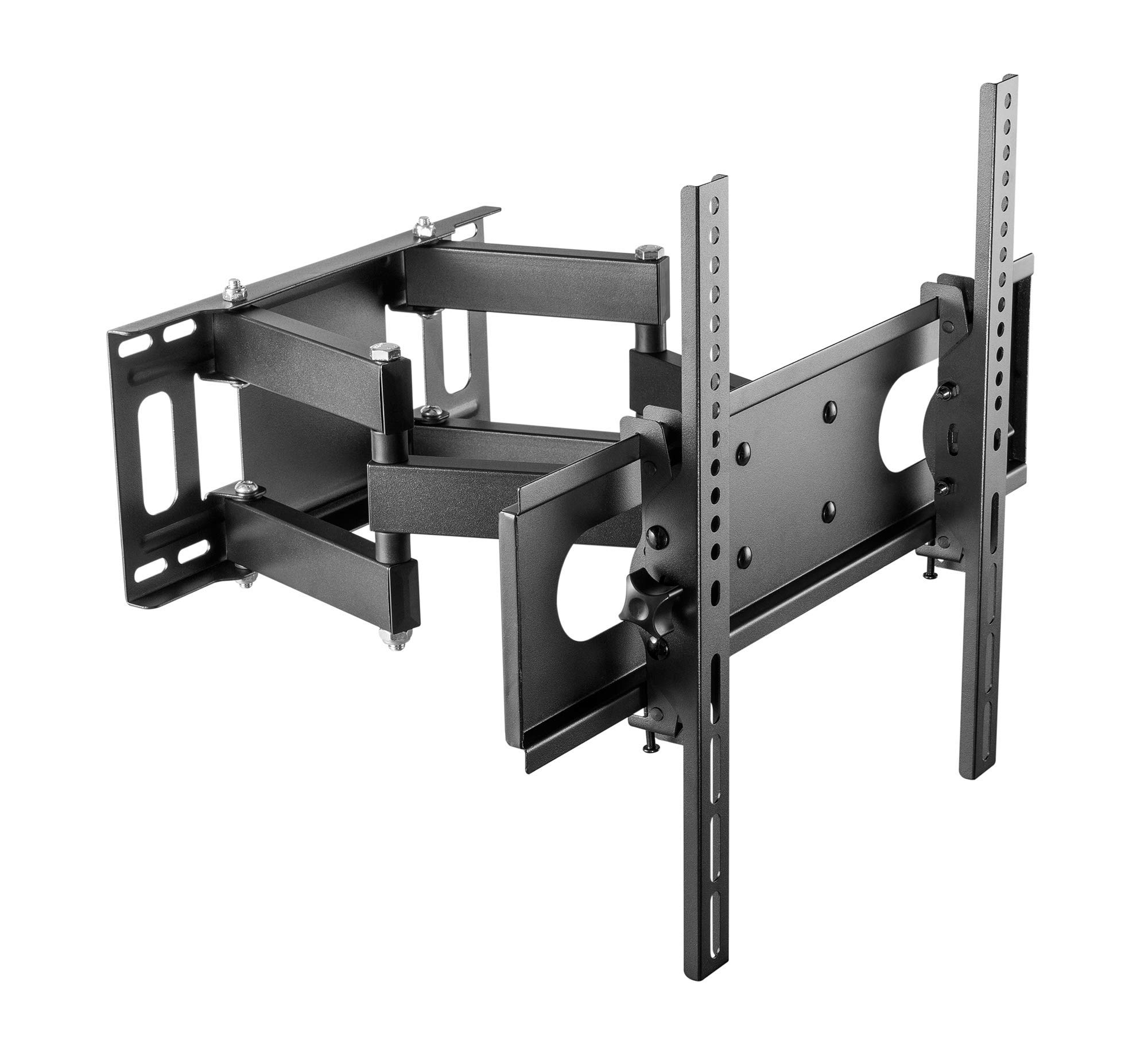
Figure 2: Cabletech UCH0198-2 wall mount in extended position.
- באַשטימען מאַונטינג אָרט: Decide on the desired height for your TV. Mark the center point on the wall.
- Locate Studs (for wood stud walls): Use a stud finder to locate the edges and center of two adjacent wood studs. The wall plate must be mounted to at least two studs for secure installation.
- פאזיציע וואנט טעלער: Hold the wall plate against the wall at your desired height and center. Use a level to ensure it is perfectly horizontal. Mark the drilling locations through the holes on the wall plate.
- בויער פּילאָט האָלעס:
- פֿאַר האָלץ סטאַדז: Drill pilot holes using a 5.5mm drill bit to a depth of approximately 60mm.
- פֿאַר Solid Concrete/Brick Walls: Drill pilot holes using a 10mm drill bit to a depth of approximately 60mm. Insert the concrete anchors into the drilled holes until they are flush with the wall surface.
- צוטשעפּען וואַנט פּלאַטע: גלייכט אויס די וואַנט פּלאַטע מיט די געבאָרטע לעכער. באַפעסטיקט עס צו דער וואַנט מיט די לעג באָלץ און וואַשערס וואָס זענען צוגעשטעלט אין די האַרדווער קיט. פֿעסט אָנציִען אַלע באָלץ, אָבער נישט צו שטאַרק אָנציִען.
5.4 אויפהענגען דעם טעלעוויזאר
- With assistance, carefully lift the TV (with brackets attached) and hook the TV bracket arms onto the wall plate.
- Ensure the TV is securely seated on the wall plate. The safety screws or locking mechanisms on the bottom of the TV bracket arms should be engaged to prevent accidental dislodging.
- פּרוביר פֿאָרזיכטיק די סטאַביליטעט פֿון דעם מאָנטירטן טעלעוויזאָר איידער איר עס אַרויסלאָזט.asinג עס גאָר.
6. אפערירן אינסטרוקציעס (אַדזשאַסטמאַנץ)
Your Cabletech UCH0198-2 mount offers various adjustments for optimal viewing.
6.1 Extending and Retracting the TV

Figure 3: Wall mount extended, showing adjustable distance from wall.
- Gently pull or push the TV to extend it away from the wall (up to 400mm) or retract it closer to the wall (minimum 78mm).
- Ensure cables are not pinched or strained during movement.
6.2 Tilting the TV
- The mount allows for a tilt range of 0° to -20° (downwards).
- Loosen the tilt adjustment knobs or bolts on the TV bracket arms.
- Adjust the TV to the desired tilt angle.
- Retighten the knobs/bolts to secure the TV in position.
6.3 Swiveling the TV (Horizontal Adjustment)
- The articulating arm allows you to swivel the TV horizontally to achieve various viewינג אַנגלעס.
- Gently push or pull the side of the TV to rotate it left or right.
- The mount also features a small horizontal level adjustment of +3° to -3° to correct for minor leveling issues after installation. This is typically adjusted by loosening specific bolts on the TV plate, leveling, and retightening. Refer to the detailed diagrams for specific adjustment points.
6.4 קאַבלע מאַנאַגעמענט
- The mount includes a cable winder or clips to help organize and route cables along the articulating arm.
- Secure cables to prevent them from dangling or getting caught during TV movement. Ensure enough slack is provided for full range of motion.
7. וישאַלט
- רייניקונג: ווישט אָפּ דעם מאָונט מיט אַ ווייכן, טרוקענעם שטאָף. ניצט נישט קיין שרײַבנדיקע רייניגער אָדער סאָלווענטן.
- פּעריאָדיש טשעקס: Periodically check all screws and bolts to ensure they remain tight and secure. Retighten if necessary.
- באַוועגונג: If the mount's movement becomes stiff, a small amount of silicone-based lubricant can be applied to the pivot points, avoiding contact with painted surfaces.
8. טראָובלעשאָאָטינג
| פּראָבלעם | מעגלעך סיבה | לייזונג |
|---|---|---|
| דער טעלעוויזאר איז נישט גלייך נאך דער אינסטאלאציע. | Wall plate not perfectly level, or minor adjustment needed. | Use the horizontal level adjustment feature (+3° to -3°). Loosen the specific bolts on the TV plate, adjust with a level, and retighten. |
| דער באַרג פילט זיך לויז אָדער נישט סטאַביל. | Mounting bolts not fully tightened, or wall structure is inadequate. | Check and retighten all wall mounting bolts. If the wall structure is compromised, consult a professional. Ensure TV safety screws are engaged. |
| TV cannot tilt or swivel smoothly. | Adjustment bolts are too tight, or pivot points need lubrication. | Loosen tilt adjustment knobs/bolts slightly. Apply a small amount of silicone-based lubricant to pivot points if necessary. |
| Cables are getting pinched. | Insufficient slack or improper cable routing. | Reroute cables using the integrated cable management. Ensure enough slack for full range of motion. |
9. גאַראַנטיע און קונה שטיצע
This Cabletech UCH0198-2 TV Wall Mount comes with a manufacturer's warranty of 2 יאָר פון די דאַטע פון קויפן.
For warranty claims, technical assistance, or if you have any questions regarding the installation or operation of your product, please contact Cabletech customer support through your retailer or the official Cabletech website. Please have your model number (UCH0198-2) and proof of purchase ready when contacting support.