
1. הקדמה
This manual provides essential information for the safe operation, maintenance, and troubleshooting of your Kobalt Hybrid 24-Volt Max Jobsite Fan. Please read this manual thoroughly before operating the fan and retain it for future reference. This fan is designed for air circulation in various indoor and outdoor environments, offering both battery-powered portability and corded operation.
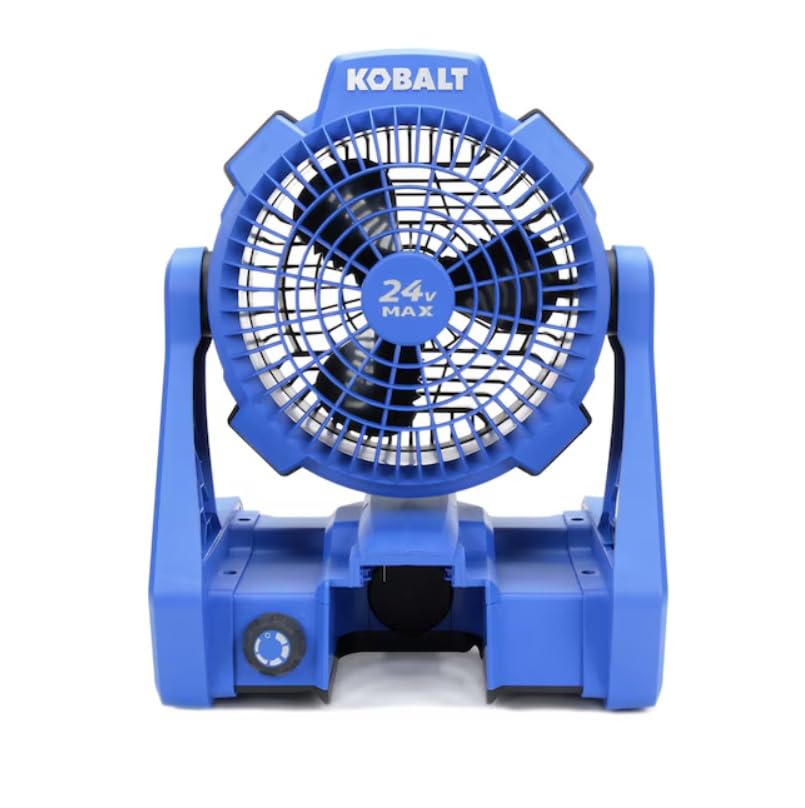
Figure 1: Kobalt Hybrid 24-Volt Max Jobsite Fan. This image displays the fan in its upright position, highlighting its robust blue and black casing and the 24V MAX branding on the fan grille.
2. זיכערקייַט אינפֿאָרמאַציע
שטענדיק אָבסערווירן גרונטלעכע זיכערהייט מיטלען צו רעדוצירן דעם ריזיקאָ פון פייער, עלעקטרישן קלאַפּ און פערזענלעכע שאָדן.
- דו זאלסט נישט אַרבעטן די פאָכער מיט אַ דאַמידזשד שנור אָדער צאַפּן.
- Avoid placing hands or objects near the fan blades during operation.
- זיכער מאַכן אַז דער ווענטילאַטאָר איז געשטעלט אויף אַ סטאַבילן, גלייכן ייבערפלאַך צו פאַרמייַדן עס צו איבערקערן.
- Keep the fan away from water or wet environments when using AC power.
- Use only Kobalt 24-Volt Max batteries and chargers with this product.
- אָפּשטעקן די מאַכט איידער איר רייניקן אָדער דורכפירן קיין וישאַלט.
3. פּעקל אינהאַלט
באַשטעטיקן אַז אַלע זאכן זענען פאַראַן ביים אויספּאַקן:
- Kobalt Hybrid 24-Volt Max Jobsite Fan (Model KJF 124B-03)
- אַק מאַכט שנור
באַמערקונג: באַטעריע און טשאַרדזשער ווערן פארקויפט באַזונדער.
4. פֿעיִקייטן
The Kobalt Hybrid 24-Volt Max Jobsite Fan offers versatile performance with the following key features:
- Hybrid Power Source: Operates on a Kobalt 24-Volt Max battery or standard AC power.
- וועריאַבלע ספּיד קאָנטראָל: A rotary knob allows for precise adjustment of airflow from low to high.
- Adjustable Fan Head: The fan head pivots to direct airflow where needed.
- אינטעגרירטע הענגענדיקע קרוקן: Convenient hooks on the frame allow for easy suspension in various locations.
- דוראַבאַל קאַנסטראַקשאַן: Built to withstand demanding jobsite conditions.
- לייטווייט פּלאַן: Facilitates easy transport and repositioning.
5. סעטאַפּ און אַסעמבלי
5.1 באַטעריע אינסטאַלירן/אַראָפּנעמען
- To install the battery (not included), align the battery pack with the battery port on the fan base.
- שטופּ די באַטאַרייע אַרײַן אין דעם פּאָרט ביז עס קליקט זיכער אין פּלאַץ.
- To remove the battery, press the battery release button (usually located on the battery pack) and slide the battery out.
5.2 אַק מאַכט קאַנעקשאַן
- Locate the AC power inlet on the fan base.
- Insert the provided AC power cord firmly into the inlet.
- Plug the other end of the power cord into a standard 120V AC electrical outlet.
6. אַפּערייטינג ינסטרוקטיאָנס
6.1 פּאַוערינג אויף / אַוועק
The fan features a rotary knob that controls both power and speed.
- To turn on the fan, rotate the knob clockwise from the 'OFF' position.
- To turn off the fan, rotate the knob counter-clockwise until it reaches the 'OFF' position.
6.2 אַדזשאַסטינג פאַן ספּיד
The rotary knob provides variable speed control:
- Rotate the knob clockwise to increase the fan speed.
- Rotate the knob counter-clockwise to decrease the fan speed.
6.3 Adjusting Fan Angle
The fan head can be manually tilted to direct airflow:
- Grasp the fan housing firmly and gently tilt it to the desired angle. The fan head will hold its position.
6.4 Using Hanging Hooks
For elevated airflow, utilize the integrated hanging hooks:
- Extend the metal hooks located on the sides of the fan frame.
- Hang the fan from a secure overhead structure, such as a tent frame or scaffolding. Ensure the structure can support the fan's weight.
7. וישאַלט
7.1 רייניקונג
- Always disconnect the fan from its power source (remove battery or unplug AC cord) before cleaning.
- ווישט די אויסערליכע זייטן פון דעם ווענטילאַטאָר מיט אַ ווייכן, דamp שטאָף. דו זאלסט נישט נוצן אַברייסיוו קלינערז אָדער סאָלוואַנץ.
- Use a vacuum cleaner with a brush attachment to remove dust and debris from the fan grille and blades.
7.2 באַטערי קער
- סטאָר באַטעריז אין אַ קיל, טרוקן אָרט אַוועק פון דירעקט זונשייַן און עקסטרעם טעמפּעראַטורעס.
- Charge batteries fully before storage and periodically during long storage periods to maintain battery health.
8. טראָובלעשאָאָטינג
אויב איר טרעפט פּראָבלעמען מיט אייער ווענטילאַטאָר, זעט די פאלגענדע געוויינטלעכע פּראָבלעמען און לייזונגען:
| פּראָבלעם | מעגלעך סיבה | לייזונג |
|---|---|---|
| דער ווענטילאַטאָר צינדט זיך נישט אָן. | No power supply; Battery depleted; AC cord not plugged in. | Ensure battery is charged and properly installed, or AC cord is securely plugged into a live outlet. |
| נידעריק לופט לויפן. | Fan speed set too low; Obstruction in front/rear grille; Dirty blades. | Increase fan speed; Remove any obstructions; Clean fan blades and grilles. |
| דער ווענטילאַטאָר מאַכט אַ נישט־געוויינטלעכן גערויש. | Loose components; Debris in fan housing. | Inspect for loose parts; Disconnect power and carefully remove any debris. |
9. ספּעסאַפאַקיישאַנז
| שטריך | באַשרייַבונג |
|---|---|
| סאָרט | קאָבאַלט |
| מאָדעל נאָמען | KJF 124B-03 |
| מאַכט מקור | Battery Powered (24V Max) / AC Cord |
| Voltage | 24 וואלטס |
| וואָסtage | 288 וואטס |
| ספּיד | אַרויף צו 1000 רפּם |
| נומער פון בלאַדעס | 3 |
| נומער פון מאַכט לעוועלס | Variable (via rotary knob) |
| קאָנטראָל מעטאָד | Button Control (Rotary Knob) |
| מאַונטינג טיפּ | Tabletop Mount, Hanging |
| פּונקט וואָג | 5.5 פונט |
| דרינענדיק / דרויסנדיק באַניץ | דרינענדיק, דרויסנדיק |
| מאַטעריאַל | פּלאַסטיק |
10. וואָראַנטי און שטיצן
This Kobalt product is covered by the manufacturer's warranty. For specific warranty details, please refer to the warranty card included with your purchase or visit the official Kobalt website. For technical support, replacement parts, or service inquiries, please contact Kobalt customer service through their official channels.