
1. הקדמה
This manual provides comprehensive instructions for the safe and efficient operation of your RAYSON SD1202 Comb Binding Machine. The SD1202 is a robust binding solution designed for office environments, capable of punching and binding documents up to letter size.
The machine features a durable metal construction, ensuring longevity and consistent performance for various document binding needs.
2. זיכערקייַט אינסטרוקציעס
- לייענט אַלע אינסטרוקציעס איידער איר ניצט די מאַשין.
- האַלט הענט און פרייַ קליידער אַוועק פון באַוועגלעכע טיילן בעת אָפּעראַציע.
- Do not exceed the specified punching and binding capacities to prevent damage to the machine.
- Ensure the machine is placed on a stable, flat surface.
- האַלטן אויס פון דערגרייכן פון קינדער.
3. פּראָדוקט איבערview
Familiarize yourself with the components of your binding machine.

Figure 3.1: RAYSON SD1202 Comb Binding Machine, front view. This image displays the overall structure of the binding machine, including the punching handle, paper input slot, and comb opener.
שליסל פֿעיִקייטן:
- פּאַנטשינג קאַפּאַציטעט: Up to 10 sheets of 20lb (80g) paper per punch.
- ביינדינג קאַפּאַציטעט: Up to 200 sheets of 70 gsm (18lb) paper with a 22mm (7/8") comb ring.
- Adjustable Edge Guide: For precise punching, adjustable from 3mm to 6mm.
- Horizontal Loading: Ensures accurate and easy paper alignment.
- דוראַבאַל קאַנסטראַקשאַן: Made with metal components for extended use.
4. סעטאַפּ
- אויספּאַקן: Carefully remove the binding machine from its packaging. Retain all packaging materials for future transport or storage.
- אָרט: שטעלט די מאַשין אויף אַ שטאַרקער, גלייכער ייבערפלאַך מיט גענוג פּלאַץ פֿאַר אָפּעראַציע.
- שעפּן ינסטאַלירונג: Insert the punching handle into its designated slot and secure it if necessary (refer to specific model instructions for handle attachment).
- Adjust Margin Guide: Locate the margin adjuster on the machine. This allows you to control the distance of the punched holes from the paper's edge. Adjust it to your desired setting (3mm to 6mm).

Figure 4.1: Margin Adjuster on RAYSON SD1202 Binding Machine. This image illustrates how to adjust the margin guide for precise hole punching.
5. אַפּערייטינג ינסטרוקטיאָנס
5.1 Punching Documents
- צוגרייטן פּאַפּיר: Ensure your paper stack is neat and free of staples or clips.
- Adjust Side Margin: Use the side margin adjustment to align papers to the left of the punching area. This ensures consistent hole placement.
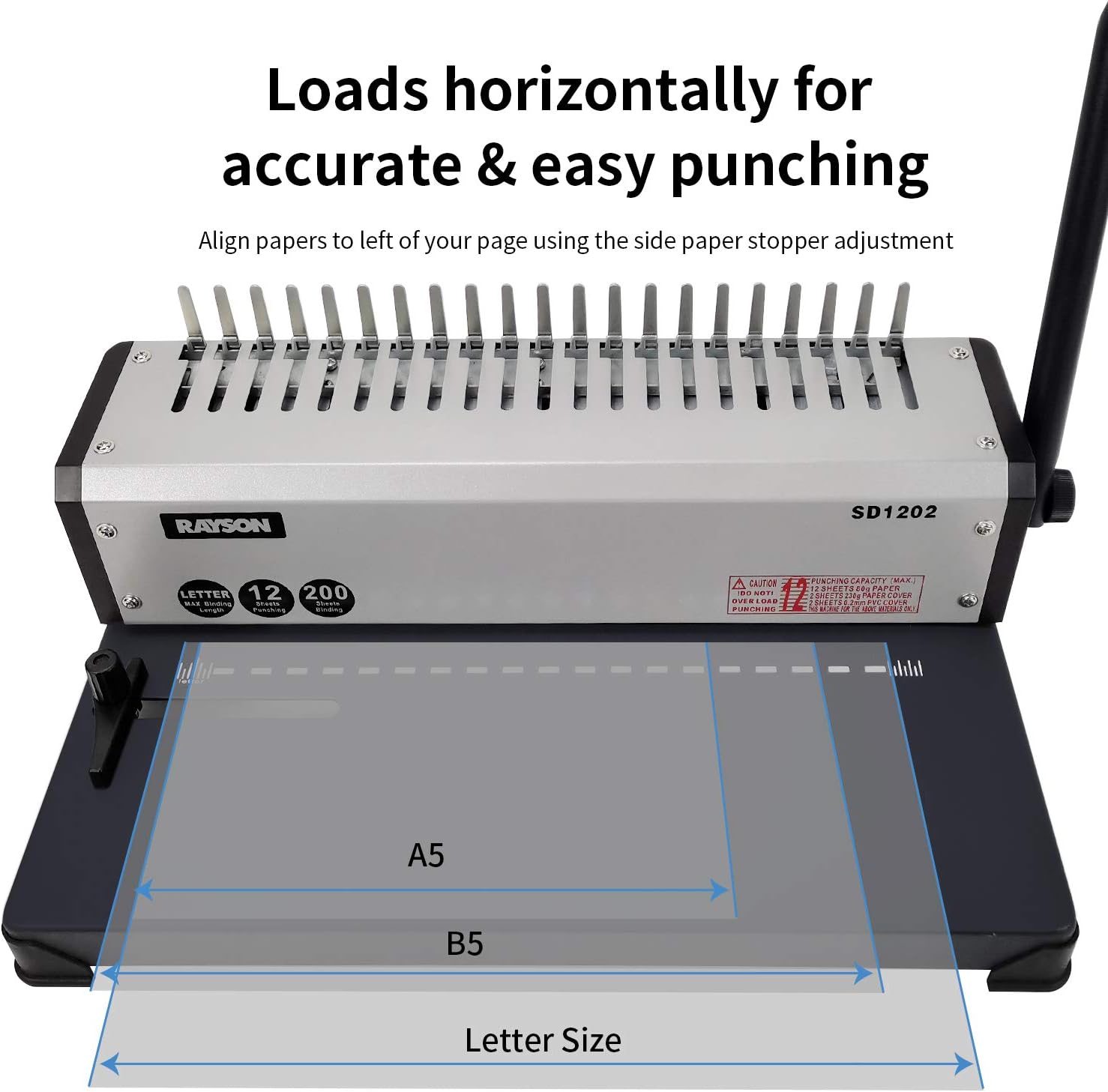
Figure 5.1: Horizontal paper loading for accurate punching on RAYSON SD1202. This image demonstrates how paper is loaded horizontally for precise hole alignment.
- מאַסע פּאַפּיר: Insert up to 10 sheets of paper horizontally into the machine's inlet. Do not force paper into the slot.
- לאָך לעכער: Firmly press down the punching handle to create the holes. Release the handle and remove the punched paper.

Figure 5.2: Steps for punching holes with the RAYSON SD1202 binding machine. This image illustrates the process of inserting paper and pressing the handle to punch holes.

Figure 5.3: Close-up of punched paper showing hole pattern. This image provides a detailed view of the rectangular holes punched by the machine.
- איבערחזרן: Continue punching all pages of your document in small batches.
5.2 Binding Documents
- אויסקלייבן קאַם: Choose a comb binding ring appropriate for the thickness of your document. The machine supports up to 22mm (7/8") combs for 200 sheets.
- עפֿענען קאַם: Place the comb binding ring onto the comb opener fingers of the machine. Pull the binding handle towards you to open the comb rings.
- לאָדן בלעטער: Carefully slide the punched pages onto the open comb rings. Start with the back cover, then the main document pages, and finally the front cover.
- נאָענטע קאַם: Push the binding handle away from you to close the comb rings, securing the document.

Figure 5.4: Operation steps for binding documents with the RAYSON SD1202. This sequence of images demonstrates how to open the comb, load pages, and close the comb to complete the binding process.

פיגורע 5.5: עקסample of a finished bound document. This image shows a blue cover and white pages bound together with a black comb binding.
- Remove Document: Once the comb is closed, remove your bound document from the machine.
6. וישאַלט
- רייניקונג: Regularly wipe the exterior of the machine with a soft, dry cloth. Do not use abrasive cleaners or solvents.
- אָפּפאַל טאַץ: Empty the paper waste tray frequently to prevent jams and ensure optimal punching performance. The waste tray is typically located at the bottom or side of the machine.
- שמירן: No user-serviceable lubrication is required.
- סטאָרידזש: האַלט די מאַשין אין אַ ריינער, טרוקענער סביבה ווען זי איז נישט אין באַנוץ.
7. טראָובלעשאָאָטינג
| פּראָבלעם | מעגלעך סיבה | לייזונג |
|---|---|---|
| Paper jams during punching. | Too many sheets loaded; paper not aligned correctly. | Reduce the number of sheets per punch; ensure paper is flush against the margin guide. |
| Holes are uneven or incomplete. | Paper not inserted straight; punching capacity exceeded; dull punching dies. | Ensure paper is inserted squarely; reduce sheet count; contact support if dies are dull. |
| Comb rings do not open or close properly. | Binding handle not fully engaged; comb size too small for document. | Ensure the binding handle is moved through its full range of motion; use a larger comb ring. |
| Machine feels unstable during use. | Not on a flat surface; rubber feet missing or worn. | Place on a stable, level surface; check rubber feet for damage. |
8. ספּעסאַפאַקיישאַנז
| שטריך | דעטאַל |
|---|---|
| סאָרט | רייסאָן |
| מאָדעל נומער | SD1202 |
| פּאַנטשינג קאַפּאַציטעט | 10 sheets (20lb/80g paper) |
| ביינדינג קאַפּאַציטעט | 200 sheets (70gsm/18lb paper) with 22mm (7/8") comb |
| מאַקס פּאַפּיר גרייס | Letter Size (19 holes) |
| Adjustable Margin | 3 מם צו 6 מם |
| מאַטעריאַל | מעטאַל |
| פּונקט וואָג | 10.61 פונט |
| פּעקל דימענשאַנז | 16.93 X 12.05 X 7.83 אינטשעס |
| ערשטער דאַטע בנימצא | 6 יוני 2019 |
9. וואָראַנטי און שטיצן
For warranty information or technical support, please refer to the documentation included with your purchase or visit the official RAYSON webזייטל. האַלט אייער קויף קוויטל ווי אַ באַווייַז פון קויפן.
Manufacturer: RAYSON ELECTRICAL MFG. LTD.