
PRITECH Universal Remote Control (Compatible with LG)
Pritech Universal Remote Control (Compatible with LG) - User Manual
Model: Universal Remote Control (Compatible with LG)
פּראָדוקט איבערview
The Pritech Universal TV Remote Control is designed as an ideal replacement for your old or faulty remote. This convenient control allows you to operate your television as if it were the original remote. Simply insert the batteries, and it's ready to use.
שליסל פֿעיִקייטן:
- Perfect replacement for your existing TV remote.
- Guaranteed to work with all TV brands.
- Made from durable ABS material.
- פֿעיִקייטן ווייכע פּלאַסטיק קנעפּלעך פֿאַר באַקוועם נוצן.
- לייטווייט און ערגאַנאַמיק פּלאַן.
- Operating range of up to 10 meters.

Image: Pritech Universal Remote Control highlighting its compatibility with LG, high performance, 8-meter range, comfortable design, and quick access buttons.
סעטאַפּ און ינסטאַלירונג
The Pritech Universal Remote Control is designed for immediate use without complex setup. Follow these simple steps to begin using your remote.
1. באַטאַרייע ייַנמאָנטירונג
The remote requires AAA batteries (not supplied). Ensure correct polarity when inserting the batteries.
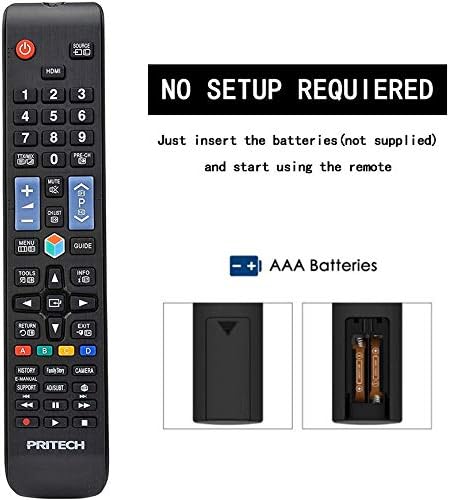
Image: A diagram illustrating the "NO SETUP REQUIRED" feature and the location for AAA battery insertion in the remote control.
- אַראָפּנעמען באַטאַרייע דעקן: Gently slide down the battery cover located on the back of the remote control.
- אַרייַנלייגן באַטעריז: Insert two AAA batteries, ensuring the positive (+) and negative (-) ends align with the markings inside the battery compartment.
- פאַרבייַטן די באַטאַרייע דעקן: רוק די באַטאַרייע דעקן צוריק אין פּלאַץ ביז עס קליקס סיקיורלי.

Image: A four-panel visual guide demonstrating the steps for battery installation: 1. Removing the battery cover, 2. Distinguishing positive and negative electrodes, 3. Snapping batteries into place, and 4. Ready to control your TV.
2. ערשט נוצן
Once batteries are installed, the remote is ready to operate your LG compatible television. No programming or code entry is typically required.
אַפּערייטינג ינסטראַקשאַנז
This universal remote control provides all the essential functions of your original LG TV remote. Familiarize yourself with the button layout for optimal use.

בילד: א קלאָרע פראָנט view of the Pritech Universal Remote Control, showing all buttons and their labels, including power, input, channel, volume, navigation, and smart TV functions.
פּראָסט פאַנגקשאַנז:
- מאַכט קנעפּל (●): טורנס די טעלעוויזיע אויף אָדער אַוועק.
- אַרייַנשרייַב / מקור: Switches between different video inputs (HDMI, AV, etc.).
- קאַנאַל אַרויף / אַראָפּ (▲/▼): טוישט טעלעוויזיע קאַנאַלן.
- באַנד אַרויף / אַראָפּ (+/-): אַדזשאַסץ די געזונט באַנד.
- שטום: שטילט דעם טעלעוויזיע אַודיאָ.
- נומער קנעפּלעך (0-9): גלייך אריינלייגן קאַנאַל נומערן.
- נאַוויגאַציע פּאַד (אַרויף, אַראָפּ, לינקס, רעכטס, גוט): געניצט צו נאַוויגירן מעניוז און באַשטעטיקן אויסוואלן.
- היים קנעפּל: צוטריט דעם טעלעוויזיע'ס הויפּט סמאַרט כאַב אָדער היים פאַרשטעלן.
- צוריק / אַרויסגאַנג: גייט צוריק צום פריערדיקן עקראַן אדער גייט ארויס פון א מעניו.
- Smart/My Apps: Direct access to smart TV features and installed applications.
For specific functions related to your LG TV model, refer to your television's user manual in conjunction with this remote control.
וישאַלט און זאָרג
To ensure the longevity and optimal performance of your Pritech Universal Remote Control, follow these maintenance guidelines:
- רייניקונג: Use a soft, dry cloth to clean the remote. For stubborn dirt, slightly dampen the cloth with water or a mild cleaning solution. Avoid abrasive cleaners or solvents.
- באַטערי פאַרבייַט: טוישט די באַטעריעס ווען די ווײַטקאָנטראָל רעאַקציע ווערט טראָג אָדער הערט אויף צו אַרבעטן. טוישט שטענדיק ביידע באַטעריעס אין דער זעלבער צײַט.
- סטאָרידזש: האַלט די ווײַטקאָנטראָלירטע אַפּאַראַטור אין אַ קיל, טרוקן אָרט, ווײַט פֿון דירעקטער זון און עקסטרעמע טעמפּעראַטורן.
- ויסמיידן טראפנס: While designed to be durable, avoid dropping the remote, as this can damage internal components.
- פליסיק ויסשטעלן: Keep the remote away from liquids. If it gets wet, remove batteries immediately and allow it to dry completely before reinserting them.
טראָובלעשאָאָטינג
If you encounter issues with your Pritech Universal Remote Control, try the following troubleshooting steps:
| פּראָבלעם | מעגלעך סיבה | לייזונג |
|---|---|---|
| ווײַטקאָנטראָל רעאַגירט נישט. | טויטע אדער נישט ריכטיג אריינגעשטעלטע באַטעריעס. שטערונג צווישן ווײַטקאָנטראָל און טעלעוויזיע. ווײַטקאָנטראָל אַרויס פון דערגרייכונג. | Check battery polarity and replace batteries if necessary. Ensure a clear line of sight to the TV's IR receiver. Move closer to the TV (within 10 meters). |
| עטלעכע קנעפּלעך אַרבעטן נישט. | שמוץ אדער דעבריס אונטער קנעפלעך. אינערלעכע פראבלעם. | Clean the remote surface. If problem persists, contact customer support. |
| די ווײַטקאָנטראָל אַרבעט צווישנצײַטיק. | נידעריגע באַטעריע מאַכט. שטערונג. | Replace batteries. Remove any potential sources of infrared interference. |
| די ווײַט קאָנטראָלירט נישט די טעלעוויזיע. | Not compatible with TV model (despite being universal). | While designed for broad compatibility, some specific TV models might not be fully supported. Verify compatibility or contact Pritech support. |
ספּעסאַפאַקיישאַנז
| שטריך | דעטאַל |
|---|---|
| סאָרט | PRITECH |
| מאָדעל | Universal Remote Control (Compatible with LG) |
| קאָליר | Black (Compatible with LG design) |
| קאַנעקטיוויטי טעכנאָלאָגיע | ינפרערעד |
| קאַמפּאַטאַבאַל דעוויסעס | Television (specifically designed for LG compatibility) |
| מאַקסימום קייט | 10 מעטער |
| מאַטעריאַל | אַבס פּלאַסטיק |
| מאַכט מקור | 2 X AAA באַטעריז (ניט אַרייַנגערעכנט) |
| ASIN | B07SRPZYWC |
| פאַבריקאַנט | Pritech |
וואָראַנטי און שטיצן
Pritech offers a 2 יאָר וואָראַנטי on this universal remote control. This warranty covers manufacturing defects and ensures the product functions as described.
For warranty claims, technical support, or further assistance, please contact Pritech customer service through their official webוועבזייטל אדער דעם פארקויפער וואו דער פראדוקט איז געקויפט געווארן. האַלט אייער קויפן-באווייז פאר וואָראַנטי וואַלידאַציע.
באַמערקונג: די וואָראַנטי דעקט נישט שעדיקן געפֿירט דורך מיסברויך, אַקסאַדאַנץ, נישט-אָטעריזירטע מאָדיפיקאַציעס, אָדער נאָרמאַל טראָגן און טרער.
Ask a question about this manual
Ask about setup, troubleshooting, compatibility, parts, safety, or missing instructions. Manuals+ will review the question and use this page’s manual context to help answer it.