
DALI Katch G2
DALI Katch G2 Portable Bluetooth Speaker User Manual
Model: Katch G2
הקדמה
Thank you for choosing the DALI Katch G2 Portable Bluetooth Speaker. This manual provides essential information for setting up, operating, and maintaining your speaker. Please read it thoroughly before use to ensure optimal performance and longevity of your device.

בילד: פראָנט view of the DALI Katch G2 Portable Bluetooth Speaker in Caramel White.
זיכערקייַט אינפֿאָרמאַציע
- שטעלט נישט אויס דעם רעדנער צו וואַסער אָדער צו פיל נעץ. דאָס פּראָדוקט איז נישט וואַסערפּרוף.
- פֿאַרמײַדט צו שטעלן דעם רעדנער לעבן היץ־קוואַלן אָדער אין דירעקטער זון פֿאַר לענגערע פּעריאָדן.
- Use only the charger supplied with the product.
- פרובירט נישט צו צענעמען אדער מאדיפיצירן דעם רעדנער. לאָזט איבער אלע סערוויסעס צו קוואַליפֿיצירטע פּערסאָנעל.
- האַלטן אויס פון דערגרייכן פון קינדער.
פּעקל אינהאַלט
באַשטעטיקן אַז אַלע זאכן זענען פאַראַן אין דער פּאַקאַדזשינג:
- DALI Katch G2 Portable Bluetooth Speaker
- מאַכט אַדאַפּטער / טשאַרדזשער
- שנעלע אָנהייב גייד (נישט אַרייַנגערעכנט אין דעם מאַנואַל)
- Travel Pouch (may vary by region)
פּראָדוקט איבערview
The DALI Katch G2 features a sleek design with intuitive controls and various connectivity options.
קאָנטראָלס און ינדיקאַטאָרס

Image: Top panel of the DALI Katch G2 showing power, Bluetooth, volume, and sound mode buttons.
- מאַכט קנעפּל: דרוק צו קער די רעדנער אויף אָדער אַוועק.
- בלועטאָאָטה קנעפּל: דריקן צו אַרייַן פּערינג מאָדע.
- באַנד קנעפּלעך (+/-): אַדזשאַסטירן די פּלייבאַק באַנד.
- סאַונד מאָדע קנעפּל: Cycle through available sound profiles.
- באַטערי ינדיקאַטאָר לייץ: Display current battery level.
פּאָרץ און קאַנעקשאַנז

Image: Side panel of the DALI Katch G2 showing the charging port and auxiliary input.
- טשאַרדזשינג פּאָרט: Connect the power adapter to the charging port on the speaker.
- 3.5 מ״מ הילפס־איינגאנג: Connect external audio sources via a stereo mini-jack cable.
ינערלעך קאַמפּאָונאַנץ

בילד: עקספּלאָדירט view illustrating the internal components of the DALI Katch G2 speaker, including drivers and circuit board.
סעטאַפּ
1. טשאַרדזשינג די באַטערי
- Connect the supplied power adapter to the charging port on the speaker.
- צאַפּן די מאַכט אַדאַפּטער אין אַ וואַנט ווענטיל.
- די באַטעריע אינדיקאַטאָר ליכטלעך וועלן זיך אָנצינדן צו ווײַזן דעם טשאַרדזשינג סטאַטוס. א פולע טשאַרדזשינג נעמט אַרום 2 שעה.
- A fully charged battery provides up to 30 hours of playback.
2. פּאָווערינג אויף / אויסגעלאשן
- צו אָנפאַנגען, דריקן און האַלטן די מאַכט קנעפּל until the indicator lights activate.
- צו האַלטן אַוועק, דריקן און האַלטן די מאַכט קנעפּל again until the indicator lights turn off.
3. בלועטאָאָטה פּערינג
- פאַרזיכערן אַז די רעדנער איז פּאַוערד אויף.
- דרוק די בלועטאָאָטה קנעפּל. The Bluetooth indicator light will flash, indicating pairing mode.
- אויף אייער דעווייס (סמאַרטפאָן, טאַבלעט, אאז"וו), אַקטיווירט בלועטוט און זוכט פֿאַר פֿאַראַן דעווייסעס.
- Select "DALI Katch G2" from the list.
- Once connected, the Bluetooth indicator light will glow solid.
4. Analog Connection
- Connect a 3.5mm stereo mini-jack cable from your audio source to the Auxiliary Input port on the speaker.
- דער רעדנער וועט אויטאָמאַטיש איבערגיין צו אַוקסיליאַר אינפוט מאָדע.
5. אמתע ווירעלעס סטערעאָ (TWS) פּאָרינג
Two DALI Katch G2 speakers can be paired together for a stereo sound experience.
- Ensure both DALI Katch G2 speakers are powered on and not connected to any other Bluetooth device.
- אויף איין רעדנער (דאָס וועט זיין דער הויפּט רעדנער), דריק און האַלט די בלועטאָאָטה קנעפּל until it enters pairing mode.
- On the second speaker, press the בלועטאָאָטה קנעפּל אַמאָל.
- The speakers will automatically connect to each other. The primary speaker's Bluetooth indicator will glow solid, and the secondary speaker's indicator will also confirm connection.
- Now, connect your audio source to the primary speaker via Bluetooth as described in step 3.
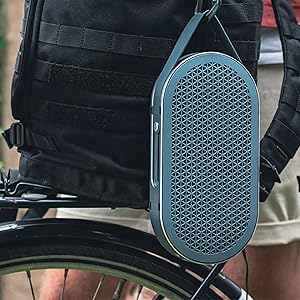
Image: Two DALI Katch G2 speakers set up for True Wireless Stereo pairing in a home environment.
אַפּערייטינג די רעדנער
1. אַודיאָ פּלייַבאַקק
- Once connected via Bluetooth or auxiliary input, start playback from your audio source.
- ניצן די באַנד קנעפּלעך (+/-) on the speaker or your connected device to adjust the volume.
2. סאָונד מאָדעס
The DALI Katch G2 offers different sound profiles to suit your listening preference or environment.
- דרוק די סאָונד מאָדע קנעפּל to cycle through the available sound modes (e.g., "Clear" and "Warm").
- Each mode provides a distinct audio characteristic.
3. קאָנטראָלירונג באַטערי לעוועל
- דריקן קורץ אויף די מאַכט קנעפּל when the speaker is on to illuminate the battery indicator lights, showing the current charge level.
וישאַלט
1. רייניקונג
- ווישט דעם רעדנער מיט אַ ווייכן, טרוקענעם שטאָף.
- ניצט נישט קיין אברייסיוו רייניגער, וואקס, אדער סאָלווענטן.
2. סטאָרידזש
- ווען נישט אין באַנוץ פֿאַר לענגערע פּעריאָדן, האַלט דעם רעדנער אין אַ קיל, טרוקן אָרט.
- ויסמיידן עקסטרעם טעמפּעראַטורעס.
3. באַטערי קער
- כדי צו פארלענגערן די לעבן פון די באַטעריע, זאָל מען נישט אָפט אויסלאָדן די באַטעריע גאָר.
- Charge the speaker regularly, even if not in frequent use.
טראָובלעשאָאָטינג
| פּראָבלעם | מעגלעך סיבה | לייזונג |
|---|---|---|
| דער רעדנער גייט נישט אן. | באַטערי איז דיפּליטיד. | Connect the speaker to the power adapter and charge it. |
| קיין קלאַנג פֿון רעדנער. | די קול איז צו נידעריג אדער שטיל. אומרעכטע איינגאַבע מקור אויסגעקליבן. Device not paired correctly. | פֿאַרגרעסערן דעם וואָלומען אויף רעדנער און פֿאַרבונדענעם מיטל. Ensure correct input (Bluetooth/Aux) is active. פאַרבינדט ווידער דעם בלוטוט מיטל. |
| בלועטאָאָטה פּערינג פיילז. | דער רעדנער איז נישט אין פּערינג מאָדע. די דעווייס איז צו ווייט פון רעדנער. ינטערפיראַנס. | Press the Bluetooth button to enter pairing mode. Move device closer to the speaker. מאַך אַוועק פון אנדערע וויירליס דעוויסעס. |
| True Wireless Stereo (TWS) pairing fails. | Speakers not in TWS pairing mode. One speaker already connected to a device. | Ensure both speakers are disconnected from other devices and follow TWS pairing steps. |
ספּעסאַפאַקיישאַנז
| מאָדעל נאָמען | DALI Katch G2 |
| סאָרט | DALI |
| רעדנער טיפּ | פּאָרטאַטיוו בלועטאָאָטה רעדנער |
| קאַנעקטיוויטי טעכנאָלאָגיע | Bluetooth 5.0 (apt-X, apt-X HD, AAC) |
| אַודיאָ רעזולטאַט מאָדע | סטערעאָ |
| רעדנער מאַקסימום רעזולטאַט מאַכט | 25 וואטס |
| באַטאַרייע קאַפּאַציטעט | 3300 מאַה |
| באַטערי לעבן | אַרויף צו 30 שעה |
| טשאַרדזשינג צייט | בעערעך 2 שעה |
| וואָאָפער דיאַמעטער | 3.5 אינטשעס |
| טוועעטער דיאַמעטער | 21 מילאַמיטערז |
| פּראָדוקט דימענשאַנז (ד רענטגענ וו רענטגענ ה) | 1.8" x 10.5" x 5.4" |
| פּונקט וואָג | 2.42 פונט (1.1 קילאָגראַמס) |
| קאָנטראָל מעטאָד | ריר |
| וואָטערפּרוף | ניין |
וואָראַנטי אינפֿאָרמאַציע
The DALI Katch G2 Portable Bluetooth Speaker comes with a לימיטעד וואָראַנטי. Specific terms and conditions of the warranty may vary by region and retailer. Please retain your proof of purchase for warranty claims. For detailed warranty information, refer to the documentation provided with your purchase or visit the official DALI webפּלאַץ.
קונה שטיצן
If you encounter any issues not covered in this manual or require further assistance, please contact DALI customer support.
- Visit the official DALI webזייטל פֿאַר שטיצע רעסורסן, אָפֿט געשטעלטע פֿראַגעס, און קאָנטאַקט אינפֿאָרמאַציע.
- Refer to your product packaging or purchase documentation for specific regional support contacts.
Ask a question about this manual
Ask about setup, troubleshooting, compatibility, parts, safety, or missing instructions. Manuals+ will review the question and use this page’s manual context to help answer it.