
Amazon Echo Show 8 (1st Gen, 2019 release)
Echo Show 8 (1st Gen) User Manual
Your comprehensive guide to setting up, operating, and maintaining your Amazon Echo Show 8.
הקדמה
The Amazon Echo Show 8 (1st Gen, 2019 release) is a smart display designed to enhance your daily life with Alexa. Featuring an 8-inch HD screen and stereo sound, it allows you to manage your day, connect with loved ones through video calls, enjoy entertainment, control smart home devices, and personalize your experience. This manual provides detailed instructions to help you get the most out of your device.
וואָס איז אין די קעסטל
Upon unboxing your Echo Show 8, ensure all components are present:
- עקאָ שאָו 8 מיטל
- Power adapter (30W) with cable (4.9 ft.)
- שנעל אָנהייב פירער
סעטאַפּ
Setting up your Echo Show 8 is a straightforward process, often simplified by Amazon Wi-Fi simple setup technology.
- מאַכט אויף: פֿאַרבינדט דעם מאַכט אַדאַפּטער צו אייער עקאָ שאָו 8 און שטעקט עס אַרײַן אין אַ וואַנט אַוטלעט. די דעוויס וועט זיך אויטאָמאַטיש אָנצינדן.
- שפּראַך סעלעקציע: פֿאָלגט די אינסטרוקציעס אויף דעם עקראַן צו אויסקלײַבן אײַער בילכער שפּראַך.
- Wi-Fi קאַנעקשאַן: Select your Wi-Fi network from the list and enter the password. The Echo Show 8 supports dual-band Wi-Fi (802.11a/b/g/n/ac).
- אַמאַזאָן אַקאַונט לאָגין: לאָגט זיך איין מיט אייערע אַמאַזאָן אַקאַונט קראַדענטשאַלז. אויב איר האָט נישט קיין איינס, וועט מען אייך בעטן צו שאַפֿן איינס.
- דיווייס רעגיסטראַציע: Your device will register to your Amazon account.
- Time Zone and Location: Confirm your time zone and location settings.
- טוטאָריאַל: The device may offer a brief tutorial on how to navigate and use its features.
די אַלעקסאַ אַפּ איז קאָמפּאַטיבל מיט פייער אָ.עס., אַנדרויד און יאָס דעוויסעס און איז אויך צוטריטלעך דורך דיין web browser for further management and customization.
אפערירן אייער עקאָ שאָו 8
The Echo Show 8 can be operated using voice commands with Alexa or through its touch screen interface.
Voice Commands (Alexa)
זאָג פשוט "אַלעקסאַ" און דערנאָך דיין באַפֿעל. למשלampדי אַרייַננעמען:
- "אַלעקסאַ, וואָס איז די וועטער?"
- "אַלעקסאַ, שפּיל מוזיק."
- "אַלעקסאַ, רוף [קאָנטאַקט נאָמען]."
- "Alexa, show me my photos."
- "Alexa, turn off the lights."

Image: Echo Show 8 displaying current weather conditions, demonstrating its ability to provide glanceable information.
ריר סקרין נאַוויגאַציע
Swipe down from the top of the screen to access quick settings and the home menu. Swipe left from the right edge to view cards with suggestions and information. Tap on icons and options to interact with the device.
פֿעיִקייטן
The Echo Show 8 offers a wide range of features to simplify and enrich your daily routines:
- Video Calling & Messaging: Connect with friends and family who have the Alexa app or an Echo device with a screen. Make announcements to other devices in your home.

Image: A user making a video call on the Echo Show 8, highlighting its communication capabilities.
- פֿאַרווייַלונג: Ask Alexa to show you movie trailers, TV shows, movies, or the news. Listen to radio stations, podcasts, and audiobooks.
- סמאַרט היים קאָנטראָל: Voice control compatible devices or manage them on the easy-to-use display. Ask Alexa to show you security cameras, control lights, and adjust thermostats.

Image: The Echo Show 8 displaying a live feed from a nursery camera, illustrating its smart home monitoring feature.
- פערזענליכען: Show off your albums from Amazon Photos. Customize your home screen. Create morning routines to start your day.
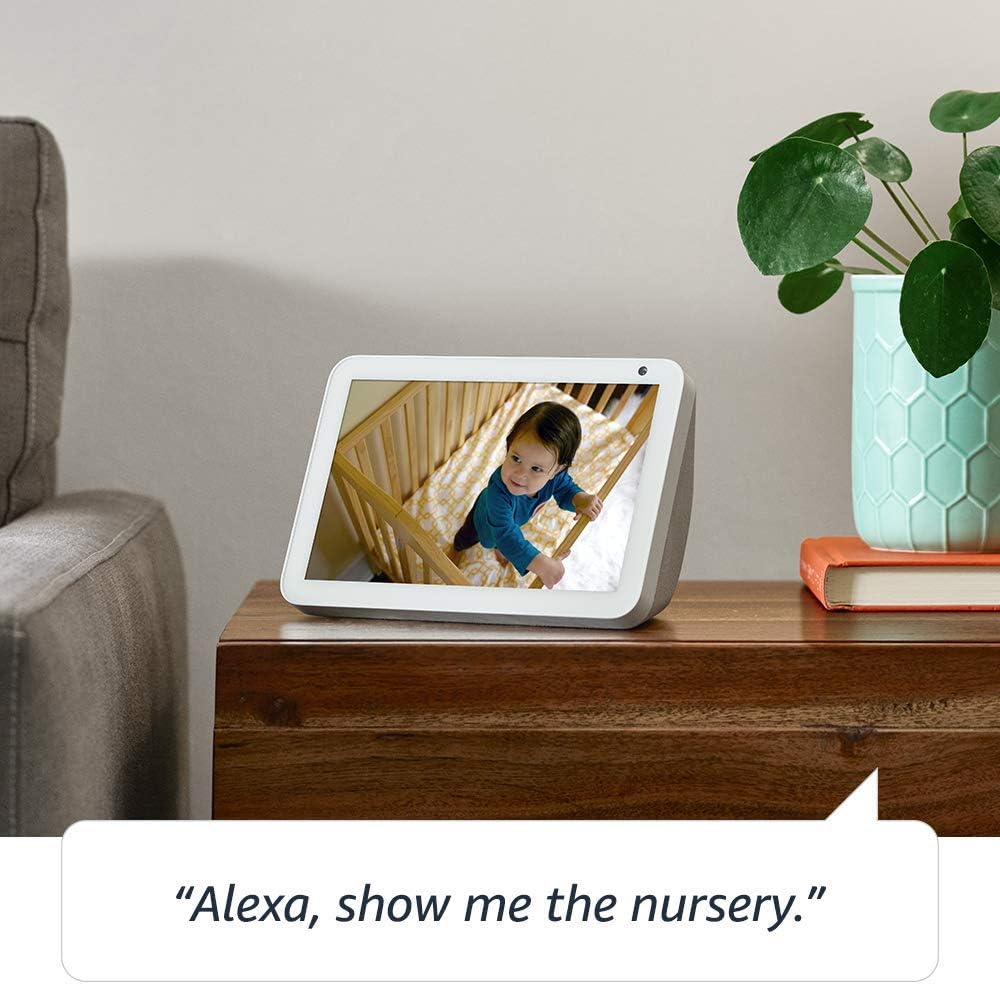
Image: The Echo Show 8 displaying a scenic photo from a user's Amazon Photos album, demonstrating its personalization options.
- Daily Assistance: Cook along to step-by-step recipes. Easily update to-do lists and calendars. Glance at weather and traffic on your way out.
פּריוואַטקייט פֿעיִקייטן
The Echo Show 8 is designed with privacy in mind, offering several controls:
- מיקראָפאָן/קאַמעראַ אויס קנעפּל: Electronically disconnect the microphones and camera with one press of a button.
- איינגעבויטע קאַמעראַ שאַטער: Slide the built-in shutter to physically cover the camera lens.

Image: A finger activating the physical camera shutter on the Echo Show 8, demonstrating a privacy control feature.
- וועק ווארד טעכנאָלאָגיע: Alexa devices are designed to detect only your chosen wake word (e.g., "Alexa").
- סטרימינג אינדיקאַטאָרן: Visual indicators show when Alexa is streaming your request to the cloud.
- שטימע רעקאָרדינג פאַרוואַלטונג: די פיייקייט צו view and delete your voice recordings through the Alexa app or Alexa Privacy Hub.
For more information, visit the Alexa Privacy Hub.
וישאַלט
כדי צו זיכער מאַכן די לאַנגלעבעדיקייט און אָפּטימאַלע פאָרשטעלונג פון אייער Echo Show 8, נאָכפאָלגן די וישאַלט גיידליינז:
- רייניקונג: Use a soft, lint-free cloth to clean the screen and exterior. Avoid abrasive cleaners or sprays directly on the device.
- אָרט: שטעלט דעם אפאראט אויף א סטאבילן, פלאכן אויבערפלאך ווייט פון דירעקטן זונשייַן, היץ-קוועלער און פייכטקייט. זיכערט זיך מיט געהעריגע ווענטילאציע.
- ווייכווארג דערהייַנטיקונגען: The device automatically receives software updates. Ensure it is connected to Wi-Fi to receive these updates, which improve performance and add new features.
טראָובלעשאָאָטינג
אויב איר טרעפט פּראָבלעמען מיט אייער Echo Show 8, פּרוּווט די פאלגענדע טריט:
- קיין מאַכט:
- זיכער מאַכן אַז דער מאַכט אַדאַפּטער איז זיכער פארבונדן צו ביידע דעם מיטל און אַ אַרבעטנדיקן מאַכט ווענטיל.
- פּרוּווט אַ אַנדערש מאַכט ווענטיל.
- Wi-Fi קאַנעקשאַן ישוז:
- באַשטעטיקן אַז אייער Wi-Fi פּאַראָל איז ריכטיק.
- ריסטאַרט דיין Wi-Fi ראַוטער און מאָדעם.
- Move the Echo Show 8 closer to your Wi-Fi router.
- אַלעקסאַ ענטפֿערט נישט:
- Ensure the microphone is not muted (check the microphone/camera off button).
- רעד קלאָר און מיט אַ נאָרמאַלן קול.
- Try restarting the device by unplugging it for a few seconds and plugging it back in.
- סקרין ישוז:
- אויב דער עקראַן רעאַגירט נישט, פּרוּווט ריסטאַרטן דעם מיטל.
- זייט זיכער אז דער עקראַן איז ריין און פריי פון פלעקן.
- פאַבריק באַשטעטיק: As a last resort, you can perform a factory reset. This will erase all your personal data and settings. To do this, go to Settings > Device Options > Reset to Factory Defaults.
ספּעסאַפאַקיישאַנז
| שטריך | דעטאַל |
|---|---|
| גרייס | 7.9”x 5.4”x 3.9” (200mm x 135mm x 99mm) |
| וואָג | 36.6 אַז (1037 גראַמז) |
| ווייַז | 8.0" פאַרבינדן פאַרשטעלן |
| אַפּאַראַט | 1MP camera with built-in shutter |
| Wi-Fi קאַנעקטיוויטי | Dual-band Wi-Fi supports 802.11a/b/g/n/ac Wi-Fi networks. Does not support connecting to ad-hoc (or peer-to-peer) Wi-Fi networks. |
| בלועטאָאָטה קאַנעקטיוויטי | אַוואַנסירטע אַודיאָ דיסטריבוטיאָן פּראָfile (A2DP) שטיצע פֿאַר אַודיאָ סטרימינג פֿון אייער מאָביל מיטל צו Echo Show 8 אָדער פֿון Echo Show 8 צו אייער בלועטוט רעדנער. אַודיאָ/ווידעאָ ווײַטקאָנטראָל פּראָfile (AVRCP) פֿאַר שטימע קאָנטראָל פֿון פֿאַרבונדענע מאָבילע דעווייסעס. הענט-פֿרײַ שטימע קאָנטראָל איז נישט געשטיצט פֿאַר Mac OS X דעווייסעס. בלועטוט רעדנערס וואָס דאַרפֿן PIN קאָדן זענען נישט געשטיצט. |
| אַודיאָ | 2.0” (52 mm) neodymium speakers with passive bass radiator |
| סיסטעם רעקווירעמענץ | Echo Show 8 comes ready to connect to your WiFi. The Alexa app is compatible with Fire OS, Android, and iOS devices and also accessible via your web browser. Supported operating systems. Certain skills and services may require subscription or other fees. |
| פּראַסעסער | MediaTek MT 8163 |
| שפּראַך | אַלעקסאַ רעדט ענגליש און שפּאַניש |
אַקסעסאַביליטי פֿעיִקייטן
די עקאָ שאָו 8 כולל פֿאַרשידענע צוטריטלעכקייט פֿעיִקייטן צו פּערסאָנאַליזירן אַלעקסאַ צו דיין פֿעיִקייטן:
- צאַפּן צו אַלעקסאַ: צוטריט אַלעקסאַ דורך פאַרבינדן דורך אויף-פאַרשטעלן טיילז אָדער אַ קלאַוויאַטור.
- אַדאַפּטיוו צוהערן: גיט מער צייט צו ענדיגן רעדן איידער אַלעקסאַ ענטפערט.
- בילכער רעדן קורס: קאָנטראָליר ווי שנעל אָדער פּאַמעלעך אַלעקסאַ רעדט.
- אַלעקסאַ קעפּלונג, רוף קעפּלונג, פארמאכטע קעפּלונג: Provide text captions for supported content.
- ווייזן און דערציילן: Helps customers who are blind or visually impaired identify products by saying “Alexa, what am I holding.”
- קולView סקרין לייענער: ערמעגליכט צוטריט פֿאַר קאַסטאַמערז וואָס זענען בלינד אָדער וויזועל באַגרענעצט.
- סקרין פֿאַרגרעסערער: Enables zooming in/out and panning around the screen.
- מעלדן ווען נאָענט: Plays notification sounds when you’re detected near your Echo device.
- קינדל לייען הויך: אַלעקסאַ קען לייענען אייערע קינדלע ביכער הויך.
- טעקסט אין רעאל-צייט: Enables typing live text in a video call.
- נאָך סעטטינגס אַרייַננעמען קאָליר ינווערסיע, קאָליר קערעקשאַן, בעטן געזונט, און מער.
To enable these features, go to Settings → Accessibility on your Echo Show 8.
וואָראַנטי און שטיצן
Your Certified Refurbished Echo Show 8 comes with a 1-year limited warranty and service, similar to a new device. Use of Echo Show 8 is subject to Amazon's terms and conditions.
פֿאַר ווייטערדיקע הילף, באַזוכט די אַמאַזאָן דעווייס שטיצע בלאַט אָדער קאָנטאַקט אַמאַזאָן קונה סערוויס.
Ask a question about this manual
Ask about setup, troubleshooting, compatibility, parts, safety, or missing instructions. Manuals+ will review the question and use this page’s manual context to help answer it.