
1. הקדמה
The ONKRON TS1881 mobile TV stand is designed to securely hold flat-panel displays ranging from 50 to 86 inches, with a maximum weight capacity of 90 kg (198 lbs). It features adjustable height, integrated shelves for AV equipment, and lockable wheels for mobility. This manual provides comprehensive instructions for the safe assembly, operation, and maintenance of your ONKRON TS1881 mobile TV stand.

Figure 1: ONKRON TS1881 Mobile TV Stand in use.
2. זיכערקייַט אינפֿאָרמאַציע
Please read all instructions carefully before assembly and use. Failure to follow these instructions may result in serious personal injury or damage to property. If you have any questions, please contact ONKRON customer support.
- וואָג קאַפּאַציטעט: Do not exceed the maximum weight capacity of 90 kg (198 lbs) for the TV mount and 5 kg (11 lbs) per shelf. Overloading can cause instability and potential injury.
- פאַרשטעלן גרייס: This stand is designed for displays between 50 and 86 inches. Ensure your TV falls within this range.
- VESA קאַמפּאַטאַבילאַטי: Verify your TV's VESA mounting pattern is compatible with the stand's range (200x200mm to 800x500mm).
- פֿאַרזאַמלונג: Assemble the stand on a soft, clean surface to prevent scratches. Ensure all fasteners are securely tightened before use. Do not overtighten screws.
- פעסטקייַט: Always ensure the stand is on a stable, level surface. Lock the wheels when the stand is in a stationary position to prevent accidental movement.
- קאַבלע פאַרוואַלטונג: Utilize the integrated cable management channels to prevent tripping hazards and protect cables from damage.
- קינדער: האַלט קינדער אַוועק פֿון דעם שטאַנד בעתן צוזאַמענשטעלן. לאָזט נישט קינדער קריכן אויף אָדער שפּילן מיטן שטאַנד אָדער מאָנטירטן טעלעוויזיע.
3. פּעקל אינהאַלט
Before beginning assembly, check that all parts are present and undamaged. If any parts are missing or damaged, do not attempt to assemble the stand. Contact ONKRON customer support for assistance.

פיגור 2: אלע קאמפאנענטן אריינגערעכנט אין פעקל.
דער פּעקל טיפּיקלי כולל:
- באַזע מיט ווילז
- Vertical columns (2 sections)
- טעלעוויזיע מאַונטינג פּלאַטע
- TV mounting brackets (2 pieces)
- AV shelves (2 pieces)
- קאַמעראַ פּאָליצע
- Hardware kit (various screws, washers, spacers, Allen keys)
- אינסטרוקציע מאַנואַל
4. אינסטרוקציעס פֿאַר אויפֿשטעלן און פֿאַרזאַמלען
Follow these steps carefully to assemble your ONKRON TS1881 mobile TV stand. It is recommended to have two people for assembly, especially when mounting the TV.
- אַסעמבאַל די באַזע: Attach the vertical columns to the base using the provided screws. Ensure they are securely fastened.
- ינסטאַלירן ווהעעלס: Insert the lockable wheels into the designated slots on the base. Ensure they are firmly in place.
- צוטשעפּען טעלעוויזיע מאָונטינג פּלאַטע: Secure the TV mounting plate to the top section of the vertical columns.
- Install TV Brackets: Attach the TV mounting brackets to the back of your television using the appropriate screws and spacers from the hardware kit. Ensure the brackets are level and centered.
- בארג טעלעוויזיע: With assistance, carefully lift the TV and hook the mounting brackets onto the TV mounting plate on the stand. Secure the TV to the stand using the safety screws or locking mechanisms.
- ינסטאַלירן שעלוועס: Attach the AV shelves to the vertical columns at your desired height. The shelves are designed to hold up to 5 kg each. The top shelf is suitable for a webcam or small camera.
- קאַבלע פאַרוואַלטונג: Route all cables through the integrated cable management channels in the vertical columns to maintain a tidy and safe setup.

Figure 3: Stand features including adjustable height and cable management.
5. אַפּערייטינג ינסטרוקטיאָנס
The ONKRON TS1881 offers flexibility in positioning and display adjustment.
- אַדזשאַסטירן טעלעוויזיע הייך: The TV height can be adjusted from 1350 mm to 1650 mm (from the floor to the center of the TV). Loosen the height adjustment screws on the vertical columns, raise or lower the TV to the desired position, and then securely tighten the screws.
- באַוועגן דעם שטאַנד: To move the stand, unlock all four wheels. Carefully push the stand to its new location. Once positioned, lock all four wheels to ensure stability.
- ניצן די שעלוועס: The two AV shelves can be adjusted in height along the vertical columns. Place your media devices, laptops, or other accessories on the shelves, ensuring not to exceed the 5 kg weight limit per shelf. The top camera shelf is fixed and designed for webcams or small cameras.
- Optional Tilt Function: An optional tilt adapter (model ATL-1881, sold separately) allows you to tilt the TV from 0 to 10 degrees for optimal viewינג אַנגלעס.
- Optional Reinforced Wheels: For enhanced mobility and stability on various surfaces, consider purchasing the ONKRON AWL-75 universal reinforced wheel kit (sold separately).

Figure 4: Easy mobility and cable management.
ווידעא 1: איבערview of ONKRON TS1881 features, including VESA compatibility, weight capacity, shelves, height adjustment, and optional accessories.
6. וישאַלט
רעגולערע אויפהאלטונג גאראנטירט די לאנגעוויטי און זיכערע אפעראציע פון אייער טעלעוויזיע שטאנד.
- רייניקונג: ווישט דעם שטאַנד מיט אַ ווייכן, דamp שטאָף. פֿאַרמײַדט ניצן אַברייסיוו רייניגער אָדער סאָלווענטן וואָס קענען שאַטן די ענדיקונג.
- פאַסטענער טשעק: קאָנטראָלירט פּעריִאָדיש אַלע שרויפן און באָלטן צו זיכער מאַכן אַז זיי בלייבן פעסט. פֿעסט צו אויב נייטיק, אָבער נישט צו שטאַרק.
- Wheel Inspection: Inspect the wheels for any debris or damage that might hinder smooth movement. Clean or replace as needed.
7. טראָובלעשאָאָטינג
If you encounter any issues with your ONKRON TS1881 mobile TV stand, refer to the following common solutions:
- שטאַנד איז נישט סטאַביל: Ensure all assembly screws are tightened. Verify the stand is on a level surface. Do not exceed the maximum weight capacity.
- שוועריקייט צו רירן דעם שטאנד: Check that all wheels are unlocked. Inspect wheels for obstructions or damage. Ensure the floor surface is suitable for rolling.
- טעלעוויזיע איז נישט גלייך: Recheck the installation of the TV mounting brackets on the TV and the mounting plate on the stand. Adjust as necessary.
- Shelves are loose: Ensure the shelf attachment screws are securely tightened.
If the problem persists, please contact ONKRON customer support.
8. ספּעסאַפאַקיישאַנז
| שטריך | באַשרייַבונג |
|---|---|
| מאָדעל | TS1881 |
| קאָמפּאַטיבלע פאַרשטעלן גרייס | 50 - 86 אינטשעס |
| מאַקסימום טעלעוויזיע וואָג | 90 קג (198 לבס) |
| VESA קאַמפּאַטאַבילאַטי | 200 קס 200 מם צו 800 קס 500 מם |
| הייך אַדדזשוסטמענט ראַנגע | 1350 מ״מ - 1650 מ״מ |
| מאַטעריאַל | שטאָל און פּלאַסטיק |
| קאָליר | ווייַס |
| מאַקסימום פּאָליצע מאַסע | 5 קג (11 לבס) פּער פּאָליצע |
| Maximum Tilt Angle (with optional adapter) | 10 דיגריז |
| פּראָדוקט וואָג | 31.5 קג (69.4 לבס) |
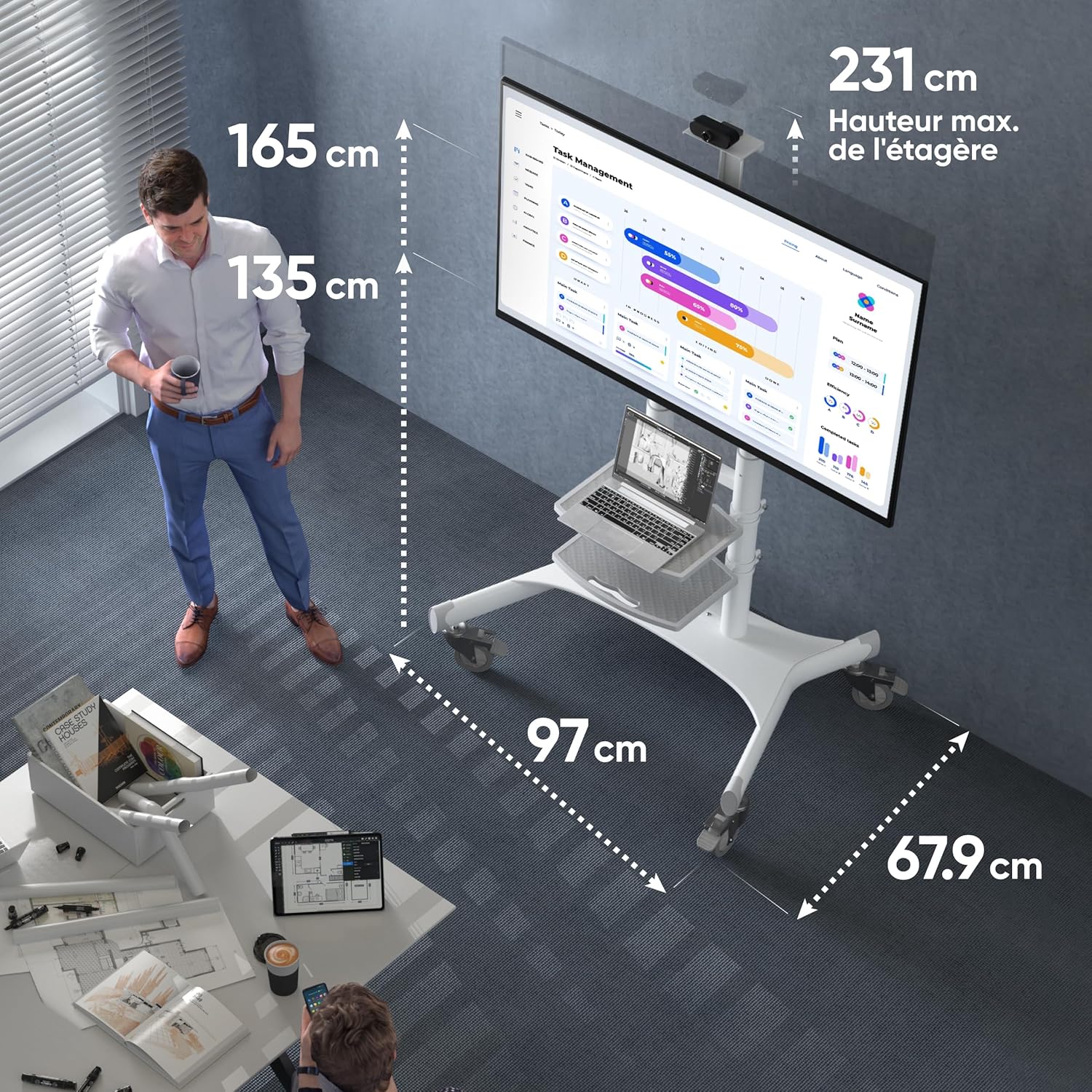
Figure 5: Key dimensions of the ONKRON TS1881 Mobile TV Stand.
9. וואָראַנטי און שטיצן
ONKRON provides a 5-year availability of spare parts in the EU for the TS1881 mobile TV stand.
For any questions, technical assistance, or warranty claims, please contact ONKRON customer support. Our specialists are available to provide support and address any concerns you may have regarding your product.
Please refer to the ONKRON official website or your purchase documentation for specific contact details and the full warranty policy.