
1. הקדמה
The ISEEVY ISV-HCDW4 is a versatile WiFi H.265/H.264 video decoder designed to receive and decode network video streams, providing output via HDMI, VGA, and CVBS interfaces. It supports resolutions up to 4K@30P or 1080P@60P and is compatible with various streaming protocols including RTMP, SRT, RTSP, UDP, and HTTP. This manual provides detailed instructions for setting up, operating, and maintaining your video decoder.
2. פֿעיִקייטן
- Supports H.265/H.264 video decoding up to 3840x2160@30P or 1920x1080@60P.
- Compatible with RTMP, SRT, RTSP, UDP, and HTTP streaming protocols.
- Provides local video output through HDMI, VGA, and CVBS interfaces.
- Supports simultaneous decoding of 1 or 4 channels.
- Includes video rotation (90/180/270 degrees) and On-Screen Display (OSD) functions.
- FCC-ID: 2A7CO-ISV-HVCDW5.
3. פּעקל אינהאַלט
ביטע באַשטעטיקן אַז אַלע זאכן זענען פאַראַן אין דיין פּעקל:
- ISEEVY ISV-HCDW4 Video Decoder Unit
- Power Adapter with various international plugs (US, Korea, CHN, EU, UK, AUS standard)
- באַניצער מאַנואַל
- Antennas (2x)
4. פּראָדוקט איבערview
4.1 מיטל אויסלייג
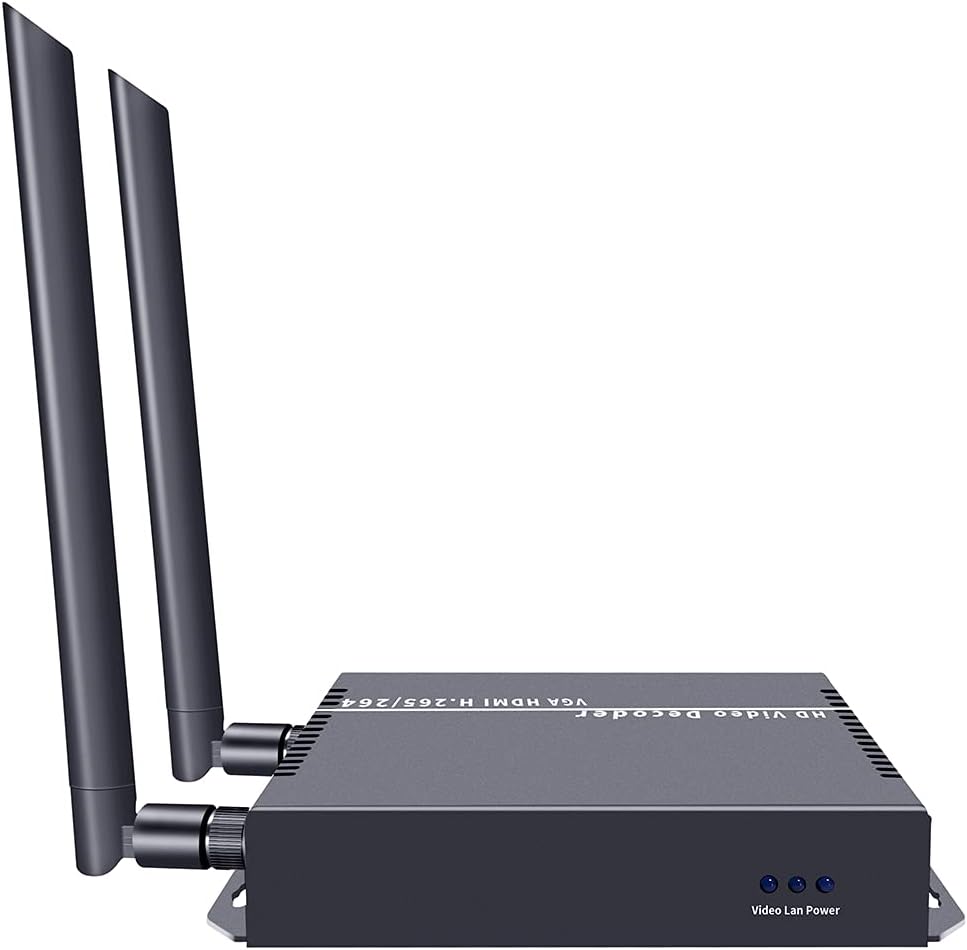
The following images illustrate the physical layout and ports of the ISEEVY ISV-HCDW4 Video Decoder.

פיגור 4.1: פאָרנט און הינטן view of the ISEEVY ISV-HCDW4 Video Decoder, showing connectivity options and dual antennas for WiFi.
פיגורע 4.2: דעטאַילעד view of the decoder's back panel, highlighting the Reset Audio button, CVBS, VGA, HDMI, LAN, and DC12V power input ports.

פיגורע 4.3: פראָנט view of the decoder, showing the 'Video Lan Power' indicators.
5. סעטאַפּ
5.1 Basic Connection Diagram
Follow these steps to set up your ISEEVY ISV-HCDW4 Video Decoder:
- Connect the video source (e.g., camera, media player) to an ISEEVY Video Encoder (sold separately) via HDMI, SDI, or VGA.
- Connect the Video Encoder to your network router via a LAN cable.
- Connect the ISEEVY Video Decoder to the same network router via a LAN cable or WiFi.
- Connect the Video Decoder's HDMI, VGA, or CVBS output to your display device (monitor, TV, projector).
- Connect the included power adapter to the DC12V input on the decoder and plug it into a power outlet.

Figure 5.1: Diagram illustrating the typical system connections for the ISEEVY Video Decoder, showing an encoder feeding into a router, which then connects to multiple decoders and displays.

Figure 5.2: Multi-purpose connection diagram showing an encoder connected to a network switch, which then distributes the stream to a video decoder connected to a display, an NVR, and an STB.
6. אַפּערייטינג ינסטרוקטיאָנס
6.1 אַקסעס די Web צובינד
To configure the decoder, access its web- באזירט פאַרוואַלטונג צובינד:
- Ensure your computer is connected to the same network as the decoder.
- עפענען א web בראַוזער (למשל, קראָום, פייערפאָקס).
- Enter the decoder's IP address in the address bar. The default IP address is typically 192.168.1.168, but it may vary or be assigned by DHCP. Refer to the device's OLED display or network tools for the current IP.
- Log in using the default credentials (if prompted).
6.2 Web צובינד איבערview
די web interface allows you to monitor status, configure decoding parameters, and manage system settings.

פיגורע 6.1: Web interface screenshot showing the 'Status' page with system information and 'Address setting' for single channel decoding.

פיגורע 6.2: Web interface screenshot showing the 'Address setting' page configured for 4-channel decoding, allowing individual stream addresses.

פיגורע 6.3: Web interface screenshot displaying 'System output' settings (resolution, rotation, brightness, contrast, hue, saturation) and 'OSD setting' for on-screen display configuration.
6.3 Decoding Modes
The decoder supports various display modes for single or multiple streams:
פיגורע 6.4: עקסamples of multiple stream display modes, including 1 Stream, Quarter Display, 3 Streams Top, 3 Streams Right, 3 Streams Left, and 3 Streams Bottom.
7. וישאַלט
- Keep the device in a cool, dry, and well-ventilated environment.
- Avoid exposing the device to direct sunlight, high temperatures, or humidity.
- Clean the device regularly with a soft, dry cloth. Do not use liquid or aerosol cleaners.
- Ensure proper ventilation by not blocking the vents on the device.
- Periodically check for firmware updates via the web interface to ensure optimal performance and access to new features.
8. טראָובלעשאָאָטינג
- קיין ווידעא רעזולטאַט:
- Check all cable connections (HDMI, VGA, CVBS, LAN).
- Ensure the decoder is powered on.
- Verify the input stream address in the web interface is correct and the encoder is sending data.
- Confirm the display device is set to the correct input source.
- נעבעך ווידעא קוואַליטעט:
- Check network bandwidth and stability. Insufficient bandwidth can cause pixelation or dropped frames.
- Ensure the encoder is sending a high-quality stream.
- Adjust video output settings (resolution, brightness, contrast) in the web צובינד.
- קענען ניט אַקסעס Web צובינד:
- Verify the decoder's IP address and ensure your computer is on the same network segment.
- Check network cable connection to the decoder.
- Try resetting the decoder to factory defaults (refer to the device's reset button or web interface option).
- אַודיאָ ישוז:
- Ensure audio is enabled and correctly configured on both the encoder and decoder.
- Check audio connections to the display device.
9. ספּעסאַפאַקיישאַנז
| שטריך | באַשרייַבונג |
|---|---|
| סאָרט | איזעווי |
| מאָדעל נומער | ISV-HCDW4 |
| ווידעא קאָדעק | H.265, H.264 (HEVC, MPEG4-AVC) |
| Max Decoding Resolution | 3840x2160@30P or 1920x1080@60P |
| וידאו רעזולטאַט ינטערפייסיז | HDMI, VGA, CVBS |
| שטיצט פּראָטאָקאָלס | RTMP, SRT, RTSP, UDP, HTTP |
| קאַנעקטיוויטי טעכנאָלאָגיע | עטערנעט, HDMI, Wi-Fi |
| פּונקט וואָג | 10.6 אונסעס (בעערעך 300 ג) |
| פּראָדוקט דימענשאַנז | 5.39 x 4.13 x 1.1 אינטשעס (אומגעפער 13.7 x 10.5 x 2.8 ס״מ) |
| מאַכט אַרייַנשרייַב | DC 12V |
10. וואָראַנטי און שטיצן
This ISEEVY product comes with a standard manufacturer's warranty. For specific warranty terms, technical support, or service inquiries, please refer to the warranty card included in your package or visit the official ISEEVY webזייטל. איר קענט אויך קאָנטאַקטירן אייער הענדלער פֿאַר הילף.