
Walfront Walfrontwhogptq3fm
Walfront Handheld Endoscope User Manual
Model: Walfrontwhogptq3fm
פּראָדוקט איבערview
The Walfront Handheld Endoscope is a versatile inspection tool designed for various applications, including automotive, pipeline, and air conditioning inspections. It features a 4.3-inch LCD color screen, a waterproof camera probe, and built-in LED lights for clear visibility in dark environments. The device is powered by a rechargeable lithium battery, offering convenience and portability.

Image: The Walfront Handheld Endoscope system, showing the main display unit, the flexible camera probe, a USB charging cable, and the included user manual.
פּעקל אינהאַלט
ביטע באַשטעטיקן אַז אַלע זאכן וואָס זענען ליסטעד אונטן זענען אַרייַנגערעכנט אין דיין פּעקל:
- 1 x Handheld Endoscope Unit
- 1 x Flexible Camera Probe (5-meter hard line)
- 1 x Small Memory Card (8GB)
- 1 x וסב טשאַרדזשינג קאַבלע
- 1 x באַניצער מאַנואַל
סעטאַפּ גייד
1. טשאַרדזשינג די מיטל
Before first use, fully charge the endoscope unit. Connect the provided USB cable to the charging port on the device and to a standard USB power adapter (not included).
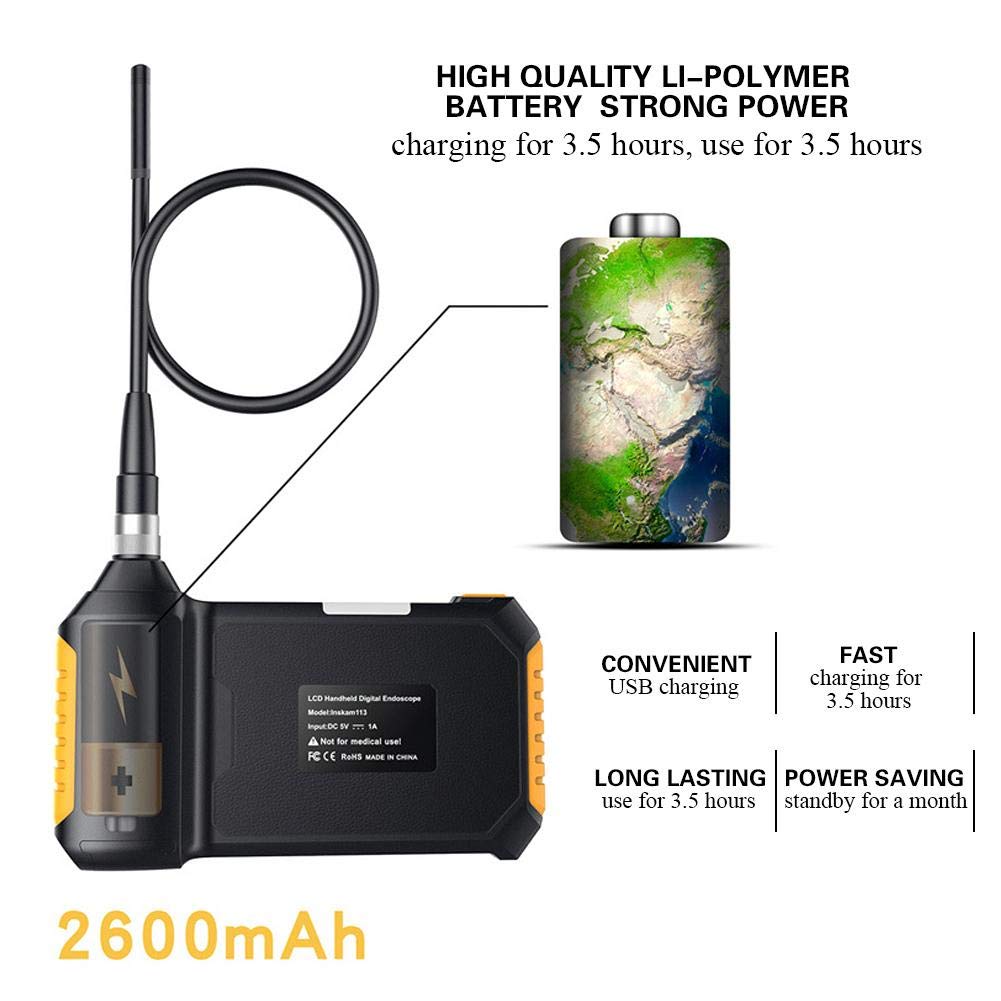
Image: Illustration of the endoscope's charging process, emphasizing its 2600mAh lithium battery which charges in 3.5 hours and provides 3.5 hours of use.
A full charge typically takes approximately 3.5 hours. The device can operate for about 3.5 hours on a full charge.
2. Attaching the Camera Probe
Carefully insert the camera probe's connector into the designated port on the main endoscope unit. Secure it by tightening the metal ring around the connection.

Image: Step-by-step visual guide on how to connect the flexible camera probe to the handheld endoscope unit, showing the alignment and securing mechanism.
3. ינסערטינג די זכּרון קאָרט
Locate the TF card slot on the side of the endoscope unit. Insert the provided 8GB memory card until it clicks into place. This card is essential for saving images and videos.
אַפּערייטינג ינסטראַקשאַנז
1. פּאָווערינג אויף / אויסגעלאשן
Press and hold the power button (usually marked with a power symbol) for a few seconds to turn the device on or off. The LCD screen will illuminate upon startup.

בילד: א קלאָרע פראָנט view of the endoscope's display and control panel, indicating the power button and other operational controls.
2. אַדזשאַסטינג LED לייץ
The endoscope is equipped with 6 adjustable LED lights to illuminate dark inspection areas. Use the dedicated light adjustment button (often marked with a light bulb icon) to cycle through brightness levels or turn the lights on/off.

בילד: אן אינערליכע view diagram highlighting the endoscope's 6 LED lights and the highly photosensitive chip designed for clear imaging in various lighting conditions.
3. קאַפּטורינג בילדער און ווידיאס
בשעת viewing the live feed, press the "OK" or capture button to take a still image. To record video, press the video recording button (if available) to start and stop recording. All captured media will be saved to the inserted memory card.
4. נאַוויגאַציע מעניוז
Use the directional buttons (up, down, left, right) and the "OK" button to navigate through the device's menu options. This allows you to adjust settings such as language, resolution, and review קאַפּטשערד מעדיע.
Supported languages include English, German, Simplified Chinese, Spanish, French, Russian, and Japanese.
וישאַלט
- רייניקונג: ווישט אָפּ די הויפּט איינהייט מיט אַ ווייכן, טרוקענעם שטאָף. די קאַמעראַ פּראָבע קען מען רייניקן מיט אַן אַדווערטייזמענט.amp cloth. Ensure the probe is dry before storage.
- סטאָרידזש: Store the endoscope in a cool, dry place, away from direct sunlight and extreme temperatures.
- באַטערי זאָרגן: כדי צו פארלענגערן די לעבן פון די באַטעריע, זאָלט איר נישט אָפט אויסלאָדן די באַטעריע. לאָדט דאָס אַפּאַראַט רעגולער אויף, אפילו אויב עס ווערט נישט גענוצט פֿאַר לענגערע צייטן.
- וואָטערפּרוף שאַץ: The camera lens and lamp are IP67 waterproof, meaning they can withstand immersion in water up to 1 meter for 30 minutes. The main unit is NOT waterproof. Do not submerge the main unit.
טראָובלעשאָאָטינג
| פּראָבלעם | מעגלעך סיבה | לייזונג |
|---|---|---|
| די מיטל טוט נישט מאַכט אויף. | נידעריגע באַטעריע; דעווייס אַרבעט נישט ריכטיק. | לאָדט דאָס אַפּאַראַט גאָר אויף. אויב די פּראָבלעם בלייבט, קאָנטאַקטירט קונה שטיצע. |
| קיין בילד אויפן עקראַן. | Camera probe not connected properly; Damaged probe. | Ensure the camera probe is securely connected. Check for visible damage to the probe. |
| Images/videos not saving. | Memory card full or not inserted correctly; Corrupted memory card. | Check if the memory card is inserted correctly. Delete old files or try a different memory card. Format the card if necessary (this will erase all data). |
| די על-אי-די לייץ ארבעטן נישט. | ליכט אויסגעלאָשן; פּראָבלעם. | Press the light adjustment button to turn on/adjust brightness. If problem persists, contact customer support. |
ספּעסאַפאַקיישאַנז
| שטריך | דעטאַל |
|---|---|
| מאָדעל | Walfrontwhogptq3fm |
| מאָניטאָר | 4.3-אינטש קאָליר על-סי-די |
| אַפּאַראַט האַכלאָטע | 1920x1080, 1280x720, 640x480 |
| האָריזאָנטאַל Viewינג אַנגלע | 70° |
| פאָקאַל לענג | 40-5000מם |
| וואָטערפּרוף לעוועל | IP67 (for lens/lamp נאָר) |
| אָביעקטיוו דיאַמעטער | 8 מם |
| באַטערי | 1 x Lithium Battery, 18650, 3.7V, 2600mAh |
| באַטערי וואָרקינג צייט | בעערעך. 3.5 שעה |
| באַטאַרייע טשאַרדזשינג צייט | בעערעך. 3.5 שעה |
| געפירט ליגהץ | 6 פּקס |
| שורה לענג | 5-meter hard line |
| מאַטעריאַל | אַבס + מעטאַל |
| וואָג | בעערעך. 676 ג |
| דימענסיעס (איינהייט) | 170mm (6.7in) x 100mm (3.9in) (approx.) |

Image: Diagram illustrating the approximate dimensions of the main endoscope unit, measuring 170mm in length and 100mm in height.
וואָראַנטי און שטיצן
For warranty information and technical support, please refer to the contact details provided in the original product packaging or visit the official Walfront webזייטל. האַלט אייער קויף קוויטל ווי אַ באַווייַז פון קויפן פֿאַר וואָראַנטי קליימז.
The product is manufactured by Walfront.
אַפּפּליקאַטיאָנס
The Walfront Handheld Endoscope is suitable for a wide range of inspection tasks, including but not limited to:
- Automobile inspection (engine, exhaust, chassis)
- Pipeline inspection (drains, plumbing, HVAC ducts)
- Air conditioning inspection
- Object retrieval in hard-to-reach areas
- אינדוסטריעלע מאַשינערי דורכקוק

בילד: וויזועל עקסamples of the endoscope's diverse applications, including automotive, plumbing, and general inspection scenarios, demonstrating its versatility.
Ask a question about this manual
Ask about setup, troubleshooting, compatibility, parts, safety, or missing instructions. Manuals+ will review the question and use this page’s manual context to help answer it.