
1. הקדמה
This manual provides instructions for the installation, operation, and maintenance of your Globe Electric 34207 Wi-Fi Smart LED Light Bulb. This smart bulb offers multicolor changing (RGB) and tunable white light (2000K - 5000K), controllable via the GLOBE SUITE™ App or voice commands through compatible smart home assistants. No hub is required for operation.
2. זיכערקייַט אינפֿאָרמאַציע
- ריזיקירן פון עלעקטריק קלאַפּ: נישט אינסטאַלירן מיט נאַסע הענט אדער ווען איר שטייט אויף נאַסע אָדער טרוקןamp סערפאַסיז.
- בלויז דרינענדיק נוצן: This bulb is designed for indoor use in dry locations.
- נישט פֿאַר פֿאַרמאַכטע פֿיקסטשורז: Do not use in fully enclosed luminaires as this may limit air circulation and affect performance.
- דיממער קאַמפּאַטאַבילאַטי: This smart bulb is dimmable via the app or voice control only. Do not use with external dimmer switches.
- אַפּערייטינג טעמפּעראַטור: Ensure the operating environment is within the recommended temperature range for LED bulbs.
- באַזייַטיקונג: אַוועקוואַרפן די ציבעלע לויט די לאָקאַלע רעגולאַציעס.
3. פּעקל אינהאַלט
The package for the Globe Electric 34207 Wi-Fi Smart LED Light Bulb (2-Pack) typically includes:
- 2 x Globe Electric Wi-Fi Smart LED Light Bulbs (Model 34207)
- 1 x Instruction Sheet / Quick Start Guide
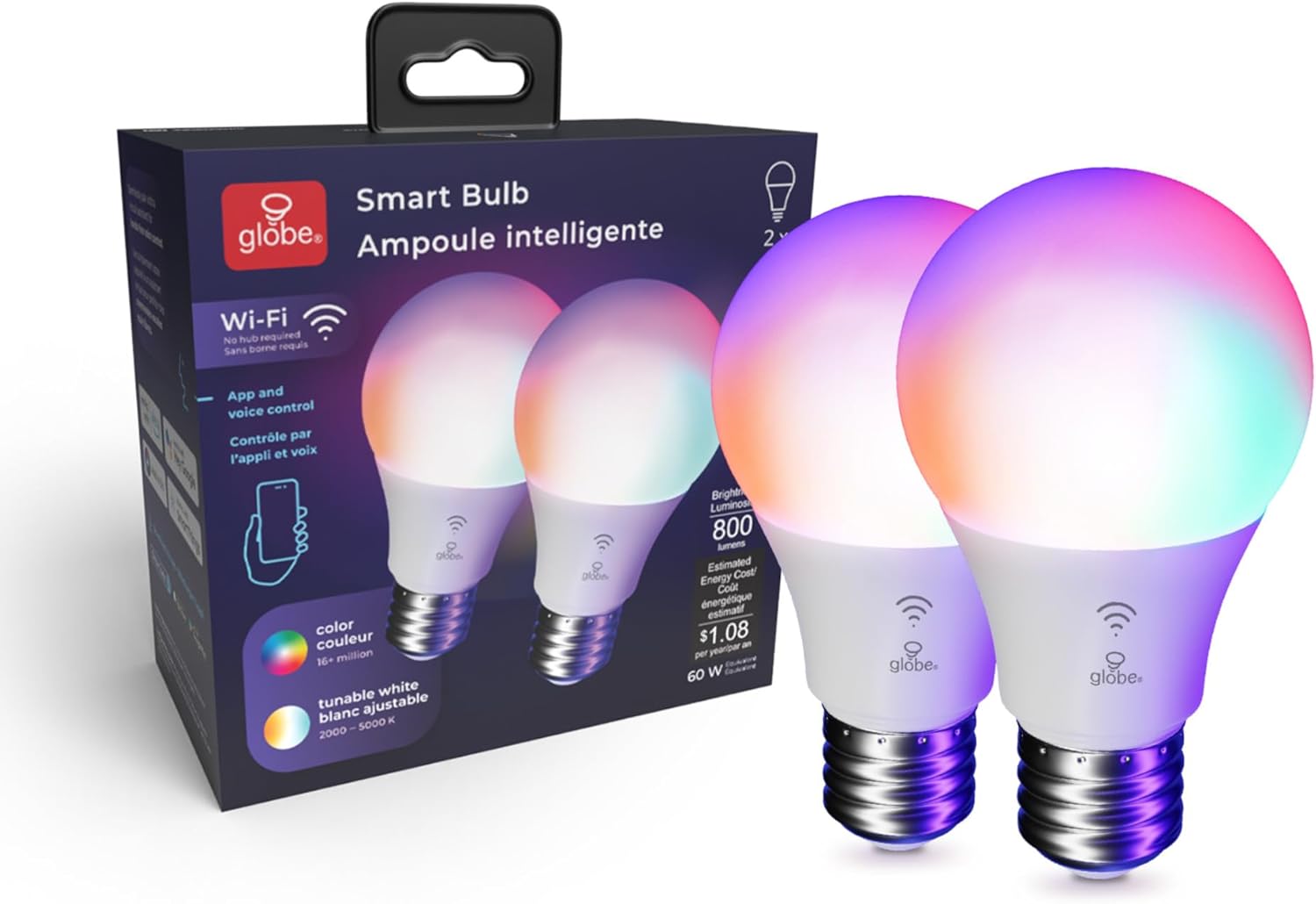
Image: Contents of the Globe Electric Smart Bulb 2-pack, showing two bulbs and the product box.
4. סעטאַפּ
4.1 גשמיות ינסטאַלירונג
- Ensure the power to the light fixture is turned OFF at the switch before installation.
- Carefully screw the Globe Electric Smart LED Light Bulb into a standard E26 base light socket.
- Turn the power ON at the switch. The bulb should light up.
Video: Globe Electric Smart Bulb Installation Guide. This video demonstrates the physical installation and initial setup process for the smart bulb.
4.2 אַפּ אראפקאפיע און ינסטאַלירונג
- אָפּלאָדירן די GLOBE SUITE™ App פֿון די עפּל אַפּ סטאָר אָדער Google פּלייַ סטאָר.
- רעגיסטרירט זיך פֿאַר אַ נײַעם אַקאַונט אָדער לאָגט זיך אײַן אויב איר האָט שוין אײנס.

Image: A user interacting with the Globe Suite app on a smartphone, demonstrating remote control capabilities.
4.3 פֿאַרבינדן זיך צו Wi-Fi און פּאָרן
The Globe Electric Smart LED Light Bulb connects directly to your home's 2.4 GHz Wi-Fi network. No separate hub is required.
- Ensure your smartphone is connected to your 2.4 GHz Wi-Fi network. (Note: 5 GHz networks are not supported for initial pairing).
- Open the GLOBE SUITE™ App and tap the "+" icon to add a new device.
- Follow the on-screen instructions in the app to put the bulb into pairing mode (usually involves turning the bulb off and on a few times until it blinks rapidly).
- Confirm the bulb is blinking and proceed with the pairing process in the app.
- Once connected, you can rename your bulb for easier control (e.g., "Living Room Light").
5. אַפּערייטינג ינסטרוקטיאָנס
5.1 Basic Controls (On/Off, Dimming)
Through the GLOBE SUITE™ App, you can:
- Turn the bulb ON or OFF remotely.
- Adjust the brightness level from 1% to 100%.
5.2 קאָליר ענדערונג (RGB)
The bulb offers millions of color options to customize your environment.
- In the app, navigate to the "Color" section.
- Select your desired color from the color wheel or choose from preset color scenes.
- Adjust the saturation and brightness for the chosen color.

Image: A user selecting a color from the color palette within the Globe Suite app to change the bulb's color.
5.3 Tunable White (2000K - 5000K)
Adjust the white light temperature to suit your mood or activity, from warm white to cool daylight.
- In the app, navigate to the "White" section.
- Slide the color temperature bar to select a range between 2000K (warm white) and 5000K (cool white).
- Preset options like "Relax" (2000K-3000K), "Comfort" (3000K-4000K), and "Focus" (4000K-5000K) are available.

Image: The Globe Suite app displaying options for tunable white light, including presets for Relax, Comfort, and Focus, with corresponding Kelvin temperatures.
5.4 קול קאָנטראָל
Integrate your smart bulb with voice assistants for hands-free control.
- קאַמפּאַטאַבאַל אַסיסטאַנץ: Amazon Alexa, Google Assistant, Siri.
- Linking Account: Follow the instructions in your voice assistant's app to link your GLOBE SUITE™ account.
- קאַמאַנדז: Use commands like "Alexa, turn on Living Room Light," "Hey Google, set Kitchen Light to blue," or "Hey Siri, dim Bedroom Light to 50%."

Image: A man in a kitchen using voice commands to control smart lighting, with a smartphone displaying Siri and smart speakers visible.
5.5 Routines and Schedules
Automate your lighting to fit your daily schedule and preferences.
- Wake Up Routine: Gradually brighten your lights in the morning.
- שלאָף-צייט רוטין: Slowly dim your lights in the evening to prepare for sleep.
- Vacation Routine: Schedule lights to turn on and off randomly to simulate occupancy when you are away.
- Sync with Sun: Adjust light color and brightness automatically throughout the day to align with natural light cycles, supporting your circadian rhythm.

Image: The Globe Suite app interface showing "Wake Up Routine" and "Bedtime Routine" settings, with a person sleeping in the background.

Image: The Globe Suite app displaying "Vacation Routine" settings, with a person packing luggage in the background, indicating automated lighting for security.

Image: The Globe Suite app illustrating the "Sync with Sun" feature, showing how light changes from morning to evening to match natural light.
Video: Globe Electric Wi-Fi Smart Bulb Product Highlights. This video showcases various features of the smart bulb, including color changing, tunable white, and smart routines.
6. וישאַלט
- רייניקונג: זיכער מאַכן אַז די לאָמפּ איז קיל און די מאַכט איז אויסגעלאָשן איידער איר רייניקט. ווישט מיט אַ ווייכן, טרוקענעם שטאָף. ניצט נישט פליסיקע אָדער שאַרפע רייניקונגסמיטלען.
- סטאָרידזש: אויב איר לייגט אַוועק די ציבעלע, האַלט זי אין אַ קיל, טרוקן אָרט, אַוועק פון דירעקט זונשייַן און עקסטרעמע טעמפּעראַטורן.
- פאַרבייַט: טוישט אויס די גלאָביר אויב זי ווערט געשעדיגט אדער הערט אויף צו ארבעטן ריכטיק.
7. טראָובלעשאָאָטינג
| פּראָבלעם | מעגלעך סיבה | לייזונג |
|---|---|---|
| ציבעלע טוט נישט ליכט אַרויף. | Power is off; bulb not screwed in properly; bulb is faulty. | Check power switch; ensure bulb is securely screwed in; test bulb in another working fixture. |
| קען נישט פאַרבינדן צו Wi-Fi / אַפּ. | Incorrect Wi-Fi band (not 2.4 GHz); incorrect password; bulb not in pairing mode; weak Wi-Fi signal. | Ensure connection to 2.4 GHz Wi-Fi; re-enter password carefully; follow app instructions to re-enter pairing mode; move bulb closer to router. |
| שטימע קאנטראל ארבעט נישט. | Account not linked; incorrect device name; internet connectivity issue. | Verify GLOBE SUITE™ account is linked to your voice assistant; use the exact device name set in the app; check internet connection. |
| Bulb is unresponsive or lags. | Weak Wi-Fi signal; app issue. | Improve Wi-Fi signal strength; restart the GLOBE SUITE™ App; power cycle the bulb (turn off/on at switch). |
8. ספּעסאַפאַקיישאַנז
- מאָדעל נומער: 34207
- סאָרט: גלאָבוס עלעקטריק
- ליכט טיפּ: געפירט
- וואָסtage: 10 וואטס (60 וואט עקוויוואַלענט)
- ליכט רעזולטאַט: 800 לומענס
- ציבעלע פאָרעם גרייס: A19
- באַלבז באַזע: E26
- קאָליר טעמפּעראַטור: 2000K - 5000K (צושטעלבאר ווייס)
- ליכט קאָליר: RGB (Multicolor Changing), Warm White
- Voltage: 120 וואלטס
- קאָנטראָל אופֿן: App (GLOBE SUITE™), Voice (Amazon Alexa, Google Assistant, Siri)
- קאַנעקטיוויטי: Wi-Fi (נאָר 2.4 GHz)
- דרינענדיק / דרויסנדיק באַניץ: דרינענדיק
- מאַטעריאַל טיפּ: פּלאַסטיק
- נומער וואָג: 0.2 אונס
- נומער דימענשאַנז (ב x ה): 2.4"ברייט x 4.33"היך
9. וואָראַנטי & שטיצן
This Globe Electric product comes with a 2-יאָר פאַבריקאַנט ס לימיטעד וואָראַנטי.
For technical support, warranty claims, or additional product information, please visit the official Globe Electric website or contact their customer service directly. Refer to the packaging or the Globe Electric webזייטל פֿאַר די מערסט אַרויף-צו-דאַטע קאָנטאַקט דעטאַילס.
אָנליין רעסורסן:
- Globe Electric Official Webפּלאַץ: www.globe-electric.com
- GLOBE SUITE™ App Support: Available via the app's help section.