
EOTECH XPS2-0
EOTECH XPS2 Holographic Weapon Sight XPS2-0 User Manual
Brand: EOTECH | Model: XPS2-0
1. פּראָדוקט איבערview & איינריכטונגען
The EOTECH XPS2-0 Holographic Weapon Sight is a compact and robust optic designed for rapid target acquisition and reliable performance. Its advanced holographic technology provides a clear and precise aiming solution for various shooting scenarios.
- EOTECH XPS2-0: Holographic Weapon Sight in black with 68MOA ring and (1) 1 MOA dot reticle.
- מאַונטינג ווערסאַטילאַטי: Compatible with both 1" weaver and MIL-STD 1913 rails, offering flexible mounting options.
- אַדזשאַסטאַבאַל ברייטנאַס: Features 20 brightness settings to ensure optimal visibility in any lighting condition, from bright daylight to low-light environments.
- סאָליד פּלאַן: Its small footprint leaves ample rail space for additional accessories such as rear iron sights or magnifiers.

2. סעטאַפּ
2.1 מאָנטירן דעם זיכט
The XPS2-0 is designed for easy mounting on any 1" Weaver or MIL-STD 1913 rail. Ensure the rail is clean and free of debris before mounting. Use the provided thumb-bolt or Allen-type bolt to securely fasten the sight to your firearm's rail. Tighten the bolt firmly to prevent movement under recoil.

2.2 באַטאַרייע ייַנמאָנטירונג
The XPS2-0 uses a single CR123 battery. To install or replace the battery:
- Unscrew the battery cap located on the front right side of the sight.
- Insert the CR123 battery with the positive (+) end facing forward.
- שרויבט צוריק אָן דעם באַטעריע דעקל זיכער.
The sight will flash when the battery is at 20% capacity, indicating it's time for replacement soon.
3. אפערירן דעם זיכט
3.1 Power On/Off & Brightness Adjustment
The control buttons are located on the rear of the sight:
- צו מאַכט אויף: Press either the 'Up' (▲) or 'Down' (▼) button.
- צו סטרויערן די ברייטנאַס: Press the 'Up' (▲) button to increase brightness or the 'Down' (▼) button to decrease brightness. There are 20 settings available.
- צו מאַכט אַוועק: Simultaneously press both the 'Up' (▲) and 'Down' (▼) buttons.

3.2 Reticle Description
The XPS2-0 features a 68 MOA (Minute of Angle) ring with a 1 MOA dot in the center. This reticle design allows for quick target acquisition while maintaining precision.
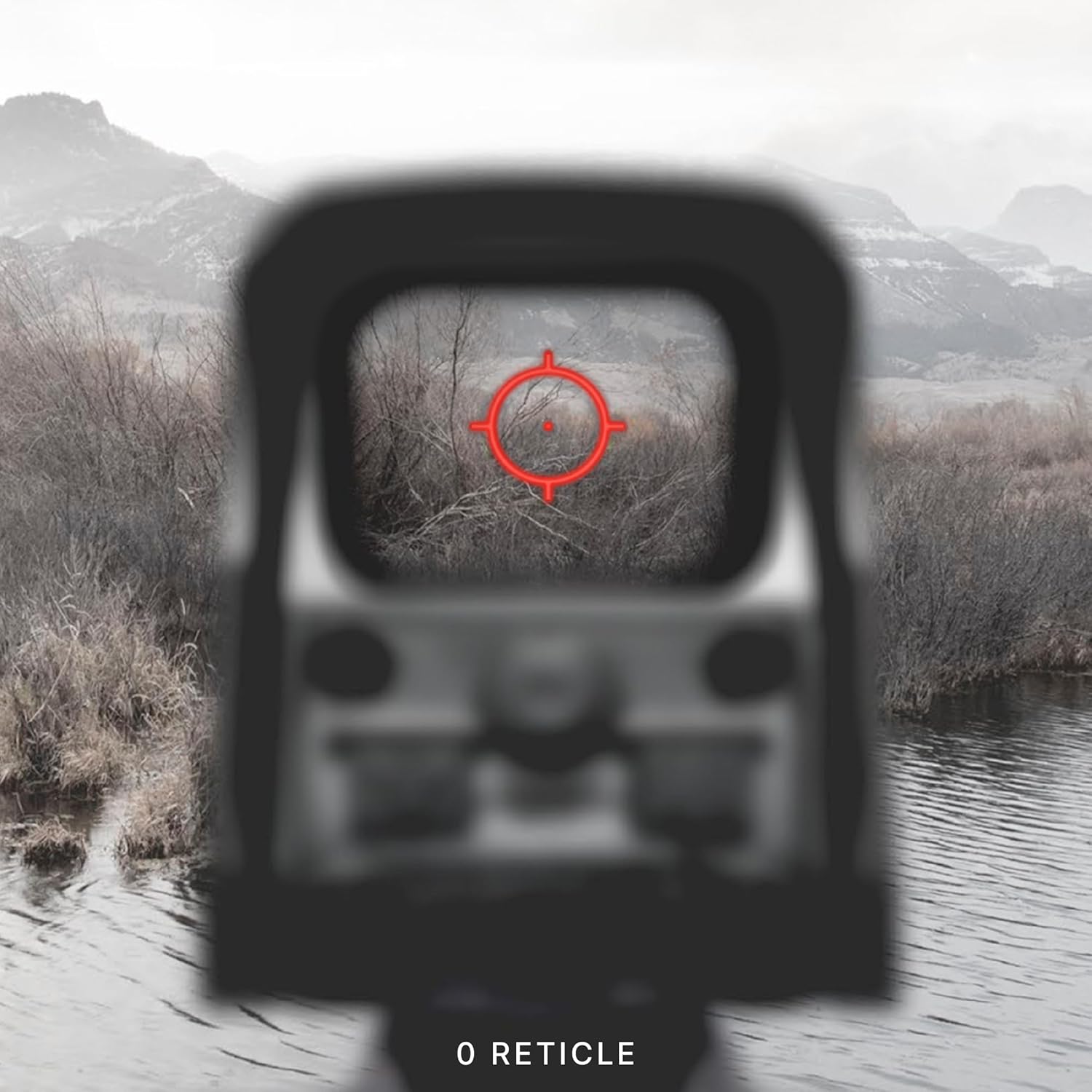

3.3 ווינטידזש און הייך אַדזשאַסטמאַנץ
Adjustments for windage (left/right) and elevation (up/down) are located on the side of the sight. Each click provides a precise adjustment to the point of impact.

4. וישאַלט
To ensure the longevity and optimal performance of your EOTECH XPS2-0, regular maintenance is recommended:
- רייניקונג לענסעס: Use a soft, lint-free cloth and lens cleaning solution to gently wipe the optical surfaces. Avoid abrasive materials or excessive pressure.
- רייניקונג קערפער: Wipe the sight's body with a damp שטאָף צו באַזייַטיקן שמוץ און גרייז. ויסמיידן שטרענגע כעמיקאַלן.
- סטאָרידזש: Store the sight in a dry, cool place away from direct sunlight and extreme temperatures. Remove the battery if storing for extended periods.
5. טראָובלעשאָאָטינג
5.1 נידעריק באַטערי ינדיקאַטאָר
When the battery life reaches approximately 20%, the reticle will flash upon power-up to indicate a low battery condition. Replace the CR123 battery promptly to ensure continued operation.
5.2 Reticle Blinking Under Recoil
If the reticle blinks or flickers during recoil, this is another indication of a low battery. Replace the battery to resolve this issue.
6. ספּעסאַפאַקיישאַנז
| שטריך | דעטאַל |
|---|---|
| סאָרט | EOTECH |
| מאָדעל נאָמען | XPS2-0 |
| קאָליר | שוואַרץ |
| סטייל | XPS2-0 |
| פּונקט וואָג | 226.79 גראַמז |
| מאַטעריאַל | פּלאַסטיק |
| מאַגניפיקאַטיאָן מאַקסימום | 1x |
| מינימום מאַגנאַפאַקיישאַן | 1x |
| קאַמפּאַטאַבאַל דעוויסעס | ביקס |
| מאַונטינג טיפּ | וויווער מאונט |
| נאַכט זעאונג קאַמפּאַטאַבאַל | ניין |
| דימענשאַנז (LxWxH) | 3.8" x 2.1" x 2.5" |
| באַטערי טיפּ | CR123 |
7. וואָראַנטי & שטיצן
The EOTECH XPS2-0 Holographic Weapon Sight comes with a 10-year limited warranty from the manufacturer, covering defects in materials and workmanship under normal use. For warranty claims or technical support, please refer to the official EOTECH webזייטל אדער קאנטאקט זייער קאסטומער סערוויס גלייך.
It is recommended to register your product online to ensure you are contacted in the event of any product issues and to facilitate warranty service.
8. וויכטיק סאַפעטי אינפֿאָרמאַציע
ווארענונג: דעם פּראָדוקט כּולל קעמיקאַלז באקאנט צו די שטאַט פון קאַליפאָרניאַ צו פאַרשאַפן ראַק און געבורט חסרונות אָדער אנדערע רעפּראָדוקטיווע שאָדן.
Ask a question about this manual
Ask about setup, troubleshooting, compatibility, parts, safety, or missing instructions. Manuals+ will review the question and use this page’s manual context to help answer it.