
Calvas HYPFCR-38W, HYPFCR-30, HYPFCR-37W, HYPFCR-47, HYPFCR-48W
באַניצער מאַנואַל פֿאַר קאַלוואַס לופטקילונג ווייַט קאָנטראָל
Compatible Models: HYPFCR-38W, HYPFCR-30, HYPFCR-37W, HYPFCR-47, HYPFCR-48W
1. פּראָדוקט איבערview
This manual provides detailed instructions for the operation and maintenance of your Calvas Air Conditioner Remote Control. This remote is designed to be compatible with various Mitsubishi air conditioner models, ensuring convenient control over your cooling and heating settings.
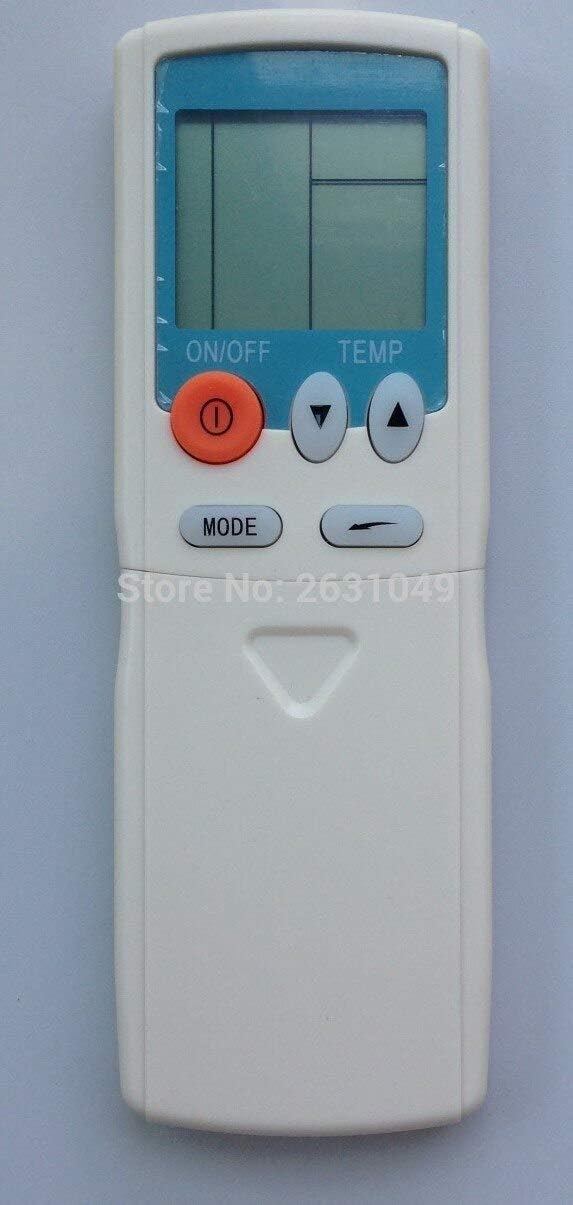
פיגורע 1: פראָנט view of the Calvas Air Conditioner Remote Control. It features a clear LCD display at the top, an orange ON/OFF button, two triangular temperature adjustment buttons (up and down), and a MODE button below them. The remote is white with a light blue accent around the display.
2. סעטאַפּ
2.1 באַטאַרייע ייַנמאָנטירונג
To begin using your remote control, you must first install the batteries. This remote requires standard batteries (typically AAA, though the product specifications mention Lithium, please verify the battery type indicated in the battery compartment).
- געפֿינען די באַטאַרייע אָפּטייל אויף די צוריק פון די ווייַט קאָנטראָל.
- רוקט דעם דעקל פונעם באַטעריע־אָפּטייל אַראָפּ אָדער אין דער ריכטונג וואָס ווערט אָנגעוויזן דורך אַ פײַל צו עס עפֿענען.
- Insert the batteries, ensuring the positive (+) and negative (-) terminals align correctly with the markings inside the compartment. Incorrect insertion can prevent the remote from functioning.
- לייגט צוריק דעם דעקל פונעם באַטעריע־אָפּטייל דורך עס צוריקצורוקן אין פּלאַץ ביז עס קליקט זיכער.
After battery installation, the LCD display on the remote should illuminate, indicating it is ready for use.
3. אַפּערייטינג ינסטרוקטיאָנס
Familiarize yourself with the buttons on your remote control to effectively manage your air conditioner's functions.

פיגורע 2: דעטאַילעד view of the remote control with the lower panel extended, revealing additional function buttons. These include buttons for fan speed, timer settings, and possibly a reset clock function.
3.1 יקערדיק פאַנגקשאַנז
- ON/OFF קנעפּל (●): Press this orange button to turn the air conditioner unit on or off.
- טעמפּעראַטור אַדדזשוסטמענט בוטטאָנס (▲ TEMP ▼): Use the up (▲) and down (▼) triangular buttons to increase or decrease the desired temperature setting.
- מאָדע קנעפּל: Press this button to cycle through the available operating modes, such as Cool, Heat, Fan, Dry, and Auto. The current mode will be displayed on the LCD screen.
3.2 פארגעשריטענע פונקציעס (אונטערן גליטשנדיקן דעקל)
Some models of this remote control feature a sliding cover at the bottom that reveals additional function buttons. Slide the cover down to access these controls.
- פאָכער ספּיד קנעפּלעך: Typically represented by fan icons, these buttons allow you to adjust the fan speed (e.g., Low, Medium, High, Auto).
- Timer Buttons (HR., MIN.): Used to set the ON/OFF timer for the air conditioner. Refer to your air conditioner's main manual for specific timer programming instructions.
- CLEAR קנעפּל: May be used to clear certain settings or timer programs.
- RESET CLOCK Button: Used to reset the internal clock of the remote, if applicable.
- באַטערי ינדיקאַטאָר: Some remotes may have a low battery indicator or a button to check battery status.
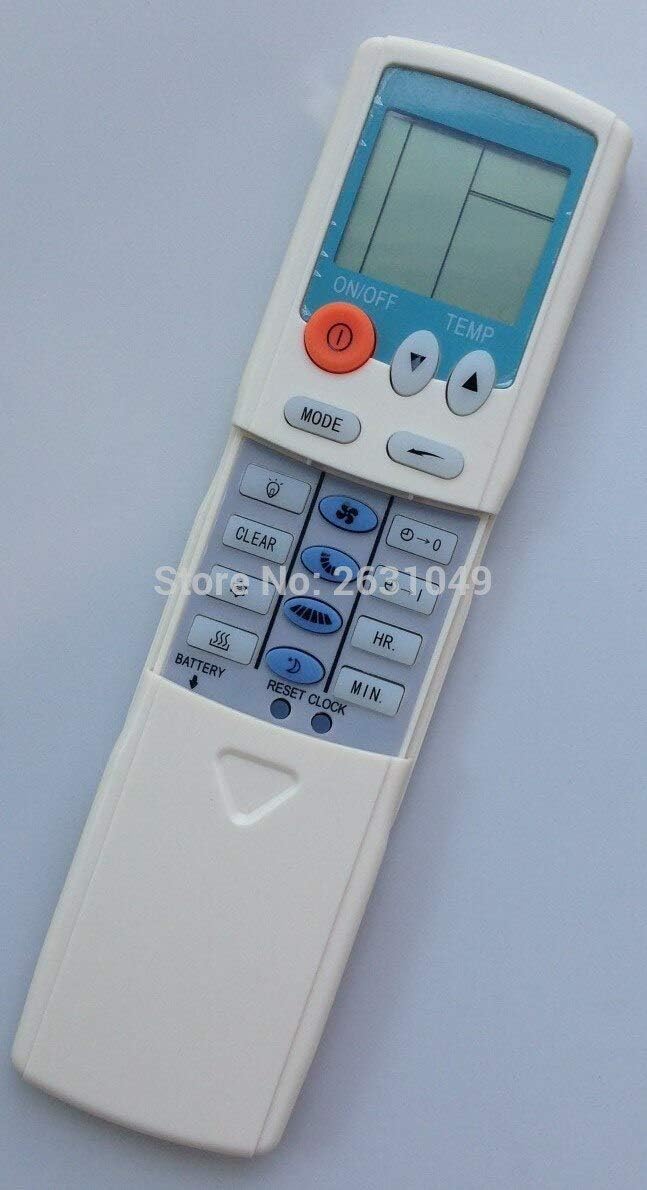
פיגורע 3: זייַט view of the remote control, providing a clearer perspective of the button arrangement and the sliding cover mechanism.
4. וישאַלט
4.1 רייניקן די ווײַטקאָנטראָל
To ensure the longevity and proper functioning of your remote control, keep it clean and free from dust and debris.
- Wipe the surface of the remote with a soft, dry cloth.
- פאר עקשנות שמוץ, לייכט דampווישט דעם שטאָף מיט וואַסער אָדער אַ מילדן, נישט-שרייַבנדיקן רייניגער. שפּריצט נישט רייניגער גלייך אויף דער ווײַטקאָנטראָל.
- פֿאַרמײַדט די נוצן פֿון שאַרפֿע כעמיקאַלן, סאָלווענטן, אָדער אַברייזיווע רייניקונג־מאַטעריאַלן, ווײַל די קענען שאַטן די ענדיקונג אָדער אינעווייניקסטע קאָמפּאָנענטן פֿון דער ווײַטקאָנטראָל.
4.2 באַטערי פאַרבייַט
Replace batteries when the display becomes dim or the remote's range decreases. Always replace all batteries at the same time with new ones of the same type.
- פֿאָלגט די באַטעריע אינסטאַלאַציע טריט וואָס זענען אויסגעשריבן אין סעקציע 2.1.
- אָפּזאָגן געוויינט באַטעריז ריספּאַנסאַבלי לויט די היגע רעגיאַליישאַנז.
5. טראָובלעשאָאָטינג
If you experience issues with your remote control, try the following troubleshooting steps before seeking further assistance.
| פּראָבלעם | מעגלעך סיבה | לייזונג |
|---|---|---|
| Remote not responding / Air conditioner not reacting. |
|
|
| דער עקראַן איז טונקל אָדער ליידיק. |
|
|
| Remote functions intermittently. |
|
|
6. ספּעסאַפאַקיישאַנז
| שטריך | דעטאַל |
|---|---|
| סאָרט | ליסע ספּאַץ |
| מאָדעל קאַמפּאַטאַבילאַטי | HYPFCR-38W, HYPFCR-30, HYPFCR-37W, HYPFCR-47, HYPFCR-48W |
| ווירעלעסס קאָמוניקאַציע | ינפרערעד (IR) |
| אָפטקייַט | 433 מהז |
| קאַנאַל | 1 |
| קאַמפּאַטאַבאַל דעוויסעס | לופטקילונג |
| מאַטעריאַל | אנדערע |
| באַטערי טיפּ | Lithium (Please verify actual battery type in compartment, typically AAA/AA for remotes) |
Ask a question about this manual
Ask about setup, troubleshooting, compatibility, parts, safety, or missing instructions. Manuals+ will review the question and use this page’s manual context to help answer it.