
Calvas CLS-D41D8CD98F00B204E9800998ECF8427E
פעטקוס ווײַטקאָנטראָל פֿאַר היטאַטשי לופטקילונג באַניצער מאַנואַל
Model Compatibility: RAS-D10EX, RAR-5E1, RAS-10XH1, RAR-5E2, RAR-5E3, RAR-5E4, RAR-5E5, RAR-5E6, RAS-D14EX2
1. הקדמה
This manual provides comprehensive instructions for the operation and maintenance of your Fetcus Universal Remote Control, designed for various Hitachi Air Conditioner models. Please read this manual thoroughly before using the remote control to ensure proper function and longevity.
This remote control is a direct replacement or compatible alternative for original Hitachi air conditioner remote models including RAS-D10EX, RAR-5E1, RAS-10XH1, RAR-5E2, RAR-5E3, RAR-5E4, RAR-5E5, RAR-5E6, and RAS-D14EX2.
2. פּראָדוקט פֿעיִקייטן
- וניווערסאַל קאַמפּאַטאַבילאַטי: Designed to work with a wide range of Hitachi air conditioner models.
- ינפרערעד קאַנעקטיוויטי: Utilizes standard infrared signals for reliable communication with your AC unit.
- Dedicated AC Functions: Includes specific buttons for common air conditioner operations such as power, mode selection, temperature adjustment, fan speed, and more.
- סאָליד פּלאַן: Ergonomic and easy to handle.
- No App Support: Operates independently without the need for a smartphone application.
- אָפטקייַט: Operates at 433 MHz for signal transmission.
3. סעטאַפּ
3.1 באַטאַרייע ייַנמאָנטירונג
The remote control requires appropriate batteries for operation. Follow these steps to install or replace batteries:
- געפֿינען די באַטאַרייע אָפּטייל אויף די צוריק פון די ווייַט קאָנטראָל.
- רוקט דעם דעקל פונעם באַטעריע־אָפּטייל אַראָפּ אָדער דריק דעם לאַטש צו עס עפֿענען.
- Insert new batteries, ensuring the positive (+) and negative (-) terminals align correctly with the markings inside the compartment. Typically, two AAA batteries are required, though specific battery type should be confirmed by checking the compartment markings.
- פֿאַרמאַכט דעם דעקל פֿון דער באַטעריע־אָפּטיילונג זיכער ביז עס קליקט אַרײַן אין פּלאַץ.

פיגורע 3.1: דערציען view of the Fetcus remote control with the battery compartment open, revealing the two battery slots and a label with battery safety warnings. This image illustrates the correct orientation for battery insertion.
וויכטיק: אַרויסנעמען באַטעריעס אויב די ווײַטקאָנטראָל וועט נישט ווערן גענוצט פֿאַר אַ לענגערע צײַט כּדי צו פֿאַרמײַדן ליקאַדזש און שאָדן.
4. אַפּערייטינג ינסטרוקטיאָנס
Familiarize yourself with the buttons on your remote control. The remote features a main display and various control buttons for your air conditioner.
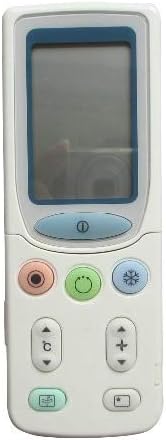
פיגורע 4.1: פראָנט view of the Fetcus remote control, highlighting the LCD screen and the primary control buttons for power, mode, and temperature adjustment.
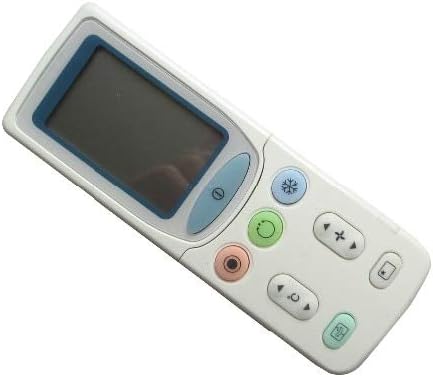
פיגורע 4.2: אַנגגאַלד view of the Fetcus remote control, showing the main display and primary function buttons including power, mode, and fan speed controls.
4.1 יקערדיק פאַנגקשאַנז
- מאַכט קנעפּל (①): דרוק צו קער די לופט קאַנדישאַנער אויף אָדער אַוועק.
- מאָדע קנעפּל (↻): Press repeatedly to cycle through operating modes: Auto, Cool, Dry, Fan, Heat (if applicable to your AC unit).
- טעמפּעראַטור אַדזשאַסטמענט קנעפּלעך (+ / -): Press to increase or decrease the desired temperature setting.
- פען גיכקייט קנעפּל (❄): Press to adjust the fan speed (e.g., Auto, Low, Medium, High).
4.2 פארגעשריטענע פונקציעס (אונטערן גליטשנדיקן דעקל)
Some advanced functions are accessible by sliding down the cover on the remote control. This reveals additional buttons for more specific controls.

פיגורע 4.3: אַנגגאַלד view of the Fetcus remote control with the sliding cover open, exposing additional advanced function buttons beneath the main display.
- Swing/Louver Control: Adjusts the direction of the airflow (vertical or horizontal swing).
- Timer/Sleep Mode: Sets a timer for the AC unit to turn on or off, or activates a sleep-friendly operating mode.
- C/F Switch (℃): באַשטימען די טעמפּעראַטור אַרויסווייַזן צווישן סעלסיוס און פאַהרענהעיט.
- באַשטעטיק קנעפּל: Used to reset the remote control settings or clear certain functions. Consult your AC unit's manual for specific reset procedures if needed.
- Other Specific Buttons: Depending on your specific Hitachi AC model, other buttons may control functions like Quiet mode, Turbo mode, or Health functions. Refer to your AC unit's original manual for detailed explanations of these specific icons.
5. וישאַלט
- רייניקונג: ווישט אָפּ די ווײַטקאָנטראָל מיט אַ ווייכן, טרוקענעם שטאָף. ניצט נישט קיין פֿליסיקע רייניקונגס־מיטלען אָדער אַברייזיוו מאַטעריאַלן, ווײַל זיי קענען שאַטן די ייבערפֿלאַך אָדער אינעווייניקסטע קאָמפּאָנענטן.
- באַטערי פאַרבייַט: Replace batteries when the remote's range decreases or the display becomes dim. Always replace all batteries at the same time with new ones of the same type.
- סטאָרידזש: סטאָר די ווייַט קאָנטראָל אין אַ קיל, טרוקן אָרט אַוועק פון דירעקט זונשייַן און עקסטרעם טעמפּעראַטורעס.
6. טראָובלעשאָאָטינג
| פּראָבלעם | מעגלעך סיבה | לייזונג |
|---|---|---|
| ווײַטקאָנטראָל רעאַגירט נישט. | טויטע אדער נישט ריכטיק אינסטאלירטע באַטעריעס. | Replace batteries, ensuring correct polarity (+/-). |
| די ווייטע ראַנג איז שוואַך. | שוואַכע באַטעריעס; שטערונג צווישן ווייַטקאָנטראָל און עיר קאַנדישאַנער אַפּאַראַט. | Replace batteries. Ensure a clear line of sight to the AC unit's infrared receiver. |
| די עיר קאַנדישאַנער אַפּאַראַט רעאַגירט נישט צו ספּעציפֿישע פֿונקציעס. | Remote not fully compatible with all AC unit features; AC unit does not support the function. | Verify the function exists on your specific AC model. This remote is a universal replacement and may not support all obscure functions of every original remote. |
| דער עקראַן איז טונקל אָדער ליידיק. | נידעריק באַטאַרייע מאַכט. | פאַרבייַטן באַטעריז. |
7. ספּעסאַפאַקיישאַנז
| שטריך | דעטאַל |
|---|---|
| סאָרט | ליסע ספּאַץ |
| מאָדעל נומער (אינעווייניק) | CLS-D41D8CD98F00B204E9800998ECF8427E |
| קאַמפּאַטאַבאַל דעוויסעס | Air Conditioner (Hitachi RAS-D10EX, RAR-5E1, RAS-10XH1, RAR-5E2, RAR-5E3, RAR-5E4, RAR-5E5, RAR-5E6, RAS-D14EX2) |
| קאַנעקטיוויטי טעכנאָלאָגיע | ינפרערעד |
| אָפטקייַט | 433 מהז |
| מאַקס נומער פון שטיצט דעוויסעס | 1 |
| מאַטעריאַל | Other (Durable Plastic) |
| באַטערי באַשרייַבונג | Lithium (Typically uses AAA batteries, please check compartment) |
| ספּעציעלע פֿעיִקייטן | Universal, Wireless |
| נומער פּעקל קוואַנטיטי | 1 |
| ערשטער דאַטע בנימצא | 8 מאי 2019 |
8. וואָראַנטי און שטיצן
This Fetcus Remote Control comes with a 90-טאָג וואָראַנטי פֿון דעם קויפֿדאַטום. די וואָראַנטי באַדעקט פֿאַבריקאַציע־דעפֿעקטן און גאַראַנטירט אַז דער פּראָדוקט פֿונקציאָנירט ווי באַשטימט אונטער נאָרמאַלן באַנוץ.
For warranty claims or technical support, please contact your retailer or the manufacturer with your purchase details. Please retain your proof of purchase for warranty validation.
Ask a question about this manual
Ask about setup, troubleshooting, compatibility, parts, safety, or missing instructions. Manuals+ will review the question and use this page’s manual context to help answer it.