
הקדמה
Thank you for choosing the ORSKEY Dash Cam S680. This manual provides detailed instructions for the installation, operation, and maintenance of your dash camera. Please read this manual thoroughly before use to ensure proper functionality and to maximize your experience with the product.
פּעקל אינהאַלט
ביטע טשעק די פּאַקעט פֿאַר די פאלגענדע זאכן:
- ORSKEY Dash Cam S680 Unit
- מאַשין טשאַרדזשער
- סאַקשאַן בארג
- באַניצער מאַנואַל (דעם דאָקומענט)

The package contents of the ORSKEY Dash Cam S680, including the main camera unit, a suction cup mount for windshield attachment, and a car charger for power.
פּראָדוקט איבערview
The ORSKEY Dash Cam S680 features a 3.0-inch LCD display, a 170-degree wide-angle lens, and records in 1080P Full HD. It is equipped with a Sony Exmor IMX 323 sensor and 6 glass lens elements for superior image quality, especially in low-light conditions with its WDR technology.
This image shows the advanced lens system of the ORSKEY Dash Cam, featuring a Sony Exmor IMX 323 sensor and 6 glass elements for clear 1080P video capture.
סעטאַפּ
1. ינסערטינג די מיקראָ סד קאַרד
Before using the dash cam, a Micro SD card (Class 10 or higher, up to 32GB) must be inserted. The Micro SD card is ניט אַרייַנגערעכנט אין דעם פּעקל.
- זייט זיכער אז די דאַש קאַם איז אויסגעלאָשן.
- Locate the Micro SD card slot on the side of the dash cam.
- אַרײַנשטעלן די מיקראָ SD קאַרטל מיט די גאָלדענע קאָנטאַקטן צו דער הינטערשטער זײַט פֿון דער קאַמעראַ ביז עס קליקט אַרײַן אין פּלאַץ.
- צו ארויסנעמען, שטופּ די קאַרטל אַרײַן לײַכט ביז זי קליקט, דערנאָך לאָזט זי לאָז, און זי וועט אַרויסשפּרינגען.
Note: It is recommended to format the Micro SD card within the dash cam settings before first use and periodically thereafter to ensure optimal performance.
2. מאַונטינג די דאַש קאַם
- רייניקט דעם געגנט אויף אייער ווינטשילד וואו איר פּלאַנירט צו מאָנטירן די דאַש קאַם.
- באַפעסטיקט דעם זויג-מאָנט צום דאַש קאַם.
- דריק דעם זויג-קאפ פעסט קעגן דעם ווינטשילד און דריי דעם הייבער צו עס באפעסטיגן. פאזיציאנירט די קאמערא צו זיכער מאכן א קלארע view פון דער וועג אָן צו שטערן אייער דרייווינג זעאונג.

A visual guide demonstrating how to properly install the dash cam onto your car's windshield using the suction mount and connect the power cable.
3. קאַנעקטינג מאַכט
- פֿאַרבינדט דעם אויטאָ טשאַרדזשער צום דאַש קאַם'ס מאַכט אַרייַנגאַנג פּאָרט.
- שטעקט אריין דעם אנדערן עק פונעם אויטא-לאדער אין אייער אויטא'ס ציגארעט-לייטער סאקעט.
- Route the power cable neatly along the edge of the windshield and dashboard to avoid obstructing your view אדער אריינמישן זיך מיט די דרייווינג קאנטראלן.
אַפּערייטינג ינסטראַקשאַנז
1. מאַכט אויף / אויסגעלאשן
- The dash cam will automatically power on and begin recording when your vehicle's engine starts (and the cigarette lighter provides power).
- עס וועט זיך אויטאמאטיש אויסלעשן ווען דער מאטאר ווערט אויסגעלאשן.
- צו מאַנועל אָנצינדן/אויסלאָשן, דריק און האַלט די פּאַוער קנעפּל.
2. רעקאָרדינג מאָדעס
The dash cam offers several recording features to ensure comprehensive coverage:
- שלייף רעקאָרדינג: This feature allows continuous recording. When the Micro SD card reaches its storage limit, the camera automatically overwrites the oldest unlocked footage with new recordings. This ensures that recording never stops due to a full card.

An illustration detailing the loop recording feature, where the camera continuously records and overwrites the oldest footage when the memory card is full, ensuring uninterrupted recording.
- G-סענסאר (נויטפאַל רעקאָרדינג): The built-in G-sensor detects sudden impacts or collisions. When triggered, it automatically locks the current video segment, preventing it from being overwritten by loop recording. This footage is saved in a separate folder to protect critical evidence.
- באַוועגונג דעטעקשאַן: When enabled, the dash cam will automatically start recording if it detects movement in front of the vehicle while parked. This feature requires continuous power supply (e.g., hardwiring kit, not included) to function when the car is off.
- פּאַרקינג מאָניטאָרינג: Similar to motion detection, this mode activates recording if an impact is detected while the vehicle is parked and the engine is off.

This image highlights the 24-hour monitoring capabilities, including motion detection and parking monitoring, which activate the camera when movement or impact is detected while parked.
3. Wide Dynamic Range (WDR) and Night Vision
The dash cam incorporates WDR technology and 6 unique infrared LED fill lights to enhance video quality in various lighting conditions, providing clear recordings both day and night.

A side-by-side comparison demonstrating the dash cam's clear video quality during the day and its enhanced night vision performance in low-light conditions.
4. מעניו נאַוויגאַציע און סעטטינגס
Use the buttons on the side of the dash cam to navigate through the menu options displayed on the 3-inch LCD screen. Common settings include video resolution, loop recording duration, G-sensor sensitivity, motion detection on/off, date/time stamp, and Micro SD card formatting.

א דיטיילד view of the dash cam's 3-inch LCD screen displaying the menu options for configuration and settings.
5. פּלייַבאַקק
צו שייַעךview רעקאָרדעד פוtage:
- Stop recording by pressing the OK button (if currently recording).
- Enter playback mode via the menu.
- Browse through video files using the navigation buttons.
- אויסקלייַבן אַ file און דריקן OK צו שפּילן.
- Alternatively, remove the Micro SD card and view footage on a computer using a card reader.
וישאַלט
1. Micro SD Card Management
- Regularly format your Micro SD card (at least once a month) to prevent data corruption and ensure smooth operation.
- Use a high-quality Class 10 or higher Micro SD card from a reputable brand.
- Replace the Micro SD card if you experience frequent errors or recording issues.
2. Cleaning the Dash Cam
- Use a soft, dry cloth to clean the camera lens and screen. Avoid abrasive materials or chemical cleaners.
- Ensure the suction cup is clean for optimal adhesion to the windshield.
טראָובלעשאָאָטינג
- קאַמעראַ טוט זיך נישט אָן: Check if the car charger is properly connected to both the dash cam and the vehicle's cigarette lighter. Ensure the vehicle's ignition is on.
- Camera stops recording or does not record:
- Ensure a Micro SD card is inserted and properly formatted.
- The Micro SD card may be full; enable loop recording or format the card.
- The Micro SD card may be faulty or not Class 10 or higher. Try a different card.
- Check power connection; intermittent power can cause recording interruptions.
- נעבעך ווידעא קוואַליטעט:
- Clean the camera lens and your car's windshield.
- זיכער מאַכן אַז די פּראַטעקטיוו פילם איז אַוועקגענומען געוואָרן פֿון דער לענס.
- טשעק די ווידעא רעזאָלוציע סעטטינגס אין די מעניו.
- Motion Detection/Parking Monitoring not working effectively:
- These features require continuous power when the vehicle is off, typically via a hardwiring kit (not included).
- The 32GB Micro SD card capacity may limit the duration of parking mode recordings.
- Adjust sensitivity settings in the menu.
- Menu navigation is confusing: Refer to the detailed instructions in the 'Operating Instructions' section for specific button functions and menu layouts.
ספּעסאַפאַקיישאַנז
| מאָדעל נומער | S680 |
| ווידעא קאַפּטורע רעסאָלוטיאָן | 1080p (1920x1080) ביי 30 fps |
| פאַרשטעלן גרייס | 3 אינטשעס |
| פאַקטיש ווינקל פון View | 170 דיגריז |
| אָפּטיש סענסאָר טעכנאָלאָגיע | CMOS (Sony Sensor) |
| פלאַש זכּרון טיפּ | MicroSD (up to 32GB, Class 10 or higher) |
| קאַנעקטיוויטי טעכנאָלאָגיע | HDMI, וסב |
| מאַונטינג טיפּ | סאַקשאַן בארג |
| באַטאַרייע צעל טיפּ | ליטהיום פּאָלימער |
| אַרייַנגערעכנט קאַמפּאָונאַנץ | Car Charger, Suction Mount, User Manual |

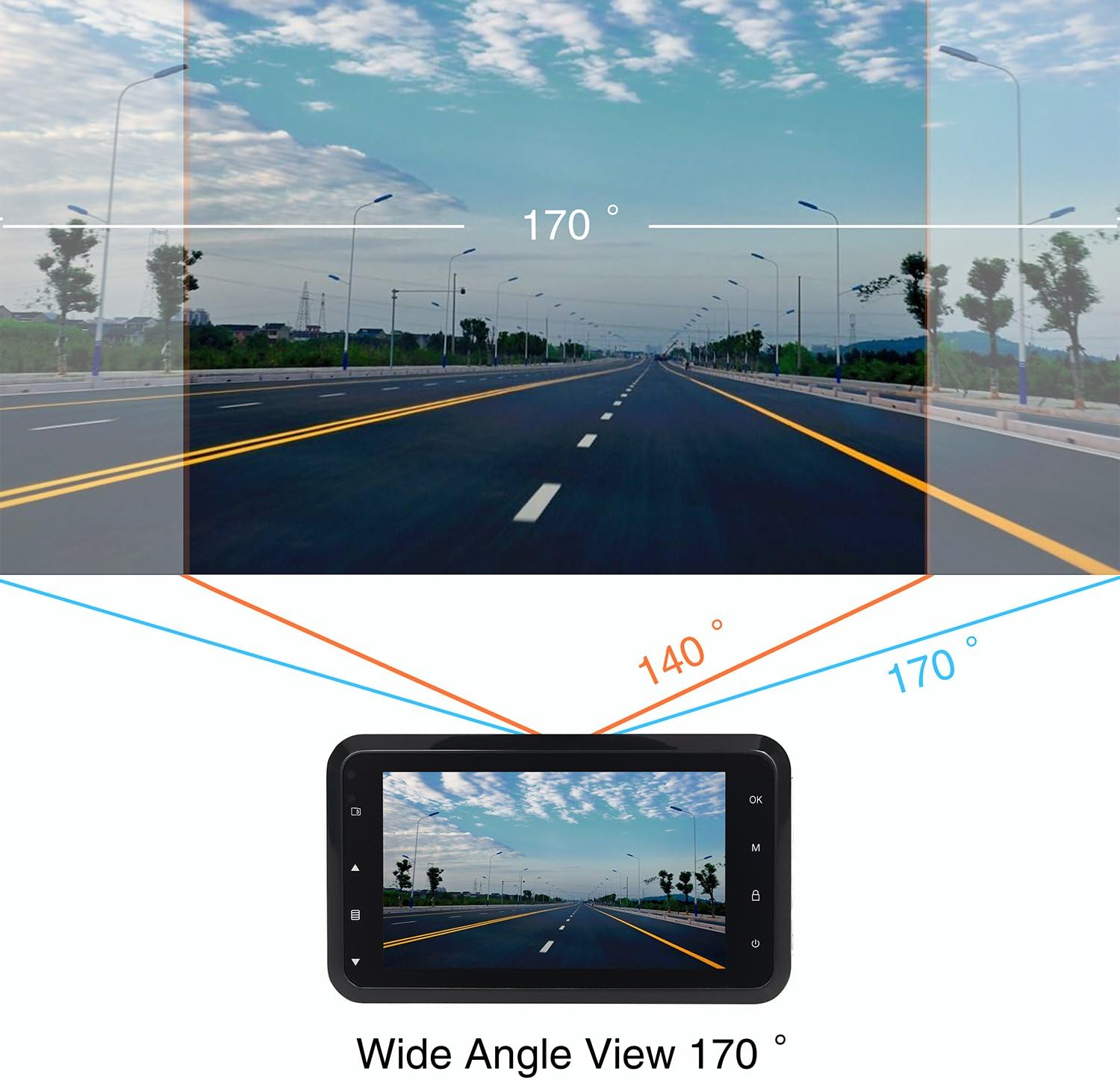
This diagram shows the expansive 170-degree wide-angle field of view captured by the dash cam, providing comprehensive road coverage.
וואָראַנטי און שטיצן
The ORSKEY Dash Cam S680 comes with a 12-חודש גאַראַנטירן פֿון דעם קויפֿדאַטום. די וואָראַנטי באַדעקט פֿאַבריקאַציע־דעפֿעקטן און גאַראַנטירט אַז דער פּראָדוקט פֿונקציאָנירט ווי באַשטימט אונטער נאָרמאַלן באַנוץ.
For technical support, warranty claims, or any questions regarding your dash cam, please contact ORSKEY customer service. Details for contacting support are typically found on the product packaging or the official ORSKEY webפּלאַץ.
ORSKEY provides a qualified after-sale service team, available 7 days a week, 24 hours a day, to assist you.