
1. הקדמה
The Zealot S11 is a portable, wireless Bluetooth speaker designed for versatile use, including outdoor activities. It features IP67 waterproofing, a multi-mode flashlight, a power bank function, and supports various audio input methods. This manual provides detailed instructions for its setup, operation, and maintenance.

Image 1: Zealot S11 Waterproof Bluetooth Speaker
2. פּעקל אינהאַלט
איידער נוצן, ביטע זיכער מאַכן אַז אַלע זאכן זענען פאַראַן אין דער פּאַקעט:
- Zealot S11 Bluetooth Speaker
- Bike/Cycle Mount
- 3.5 מם אַודיאָ קאַבלע
- וסב טשאַרדזשינג קאַבלע
- באַניצער מאַנואַל
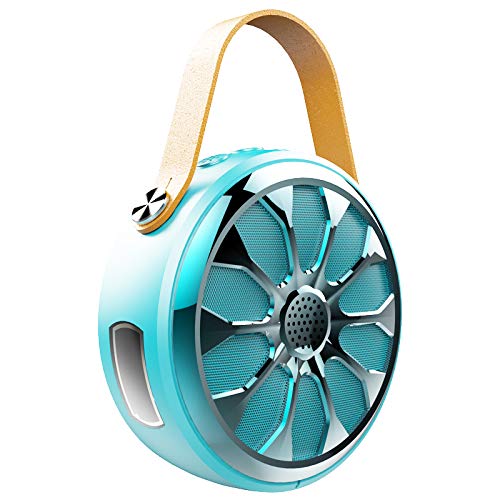
Image 2: Zealot S11 Speaker with included accessories
3. פּראָדוקט אויסלייג
3.1 פּאָרץ און קאַנעקטערז

בילד 3: זייט view of the Zealot S11 showing the AUX-in port, USB-out port (for power bank), USB-in port (for charging), Power ON/OFF switch, and TF card slot.
- IN (USB-in): מיקראָ USB פּאָרט פֿאַר טשאַרדזשינג דעם רעדנער.
- OFF / ON: Power switch to turn the speaker on or off.
- טף: Slot for a TF (MicroSD) card for local music playback.
- OUT (USB-out): Standard USB port for using the speaker as a power bank.
- AUX: 3.5mm audio input jack for wired connection.
3.2 קאָנטראָל קנעפּלעך

בילד 4: אויבן view of the Zealot S11 showing the control buttons for Flashlight, Mode Switch, Volume Down/Previous Track, and Volume Up/Next Track.
- פלאַשליגהט קנעפּל: Activates and cycles through flashlight modes.
- M (Mode Switch): Switches between Bluetooth, TF card, and AUX modes.
- Vol-/Pre Track: קורץ דריקן צו פארמינערן די קול, לאנג דריקן פארן פריערדיגן ליד.
- Vol+/Next Track: קורץ דריקן צו פארגרעסערן די קול, לאנג דריקן פארן נעקסטן ליד.
4. סעטאַפּ
4.1 אויפלאָדן דעם רעדנער
- פֿאַרבינדט דעם צוגעשטעלטן USB טשאַרדזשינג קאַבל צום IN פּאָרט אויף די רעדנער.
- פֿאַרבינדט דעם אַנדערן עק פֿונעם USB קאַבל צו אַ 5V/1A USB מאַכט אַדאַפּטער (נישט אַרייַנגערעכנט) אָדער אַ קאָמפּיוטער'ס USB פּאָרט.
- The charging indicator light will illuminate. Once fully charged, the light will change or turn off (refer to specific LED behavior in the quick start guide if available).
- A full charge provides approximately 20 hours of music playback.
4.2 Mounting on a Bike/Cycle
The Zealot S11 includes a mount for attachment to a bike or cycle handlebar.
- Locate the screw hole on the bottom of the speaker.
- Attach the provided bike mount to the speaker using the screw.
- Securely fasten the mount to your bike's handlebar. Ensure the speaker is stable before riding.
5. אַפּערייטינג ינסטרוקטיאָנס
5.1 מאַכט אויף / אַוועק
- צו אנצינדן, גליטשט דעם OFF/ON באַשטימען צו דער 'ON' פּאָזיציע.
- צו אויסלעשן, גליטשט דעם OFF/ON switch to the 'OFF' position.
5.2 בלועטאָאָטה פּערינג
- Ensure the speaker is powered on and in Bluetooth mode (indicated by a flashing LED, if applicable). If not, press the M קנעפּל צו באַשטימען צו בלועטאָאָטה מאָדע.
- אויף דיין סמאַרטפאָנע אָדער טאַבלעט, געבן בלועטאָאָטה און זוכן פֿאַר בנימצא דעוויסעס.
- Select "Zealot S11" from the list of devices.
- אַמאָל פּערד, וועט דער רעדנער אַרויסלאָזן אַן אָודאַבאַל באַשטעטיקונג, און די LED אינדיקאַטאָר וועט אויפהערן צו בלינקען.
5.3 מוזיק פּלייבאַק

Image 5: The Zealot S11 supports three major player modes: Bluetooth, TF card, and AUX input.
- בלועטוט שפּיל: נאָך אַ געלונגענעם פּאָרינג, שפּילט מוזיק פֿון אייער פֿאַרבונדענעם מיטל.
- TF Card שפּיל: אַרײַנשטעלן אַ TF (MicroSD) קאַרטל מיט מוזיק fileס אין די TF slot. The speaker will automatically switch to TF card mode or you can press the M קנעפּל צו אויסקלייַבן עס.
- AUX שפּיל: Connect an audio device using the 3.5mm audio cable to the AUX port. Press the M קנעפּל צו באַשטימען צו AUX מאָדע.
5.4 הענט-פריי רופן

Image 6: The Zealot S11 allows for hands-free phone calls when connected via Bluetooth.
When connected via Bluetooth to your smartphone, the speaker can be used for hands-free calls.
- ענטפער רופן: דרוק די M קנעפּל אַמאָל צו ענטפֿערן אַ ינקאַמינג רופן.
- סוף רופן: דרוק די M קנעפל איין מאל בעת א רוף צו ענדיגן עס.
- אָפּוואַרפן רופן: דריקן און האַלטן די M קנעפּל צו אָפּוואַרפן אַ ינקאַמינג רופן.
5.5 פלאַשליכט אָפּעראַציע
The speaker features a 3-mode flashlight.
- דרוק די פלאַשליגהט קנעפּל once to turn on the flashlight.
- Press again to cycle through the different modes (e.g., high, low, SOS).
- Press a third time to turn off the flashlight.
5.6 פּאַוער באַנק פונקציע
The Zealot S11 can act as a power bank to charge other devices.
- Connect your mobile phone or other USB-powered device to the OUT (USB-out) port on the speaker using a compatible USB cable.
- The speaker will begin providing 5V/1A current to charge your device.
6. וישאַלט
- וואָטערפּרוף שאַץ: The Zealot S11 is IP67 waterproof and dustproof. This means it can withstand immersion in water up to 1 meter for 30 minutes and is protected against dust ingress. Ensure all port covers are securely closed before exposure to water or dust.
- רייניקונג: ווישן די רעדנער מיט אַ ווייך, דamp שטאָף. דו זאלסט נישט נוצן האַרב קעמיקאַלז אָדער אַברייסיוו קלינערז.
- סטאָרידזש: האַלט דעם רעדנער אין אַ קיל, טרוקן אָרט אַוועק פון דירעקט זונשייַן און עקסטרעמע טעמפּעראַטורן.
- באַטערי זאָרגן: To prolong battery life, fully charge the speaker before first use and at least once every three months if not used regularly. Avoid completely draining the battery frequently.
7. טראָובלעשאָאָטינג
- רעדנער טוט זיך נישט אן: Ensure the battery is charged. Connect the speaker to a power source using the USB charging cable.
- קען נישט צוזאמענשטעלן דורך בלוטוט:
- זיכער מאַכן אַז דער רעדנער איז אין בלועטוט פּערינג מאָדע (בלינקען LED).
- Make sure your device's Bluetooth is enabled and within range (typically 10 meters).
- Forget "Zealot S11" from your device's Bluetooth list and try pairing again.
- ריסטאַרט ביידע דעם רעדנער און אייער בלועטוט מיטל.
- קיין קול:
- קאָנטראָלירט די וואָלומען לעוועלס אויף ביידע דעם רעדנער און אייער פֿאַרבונדענעם מיטל.
- Ensure the correct playback mode (Bluetooth, TF, AUX) is selected.
- אויב איר ניצט AUX, זאָרגט אַז דער קאַבל איז גאָר אַרײַנגעשטעקט און אַרבעט.
- פלאַשליכט אַרבעט נישט: Ensure the speaker is powered on and press the flashlight button.
- Power bank not charging device: Ensure the speaker has sufficient charge. Verify the USB cable and the connected device are functional.
8. ספּעסאַפאַקיישאַנז
| שטריך | באַשרייַבונג |
|---|---|
| מאָדעל | S11 |
| סאָרט | ברען |
| קאַנעקטיוויטי טעכנאָלאָגיע | Bluetooth, Auxiliary, Wireless |
| וואַסער קעגנשטעל מדרגה | IP67 וואָטערפּרוף |
| מאַכט מקור | באַטאַרייע פּאַוערד |
| באַטאַרייע קאַפּאַציטעט | 4000 מאַה ליטהיום באַטערי |
| באַטערי דורכשניטלעך לעבן | 20 Hours (Music Time) |
| קאָנטראָל מעטאָד | ריר (קנעפּלעך) |
| ספּעציעלע פֿעיִקייטן | Bluetooth, Portable, Wireless, Flashlight (3 Modes), Power Bank, TF Card Support, Hands-Free Calling |
| קאַמפּאַטאַבאַל דעוויסעס | סמאַרטפאָנע, טאַבלעט |
| אַודיאָ רעזולטאַט מאָדע | סטערעאָ |
| פּונקט וואָג | 360 גראַמז |
| פּראָדוקט דימענשאַנז (LxWxH) | 11.5 X 11.5 X 4.5 סענטימעטער |
9. פּראָדוקט ווידעאָ איבערview
דאס ווידעא גיט א וויזועלע איבערבליקview of the Zealot S11 speaker's features, including its flashlight, design, and various playback options. Please note that the video source URL is a placeholder as a direct m3u8 link was not provided in the product data.
10. וואָראַנטי און שטיצן
For warranty information and customer support, please refer to the documentation included with your purchase or visit the official Zealot webזייטל. האַלט דיין קויפן באַווייַז פֿאַר קיין וואָראַנטי קליימז.