
הקדמה
This manual provides detailed instructions for the installation, operation, and maintenance of your LoraTap WIFI Smart Roller Shutter Timer. Please read this manual carefully before installation and use to ensure proper function and safety.
זיכערקייַט אינפֿאָרמאַציע
- זיכער מאַכן אַז די מאַכט צושטעל איז דיסקאַנעקטיד איידער ינסטאַלירונג אָדער וישאַלט צו פאַרמייַדן עלעקטרישע קלאַפּ.
- די אינסטאַלאַציע זאָל דורכגעפירט ווערן דורך אַ קוואַליפֿיצירטן עלעקטריקער אָדער לויט די לאָקאַלע עלעקטרישע קאָודן.
- דו זאלסט נישט אַרבעטן די מיטל מיט נאַס הענט.
- האַלט דעם אַפּאַראַט אַוועק פון וואַסער און הויך-פייכטקייט סביבות.
- פרובירט נישט צו צענעמען אדער פאררעכטן דעם אפאראט אליין. קאנטאקטירט שטיצע אויב פראבלעמען קומען ארויף.
- דער מיטל איז דיזיינד בלויז פֿאַר דרינענדיק נוצן.
פּראָדוקט פֿעיִקייטן
- סמאַרט קאָנטראָל: Upgrade traditional electric roller shutters or awnings for smart control via smartphone app or voice commands.
- Remote Access & Scheduling: Control your blinds from anywhere and set custom schedules for automatic opening and closing.
- Group Control & Family Sharing: Group multiple roller shutters for simultaneous control and share access with family members.
- דוראַבאַל פּלאַן: Features a scratch-resistant tempered crystal glass panel, safe to touch with wet hands and easy to clean.
- Adjustable Motor Run Time: Configure the motor's operating time for precise control over shutter position (e.g., 50% open/close).
- קול קאָנטראָל קאַמפּאַטאַבילאַטי: Works with Google Home and Amazon Alexa for hands-free operation.
פּעקל אינהאַלט
באַשטעטיקן אַז אַלע זאכן זענען פאַראַן אין פּעקל:
- 1 x LoraTap WIFI Smart Roller Shutter Timer
- 1 x User Manual (German/English)
- 1 x שרויפנ - ציער
- 4 רענטגענ סקרוז
- 1 x Wiring Clamp
ספּעסאַפאַקיישאַנז
| פּאַראַמעטער | ווערט |
|---|---|
| דימענשאַנז | 86 x 86 x 34 mm (with cover frame) |
| פּאַנעל מאַטעריאַל | טעמפּערד קריסטאַל גלאַס |
| דנאָ מאַטעריאַל | Fire-retardant Polycarbonate (Plastic) |
| אַפּערייטינג וואָלtage | AC 100-250 V 50/60 הז |
| Rated/Maximum Current | 3 א / 10 א |
| Power per Speed | 300 וו |
| ווי-פי סטאַנדאַרד | 2.4 גהז, 802.11 ב/ג/ען |
| סטאַנדביי קראַנט | 0.001 א |
| סטאַנדביי קאַנסאַמשאַן | 0.25 וו |
| ייַנמאָנטירונג אופֿן | Screw-mounted, fits standard 60mm flush-mounted box |
| קאַמפּאַטאַבאַל ווייכווארג | Smart Life App (Android 4.4+, iOS 8+) |
| סערטיפיקאַטיאָנס | CE |
סעטאַפּ און ינסטאַלירונג
1. וויירינג דיאַגראַמע
The smart roller shutter timer requires a neutral conductor for proper operation. Ensure your existing wiring includes a neutral wire. This switch is suitable for already motorized roller shutters.

Image: Detailed wiring diagram showing connections for Live (L), Neutral (N), and motor control wires (L1 for Up, L2 for Down). The diagram also indicates the input voltagדי קייט פון 100-250VAC.
- אַרייַנשרייַב: Connect the Neutral (N) and Live (L) wires from your power supply to the corresponding terminals on the switch.
- Output to Motor: Connect the motor's Neutral (N), Up (L1), and Down (L2) wires to the respective terminals on the switch.
- וויכטיק באַמערקונג: A neutral conductor must be present.
2. גשמיות ייַנמאָנטירונג
- דיסקאַנעקט מאַכט: Before starting, turn off the main power supply to the circuit where you will install the switch.
- Prepare Mounting Box: The switch fits a standard 60mm diameter flush-mounted box.
- פאַרבינדן ווירעס: Follow the wiring diagram carefully. Use the provided wiring clamp אויב נייטיק.
- שטעלן די סוויטש: Secure the switch into the flush-mounted box using the two provided screws (one on the left, one on the right).
- צוטשעפּען פּאַנעל: Carefully attach the crystal glass panel to the switch module.
- ומקערן מאַכט: Once installation is complete and secure, restore power to the circuit.
3. אַפּ אינסטאַלאַציע און פּערינג
- אראפקאפיע אַפּ: Download the "Smart Life" application from the App Store (iOS 8 or higher) or Google Play Store (Android 4.4 or higher).
- רעגיסטרירן/אריינלאָגירן: עפֿנט די אַפּ און רעגיסטרירט אַ נײַעם אַקאַונט אָדער לאָגט זיך אײַן מיט אַן עקזיסטירנדיקן.
- לייג דיווייס: In the Smart Life app, tap the "+" icon to add a new device. Select "Curtain Switch" or a similar category.
- אַרייַן Wi-Fi דעטאַילס: Follow the on-screen instructions to connect the switch to your 2.4 GHz Wi-Fi network. Ensure your phone is connected to the same 2.4 GHz network during pairing.
- באַשטעטיקונג: אַמאָל עס איז געראָטן צוגעבונדן, וועט דער מיטל דערשייַנען אין אייער אַפּ, גרייט פֿאַר קאָנטראָל.
אַפּערייטינג ינסטראַקשאַנז
1. מאַנואַל קאָנטראָל
The touch panel allows for direct control of your roller shutters:
- אַרויף פייַל: Tap to open the roller shutter.
- אַראָפּ פייַל: Tap to close the roller shutter.
- Stop Button (Circle): Tap to pause the roller shutter at its current position.

בילד: פראָנט view of the LoraTap Smart Roller Shutter Timer showing the touch-sensitive Up, Stop, and Down buttons. Also displays product dimensions (86x86x34mm) and a detailed wiring diagram on the back of the unit.
2. App Control (Smart Life)
After successful pairing, you can control your roller shutters via the Smart Life app:
- עפֿענען / נאָענט: Use the virtual buttons in the app to open, close, or stop the roller shutter.
- Set Motor Run Time: The latest version of the switch allows you to set the motor's operating time. This enables partial opening or closing (e.g., 50%).

Image: Screenshot of the Smart Life app interface demonstrating the new function to set the motor's operating time in seconds (e.g., 10s, 120s) for precise control of roller shutter position.
3. פּלאַנירונג און טיימערס
Set up automated schedules for your roller shutters:
- In the Smart Life app, navigate to the device settings and select "Schedule" or "Timer."
- Add new schedules by specifying the time, action (open/close), and repetition days.
- This feature allows for automatic operation, such as opening blinds in the morning.

Image: Demonstrates the Smart Life app's scheduling feature with various set times for opening and closing. Also highlights voice control compatibility with Amazon Alexa and Google Assistant.
4. קול קאָנטראָל
Integrate your LoraTap switch with voice assistants:
- אַמאַזאָן אַלעקסאַ: Enable the "Smart Life" skill in the Alexa app and link your account. You can then use commands like "Alexa, open the roller shutter" or "Alexa, close the roller shutter."
- Google היים: Link your Smart Life account in the Google Home app. Use commands such as "Hey Google, open the blinds" or "Hey Google, close the blinds."
5. Group Control and Family Sharing
- גרופע קאָנטראָל: In the Smart Life app, you can create groups of multiple LoraTap roller shutter timers to control them simultaneously with a single command.
- משפּחה ייַנטיילונג: Share control of your devices with family members through the Smart Life app, allowing everyone in the household to manage the roller shutters.
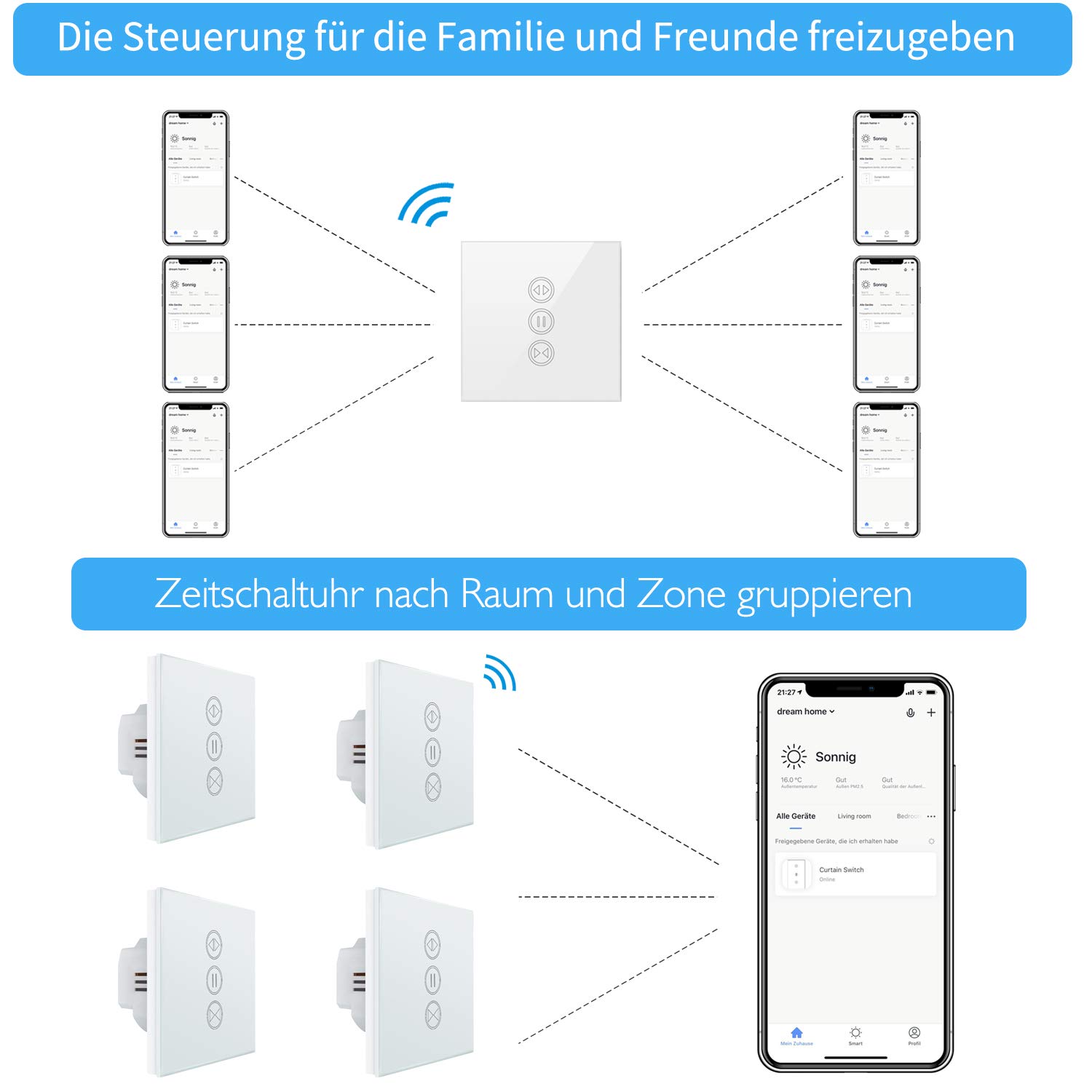
Image: Illustration of how multiple users can control the LoraTap Smart Roller Shutter Timer via the Smart Life app, demonstrating family sharing and the ability to group devices by room or zone for unified control.
וישאַלט
- רייניקונג: The crystal glass panel is easy to clean. Use a soft, damp cloth to wipe the surface. Avoid abrasive cleaners or harsh chemicals.
- רעגולער טשעקס: פּיריאַדיקלי קאָנטראָלירן די וויירינג קאַנעקשאַנז צו ענשור זיי זענען זיכער.
טראָובלעשאָאָטינג
- מיטל ניט ריספּאַנדינג:
- Check if the power supply to the switch is active.
- Ensure the switch is properly connected to your Wi-Fi network (2.4 GHz only).
- Restart the switch by turning off and on the circuit breaker.
- Verify that the Smart Life app is up to date.
- Roller Shutter Not Moving:
- Confirm that the motor is receiving power and is functioning correctly.
- Check the motor wiring connections to the switch.
- Ensure the motor run time is correctly configured in the app if using partial open/close functions.
- שטימע קאנטראל ארבעט נישט:
- Ensure your Smart Life account is correctly linked to Alexa or Google Home.
- Check your internet connection and the status of your voice assistant device.
- Try re-discovering devices in the Alexa or Google Home app.
- Automatic Stop Issue: This issue has been resolved in newer versions. If you experience unexpected stops, ensure your device firmware is updated via the Smart Life app.
וואָראַנטי און שטיצן
LoraTap specializes in the research, development, and manufacturing of wireless switches. All LoraTap products are CE certified, ensuring compliance with European safety, health, and environmental protection requirements.
For technical support or warranty inquiries, please contact your retailer or visit the official LoraTap website for further assistance. Please have your product model number (5d4cddd3-8a52-4746-8937-9fbf21a20273) ready when contacting support.