
1. הקדמה
Thank you for choosing the Targus W620 Wireless Optical Mouse. This manual provides detailed instructions for setting up, operating, and maintaining your mouse to ensure optimal performance and longevity. The Targus W620 offers reliable 2.4 GHz wireless connectivity, a precise 1600 DPI optical sensor, and a compact design suitable for both office and mobile use.
2. פּעקל אינהאַלט
ביטע טשעק די פּאַקעט פֿאַר די פאלגענדע זאכן:
- Targus W620 Wireless Optical Mouse
- וסב ופנעמער
- 2 X AAA באַטעריז
3. פּראָדוקט איבערview
Familiarize yourself with the components of your Targus W620 Wireless Optical Mouse.
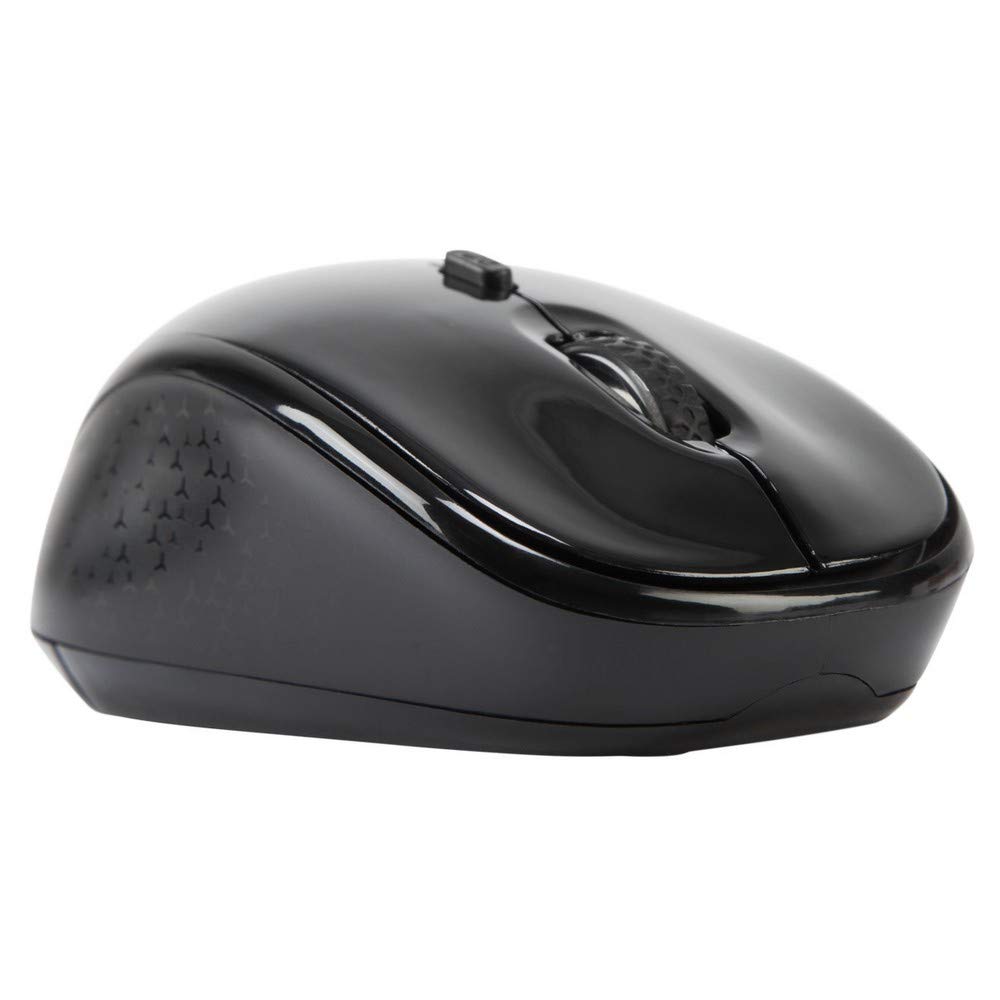
בילד 3.1: Top view of the Targus W620 Wireless Optical Mouse. This image displays the primary buttons and scroll wheel.
- לינקער קליק קנעפל: נאָרמאַלע ערשטיקע קליק פונקציע.
- רעכט קליק קנעפל: נאָרמאַלע צווייטיקע קליק פונקציע.
- סקראָל ראָד: פֿאַר ווערטיקאַל סקראָלן און מיטל-קליק פונקציע.
- DPI קנעפּל: אַדזשאַסטירט די מויז סענסיטיוויטי (DPI).
- אָפּטיש סענסאָר: Located on the bottom, detects mouse movement.
- באַטערי אָפּטייל: Located on the bottom, holds two AAA batteries.
- USB ופנעמער סטאָרידזש: A dedicated slot on the bottom for storing the USB receiver when not in use.

בילד 3.2: דנאָ view of the mouse, highlighting the battery compartment and optical sensor.
4. סעטאַפּ אינסטרוקציעס
Follow these steps to set up your Targus W620 Wireless Optical Mouse:
- ינסטאַלירן באַטעריז:
- געפינט דעם דעקל פונעם באַטעריע־אָפּטייל אויף דער אונטערשטער טייל פונעם מויז.
- רוק די דעקל עפענען.
- אַרײַנשטעלן די צוויי AAA באַטעריעס, און זיכער מאַכן אַז די פּאָלאַריטעט איז ריכטיק (+/-).
- פאַרמאַכן די באַטאַרייע אָפּטייל דעקן סיקיורלי.
- פאַרבינדן וסב ופנעמער:
- The USB receiver is typically stored in a slot on the bottom of the mouse for transport. Gently remove it.
- צאַפּן די וסב ופנעמער אין אַ בנימצא וסב פּאָרט אויף דיין קאָמפּיוטער.

בילד 4.1: The mouse with its USB receiver, ready for connection.
- מאַכט אויף:
- There is no explicit power switch on this model; the mouse activates upon movement and connection.
- אייער קאָמפּיוטער זאָל אויטאָמאַטיש דעטעקטירן און אינסטאַלירן די נויטיקע דרייווערס. דאָס קען נעמען אַ פּאָר מינוט.
- Once drivers are installed, the mouse is ready for use.
5. אַפּערייטינג ינסטרוקטיאָנס
The Targus W620 Wireless Optical Mouse is designed for intuitive use. Here are its primary functions:
- גרונטלעכע נאַוויגאַציע: Move the mouse on a flat surface to control the cursor on your screen.
- לינק קליקט: ניצן פֿאַר אויסקלייבן זאכן, עפֿענען fileס, אדער אקטיוויזירן פונקציעס.
- רעכט גיט: Use for accessing context menus or secondary functions.
- סקראָל ראָד: Rotate the wheel to scroll vertically through documents and web pages. Press the scroll wheel for a middle-click function, often used for opening links in new tabs or auto-scrolling.
- דפּי אַדזשאַסטמאַנט: Press the DPI button (located behind the scroll wheel) to cycle through the available DPI settings (800, 1200, 1600 DPI). This changes the sensitivity of the mouse cursor. A higher DPI means the cursor moves further with less physical mouse movement.
6. וישאַלט
Proper maintenance ensures the longevity and performance of your mouse.
- רייניקונג: ניצט אַ ווייכע, טרוקענע, לינט-פֿרייע שטאָף צו רייניקן די אויסערלעכע זייט פֿון דער מויז. פֿאַר שווערע שמוץ, אַ ביסל ווישןampשווענק דעם שטאָף מיט וואַסער. פֿאַרמייַדט ניצן שטרענגע כעמיקאַלן אָדער אַברייסיוו רייניגער.
- אָפּטיש סענסאָר: האַלט די אָפּטישע סענסאָר געגנט אויף דער אונטערשטער טייל פון דער מויז ריין און פריי פון שטויב אָדער דעבריס צו ענשור פּינקטלעכע טראַקינג.
- באַטערי פאַרבייַט: When the mouse performance degrades or stops responding, it is likely time to replace the batteries. Follow the steps in Section 4.1 to replace the two AAA batteries.
- סטאָרידזש: When transporting or storing the mouse, always place the USB receiver back into its dedicated storage slot on the bottom of the mouse to prevent loss.
7. טראָובלעשאָאָטינג
If you encounter issues with your Targus W620 mouse, try the following solutions:
| פּראָבלעם | מעגלעך לייזונג |
|---|---|
| Mouse not responding or cursor not moving. |
|
| קורסאָר באַוועגונג איז אומשטענדלעך אָדער שפּרינגען. |
|
| די DPI קנעפל טוישט זיך נישט די סענסיטיוויטי. |
|
| פראבלעמען מיט דראטלאזע פארבינדונג. |
|
8. ספּעסאַפאַקיישאַנז
| סאָרט | טאַרגוס |
| מאָדעל נומער | AMW620AP |
| קאַנעקטיוויטי טעכנאָלאָגיע | 2.4 GHz ווירעלעס (ראַדיאָ פרעקווענץ) |
| באַוועגונג דעטעקשאַן טעכנאָלאָגיע | Optical (BlueTrace Technology) |
| דפּי לעוועלס | 800 / 1200 / 1600 DPI (Adjustable) |
| נומער פון קנעפּלעך | 4 (Left, Right, Scroll Wheel, DPI) |
| האַנט אָריענטירונג | Right (Comfortable for ambidextrous use) |
| מאַכט מקור | 2 X AAA באַטעריז (אַרייַנגערעכנט) |
| פּונקט וואָג | 26 גראַמז |
| אַפּערייטינג סיסטעם קאַמפּאַטאַבילאַטי | Linux, Windows XP (Compatible with modern Windows and macOS) |
| ייַזנוואַרג פּלאַטפאָרמע | מעק, פּיסי |
| קאָליר | שוואַרץ |
9. וואָראַנטי און שטיצן
וואָראַנטי אינפֿאָרמאַציע: The Targus W620 Wireless Optical Mouse comes with a 3-יאָר פאַבריקאַנט ס וואָראַנטי פֿון דעם קויפֿדאַטום. די וואָראַנטי דעקט חסרונות אין מאַטעריאַלן און אַרבעט אונטער נאָרמאַלן באַנוץ. ביטע באַהאַלטן אייער קויפֿבאַווייַז פֿאַר וואָראַנטי קלאַגעס.
קונה שטיצן: For technical assistance, troubleshooting beyond this manual, or warranty inquiries, please visit the official Targus website or contact their customer support service. Refer to the contact information provided with your product packaging or on the Targus official webפּלאַץ.