
1. הקדמה
The Divoom Macchiato is a palm-sized, portable Bluetooth speaker with an integrated FM radio tuner, designed to deliver high-quality audio in a compact form factor.
2. פּעקל אינהאַלט
ביטע אָפּהאַקן דאָס קעסטל פֿאַר די פֿאָלגנדיקע זאַכן:
- Divoom Macchiato Bluetooth Speaker
- וסב טשאַרדזשינג קאַבלע
- באַניצער מאַנואַל
- (Additional accessories may vary by region)
3. פּראָדוקט איבערview
מאַכט זיך באַקאַנט מיט די רעדנער'ס קאָמפּאָנענטן און קאָנטראָלס.
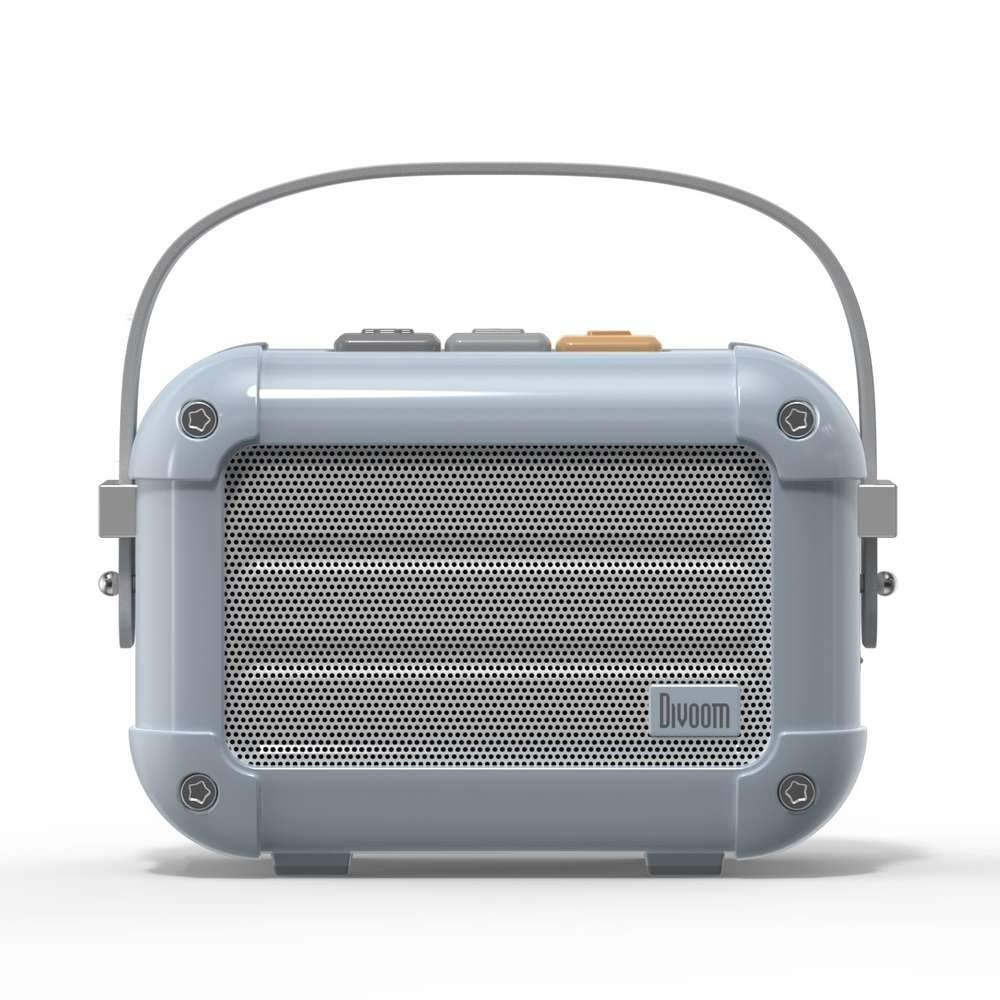
פיגורע 3.1: פראָנט view of the Divoom Macchiato Bluetooth Speaker in blue.
3.1 קאָנטראָלן און פּאָרטן
The Divoom Macchiato speaker features intuitive controls for easy operation.
- שפּיץ קנעפּלעך: Typically control power, volume, track navigation, and mode selection (e.g., Bluetooth, FM).
- טשאַרדזשינג פּאָרט: Usually a USB Type-C port for charging the device.
- טף קאַרד שפּעלטל: Allows playback of music directly from a TF (MicroSD) card.
- FM אַנטענע: An extendable antenna for improved FM radio reception.

פיגורע 3.2: צוריק view of the Divoom Macchiato Bluetooth Speaker, showing the charging port and TF card slot.
4. סעטאַפּ
4.1 מאַכט אויף / אַוועק
- צו מאַכט אויף: Press and hold the power button (usually one of the top buttons) for approximately 2-3 seconds until you hear an audible cue or see an indicator light.
- צו מאַכט אַוועק: Press and hold the power button for approximately 2-3 seconds until you hear an audible cue or the indicator light turns off.
4.2 בלועטאָאָטה פּערינג
- Ensure the speaker is powered on and in Bluetooth pairing mode. The indicator light will typically blink rapidly.
- אויף אייער מאָבילער מיטל (סמאַרטפאָן, טאַבלעט, אאז"וו), אַקטיווירט בלועטוט.
- זוכן פֿאַר "Divoom Macchiato" in the list of available Bluetooth devices.
- Select "Divoom Macchiato" to connect. Once connected, the speaker will provide an audible confirmation, and the indicator light will turn solid.
באַמערקונג: דער רעדנער וועט אויטאָמאַטיש פּרובירן זיך ווידער צו פֿאַרבינדן מיטן לעצטן פֿאַרבונדענעם מיטל ווען עס ווערט אָנגעצונדן.
4.3 FM Radio Setup
- Extend the FM antenna fully for optimal reception.
- Switch the speaker to FM radio mode using the mode button (refer to your specific model's button layout).
- Use the track navigation buttons (usually +/-) to scan for available FM stations.
- Some models may allow saving favorite stations; refer to your specific model's instructions for details.
5. אַפּערייטינג ינסטרוקטיאָנס
5.1 Music Playback (Bluetooth/TF Card)
- שפּיל / פּויזע: Press the Play/Pause button (often integrated with the power button or a dedicated button).
- באַנד קאָנטראָל: ניצט די באַנד אַרויף (+) און באַנד אַראָפּ (-) קנעפּלעך.
- ווייַטער שפּור: Press and hold or short press the next track button (often the + button).
- פֿריִערדיקע שפּור: Press and hold or short press the previous track button (often the - button).
- TF Card Playback: אַרייַנלייגן אַ טף קאָרט מיט mp3 files into the TF card slot. The speaker should automatically switch to TF card mode or require manual selection via the mode button.
5.2 App Features (if applicable)
For enhanced functionality, download the Divoom companion app from your device's app store. The app may offer features such as:
- Customizing sound profiles.
- Accessing additional audio sources.
- Managing FM radio stations.
- Firmware דערהייַנטיקונגען.
6. וישאַלט
- רייניקונג: ניצט אַ ווייכע, טרוקענע שטאָף צו רייניקן די רעדנער'ס ייבערפלאַך. ניצט נישט קיין שרײַבנדיקע רייניגער אָדער סאָלווענטן.
- סטאָרידזש: האַלט דעם רעדנער אין אַ קיל, טרוקן אָרט אַוועק פון דירעקט זונשייַן און עקסטרעמע טעמפּעראַטורן.
- באַטערי זאָרגן: כדי צו פארלענגערן די לעבן פון די באַטעריע, זאָלט איר נישט אָפט אויסלאָדן די באַטעריע. לאָדט דעם רעדנער רעגולער אויף, אפילו אויב עס ווערט נישט גענוצט פאר לענגערע צייטן.
- וואַסער קעגנשטעל: This model is NOT waterproof. Avoid exposure to water or high humidity.
7. טראָובלעשאָאָטינג
| פּראָבלעם | לייזונג |
|---|---|
| דער רעדנער גייט נישט אן. | Ensure the battery is charged. Connect the speaker to a power source using the USB charging cable. |
| קען נישט פארבינדן דורך בלוטוט. |
|
| קיין קלאַנג אָדער נידעריקע וואָלומען. |
|
| שלעכטע FM ראַדיאָ אָפּנאַם. |
|
8. ספּעסאַפאַקיישאַנז
| שטריך | דעטאַל |
|---|---|
| מאָדעל נומער | MACCHIATO |
| סאָרט | דיוואָם |
| קאַנעקטיוויטי טעכנאָלאָגיע | בלועטאָאָטה |
| ווירעלעסס קאָמוניקאַציע טעכנאָלאָגיע | בלועטאָאָטה |
| רעדנער מאַקסימום רעזולטאַט מאַכט | 6 וואטס |
| רעדנער טיפּ | סאָונדבאַר |
| מאַונטינג טיפּ | טאַבלעטאָפּ בארג |
| רעקאָממענדעד ניצט פֿאַר פּראָדוקט | מוזיק |
| קאָנטראָל מעטאָד | קול |
| וואָטערפּרוף | FALSE (Not Waterproof) |
9. וואָראַנטי און שטיצן
For warranty information and customer support, please refer to the documentation included with your product or visit the official Divoom webזייטל. האַלט אייער קויף קוויטל ווי אַ באַווייַז פון קויפן פֿאַר וואָראַנטי קליימז.