
הקדמה
This manual provides essential information for the proper use and maintenance of your Easytry123 replacement remote control. This remote is designed to function with various Hitachi 3LCD projector models, offering a convenient way to control your projector's features. Please read these instructions carefully before use.
קאַמפּאַטאַבילאַטי
This replacement remote control is compatible with the following Hitachi 3LCD Projector models:
- CP-X275WA
- CP-X300
- CP-X301
- CP-X3010
- CP-X308
- CP-X320W
- CP-X325W
- CP-X3010EN
- CP-X3010Z
- CP-X3011N
Note: While designed for broad compatibility, some advanced or specific functions of your original projector remote may not be fully supported by this replacement unit.
פּעקל אינהאַלט
אייער פּעקל זאָל אַנטהאַלטן די פאלגענדע זאַך:
- 1 x Easytry123 Replacement Remote Control
באַטעריז זענען נישט אַרייַנגערעכנט און מוזן זיין פּערטשאַסט סעפּעראַטלי.
סעטאַפּ
ינסטאָלינג באַטעריז
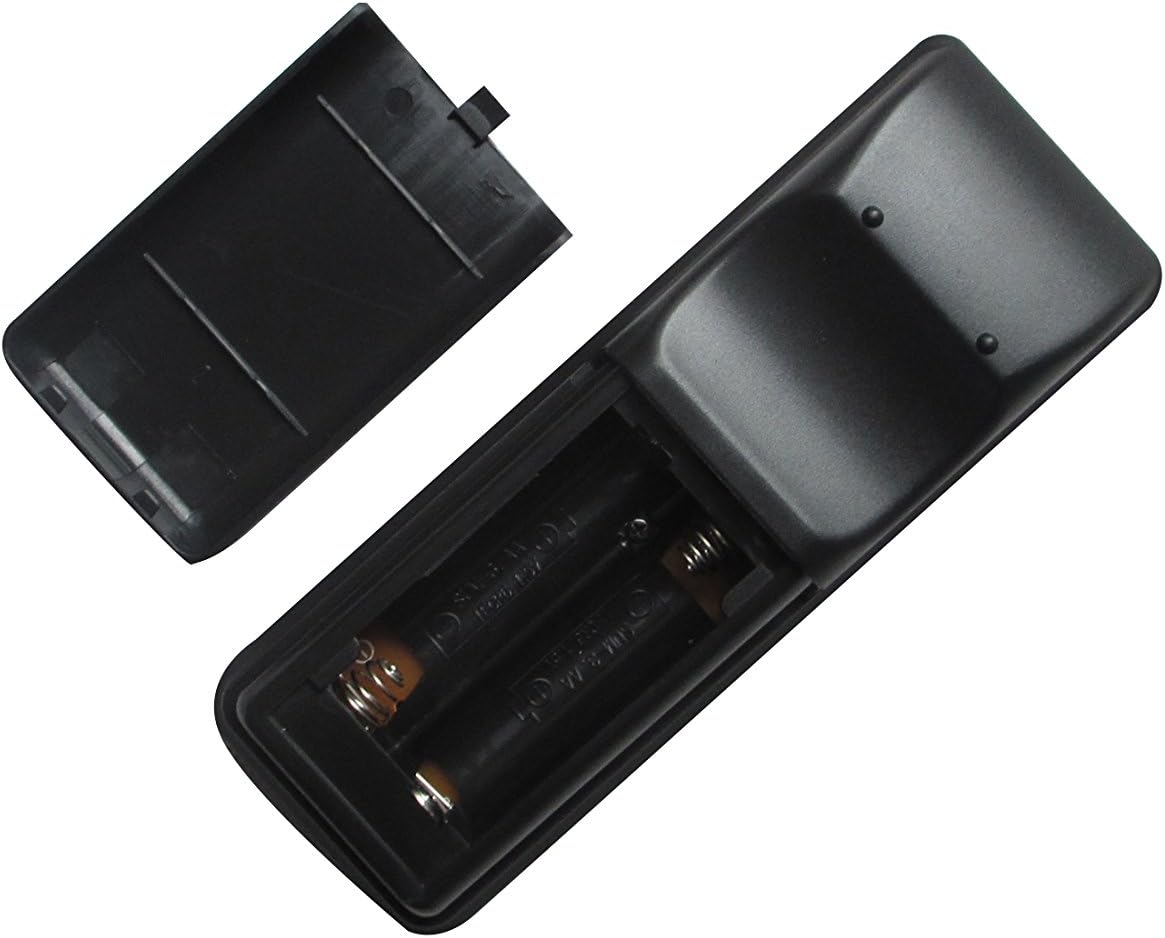
- געפֿינען די באַטאַרייע אָפּטייל אויף די צוריק פון די ווייַט קאָנטראָל.
- Slide the battery compartment cover downwards or press the latch and lift to open it.
- אַרײַנשטעלן צוויי (2) AA באַטעריעס, און זיכער מאַכן אַז די פּאָזיטיוו (+) און נעגאַטיוו (-) טערמינאַלן זענען ריכטיק אויסגעשטעלט מיט די מאַרקירונגען אינעווייניק אין דעם אָפּטייל.
- לייגט צוריק דעם דעקל פונעם באַטעריע־אָפּטייל דורך עס צוריקצורוקן אין פּלאַץ ביז עס קליקט זיכער.

Image: The remote control with its battery cover removed, revealing the two AA battery slots. Observe the correct polarity markings (+/-) inside the compartment for proper battery insertion.
After installing the batteries, the remote control is ready for use. No additional pairing or programming is typically required for this replacement unit.
אַפּערייטינג ינסטראַקשאַנז
Point the remote control directly at the infrared receiver on your Hitachi projector. Ensure there are no obstructions between the remote and the projector.
בילד: פראָנט view of the Easytry123 replacement remote control, displaying its array of function buttons for projector operation.
יקערדיק פאַנגקשאַנז:
- מאַכט אויף / אַוועק: דרוק די מאַכט קנעפּל צו קער די פּראַדזשעקטער אויף אָדער אַוועק.
- אַרייַנשרייַב סעלעקציע: ניצן די אַרייַנשרייַב or dedicated input buttons (e.g., HDMI, VGA) to cycle through available input sources.
- מעניו נאַוויגאַציע: ניצן די MENU button to access the projector's on-screen display (OSD) menu. Use the arrow keys (אַרויף, אַראָפּ, לינקס, רעכטס) צו נאַוויגירן און אַרייַן / OK צו באַשטעטיקן סאַלעקשאַנז.
- באַנד קאָנטראָל: If your projector supports audio output, use the VOL+ און וואָל- קנעפּלעך צו סטרויערן די באַנד.
- אַספּעקט פאַרהעלטעניש: Some remotes include an אַספּעקט button to change the display aspect ratio.
וישאַלט
רייניקונג פון די ווייַטקאָנטראָל
צו רייניקן די ווײַטקאָנטראָל, ווישט אָפּ זײַן ייבערפֿלאַך מיט אַ ווייכן, טרוקענעם שטאָף. פֿאַר שווערן שמוץ, ווישט אַ ביסלampווישט דעם שטאָף מיט וואַסער. פֿאַרמייַדט ניצן שטרענגע כעמיקאַלן, שרײַבנדיקע רייניקונגס־מיטלען, אָדער איבערגעטריבענע פֿײַכטקייט, ווײַל די קענען שאַטן דעם ווײַטקאָנטראָל.
באַטערי פאַרבייַט
Replace the batteries when the remote control's responsiveness decreases or it stops functioning. Always replace both batteries at the same time with new AA batteries. Do not mix old and new batteries, or different types of batteries.
סטאָרידזש
When not in use for extended periods, remove the batteries from the remote control to prevent leakage and potential damage. Store the remote in a cool, dry place away from direct sunlight and extreme temperatures.
טראָובלעשאָאָטינג
- ווייַט ניט ריספּאַנדינג:
- קאָנטראָלירט צי די באַטעריעס זענען ריכטיק אַרײַנגעשטעלט מיט דער ריכטיקער פּאָלאַריטעט.
- פאַרבייַטן די באַטעריז מיט נייַע.
- זיכער מאַכן אַז עס זענען נישטאָ קיין שטערונגען צווישן דעם ווײַטקאָנטראָל און דעם פּראָיעקטאָר'ס IR ופנעמער.
- Confirm the remote is pointed directly at the projector.
- עטלעכע פונקציעס אַרבעטן נישט:
- This replacement remote may not support all advanced or specific functions of your original projector remote. Refer to your projector's original manual for specific function requirements.
- Projector turns on/off unexpectedly:
- Ensure no other infrared devices are interfering with the projector's receiver.
ספּעסאַפאַקיישאַנז
- סאָרט: גרינג צו טריי123
- קאַמפּאַטאַבאַל דעוויסעס: Hitachi 3LCD Projectors (listed models)
- קאַנעקטיוויטי טעכנאָלאָגיע: ינפרערעד (IR)
- קאָנטראָללער טיפּ: קנעפּל קאָנטראָל
- מאַכט מקור: 2 קס אַאַ באַטעריז (ניט אַרייַנגערעכנט)
- ספּעציעלע שטריך: ערגאַנאַמיק פּלאַן

בילד: הינטערשטע view of the Easytry123 replacement remote control, showing its ergonomic shape and battery compartment.