
1. הקדמה און איבערview
This manual provides essential information for the safe and efficient operation of your Sharp Microwave Oven with Grill, Model R-77AT. Please read these instructions thoroughly before using the appliance and retain them for future reference. This microwave oven is designed for reheating, cooking quick meals, defrosting frozen items, and grilling food.
Your Sharp R-77AT microwave oven features:
- 34 Liters Capacity
- 1000 Watts Microwave Output Power
- 1100 Watts Grill Power
- 5 מאַכט לעוועלס
- 9 אָטאַמאַטיק קוקינג מגילה
- טייַמער פֿונקציע
- ומבאַפלעקט שטאָל עקסטעריאָר
- זיכערקייַט לאַק שטריך
2. וויכטיק סאַפעטי אינסטרוקציעס
ווען ניצן עלעקטריקאַל אַפּפּליאַנסעס, יקערדיק זיכערקייַט פּריקאָשאַנז זאָל זיין נאכגעגאנגען, אַרייַנגערעכנט די פאלגענדע:
- לייענען אַלע ינסטראַקשאַנז איידער ניצן די אַפּפּליאַנסע.
- Do not operate the oven if the door or door seals are damaged. Contact qualified service personnel.
- צי ניט היץ ליקווידס אָדער אנדערע פודז אין געחתמעט קאַנטיינערז ווייַל זיי זענען מסתּמא צו ופרייַסן.
- נאָר נוצן יוטענסאַלז פּאַסיק פֿאַר מייקראַווייוו אָווענס.
- דו זאלסט נישט נוצן קעראָוסיוו קעמיקאַלז אָדער וואַפּערז אין דעם אַפּפּליאַנסע.
- דער מיטל איז בדעה בלויז פֿאַר הויזגעזינד נוצן.
- שטענדיק קאָנטראָלירן קינדער ווען זיי זענען לעבן די אַפּפּליאַנסע.
- פאַרזיכערן אַז די אַפּפּליאַנסע איז רעכט גראָונדעד.
- Do not immerse the cord, plug, or oven in water or other liquid.
- דו זאלסט נישט אַרבעטן קיין אַפּפּליאַנסע מיט אַ דאַמידזשד שנור אָדער צאַפּן, אָדער נאָך די אַפּפּליאַנסע מאַלפאַנגקשאַנז אָדער איז דאַמידזשד אין קיין שטייגער.
3. פּראָדוקט קאַמפּאָונאַנץ
Familiarize yourself with the main parts of your microwave oven.
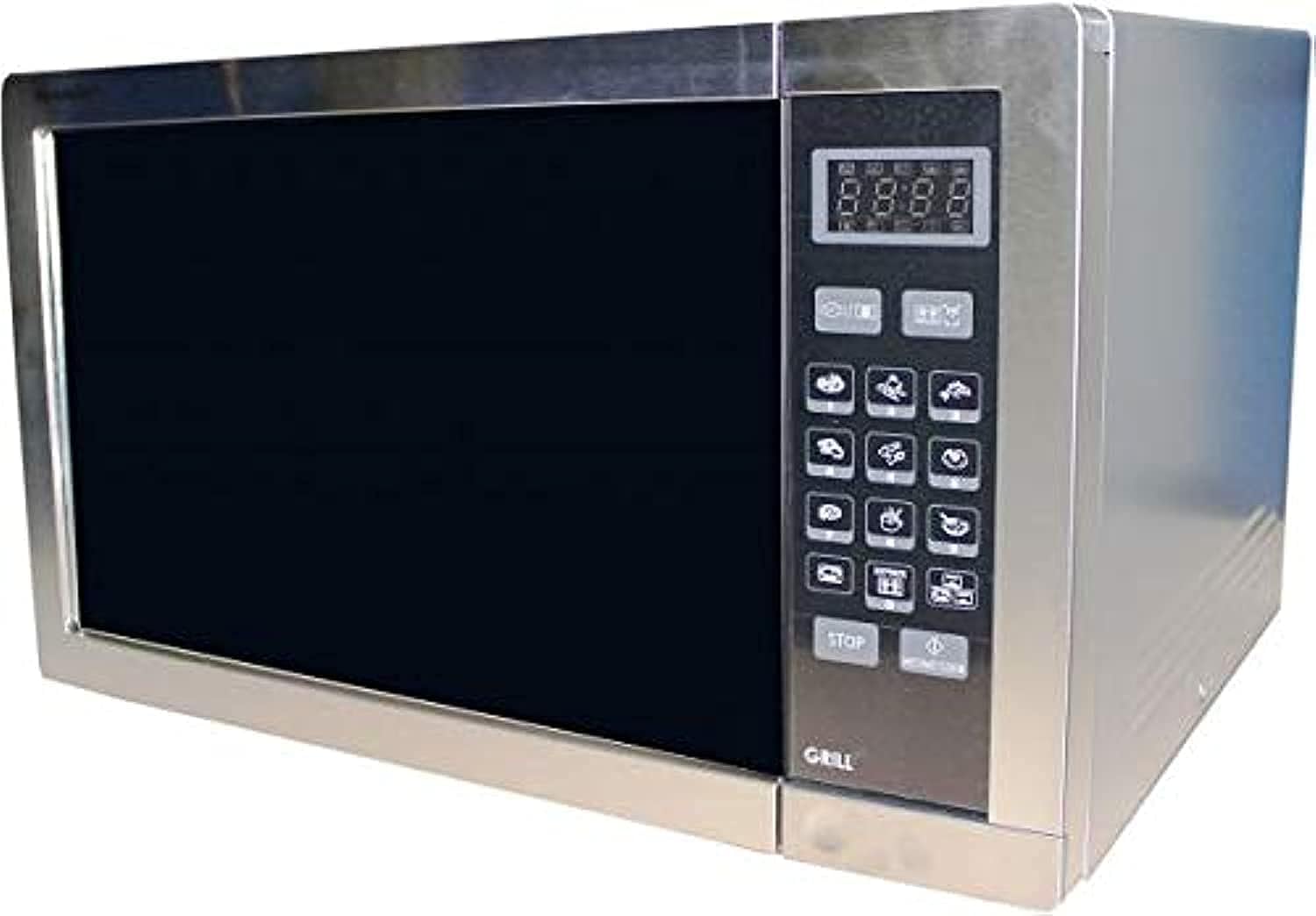
- אויוון קאַוואַטי: דער אינעווייניקסטער פּלאַץ וואו עסן ווערט געשטעלט.
- טערנטייבאַל: A rotating glass tray that ensures even cooking.
- טערנטייבאַל שטיצן: שטיצט דעם דריי־טיש.
- קאָנטראָל פּאַנעל: Features a digital display, touch buttons for settings, and a timer.
- Door with Safety Lock: Prevents microwave operation when open.
- גרילל געשטעל: אַרייַנגערעכנט פֿאַר נוצן מיט דער גריל פונקציע.
4. סעטאַפּ
גיי די סטעפּס צו שטעלן דיין מייקראַווייוו ויוון:
- אויספּאַקן: Remove all packaging materials and accessories. Check the oven for any damage, such as dents or a broken door. Do not install if damaged.
- אָרט: Place the oven on a flat, stable surface that can support its weight and the heaviest food likely to be cooked in it. Ensure there is adequate ventilation space: at least 20 cm (8 inches) above the oven, 10 cm (4 inches) at the rear, and 5 cm (2 inches) on each side.
- מאַכט קשר: שטעקט אריין דעם עלעקטרישן שנור אין א סטאַנדאַרט געערדטן עלעקטרישן אַוטלעט. מאַכט זיכער אַז דער וואָלומען איז גוטtage און אָפטקייט שטימען מיט די ספּעציפֿיקאַציעס אויף דער ראַנג־עטיקעט פֿונעם אויוון.
- טערנטייבאַל ינסטאַלירונג: Place the turntable support ring in the center of the oven cavity. Position the glass turntable plate securely on top of the support.
5. אַפּערייטינג ינסטרוקטיאָנס
Your Sharp R-77AT microwave oven offers various cooking functions.
5.1. גרונטלעכע מייקראַווייוו קאָכן
- לייגט די עסן אין א מייקראַוועוו-זיכערן קאַנטיינער אויף דער דריי-טיש.
- פאַרמאַכן די ויוון טיר סיקיורלי.
- Press the 'Microwave' button to select the desired power level (1-5).
- Use the number buttons or dial to set the cooking time.
- דריק 'אָנהייב' צו אָנהייבן קאָכן.
5.2. גריל פונקציע
די גריל פונקציע איז אידעאל פארן ברוינען און קרוכלע מאכן עסן.
- לייגט די עסן אויף די גריל געשטעל (אויב עס איז פאראן) אדער א היץ-קעגנשטעליקע טעלער.
- דריק דעם 'גריל' קנעפּל.
- Set the desired grilling time using the number buttons or dial.
- Press 'Start' to begin grilling.
- באַמערקונג: The grill element will heat up and cool down periodically to maintain the set temperature.
5.3. אַוטאָ מגילה
The oven has 9 pre-set auto programs for common foods.
- Press the 'Auto Menu' button repeatedly or use the dial to select the desired program (e.g., Popcorn, Potato, Pizza).
- Confirm the weight or quantity if prompted.
- Press 'Start' to begin the automatic program.
5.4. דעפראָסט פֿונקציע
The automatic defrost function allows for quick and even thawing.
- לייגט די פארפרוירענע עסן אין א מייקראַוועוו-זיכערע שיסל.
- דריק דעם 'אויפֿטויען' קנעפּל.
- Enter the weight of the food using the number buttons or dial.
- Press 'Start'. The oven will automatically calculate the defrosting time and may prompt you to turn the food over during the cycle.
5.5. טייַמער פֿונקציע
Use the timer for general kitchen timing, independent of cooking functions.
- דריק דעם 'טיימער' קנעפל.
- Set the desired time using the number buttons or dial.
- Press 'Start'. The timer will count down without activating the microwave or grill.
6. וישאַלט און רייניקונג
Regular cleaning and maintenance ensure optimal performance and longevity of your microwave oven.
- עקסטעריע: ווישן די יקסטיריער מיט אַדamp שטאָף און מילד וואַשפּולווער. ויסמיידן אַברייסיוו קלינערז.
- ינלענדיש: רייניקט דעם אויוון נאך יעדן באַניץ. ווישט מיט אדווערטייזמענט.amp cloth. For stubborn food splatters, place a bowl of water with lemon slices inside and microwave for 2-3 minutes to loosen residue, then wipe clean. The interior material is enamel.
- דריי-טיש און שטיצע: The glass turntable and its support can be washed in warm soapy water or in a dishwasher.
- טיר סתימות: Keep the door seals clean to ensure proper closure and safe operation.
- גרילל געשטעל: Wash the grill rack with warm soapy water after use.
- מאַכט שנור: קעסיידער קאָנטראָלירן די מאַכט שנור פֿאַר קיין שעדיקן.
שטענדיק אָפּשטויסן די מייקראַווייוו ויוון איידער רייניקונג.
7. טראָובלעשאָאָטינג
אויב איר טרעפט פּראָבלעמען מיט אייער מייקראַווייוו אויוון, זעט די פאלגענדע געוויינטלעכע פּראָבלעמען און לייזונגען:
| פּראָבלעם | מעגלעך סיבה | לייזונג |
|---|---|---|
| ויוון טוט נישט אָנהייבן | עלעקטרישע שנור נישט אריינגעשטעקט; טיר נישט געהעריג פארמאכט; פיוז דורכגעבראכן אדער קרייז ברעיקער האט אויסגעלאשן. | זיכער מאַכן אַז דער פּלאָג איז זיכער אין דער אַוטלעט; פֿאַרמאַכט די טיר פֿעסט; קאָנטראָלירט די הויזגעזינד־פיוז/קרייז־ברעכער. |
| עסן קאָכט/הייצט זיך נישט | Door not closed properly; Cooking time/power level not set correctly; Utensil not microwave-safe. | מאַכט די טיר פעסט צו; אַדזשאַסטירן צייט/מאַכט; ניצט מייקראַווייוו-זיכערע קאָכוואַרג. |
| פֿונקען אינעווייניק אויוון | מעטאַל אָדער פאָליע אין אויוון; עסן רעשטלעך אויף די ווענט פון די קאַוואַטי. | אַראָפּנעמען אַלע מעטאַלענע אָביעקטן; רייניקן דעם אינעווייניק פון אויוון גרינטלעך. |
| טערנטייבאַל נישט ראָוטייטינג | Turntable not positioned correctly; Obstruction under turntable. | Reposition turntable and support; Remove any obstructions. |
אויב די פראבלעם בלייבט נאך פרובירן די לייזונגען, ביטע קאנטאקט קוואליפיצירטע סערוויס פערסאנאל.
8. ספּעסאַפאַקיישאַנז
| שטריך | באַשרייַבונג |
|---|---|
| סאָרט | שאַרף |
| מאָדעל נומער | R-77AT |
| קאַפּאַציטעט | 34 ליטער |
| מייקראַווייוו מאַכט רעזולטאַט | 1000 וואטס |
| גרילל מאַכט | 1100 וואטס |
| נומער פון מאַכט לעוועלס | 5 |
| נומער פון מגילה | 9 (Auto Programs) |
| קאָנטראָל טיפּ | ריר קנעפּלעך |
| ספּעציעלע פֿעיִקייטן | Timer Function, Safety Lock |
| לאָזנ אָפּגיין סיסטעם | אָטאַמאַטיק דעפראָסט |
| באַהיצונג מעטאַד | עלעקטריק |
| מאַטעריאַל (עקסטעריאָר) | ומבאַפלעקט שטאָל |
| מאַטעריאַל (אינעווייניק) | ינאַמאַל |
| קאָליר | זילבער |
| אָפטקייַט | 50 הז |
| ייַנמאָנטירונג טיפּ | Freestanding |
| אַרייַנגערעכנט קאַמפּאָונאַנץ | גרילל ראַק |
9. וואָראַנטי און שטיצן
פֿאַר וואָראַנטי אינפֿאָרמאַציע און קונה שטיצע, ביטע זען די וואָראַנטי קאַרטל וואָס איז אַרייַנגערעכנט מיט דיין פּראָדוקט אָדער באַזוכן די באַאַמטער שאַרפּ webזייטל. האַלט אייער קויף קוויטל ווי אַ באַווייַז פון קויפן פֿאַר קיין וואָראַנטי קליימז.
For technical assistance or service inquiries, please contact Sharp customer service through their official channels.