
1. וויכטיק סאַפעטי אינפֿאָרמאַציע
Please read all safety instructions carefully before using your monitor. Keep this manual for future reference.
- דו זאלסט נישט שטעלן די מאָניטאָר אויף אַן אַנסטייבאַל וואָגן, שטיין, דרייַפוס, קאַנטיקער אָדער טיש.
- זיכער מאַכן אַז די ווענטילאַציע אַרום דעם מאָניטאָר איז ריכטיק. בלאָקירט נישט די ווענטילאַציע עפענונגען.
- ניצט נאָר דעם מאַכט שנור און אַדאַפּטער וואָס ווערט צוגעשטעלט מיטן מאָניטאָר.
- Avoid exposing the monitor to rain or moisture to prevent fire or electric shock.
- עפֿנט נישט דעם מאָניטאָר casinז. איבערגעבן אלע סערוויסינג צו קוואַליפֿיצירטע סערוויס פּערסאָנעל.
- Unplug the monitor from the wall outlet during lightning storms or when unused for long periods.
2. פּעקל אינהאַלט
באַשטעטיקט אַז אַלע זאכן זענען פאַראַן אין אייער פּראָדוקט פּאַקעט:
- Samsung LC27F396FHNXZA 27-Inch Curved Monitor
- שטיין באַזע
- שטיין האַלדז
- Power Adapter and Power Cable (1.5 m)
- HDMI קאַבלע
- שנעל סעטאַפּ גייד
- וואָראַנטי קאַרד
3. סעטאַפּ
3.1 צוזאַמענשטעלן דעם שטאַנד
- לייגט פֿאָרזיכטיק דעם מאָניטאָר מיטן פּנים אַראָפּ אויף אַ ווייכן, ריינעם שטאָף כּדי צו פֿאַרמייַדן קראַצן.
- באַפעסטיקט דעם שטאַנד האַלדז צו דער הינטערשטער טייל פֿון מאָניטאָר ביז עס קליקט אַרײַן אין פּלאַץ.
- Connect the stand base to the stand neck by aligning the tabs and tightening the screw at the bottom of the base.

3.2 קאַנעקטינג קאַבלעס
Ensure the monitor and your computer are powered off before connecting any cables.
- מאַכט קאַבלע: Connect the power adapter to the monitor's power input, then plug the power cable into the adapter and a wall outlet.
- ווידעא קאַבל (HDMI אדער VGA): Connect one end of the HDMI or VGA cable to the corresponding port on your computer's graphics card and the other end to the HDMI or VGA input on the monitor. Ensure cables are tightened securely.
- Audio Cable (Optional): If you wish to use external speakers or headphones, connect a 3.5mm audio cable from your computer's audio output to the monitor's 3.5mm audio input.
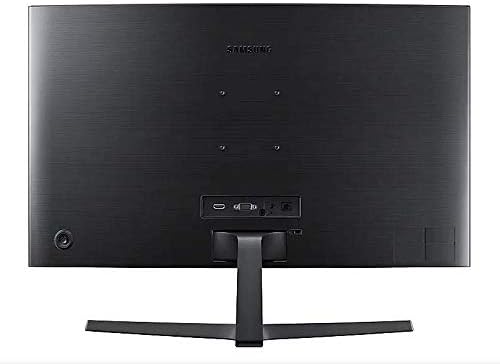
3.3 מאַכט אויף
After connecting all necessary cables, power on your computer, then press the power button on the monitor. The monitor should automatically detect the input signal.
4. אַפּערייטינג די מאָניטאָר
4.1 Basic Functions and OSD Menu
The monitor features a single joystick button located on the back for navigating the On-Screen Display (OSD) menu. Press the joystick to open the OSD menu, then move it up/down/left/right to select and adjust settings.
4.2 בילד סעטטינגס
Adjust picture quality settings via the OSD menu:
- ברייטנאַס / קאַנטראַסט: Adjust these to your preferred viewing levels.
- רעזאלוציע: The optimal resolution for this monitor is 1920 x 1080 (FHD 1080p).
- אַספּעקט פאַרהעלטעניש: Set to 16:9 for widescreen content.
- MagicBright: Select from various preset modes (e.g., Standard, Cinema, Dynamic Contrast) for optimized viewינג ינווייראַנמאַנץ.
- Active Crystal Color: Enhances color reproduction for a more vibrant display.

4.3 AMD FreeSync and Game Mode
This monitor supports AMD FreeSync technology, which synchronizes the screen refresh rate with your graphics card's frame rate to reduce input latency and minimize image tearing and stutter during gaming. Enable FreeSync through the OSD menu for a smoother gaming experience.

4.4 בענעפיטן פון אַ געבויגענעם דיספּליי
The 1800R curvature of this monitor is designed to match the natural curve of the human eye, providing a more immersive viewing experience. This curvature helps to reduce peripheral distractions and enhances depth perception, drawing you deeper into your content.

5. וישאַלט
5.1 רייניקונג די מאָניטאָר
- שטענדיק אָפּשטויסן די מאָניטאָר איידער רייניקונג.
- ניצן אַ ווייך, לינט-פֿרייַ שטאָף לייטלי דampאָפּגעווישט מיט וואַסער אָדער אַ ספּעציעלן עקראַן רייניגער.
- שפריצט נישט רייניגער גלייך אויפן עקראַן.
- ויסמיידן ניצן אַברייסיוו קלינערז, וואַקסעס אָדער סאָלוואַנץ.
5.2 סטאָרידזש
When storing the monitor for an extended period, ensure it is kept in a cool, dry place, preferably in its original packaging to protect it from dust and physical damage.
6. טראָובלעשאָאָטינג
אויב איר טרעפט פּראָבלעמען מיט אייער מאָניטאָר, זעט די פאלגענדע געוויינטלעכע טראָובלעשווטינג טריט:
| פּראָבלעם | מעגלעך לייזונג |
|---|---|
| קיין מאַכט | Ensure the power cable is securely connected to the monitor, power adapter, and wall outlet. Check if the wall outlet is functioning. |
| קיין סיגנאַל / ליידיקער עקראַן | Verify that the video cable (HDMI/VGA) is firmly connected to both the monitor and the computer. Try a different video input source on the monitor if available. Ensure the computer is powered on and not in sleep mode. |
| Distorted Image / Incorrect Resolution | Adjust the display resolution on your computer to 1920 x 1080. Check the video cable for damage. |
| Screen Tearing / Stuttering (during gaming) | Ensure AMD FreeSync is enabled in the monitor's OSD menu and your graphics card settings. |
| Monitor does not wake up from sleep | Try unplugging and replugging the monitor's power cable. Check your computer's power management settings. |
7. ספּעסאַפאַקיישאַנז
| שטריך | דעטאַל |
|---|---|
| מאָדעל נומער | LC27F396FHNXZA |
| פאַרשטעלן גרייס | 27 אינטשעס |
| האַכלאָטע | 1920 x 1080 (FHD 1080p) |
| אַספּעקט פאַרהעלטעניש | 16:9 |
| סקרין קערוואַטשער | 1800ר |
| טאַפליע טיפּ | VA |
| ענטפער צייט | 4 מיליסעקאַנדז |
| דערפרישן קורס | 60 הז |
| קאַנעקטיוויטי | 1x HDMI, 1x VGA, 1x 3.5mm Audio Out |
| אַדאַפּטיוו סינק טעכנאָלאָגיע | AMD FreeSync |
| מאַכט קאַנסאַמשאַן | 25 Watts (Typical) |
| דימענשאַנז (מיט שטיין) | 62.28 x 24.26 x 46.61 ס״מ (24.5" x 9.6" x 18.4") |
| וואָג (מיט שטאַנד) | 4.1 ק״ג (9.04 פונט) |
| מאַונטינג טיפּ | וואנט מאָונטאַבלע |
8. וואָראַנטי און שטיצן
8.1 פאַבריקאַנט'ס גאַראַנטיע
This Samsung monitor is covered by a 1 יאָר פאַבריקאַנט ס וואָראַנטי פֿון דעם קויפֿדאַטום. ביטע באַהאַלטן אייער קויפֿבאַווײַז פֿאַר וואָראַנטי־פֿאָדערונגען. די וואָראַנטי דעקט חסרונות אין מאַטעריאַלן און אַרבעט אונטער נאָרמאַלן באַנוץ.
8.2 קונה שטיצן
For technical assistance, troubleshooting, or warranty service, please contact Samsung Customer Support. You can find contact information on the official Samsung webפּלאַץ פֿאַר דיין געגנט.
פאַבריקאַנט קאָנטאַקט אינפֿאָרמאַציע: Mississauga, ON L5M 9Z9, CA
פֿאַר מער אינפֿאָרמאַציע, באַזוכן די באַאַמטער סאַמסונג קאַנאַדע שטיצע webפּלאַץ.